Post Your Overclock!

Status
Not open for further replies.
I love the H50. I have the Corsair 800D case as well. I have 5 x 120mm fans (3 on top pulling hot air out, and 2 on the H50 rad for push/pull setup. It pulls cooler outside air into the case) and 2 x 140mm Fans (one on the hot swap tray and 1 in bottom section). The thing I love the most about the H50 is the lack of worry of a sealed unit plus the quite operation of the H50. It is a great setup. Very happy with corsair over these products! Fan for life now.
 

My Computer

OS
Windows 7 Ultimate
CPU
Intel Core i5 750 (Quad Core)
Motherboard
Gigabyte P55A-UD3
Memory
4GB DDR3 1600
Graphics Card(s)
XFX ATI Radeon HD5770
Sound Card
On board
Monitor(s) Displays
2
Screen Resolution
1280x1024
Hard Drives
1tb Hitachi Sata
PSU
Thermaltake 750W
Case
Corsair 800D
Cooling
Corsair H50
Keyboard
Logitech Wireless
Mouse
Logitech WIreless
Internet Speed
Cable Internet
Thats a nice case, excellent cooling system :)
 

My Computer

Computer type
PC/Desktop
Computer Manufacturer/Model Number
76~2.0
OS
Windows 7 Ult x64 - SP1/ Windows 8 Pro x64
CPU
Intel Core i5-3570K 4.6GHz
Motherboard
Gigabyte GA-Z77X UD3H, f18
Memory
8GB (2X4GB) DDR3 1600 Corsair Vengeance CL8 1.5v
Graphics Card(s)
Sapphire HD 7770 Vapor-X OC 1GB DDR5
Sound Card
Onboard VIA VT2021
Monitor(s) Displays
22" LCD Dell
Screen Resolution
1680x1050
Hard Drives
Samsung 840Pro 128GB SSD,
Seagate Barracuda 500GB SATA2 7200rpm 32MB cache, Seagate Barracuda 1TB SATA2 7200rpm 32MB cache,
PSU
Corsair HX650W
Case
Cooler Master Storm Scout
Cooling
Corsair H80 2x12cm Noctua NF P12 , 2x14cm case fans
Keyboard
Logitech Wave
Mouse
CM Sentinel
Internet Speed
Dismal
Antivirus
Avast
Browser
Opera Next
Other Info
Haswell laptop: HP Envy 17t-j, i7-4700MQ, GeForce 740M 2GB DDR3, 17.3" Full HD 1920x1080, 16GB RAM, Samsung 840 Pro 128GB, 1TB Hitachi 7200 HDD,
Desktop: eSATA ports,
External eSATA Seagate 500GB SATA2 7200rpm,
External WD USB 500GB
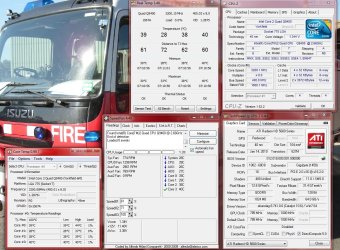
Well so far I have a minor OC.
What I have is the C2Q Q9450 (stock 2.6Ghz) running at 3.2Ghz
Kingston HyperX 1066Mhz running at stock with a FSB:DRAM of 3:4. Timings set at 5-5-5-15
Everything is stable, temps are fine :-)
My next goal is to tighten the RAM timings a bit, then maybe OC the video card a little bit just to see what it is capable of.
 

Attachments

  • desktoptemps.jpg
    desktoptemps.jpg
    210.7 KB · Views: 22

My Computer

Computer Manufacturer/Model Number
I'll Fix IT Computers
OS
Windows 7 Ultimate 64 Bit
CPU
Intel Core 2 Quad 9400 2.66Ghz @ 3.20
Motherboard
Asus P5QL-E
Memory
4Gb (2x2g) Kingston HyperX 1066Mhz Dual Channel @ 2.3v
Graphics Card(s)
Gigabyte HD5670 1Gig no o/c
Sound Card
On board
Monitor(s) Displays
Screen1 = Samsung 953BW Screen 2 = Samsung 943BW
Screen Resolution
Screen 1 @ 1440x900 Screen 2 @ 1440x900
Hard Drives
Seagate SataII 500Gb 7200 Rpm
PSU
Coolermaster 550w
Case
Coolermaster RC-332
Cooling
Front 120mm, Rear 120mm, side (VGA card vent) 80mm
Keyboard
Logitech G15
Mouse
Logitech G9 Gaming Mouse
Internet Speed
Bigpond Wireless Broadband (variable speeds up to 7Mbps)
Other Info
Thermaltake Max Orb II CPU Fan @ 2000rpm
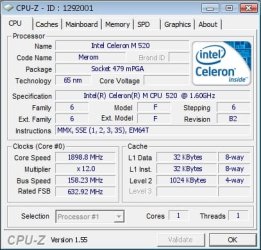
Check this out: Celron M 520
 

Attachments

  • celron m 520.jpg
    celron m 520.jpg
    36.4 KB · Views: 7

My Computer

Computer type
PC/Desktop
Computer Manufacturer/Model Number
HP Pavilion g7-1350dx
OS
Windows 7 Ultimate SP1 x64
CPU
AMD A6-3420M APU
Memory
4.0 Gb DDR3 838 MHz
Graphics Card(s)
AMD Radeon HD 6520G
Sound Card
IDT HD Audio
Screen Resolution
1600x 900
Hard Drives
500GB Hitachi HTS547550A9E384
Decided to see how far I could go without bumping the voltage. Looks like I may have topped out here...
 

Attachments

  • OC.png
    OC.png
    16.1 KB · Views: 4

My Computer

Computer type
PC/Desktop
Computer Manufacturer/Model Number
SuperBeast
OS
Windows 10 Tech Preview 9926 x64
CPU
AMD FX-8350
Motherboard
Gigabyte GA-990FXA-UD3
Memory
16GB DDR3 1333
Graphics Card(s)
Asus R9 290 DirectCU II OC, Gigabyte Windforce R9 290 OC
Sound Card
Integrated w/ Creative A250 2.1 speakers
Monitor(s) Displays
Main: Asus VN289H 28" Secondary: Acer G246HL 24"
Screen Resolution
1920x1080
Hard Drives
128 GB SanDisk Ultra Plus (Windows drive)

240 GB Crucial M500 SSD (Games drive)

1 TB WDC WD10EACS 7200RPM HDD (Data drive)

2 TB Seagate Expansion Desktop external HDD (Backup drive)
PSU
900w Antec HCG-900
Case
Raidmax Agusta Full ATX
Cooling
Corsair H80
Keyboard
Cooler Master Devastator MB24
Mouse
Cooler Master Devastator MS2K 1000/1600/2000 DPI
Internet Speed
100Mbps cable
Antivirus
Avast!
Browser
Chrome
Decided to see how far I could go without bumping the voltage. Looks like I may have topped out here...
Surely 1.344v isn't stock voltage. ;)
 

My Computer

Computer Manufacturer/Model Number
Home Grown
OS
Windows 7 Ultimate (64)
CPU
i7-2600K
Motherboard
Asus P8P67-M Pro
Memory
G.SKILL Ripjaws X Series 8GB (2 x 4GB)
Graphics Card(s)
ATI 5750
Sound Card
On-Board
Monitor(s) Displays
LG W2486L
Screen Resolution
1920X1080
Hard Drives
Intel X-25M 80 Gig SSD | Intel X-25M 160 Gig SSD | WD Black 500MB - External eSata
PSU
Zalman ZM770-XT 770 Watts
Case
Antec 180 mini
Cooling
Cooler Master V8
Internet Speed
15MB - Cable
Other Info
Sissy OC - 4.6 @ 1.3175 24/7 | 18' Idle - 55' Load
Decided to see how far I could go without bumping the voltage. Looks like I may have topped out here...
Surely 1.344v isn't stock voltage. ;)

Haha, good point. I meant without me going in and changing any voltages manually. If the voltages were raised, then it did it on it's own. Best OC I've gotten so far, although temps are a little high. Idle is around 50c, load is between 75 and 80.
 

My Computer

Computer type
PC/Desktop
Computer Manufacturer/Model Number
SuperBeast
OS
Windows 10 Tech Preview 9926 x64
CPU
AMD FX-8350
Motherboard
Gigabyte GA-990FXA-UD3
Memory
16GB DDR3 1333
Graphics Card(s)
Asus R9 290 DirectCU II OC, Gigabyte Windforce R9 290 OC
Sound Card
Integrated w/ Creative A250 2.1 speakers
Monitor(s) Displays
Main: Asus VN289H 28" Secondary: Acer G246HL 24"
Screen Resolution
1920x1080
Hard Drives
128 GB SanDisk Ultra Plus (Windows drive)

240 GB Crucial M500 SSD (Games drive)

1 TB WDC WD10EACS 7200RPM HDD (Data drive)

2 TB Seagate Expansion Desktop external HDD (Backup drive)
PSU
900w Antec HCG-900
Case
Raidmax Agusta Full ATX
Cooling
Corsair H80
Keyboard
Cooler Master Devastator MB24
Mouse
Cooler Master Devastator MS2K 1000/1600/2000 DPI
Internet Speed
100Mbps cable
Antivirus
Avast!
Browser
Chrome
If you manually set the voltage you may find you can lower temps and maintain your OC at considerably lower VID.
 

My Computer

Computer Manufacturer/Model Number
Home Grown
OS
Windows 7 Ultimate (64)
CPU
i7-2600K
Motherboard
Asus P8P67-M Pro
Memory
G.SKILL Ripjaws X Series 8GB (2 x 4GB)
Graphics Card(s)
ATI 5750
Sound Card
On-Board
Monitor(s) Displays
LG W2486L
Screen Resolution
1920X1080
Hard Drives
Intel X-25M 80 Gig SSD | Intel X-25M 160 Gig SSD | WD Black 500MB - External eSata
PSU
Zalman ZM770-XT 770 Watts
Case
Antec 180 mini
Cooling
Cooler Master V8
Internet Speed
15MB - Cable
Other Info
Sissy OC - 4.6 @ 1.3175 24/7 | 18' Idle - 55' Load
If you manually set the voltage you may find you can lower temps and maintain your OC at considerably lower VID.

Yeah, I was looking at that in my BIOS, but it was pretty confusing. I've never messed with voltages when OCing before, so I don't want to go in and blow out my CPU because I made a dumb little error.

I was thinking about trying to raise the bclk and lower the multiplier instead. Not sure how that effects voltages though.
 

My Computer

Computer type
PC/Desktop
Computer Manufacturer/Model Number
SuperBeast
OS
Windows 10 Tech Preview 9926 x64
CPU
AMD FX-8350
Motherboard
Gigabyte GA-990FXA-UD3
Memory
16GB DDR3 1333
Graphics Card(s)
Asus R9 290 DirectCU II OC, Gigabyte Windforce R9 290 OC
Sound Card
Integrated w/ Creative A250 2.1 speakers
Monitor(s) Displays
Main: Asus VN289H 28" Secondary: Acer G246HL 24"
Screen Resolution
1920x1080
Hard Drives
128 GB SanDisk Ultra Plus (Windows drive)

240 GB Crucial M500 SSD (Games drive)

1 TB WDC WD10EACS 7200RPM HDD (Data drive)

2 TB Seagate Expansion Desktop external HDD (Backup drive)
PSU
900w Antec HCG-900
Case
Raidmax Agusta Full ATX
Cooling
Corsair H80
Keyboard
Cooler Master Devastator MB24
Mouse
Cooler Master Devastator MS2K 1000/1600/2000 DPI
Internet Speed
100Mbps cable
Antivirus
Avast!
Browser
Chrome
Not likely you will damage the chip by lowering the voltage. Changing the bclk and multiplier won't have any impact on the auto VID if the same clock speed is the result. The bios always over-compensates VID when OCing at "Auto" VID settings.

For instance, if I leave VID set to Auto, the bios runs voltage up to 1.375 to OC @ 4.0, yet if I set it manually it only requires 1.250 to achieve the same result 24/7 prime stable with a 12 degree reduction in temps.

I don't suggest you do anything you're not 100% comfortable with. Yet there's no reason to accept higher temps and excessive voltage that's not necessary to achieve the same result. ;)
 

Attachments

  • cpuz.png
    cpuz.png
    17.7 KB · Views: 5

My Computer

Computer Manufacturer/Model Number
Home Grown
OS
Windows 7 Ultimate (64)
CPU
i7-2600K
Motherboard
Asus P8P67-M Pro
Memory
G.SKILL Ripjaws X Series 8GB (2 x 4GB)
Graphics Card(s)
ATI 5750
Sound Card
On-Board
Monitor(s) Displays
LG W2486L
Screen Resolution
1920X1080
Hard Drives
Intel X-25M 80 Gig SSD | Intel X-25M 160 Gig SSD | WD Black 500MB - External eSata
PSU
Zalman ZM770-XT 770 Watts
Case
Antec 180 mini
Cooling
Cooler Master V8
Internet Speed
15MB - Cable
Other Info
Sissy OC - 4.6 @ 1.3175 24/7 | 18' Idle - 55' Load
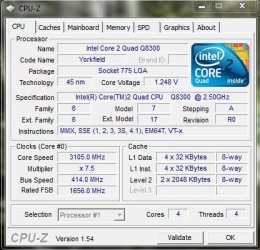
This is the most I could get out of the Q8300 with my motherboard.

Nothing amazing , but its not a good cpu for overclocking apparently.

I am happy with it and its 100% stable :D
 

Attachments

  • Overclock.JPG
    Overclock.JPG
    45.3 KB · Views: 7

My Computer

OS
Windows 7 Professional 64 bit
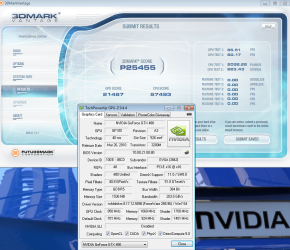
Latest 3D mark vantage run with my gtx 480 pushed to max on stock cooler, hopefully i get new cooler this week or early next week :D
CPU is at 4ghz too, but it's nothing really, I don't wanna burn my northbridge.
 

Attachments

  • 3Dmark.png
    3Dmark.png
    169.7 KB · Views: 19

My Computer

OS
Windows 7 Professional x64
CPU
E6420 (temporary)
Motherboard
G43 Twins-FullHD (temporary)
Memory
DDR2 2x1gb (temporary)
Graphics Card(s)
Evga GTX 480 Superclocked+
Sound Card
Creative X-FI Extreme Audio Pci-E
Monitor(s) Displays
2x24" Samsung SyncMaster 2494HS
Screen Resolution
1920x1080
Hard Drives
2xSamsung 500GB
Samsung F3 1 TB
PSU
OCZ GameXstream 850w
Case
Cooler Master HAF X
Keyboard
Logitech Illuminated
Mouse
Logitech MX518
Internet Speed
40/2
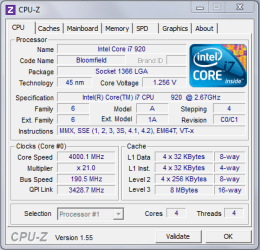
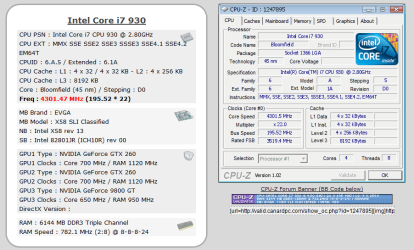
My best O.C

This is my highest O.C so far. But I still prefer running my processor at it's native 2.80 GHz.
 

Attachments

  • Cpu-z-2.PNG
    Cpu-z-2.PNG
    57.1 KB · Views: 34

My Computer

Computer Manufacturer/Model Number
Self Built:kellymac35/TOSHIBA LAPTOP X775 3DV78
OS
WINDOWS 7 Ultimate x64 Full
CPU
INTEL i7 930/INTEL i7 2630QM 2.9 GHz With Turbo Boost
Motherboard
EVGA X58 3X SLI CLASSIFIED/TOSHIBA
Memory
MUSHKIN ENHANCED 12GB/8GB SAMSUNG DDR3 1333 MHz
Graphics Card(s)
EVGA GTX570 S.C(SLI) FERMI /GTX560M 1.5GB of GDDR 5 DISCRETE
Sound Card
REALTEK ON BOARD /BUILT IN HARMAN KARDON STEREO SPKS
Monitor(s) Displays
TOSHIBA 32'' /17.3" LCD 3D READY 120 Hz LED BACKLIT
Screen Resolution
1360x768/1920x1080
Hard Drives
MUSHKIN Enhanced Callisto Deluxe SSD X 2 240GB RAID 0/MUSHKIN Enhanced Callisto Deluxe 240 GB SSD 750 GB Serial ATA Hard Drive
PSU
CORSAIR Professional Series AX1200 1200W
Case
THERMALTAKE Xaser VI
Cooling
CORSAIR HYDRO SERIES H70
Keyboard
Logitech MX 3200/PREMIUM RAISED TILE LED BACKLIT
Mouse
Logitech
Internet Speed
DSL
Other Info
(SPDIF) To Kenwood VR-6070 Lucasfilm THX Select Surround EX
Not likely you will damage the chip by lowering the voltage. Changing the bclk and multiplier won't have any impact on the auto VID if the same clock speed is the result. The bios always over-compensates VID when OCing at "Auto" VID settings.

For instance, if I leave VID set to Auto, the bios runs voltage up to 1.375 to OC @ 4.0, yet if I set it manually it only requires 1.250 to achieve the same result 24/7 prime stable with a 12 degree reduction in temps.

I don't suggest you do anything you're not 100% comfortable with. Yet there's no reason to accept higher temps and excessive voltage that's not necessary to achieve the same result. ;)

Yeah, unfortunately it seems that I have to let the BIOS auto set to voltage. I tried yesterday setting the voltage to the Normal setting (1.20) and it shut down on me after about 5 minutes. No surprise there. However, the voltage settings I have in my BIOS are set to go up 0.50v at a time, so I'm really thinking that jumping up to 1.70v would be pretty disastrous. As it is now, I'm sitting at 1.344v, which seems to be within the safe range.
 

My Computer

Computer type
PC/Desktop
Computer Manufacturer/Model Number
SuperBeast
OS
Windows 10 Tech Preview 9926 x64
CPU
AMD FX-8350
Motherboard
Gigabyte GA-990FXA-UD3
Memory
16GB DDR3 1333
Graphics Card(s)
Asus R9 290 DirectCU II OC, Gigabyte Windforce R9 290 OC
Sound Card
Integrated w/ Creative A250 2.1 speakers
Monitor(s) Displays
Main: Asus VN289H 28" Secondary: Acer G246HL 24"
Screen Resolution
1920x1080
Hard Drives
128 GB SanDisk Ultra Plus (Windows drive)

240 GB Crucial M500 SSD (Games drive)

1 TB WDC WD10EACS 7200RPM HDD (Data drive)

2 TB Seagate Expansion Desktop external HDD (Backup drive)
PSU
900w Antec HCG-900
Case
Raidmax Agusta Full ATX
Cooling
Corsair H80
Keyboard
Cooler Master Devastator MB24
Mouse
Cooler Master Devastator MS2K 1000/1600/2000 DPI
Internet Speed
100Mbps cable
Antivirus
Avast!
Browser
Chrome
Why not try setting it to 1.35 and start testing stability. Then try dropping .05 at a time until you find the (sweet spot) lowest voltage that keeps the box stable. I personally never run VID any higher than 1.45 even for short term benchmarking. Certainly 1.70 is out of the question.
 

My Computer

Computer Manufacturer/Model Number
Home Grown
OS
Windows 7 Ultimate (64)
CPU
i7-2600K
Motherboard
Asus P8P67-M Pro
Memory
G.SKILL Ripjaws X Series 8GB (2 x 4GB)
Graphics Card(s)
ATI 5750
Sound Card
On-Board
Monitor(s) Displays
LG W2486L
Screen Resolution
1920X1080
Hard Drives
Intel X-25M 80 Gig SSD | Intel X-25M 160 Gig SSD | WD Black 500MB - External eSata
PSU
Zalman ZM770-XT 770 Watts
Case
Antec 180 mini
Cooling
Cooler Master V8
Internet Speed
15MB - Cable
Other Info
Sissy OC - 4.6 @ 1.3175 24/7 | 18' Idle - 55' Load
@ kellymac35

Very nice overclock!

At those clock speeds have you tested 10 hours+ Prime95 stable? It's hard to believe you got those clock speeds with a H50, what are your idle and loads temps? Are you using the stock fan that came with the H50 or have you replaced the stock fan and maybe have it in a push/pull setup from intake?

And finally, what's up with the voltage cover up? :p
 
Last edited:

My Computer

OS
Windows 7 Professional
CPU
Intel Core i7-2670QM
Memory
Samsung 8GB
Graphics Card(s)
NVIDIA GT 555M
Hard Drives
Intel 525 120GB | HGST Travelstar 1TB
Mouse
CM Storm Xornet | Microsoft Sculpt Comfort
Internet Speed
25 Mbps | 600 Kbps
Other Info
Centrino 6205 | Seagate Backup Plus 1TB
Yeah, unfortunately it seems that I have to let the BIOS auto set to voltage. I tried yesterday setting the voltage to the Normal setting (1.20) and it shut down on me after about 5 minutes. No surprise there. However, the voltage settings I have in my BIOS are set to go up 0.50v at a time, so I'm really thinking that jumping up to 1.70v would be pretty disastrous. As it is now, I'm sitting at 1.344v, which seems to be within the safe range.

I'm know I'm a day (days) late but.... I just want to say that the voltage range of an i5-750 is anywhere between 0.6500V-1.4000V. So, believe it or not, @ 1.20 volts, you "might" (though not likely) be over-volting! Intel® Core™ i5-750 Processor (8M Cache, 2.66 GHz) with SPEC Code(s) SLBLC. Also those high volts could also lead to high temps.

BTW my i7-930's voltage range is between 0.800V-1.375V but I have my volts set at 1.1875 as it gives me the stability without high temps. And I'm slightly OC to 3.3 (3.5 turbo mode)

Just food for thought.
 

My Computer

Computer type
PC/Desktop
Computer Manufacturer/Model Number
Custom built by me.
OS
Windows 10 Pro
CPU
Intel Core i7-4770K (3.5Ghz)
Motherboard
Gigabyte G1 Sniper 5 (F10 Bios)
Memory
32 gig Corsair Dominator Platinum (4x8Gig)
Graphics Card(s)
Sapphire Tri-X R9 Fury
Sound Card
Soundblaster ZXR
Monitor(s) Displays
NEC PA242W 24" LCD Monitor
Screen Resolution
1920 x 1200
Hard Drives
Primary - Samsung 850 Pro (512gig), Samsung 840 Pro (256gig), 2TB WD Caviar Black.
PSU
EVGA Supernova 1000 G2
Case
Cooler Master HAF X
Cooling
Corsair H100i with Corsair Air Series SP120 Quiet Fans
Keyboard
Logitech Wireless Wave
Mouse
Logitech Performance MX
Internet Speed
High Speed Cable
Antivirus
Norton Security
Browser
IE11
Other Info
Memory Timings - 1866MHz @ 9-9-9-27-1T @ 1.5 volts
@ kellymac35

Very nice overclock!

At those clock speeds have you tested 10 hours+ Prime95 stable? It's hard to believe you got those clock speeds with a H50, what are your idle and loads temps? Are you using the stock fan that came with the H50 or have you replaced the stock fan and maybe have it in a push/pull setup from intake?

And finally, what's up with the voltage cover up? :p


Stable enough to play games with load temps 68c in Assassins Creed 2 but under prime temps quickly get out of controll. I wondered the same about the voltage not showing cpu vcore was set @ 1.35000V
 

My Computer

Computer Manufacturer/Model Number
Self Built:kellymac35/TOSHIBA LAPTOP X775 3DV78
OS
WINDOWS 7 Ultimate x64 Full
CPU
INTEL i7 930/INTEL i7 2630QM 2.9 GHz With Turbo Boost
Motherboard
EVGA X58 3X SLI CLASSIFIED/TOSHIBA
Memory
MUSHKIN ENHANCED 12GB/8GB SAMSUNG DDR3 1333 MHz
Graphics Card(s)
EVGA GTX570 S.C(SLI) FERMI /GTX560M 1.5GB of GDDR 5 DISCRETE
Sound Card
REALTEK ON BOARD /BUILT IN HARMAN KARDON STEREO SPKS
Monitor(s) Displays
TOSHIBA 32'' /17.3" LCD 3D READY 120 Hz LED BACKLIT
Screen Resolution
1360x768/1920x1080
Hard Drives
MUSHKIN Enhanced Callisto Deluxe SSD X 2 240GB RAID 0/MUSHKIN Enhanced Callisto Deluxe 240 GB SSD 750 GB Serial ATA Hard Drive
PSU
CORSAIR Professional Series AX1200 1200W
Case
THERMALTAKE Xaser VI
Cooling
CORSAIR HYDRO SERIES H70
Keyboard
Logitech MX 3200/PREMIUM RAISED TILE LED BACKLIT
Mouse
Logitech
Internet Speed
DSL
Other Info
(SPDIF) To Kenwood VR-6070 Lucasfilm THX Select Surround EX
@ kellymac35

Have you considered a push/pull set from from intake fan(s) for your setup and maybe some Yate Loon, Scythe or Noctua fans for the push/pull intake configuration?

You will see temp drops just by moving to a push/pull setup, if you only have a push or pull single fan right now. And if you move to a push/pull setup from intake from rear push/pull that would further your temp drops because from intake you push fresh air onto the rad and pull hot air moved through the rad. :p
 

My Computer

OS
Windows 7 Professional
CPU
Intel Core i7-2670QM
Memory
Samsung 8GB
Graphics Card(s)
NVIDIA GT 555M
Hard Drives
Intel 525 120GB | HGST Travelstar 1TB
Mouse
CM Storm Xornet | Microsoft Sculpt Comfort
Internet Speed
25 Mbps | 600 Kbps
Other Info
Centrino 6205 | Seagate Backup Plus 1TB
@ kellymac35

Have you considered a push/pull set from from intake fan(s) for your setup and maybe some Yate Loon, Scythe or Noctua fans for the push/pull intake configuration?

You will see temp drops just by moving to a push/pull setup, if you only have a push or pull single fan right now. And if you move to a push/pull setup from intake from rear push/pull that would further your temp drops because from intake you push fresh air onto the rad and pull hot air moved through the rad. :p


Already set up on push pull you can check out my pics on my sevenforums home page. Thanks for the tips Nemix77, I have considered a possible fan change then there is the consideration of them both matching the same rpm's.
 

My Computer

Computer Manufacturer/Model Number
Self Built:kellymac35/TOSHIBA LAPTOP X775 3DV78
OS
WINDOWS 7 Ultimate x64 Full
CPU
INTEL i7 930/INTEL i7 2630QM 2.9 GHz With Turbo Boost
Motherboard
EVGA X58 3X SLI CLASSIFIED/TOSHIBA
Memory
MUSHKIN ENHANCED 12GB/8GB SAMSUNG DDR3 1333 MHz
Graphics Card(s)
EVGA GTX570 S.C(SLI) FERMI /GTX560M 1.5GB of GDDR 5 DISCRETE
Sound Card
REALTEK ON BOARD /BUILT IN HARMAN KARDON STEREO SPKS
Monitor(s) Displays
TOSHIBA 32'' /17.3" LCD 3D READY 120 Hz LED BACKLIT
Screen Resolution
1360x768/1920x1080
Hard Drives
MUSHKIN Enhanced Callisto Deluxe SSD X 2 240GB RAID 0/MUSHKIN Enhanced Callisto Deluxe 240 GB SSD 750 GB Serial ATA Hard Drive
PSU
CORSAIR Professional Series AX1200 1200W
Case
THERMALTAKE Xaser VI
Cooling
CORSAIR HYDRO SERIES H70
Keyboard
Logitech MX 3200/PREMIUM RAISED TILE LED BACKLIT
Mouse
Logitech
Internet Speed
DSL
Other Info
(SPDIF) To Kenwood VR-6070 Lucasfilm THX Select Surround EX
Status
Not open for further replies.
Back
Top