Post Your Overclock!

Status
Not open for further replies.
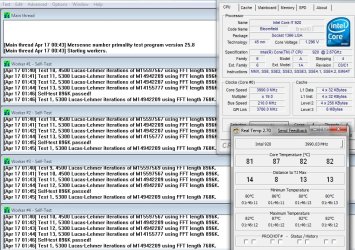
Intel Core i7 920 (3842A) @ 3990Mhz
Gigabyte EX58-UD3R
OCZ Platinum XTC 1600Mhz 7-7-7-16

Still on stock cooler, but im getting a Noctua NH-U12P tomorrow. Gunning for 4.2 with HT as soon as its installed.


Attachments

  • 3990_stock2.jpg
    3990_stock2.jpg
    158.8 KB · Views: 125

My Computer

OS
Windows 7 7000 64bit
CPU
Intel Core i7 920 @ 4000Mhz
Motherboard
Gigabyte EX58-UD3R
Memory
3x2 GB OCZ Platinum 1600Mhz 7-7-7-19
Graphics Card(s)
Asus GTX 260 216SP @ 720/1520/1050
Sound Card
Integrated
Monitor(s) Displays
BenQ Senseye FP202W + Mermaid Ventura
Screen Resolution
1680x1050
Hard Drives
2x Raptor @ RAID0
2x Seagate 250GB
1x WD 320GB
1x MaxWhore 160GB
PSU
Tagan TG780-U33II 780W SuperRock
Case
Cooler Master Stacker
Cooling
Stock
Keyboard
Logitec something
Mouse
Logitec MX518
Internet Speed
20/3.6 Mbit
Intel Core i7 920 (3842A) @ 3990Mhz
Gigabyte EX58-UD3R
OCZ Platinum XTC 1600Mhz 7-7-7-16

Still on stock cooler, but im getting a Noctua NH-U12P tomorrow. Gunning for 4.2 with HT as soon as its installed.


nice......:D


gotta get that ''HT'' firing on all cylinders....


:)SK
 

My Computer

Computer Manufacturer/Model Number
myself
OS
SEVEN x64
CPU
Q9450 @ 3.6GHZ 1.34v
Motherboard
ASUS P5K PREMIUM P35
Memory
8GB 1066 buffalo firestix @ 1152mhz CL5
Graphics Card(s)
Sapphire HD 5970 + GTX260 (physX)
Sound Card
Creative X-FI Xtreme Gamer
Monitor(s) Displays
SAMSUNG 20'' & SAMSUNG 23'' (dual screens)
Screen Resolution
2048x1152 & 1680x1050
Hard Drives
1x seagate 160gb IDE & 1x seagate 160gb SATA
PSU
XCILIO 850w (78A)
Case
CM590 1x 120x38mm & 2x92x38mm / 4x 120x25mm
Cooling
AC7 PRO @ 92x38mm blower, Lamptron military bus bay controll
Keyboard
LOGITECH E110
Mouse
logitech NX5
Internet Speed
2MB
Other Info
its a continual ''work in progress''....
Just to tell you, your CPU-Z download link is broken.

You can download it from their website: CPUID

I only have screenshots from my XP install.... Ill post my GPU OC when I get the chance.

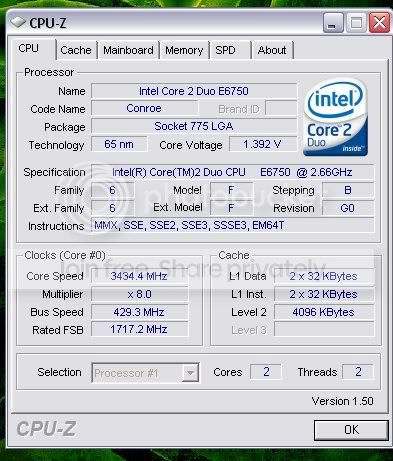
Current CPU OC (Stock Heatsink and fan, Ran ORTHOS for 8hours and no errors)
34OCGOOD.jpg


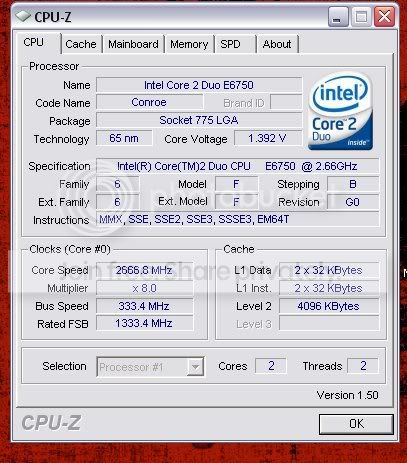
Stock Settings....
CPU.jpg


PS Forman WOW those Temps are flaming....
 

My Computer

OS
Windows 7 x64
CPU
Intel E6750 O.Ced to 3.22GHz
Motherboard
ASUS P5N-E
Memory
CORSAIR XMS2 2GB (2 x 1GB)
Graphics Card(s)
EVGA GTS 250 1GB
Sound Card
Onboard
Monitor(s) Displays
2(17inch)
Hard Drives
WD WD3200YS
PSU
Corsair 750w
Case
Antec 900
Cooling
Stock HSF.... Antec has (4) 120mm Fans and (1) 200mm fan
Keyboard
G15
Mouse
Deathadder
Installed the new MB, but the Noctua cooler I ordered turned out to be a LGA775/AM2 one, so I have to return it to get the one with LGA1366 mounts.
So... this one is not with a Noctua, but with a Cooler Master Hyper 212.
Vcore of 1.33 is a bit high for 4Ghz, but I forgot to turn it down after trying 4.2Ghz.


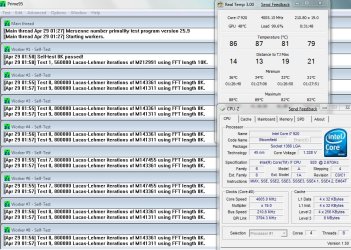
Core i7 920 @ 4005Mhz HT:ON
Asus P6T Deluxe V2

@Warfare: High temps? Well... no guts, no glory :D
Its stable, and no matter what normal activities I throw at it, it stays stable @ 75-80c.
With my usage im not even remotely utilizing all four cores at the same time.
 

Attachments

  • 4005_HT.jpg
    4005_HT.jpg
    152.7 KB · Views: 53

My Computer

OS
Windows 7 7000 64bit
CPU
Intel Core i7 920 @ 4000Mhz
Motherboard
Gigabyte EX58-UD3R
Memory
3x2 GB OCZ Platinum 1600Mhz 7-7-7-19
Graphics Card(s)
Asus GTX 260 216SP @ 720/1520/1050
Sound Card
Integrated
Monitor(s) Displays
BenQ Senseye FP202W + Mermaid Ventura
Screen Resolution
1680x1050
Hard Drives
2x Raptor @ RAID0
2x Seagate 250GB
1x WD 320GB
1x MaxWhore 160GB
PSU
Tagan TG780-U33II 780W SuperRock
Case
Cooler Master Stacker
Cooling
Stock
Keyboard
Logitec something
Mouse
Logitec MX518
Internet Speed
20/3.6 Mbit
Oh my god I shudder at any temp above 65c for a CPU.. wow, you can fry an egg on that processor...

Nice overclock, but hey, if its stable its stable...


Whats the temp rating on that i7? And please tell me your not using stock thermal paste o.0
 

My Computer

OS
Windows 7 x64
CPU
Intel E6750 O.Ced to 3.22GHz
Motherboard
ASUS P5N-E
Memory
CORSAIR XMS2 2GB (2 x 1GB)
Graphics Card(s)
EVGA GTS 250 1GB
Sound Card
Onboard
Monitor(s) Displays
2(17inch)
Hard Drives
WD WD3200YS
PSU
Corsair 750w
Case
Antec 900
Cooling
Stock HSF.... Antec has (4) 120mm Fans and (1) 200mm fan
Keyboard
G15
Mouse
Deathadder
Oh my god I shudder at any temp above 65c for a CPU.. wow, you can fry an egg on that processor...

Nice overclock, but hey, if its stable its stable...


Whats the temp rating on that i7? And please tell me your not using stock thermal paste o.0

It doesn´t take much to fry an egg. You can even do it with an unoverclocked Apple MacBook, or should I say iCook?

Temp rating.... hmmmm. IFAIK Intel does not garantee stability any higher than 65c, but it takes ~100c before any damage occurs.
So I figure its all OK as long as its stable and it doesn´t exceed ~100c.

Im using OCZ Freeze as thermal compound.
 

My Computer

OS
Windows 7 7000 64bit
CPU
Intel Core i7 920 @ 4000Mhz
Motherboard
Gigabyte EX58-UD3R
Memory
3x2 GB OCZ Platinum 1600Mhz 7-7-7-19
Graphics Card(s)
Asus GTX 260 216SP @ 720/1520/1050
Sound Card
Integrated
Monitor(s) Displays
BenQ Senseye FP202W + Mermaid Ventura
Screen Resolution
1680x1050
Hard Drives
2x Raptor @ RAID0
2x Seagate 250GB
1x WD 320GB
1x MaxWhore 160GB
PSU
Tagan TG780-U33II 780W SuperRock
Case
Cooler Master Stacker
Cooling
Stock
Keyboard
Logitec something
Mouse
Logitec MX518
Internet Speed
20/3.6 Mbit
Latest versions of CPU-Z v1.51 and GPU-z v0.34 released.

Links corrected. See first post for the latest version download links.
 

My Computer

Computer type
PC/Desktop
Computer Manufacturer/Model Number
Airbot 2.0
OS
Windows 7 Ultimate x64 SP1
CPU
Core i7 920 (D0) @ 4Ghz, *26c idle *65c full load on air
Motherboard
Asus P6X58D Premium - Sata 6Gb/s - USB 3.0
Memory
12GB DDR3 Corsair Dominator -CMD12GX3M6A1600C8 at 1600MHz
Graphics Card(s)
Zotac Geforce GTX 770
Sound Card
ASUS Xonar D2X
Monitor(s) Displays
1 LG 24" Flatron W2453V-PF 1 Samsung 24" P2450H both 2ms RT
Screen Resolution
1920x1080@60hz
Hard Drives
1 Samsung 250GB 840 Evo SSD
1 OCZ Vertex2 180GB SSD
1 TB Samsung Spinpoint F1 7200RPM 32MB cache
2 500GB WD Caviar Blacks 7200RPM 32MB cache (WD5001AALS)

Pioneer DVD Burner DVR-S18M
PSU
Corsair HX1000W
Case
Cooler Master HAF 932
Cooling
Case Fans *3 230mm, *1 140mm/CPU - *Tuniq Tower 120 Extreme
Keyboard
Logitech Wireless MK700
Mouse
Logitech Wireless MK700
Internet Speed
DL 15 Mbps UL 0.98 Mbps
Antivirus
None
Browser
Firefox Nightly
Other Info
Processor-7.7 *RAM- 7.9 *Graphics-7.9 *Gaming Graphics- 7.9 *SSD- 7.8 W.E.I final score= 7.7
*Phone- LG Nexus 5
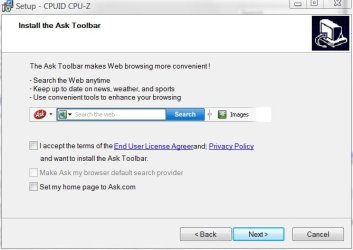
*sigh* another great app now bundled with crapware:

CPU-Z 1.51

wtf.JPG

And before anyone jumps on the 'but developers need to blah blah and you don't have to install it blah blah'. I know. I've heard it before. It doesn't mean I have to like it though :p
 

My Computer

Computer type
PC/Desktop
Computer Manufacturer/Model Number
Systems by SmartEyeball
OS
8 Pro x64
CPU
i7 3770K 4.6GHz
Motherboard
ASUS P8Z77 WS
Memory
16GB G.Skill Trident X 2666mhz
Graphics Card(s)
x2 EVGA 780 Ti Superclocked SLI
Sound Card
SB X-FI Surround 5.1 PRO USB / ATH-AD900 Headphones
Monitor(s) Displays
x3 Dell U2410 / 58" Samsung
Screen Resolution
5760*1200/ 1920*1200
Hard Drives
2x Intel 520 240GB (RAID 0) * 2x WD Caviar Blacks 2TB (RAID 0) * 2TB WD Caviar Black * Sony Optirac DVD
PSU
Silverstone Strider Evolution 1200W
Case
Thermaltake Level 10 GT Snow Edition
Cooling
Noctua NH-D14
Keyboard
Topre Realforce // Ducky Shine MX Black // Filco Ninja TKL
Mouse
Thermaltake Theron (Highly Recommended) + Razer Imperator
Antivirus
MSE
Browser
IE, FF, WaterFox
Other Info
GT Extreme V2 Sim Racing Cockpit + 40" LCD and K/B Mouse stand ▼
Fanatec CSR Elite Wheel + Clubsport V1 Pedals + CSR shifter/7G-H ▼Saitek X52 Pro ▼ TrackIR 5 Pro
Buttkicker v2 Seat Rumbler with Dedicated 5.1 and Sub Woofer attached to frame ▼
=
Bloody Big Grin
*sigh* another great app now bundled with crapware:

CPU-Z 1.51

View attachment 9425

And before anyone jumps on the 'but developers need to blah blah and you don't have to install it blah blah'. I know. I've heard it before. It doesn't mean I have to like it though :p

lol...... you tell em Smarty. ;)


:)SK
 

My Computer

Computer Manufacturer/Model Number
myself
OS
SEVEN x64
CPU
Q9450 @ 3.6GHZ 1.34v
Motherboard
ASUS P5K PREMIUM P35
Memory
8GB 1066 buffalo firestix @ 1152mhz CL5
Graphics Card(s)
Sapphire HD 5970 + GTX260 (physX)
Sound Card
Creative X-FI Xtreme Gamer
Monitor(s) Displays
SAMSUNG 20'' & SAMSUNG 23'' (dual screens)
Screen Resolution
2048x1152 & 1680x1050
Hard Drives
1x seagate 160gb IDE & 1x seagate 160gb SATA
PSU
XCILIO 850w (78A)
Case
CM590 1x 120x38mm & 2x92x38mm / 4x 120x25mm
Cooling
AC7 PRO @ 92x38mm blower, Lamptron military bus bay controll
Keyboard
LOGITECH E110
Mouse
logitech NX5
Internet Speed
2MB
Other Info
its a continual ''work in progress''....
That's funny...I just went thru the whole install routine without it asking me for that. And no trace of the ask toolbar installed after I completed the setup. :confused:


Makes no mention of it here either:
Install and Remove
Since version 1.51, CPU-Z includes an installer. The installation offers several advantages in comparison to the stand-alone version :

  • The installation creates program entries in the start menu and on the desktop.
  • The kernel mode driver used by CPU-Z is installed on the system, that avoids to install / remove it at every run. That makes the process more stable, slightly faster, and also allows to run CPU-Z without the administrator rights (please note that the installation requires administrator privileges however).
Installation

Run the setup executable file, and let it guide you for the installation process. The setup installs a service, that is started the first time that you run CPU-Z. After that first run, you can run CPU-Z from any account, even without administrator privileges.
Removal

You can remove the program either from the Add or Remove Programs window (from Settings, Control Panel), or choose Uninstall CPU-Z from Start menu, Programs, CPUID, CPU-Z.
:huh:
 

My Computer

Computer type
PC/Desktop
Computer Manufacturer/Model Number
Airbot 2.0
OS
Windows 7 Ultimate x64 SP1
CPU
Core i7 920 (D0) @ 4Ghz, *26c idle *65c full load on air
Motherboard
Asus P6X58D Premium - Sata 6Gb/s - USB 3.0
Memory
12GB DDR3 Corsair Dominator -CMD12GX3M6A1600C8 at 1600MHz
Graphics Card(s)
Zotac Geforce GTX 770
Sound Card
ASUS Xonar D2X
Monitor(s) Displays
1 LG 24" Flatron W2453V-PF 1 Samsung 24" P2450H both 2ms RT
Screen Resolution
1920x1080@60hz
Hard Drives
1 Samsung 250GB 840 Evo SSD
1 OCZ Vertex2 180GB SSD
1 TB Samsung Spinpoint F1 7200RPM 32MB cache
2 500GB WD Caviar Blacks 7200RPM 32MB cache (WD5001AALS)

Pioneer DVD Burner DVR-S18M
PSU
Corsair HX1000W
Case
Cooler Master HAF 932
Cooling
Case Fans *3 230mm, *1 140mm/CPU - *Tuniq Tower 120 Extreme
Keyboard
Logitech Wireless MK700
Mouse
Logitech Wireless MK700
Internet Speed
DL 15 Mbps UL 0.98 Mbps
Antivirus
None
Browser
Firefox Nightly
Other Info
Processor-7.7 *RAM- 7.9 *Graphics-7.9 *Gaming Graphics- 7.9 *SSD- 7.8 W.E.I final score= 7.7
*Phone- LG Nexus 5
Just installed it and I don't get it either, I was thinking for a moment maybe it was something that only the Aussies were getting but it looks like SE is the only one.
 

My Computer

Computer Manufacturer/Model Number
Home Brew
OS
Windows 7 Ultimate Vista Ultimate x64
CPU
Core 2 Duo E8500 3.16Ghz @ 3.8Ghz
Motherboard
eVGA 750i FTW
Memory
2x2Gigs Patriot PC2-6400 LL
Graphics Card(s)
Inno3D GeForce GTX260 216 SP
Monitor(s) Displays
ASUS VW222U 22" 2ms Response time
Screen Resolution
1680x1050
Hard Drives
SATA 150GB
SATA II 250GB
USB IDE 750GB Ext.
PSU
HYTEC 600W & Thermaltake 650W Toughpower Power Exp
Case
Thermaltake Armor LCS (Liquid Cooling System)
Cooling
Liquid Cooling System
Keyboard
Logitech G15 Gaming Keyboard
Mouse
Logitech G9 Gaming Mouse
OK peeps, just ordered these......:D:D

Coolermaster CM590

OCZ PC8500 CL5 8GB


thought i'd treat myself seeing as there's a depression & the world could very well end....lol :p

4ghz here i come........


:)SK
 

My Computer

Computer Manufacturer/Model Number
myself
OS
SEVEN x64
CPU
Q9450 @ 3.6GHZ 1.34v
Motherboard
ASUS P5K PREMIUM P35
Memory
8GB 1066 buffalo firestix @ 1152mhz CL5
Graphics Card(s)
Sapphire HD 5970 + GTX260 (physX)
Sound Card
Creative X-FI Xtreme Gamer
Monitor(s) Displays
SAMSUNG 20'' & SAMSUNG 23'' (dual screens)
Screen Resolution
2048x1152 & 1680x1050
Hard Drives
1x seagate 160gb IDE & 1x seagate 160gb SATA
PSU
XCILIO 850w (78A)
Case
CM590 1x 120x38mm & 2x92x38mm / 4x 120x25mm
Cooling
AC7 PRO @ 92x38mm blower, Lamptron military bus bay controll
Keyboard
LOGITECH E110
Mouse
logitech NX5
Internet Speed
2MB
Other Info
its a continual ''work in progress''....
Looks nice Mitch, I like the way they display 3 Big fans on the front of the case when you can only really have 2 unless you don't intend to have an Internal DVD drive.
 

My Computer

Computer Manufacturer/Model Number
Home Brew
OS
Windows 7 Ultimate Vista Ultimate x64
CPU
Core 2 Duo E8500 3.16Ghz @ 3.8Ghz
Motherboard
eVGA 750i FTW
Memory
2x2Gigs Patriot PC2-6400 LL
Graphics Card(s)
Inno3D GeForce GTX260 216 SP
Monitor(s) Displays
ASUS VW222U 22" 2ms Response time
Screen Resolution
1680x1050
Hard Drives
SATA 150GB
SATA II 250GB
USB IDE 750GB Ext.
PSU
HYTEC 600W & Thermaltake 650W Toughpower Power Exp
Case
Thermaltake Armor LCS (Liquid Cooling System)
Cooling
Liquid Cooling System
Keyboard
Logitech G15 Gaming Keyboard
Mouse
Logitech G9 Gaming Mouse
Looks nice Mitch, I like the way they display 3 Big fans on the front of the case when you can only really have 2 unless you don't intend to have an Internal DVD drive.


lol....i know :p

just recently my temps have been getting obscene while gaming....... my 260 actually hit 80c the other day with the fan @ 80% :eek:, my current case is very old & it has no motherboard tray, so i cannot manage the cables.....

god....my components are screaming for some air.....


:)SK
 

My Computer

Computer Manufacturer/Model Number
myself
OS
SEVEN x64
CPU
Q9450 @ 3.6GHZ 1.34v
Motherboard
ASUS P5K PREMIUM P35
Memory
8GB 1066 buffalo firestix @ 1152mhz CL5
Graphics Card(s)
Sapphire HD 5970 + GTX260 (physX)
Sound Card
Creative X-FI Xtreme Gamer
Monitor(s) Displays
SAMSUNG 20'' & SAMSUNG 23'' (dual screens)
Screen Resolution
2048x1152 & 1680x1050
Hard Drives
1x seagate 160gb IDE & 1x seagate 160gb SATA
PSU
XCILIO 850w (78A)
Case
CM590 1x 120x38mm & 2x92x38mm / 4x 120x25mm
Cooling
AC7 PRO @ 92x38mm blower, Lamptron military bus bay controll
Keyboard
LOGITECH E110
Mouse
logitech NX5
Internet Speed
2MB
Other Info
its a continual ''work in progress''....
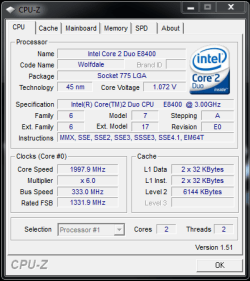
I'm once again trying to get my OC back up :( Damn me forgetting how I did it before :(
 

Attachments

  • cpuz.PNG
    cpuz.PNG
    15.5 KB · Views: 28

My Computer

OS
Vista Ultimate x64, Windows 7 RC 7100
CPU
Intel C2D E8400 @ 3.8ghz
Motherboard
ASUS P5Q SE PLUS
Memory
4x 2gb G.Skill DDR2 1600
Graphics Card(s)
nVidia GTX260 896mb
Sound Card
Onboard 5.1 Surround Sound
Monitor(s) Displays
22" Acer LCD and 19" Westinghouse LCD
Screen Resolution
1680x1050 and 1280x1024
Hard Drives
Seagate Barracuda 7200rpm 750gb
Western Digital 500gb
PSU
Corsair H520X 520w
Case
Antec 300
Keyboard
Old G15
Mouse
Logitech G5
Internet Speed
15mbps down .34mbps up
I'm once again trying to get my OC back up :( Damn me forgetting how I did it before :(

If you are going to get a decent Overclock you will need to raise your voltage allot more then that, try about 1.33v and set your FSB to 400 and set your RAM to the same to get a 1-1 Ratio and set your Multiplier to 9 and see how that goes, should give 3.6Ghz and if you want get 3.8Ghz you will need to raise the FSB to 423 and Your RAM should handle that too.
 

My Computer

Computer Manufacturer/Model Number
Home Brew
OS
Windows 7 Ultimate Vista Ultimate x64
CPU
Core 2 Duo E8500 3.16Ghz @ 3.8Ghz
Motherboard
eVGA 750i FTW
Memory
2x2Gigs Patriot PC2-6400 LL
Graphics Card(s)
Inno3D GeForce GTX260 216 SP
Monitor(s) Displays
ASUS VW222U 22" 2ms Response time
Screen Resolution
1680x1050
Hard Drives
SATA 150GB
SATA II 250GB
USB IDE 750GB Ext.
PSU
HYTEC 600W & Thermaltake 650W Toughpower Power Exp
Case
Thermaltake Armor LCS (Liquid Cooling System)
Cooling
Liquid Cooling System
Keyboard
Logitech G15 Gaming Keyboard
Mouse
Logitech G9 Gaming Mouse
morning guys....... been busy tweaking my new OC :D:D,

what do ya reckon...;), check the FSB on that bad boy.....

4ghz.JPG

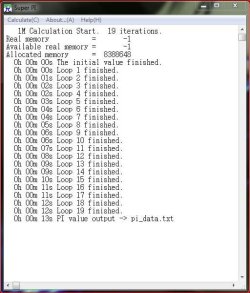
13sec superPI

4ghz 2.JPG

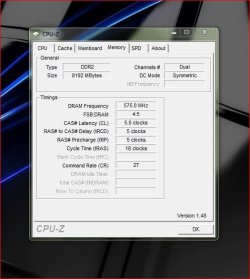
1150mhz @ CL5 ...(8GB :eek:)

4ghz 4.JPG

she's stable but its swallowing 1.5v to keep her there, i hit 70c yesterday after an hour on GTA4 ....i need a new cooler


:DSK
 

My Computer

Computer Manufacturer/Model Number
myself
OS
SEVEN x64
CPU
Q9450 @ 3.6GHZ 1.34v
Motherboard
ASUS P5K PREMIUM P35
Memory
8GB 1066 buffalo firestix @ 1152mhz CL5
Graphics Card(s)
Sapphire HD 5970 + GTX260 (physX)
Sound Card
Creative X-FI Xtreme Gamer
Monitor(s) Displays
SAMSUNG 20'' & SAMSUNG 23'' (dual screens)
Screen Resolution
2048x1152 & 1680x1050
Hard Drives
1x seagate 160gb IDE & 1x seagate 160gb SATA
PSU
XCILIO 850w (78A)
Case
CM590 1x 120x38mm & 2x92x38mm / 4x 120x25mm
Cooling
AC7 PRO @ 92x38mm blower, Lamptron military bus bay controll
Keyboard
LOGITECH E110
Mouse
logitech NX5
Internet Speed
2MB
Other Info
its a continual ''work in progress''....
If you are going to get a decent Overclock you will need to raise your voltage allot more then that, try about 1.33v and set your FSB to 400 and set your RAM to the same to get a 1-1 Ratio and set your Multiplier to 9 and see how that goes, should give 3.6Ghz and if you want get 3.8Ghz you will need to raise the FSB to 423 and Your RAM should handle that too.

FSB - 410
CPU Voltage - 1.3 (i typed in 1.3 and hit enter and it's still saying 1.27v in cpu-z)
Multiplier - 9
 

Attachments

  • cpuz.PNG
    cpuz.PNG
    14.2 KB · Views: 20

My Computer

OS
Vista Ultimate x64, Windows 7 RC 7100
CPU
Intel C2D E8400 @ 3.8ghz
Motherboard
ASUS P5Q SE PLUS
Memory
4x 2gb G.Skill DDR2 1600
Graphics Card(s)
nVidia GTX260 896mb
Sound Card
Onboard 5.1 Surround Sound
Monitor(s) Displays
22" Acer LCD and 19" Westinghouse LCD
Screen Resolution
1680x1050 and 1280x1024
Hard Drives
Seagate Barracuda 7200rpm 750gb
Western Digital 500gb
PSU
Corsair H520X 520w
Case
Antec 300
Keyboard
Old G15
Mouse
Logitech G5
Internet Speed
15mbps down .34mbps up
That's allot better, as for your voltage drop, you will always get that uless your motherboard has the option to eliminate the V droop, also if you disable CE1 in the Bios you will not get the multiplier dropping to 6 and it will stay at x9 and you will have a constant 3.69Ghz.


That's a nice Overclock Mitch, would definitely think about getting a better cooler though. ;)
 

My Computer

Computer Manufacturer/Model Number
Home Brew
OS
Windows 7 Ultimate Vista Ultimate x64
CPU
Core 2 Duo E8500 3.16Ghz @ 3.8Ghz
Motherboard
eVGA 750i FTW
Memory
2x2Gigs Patriot PC2-6400 LL
Graphics Card(s)
Inno3D GeForce GTX260 216 SP
Monitor(s) Displays
ASUS VW222U 22" 2ms Response time
Screen Resolution
1680x1050
Hard Drives
SATA 150GB
SATA II 250GB
USB IDE 750GB Ext.
PSU
HYTEC 600W & Thermaltake 650W Toughpower Power Exp
Case
Thermaltake Armor LCS (Liquid Cooling System)
Cooling
Liquid Cooling System
Keyboard
Logitech G15 Gaming Keyboard
Mouse
Logitech G9 Gaming Mouse
So as long as I set 1.3v in the BIOS it's safe no matter if the v drop is enabled? I'm stress testing it in prime95 right now so after a bit I'll increase the FSB to 420 from 410.

Should I up my DRAM Freq to 1066 or higher or just leave it?
 

My Computer

OS
Vista Ultimate x64, Windows 7 RC 7100
CPU
Intel C2D E8400 @ 3.8ghz
Motherboard
ASUS P5Q SE PLUS
Memory
4x 2gb G.Skill DDR2 1600
Graphics Card(s)
nVidia GTX260 896mb
Sound Card
Onboard 5.1 Surround Sound
Monitor(s) Displays
22" Acer LCD and 19" Westinghouse LCD
Screen Resolution
1680x1050 and 1280x1024
Hard Drives
Seagate Barracuda 7200rpm 750gb
Western Digital 500gb
PSU
Corsair H520X 520w
Case
Antec 300
Keyboard
Old G15
Mouse
Logitech G5
Internet Speed
15mbps down .34mbps up
Status
Not open for further replies.
Back
Top