Post Your Overclock!

Status
Not open for further replies.
Does the board have any diagnostic lights?

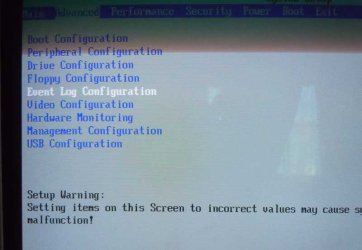
Also, you can check your BIOS to see if it keeps a record of issues the MB is having. Most motherboards usually keep such a record in the BIOS; you might check the maintenance section of the BIOS, should be something like a log.
Nope, no lights unfortunately.

I have yet to notice anything like a maintenance log in my BIOS, but I'll take a look.

~Lordbob
 

My Computer

Computer Manufacturer/Model Number
Hera
OS
Windows 7 Ultimate x64, Mint 9
CPU
Intel i5-2500k
Motherboard
ASUS P8P67 Pro
Memory
2x 4Gb Corsair VENGEANCE DDR3-1600
Graphics Card(s)
NVidia GeForce N260GTX Twin Frozr
Sound Card
Realtek HD OnBoard Audio
Monitor(s) Displays
ASUS 24" Monitor
Screen Resolution
1920x1080
Hard Drives
G.SKILL Phoenix Series 60GB SATA II MLC Internal Solid State Drive (SSD)
SAMSUNG Spinpoint F3R 1TB 7200 RPM 32MB Cache SATA II
PSU
Cooler Master Real Power Pro 750W
Case
Cooler Master Haf 932
Cooling
Fans
Keyboard
Razer Tarantula
Mouse
Razer Lachesis
Internet Speed
not fast enough
Some boards have them, some don't? I couldn't find one on my Gigabyte, but I do have one on my Intel board.....

DSCN0545.jpg
 

My Computer

Computer type
PC/Desktop
Computer Manufacturer/Model Number
Custom built by me.
OS
Windows 10 Pro
CPU
Intel Core i7-4770K (3.5Ghz)
Motherboard
Gigabyte G1 Sniper 5 (F10 Bios)
Memory
32 gig Corsair Dominator Platinum (4x8Gig)
Graphics Card(s)
Sapphire Tri-X R9 Fury
Sound Card
Soundblaster ZXR
Monitor(s) Displays
NEC PA242W 24" LCD Monitor
Screen Resolution
1920 x 1200
Hard Drives
Primary - Samsung 850 Pro (512gig), Samsung 840 Pro (256gig), 2TB WD Caviar Black.
PSU
EVGA Supernova 1000 G2
Case
Cooler Master HAF X
Cooling
Corsair H100i with Corsair Air Series SP120 Quiet Fans
Keyboard
Logitech Wireless Wave
Mouse
Logitech Performance MX
Internet Speed
High Speed Cable
Antivirus
Norton Security
Browser
IE11
Other Info
Memory Timings - 1866MHz @ 9-9-9-27-1T @ 1.5 volts
EIST is Speed Step, it's likely CoreTemp and CPUZ may not be programed for your CPU.

The CPUZ snip showed a multiplier of 30 at 4GHz and 1.056v, that's really good low voltage, haven't seen any X980 OC'ed specs so was wondering if that is normal.

The IXTU app might be good for getting the true system readings under various loads.
Hi Dave, CPU-Z and Core temp does work with those chips. As for the voltage, yeah 1.056 is very good. I asked about it earlier, but didn't get much info since he said he has limited access to the BIOS.

As for the 30 multiplier, since the chip is unlocked, 30 is very possible, and would be normal on that chip. Not to mention that achieving a 4gig OC on it really isn't all that hard. I can do 4+ gigs with my locked i7-950, so an unlocked i7-980x doing it is nothing.

Having that low CPU voltage definitely keeps temps down and I'm betting he could push that chip higher, 4.3 or more? But with limited BIOS options I wouldn't push too much.

Yeah, the rig came with the core multipliers set to 28 - and several Alienware techs suggested, "off the record", that I change them to 30. I guess thats how they have their Alienware Area-51 setup because I believe it uses the same MB.
Too bad I cant change more voltages in the Bios.

They do offer an OC'd version option of 4.0 Ghz if you buy the Area 51 ALX. The only differences between my Aurora and the Area-51 ALX (Besides cost) is that the Area-51 comes in a bigger case so that it can hold multiple large video cards and the Area-51's power supply is 1000 or 1200 watts instead of the 850 watts I have.

Also the Area 51 ALX has more pretty lights on it and weighs almost 50 pounds more. You can order it with two HD 5970's in crossfire (and each 5970 is already dual GPU). I can do without the lights and the extra weight but I do very much wish I had dual 5970's instead of just one. But it wont fit.:cry::cry::cry:
 

My Computer

Computer Manufacturer/Model Number
Alienware Aurora
OS
Win 7 Ultimate x64
CPU
Core I7 980X O.C. to 4.0 Ghz
Motherboard
Custom Intel mATX (Bios ver A10)
Memory
12GB 1600 mhz triple channel DDR3 - Kingston
Graphics Card(s)
ATI Radeon HD 5970 2GB Video Card
Sound Card
Creative Labs Titanium sound blaster
Monitor(s) Displays
30" Dell LCD
Screen Resolution
2560 x 1600
Hard Drives
240 GB OCZ Vertex 2 SSD
256 GB Samsung V2 SSD
2TB WD Black Caviar 7200 rpm SATA3
600GB WD Velociraptor 10,000 rpm SATA3
3TB WD MyBook Essential USB 3.0 7200 rpm External
PSU
850 Watt
Case
Alienware Aurora
Cooling
Water
Keyboard
Logitech G15 (original version)
Mouse
Logitech MX1000 Laser - Wireless
Internet Speed
Cable 22 Mb/sec download
Other Info
USB 3.0,
Blue Ray DVD Read/Writer
Bose Companion 3 Speakers
WRT54G Wireless Router
Capture1.PNG

scrooge
 

My Computer

Computer Manufacturer/Model Number
home build
OS
win 7 ( 64 bit)
CPU
Intel Core i7-870 Lynnfield 2.93GHz 8MB L3 Cache LGA 1156 95
Motherboard
ASUS P7P55 LX LGA 1156
Memory
G.SKILL Sniper Series 16GB (4 x 4GB) 240-Pin DDR3 SDRAM
Graphics Card(s)
ATI Radeon HD6800 Series
Sound Card
hdmi
Monitor(s) Displays
42" lg 3d tv
Screen Resolution
1920 x 1080
Hard Drives
1 ssd pci-e revodrive
4 seagate 1.5 tb
PSU
Rosewill BRONZE Series RBR1000-M 1000W Continuous@40°C, 80Pl
Case
CoolMaster 922
Cooling
CORSAIR CWCH60 Hydro Series H60 High Performance Liquid CPU
Keyboard
logtech
Mouse
logitect
Internet Speed
5 mbit
Mine!!!
 

My Computer

Computer Manufacturer/Model Number
Custom
OS
Windows 7 pro x64
CPU
Intel Core i5 750 @ 3.3 GHz
Motherboard
Evga P55 Sli
Memory
G.SKILL 8GB (4 x 2GB) 240-Pin DDR3 @ 1600
Graphics Card(s)
EVGA GeForce GTX 260 And EVGA GeForce GTX 9800+
Sound Card
EarForce PX21
Monitor(s) Displays
ASUS VH222H Black 21.5"
Screen Resolution
1920x1080
Hard Drives
320Gb Sata
150Gb Sata
3 tb External
PSU
COOLER MASTER Silent Pro 600W
Case
Antec Nine Hundred
Cooling
ZALMAN CNPS9900ALED 120mm
Keyboard
Logitech G15
Mouse
Logitech G5
Internet Speed
21ish Mbps
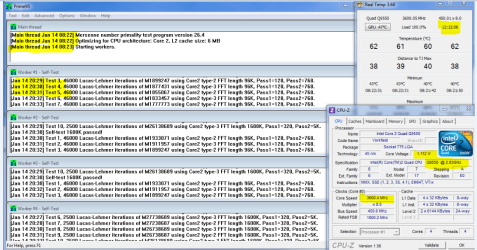
Here's my overclock, it's the same settings as in my signature except this time I set the CPU fan to auto instead of 100%.
 

Attachments

  • overclock stress test.PNG
    overclock stress test.PNG
    222.7 KB · Views: 27

My Computer

Computer Manufacturer/Model Number
Custom Built/ Built by me, CR-48
OS
Windows 7 Ultimate x64
CPU
INTEL CORE I5 750 180x20 all powersaving 1.168v
Motherboard
MSI P55-GD55
Memory
OCZ 4GB DDR3 PC3-10666 (7-7-7-20-2t) @1.651v
Graphics Card(s)
ASUS 9800GT GLACIATOR FANSINK
Sound Card
ONBOARD REALTEK ALC889
Monitor(s) Displays
VIEWSONIC VX924, VIZIO VS420LF1A
Screen Resolution
VX924: 1280x1024 75hz, VS420LF1A: 1920x1080 60hz(1080p)
Hard Drives
HITACHI Deskstar HD31000 IDK/7K 1TB 7200RPM 32MB CACHE SATA II
PSU
OCZ MODXSTREAM PRO 700 WATT SEMI-MODULAR
Case
ANTEC 900
Cooling
CoolerMaster Hyper 212+
Keyboard
Logitech K520
Mouse
LOGITECH M310
Internet Speed
CHARTER PIPELINE 15MB DOWN/ 3MB UP
Other Info
ROUTER: DLINK DIR-655, Netgear WNR3500L (SamKnows)
MODEM: MOTOROLA SB6120
HTPC: AMD Athlon II x2 255 C3, Pegatron M2N78-LA (Violet 3.02) , Galaxy NVidia Geforce 210, HP OEM 300WATT PSU, Zalman Z7 Plus, SAMSUNG 3GB PC2-5300, SEAGATE 80GB SATA, Hauppauge WinTV-HVR-1800
I tried OCing my CPU once, and at 3MHz above stock it crashed :shock:
EDIT: It also won't start up if I drop it DOWN 3MHz as well...

That's what I get for buying a bargain component.
(Perhaps this also has something to do with the Prime95 crash?)

Also, the motherboard does not have a log.

~Lordbob
 

My Computer

Computer Manufacturer/Model Number
Hera
OS
Windows 7 Ultimate x64, Mint 9
CPU
Intel i5-2500k
Motherboard
ASUS P8P67 Pro
Memory
2x 4Gb Corsair VENGEANCE DDR3-1600
Graphics Card(s)
NVidia GeForce N260GTX Twin Frozr
Sound Card
Realtek HD OnBoard Audio
Monitor(s) Displays
ASUS 24" Monitor
Screen Resolution
1920x1080
Hard Drives
G.SKILL Phoenix Series 60GB SATA II MLC Internal Solid State Drive (SSD)
SAMSUNG Spinpoint F3R 1TB 7200 RPM 32MB Cache SATA II
PSU
Cooler Master Real Power Pro 750W
Case
Cooler Master Haf 932
Cooling
Fans
Keyboard
Razer Tarantula
Mouse
Razer Lachesis
Internet Speed
not fast enough
I tried OCing my CPU once, and at 3MHz above stock it crashed :shock:
EDIT: It also won't start up if I drop it DOWN 3MHz as well...

That's what I get for buying a bargain component.
(Perhaps this also has something to do with the Prime95 crash?)

Also, the motherboard does not have a log.

~Lordbob

That's pretty touchy that you can't make a 3MHz move :eek:

BTW what "bargain component" are you talking about? If it's the processors, it could have been damaged from a previous overclock, same could be said of the memory, and to a lessor degree, the MB.
 

My Computer

Computer type
PC/Desktop
Computer Manufacturer/Model Number
Custom built by me.
OS
Windows 10 Pro
CPU
Intel Core i7-4770K (3.5Ghz)
Motherboard
Gigabyte G1 Sniper 5 (F10 Bios)
Memory
32 gig Corsair Dominator Platinum (4x8Gig)
Graphics Card(s)
Sapphire Tri-X R9 Fury
Sound Card
Soundblaster ZXR
Monitor(s) Displays
NEC PA242W 24" LCD Monitor
Screen Resolution
1920 x 1200
Hard Drives
Primary - Samsung 850 Pro (512gig), Samsung 840 Pro (256gig), 2TB WD Caviar Black.
PSU
EVGA Supernova 1000 G2
Case
Cooler Master HAF X
Cooling
Corsair H100i with Corsair Air Series SP120 Quiet Fans
Keyboard
Logitech Wireless Wave
Mouse
Logitech Performance MX
Internet Speed
High Speed Cable
Antivirus
Norton Security
Browser
IE11
Other Info
Memory Timings - 1866MHz @ 9-9-9-27-1T @ 1.5 volts
I tried OCing my CPU once, and at 3MHz above stock it crashed :shock:
EDIT: It also won't start up if I drop it DOWN 3MHz as well...

That's what I get for buying a bargain component.
(Perhaps this also has something to do with the Prime95 crash?)

Also, the motherboard does not have a log.

~Lordbob

That's pretty touchy that you can't make a 3MHz move :eek:

BTW what "bargain component" are you talking about? If it's the processors, it could have been damaged from a previous overclock, same could be said of the memory, and to a lessor degree, the MB.
It hasn't been OCed at all before (though it could have been damaged installing my water cooling).

I was referring to my CPU. I bought the Q8200, which (from what I have read) can't really be overclocked, though should be a solid CPU. I am also not feeling to great about my motherboard, it could be causing these as well...

I can tell there is SOMETHING wrong, it has just proven next to impossible for me to flesh out. The computer runs normally 99% of the time, and then I do something routine and it crashes, or if I run Prime95 for over 2 hours it crashes.

~Lordbob
 

My Computer

Computer Manufacturer/Model Number
Hera
OS
Windows 7 Ultimate x64, Mint 9
CPU
Intel i5-2500k
Motherboard
ASUS P8P67 Pro
Memory
2x 4Gb Corsair VENGEANCE DDR3-1600
Graphics Card(s)
NVidia GeForce N260GTX Twin Frozr
Sound Card
Realtek HD OnBoard Audio
Monitor(s) Displays
ASUS 24" Monitor
Screen Resolution
1920x1080
Hard Drives
G.SKILL Phoenix Series 60GB SATA II MLC Internal Solid State Drive (SSD)
SAMSUNG Spinpoint F3R 1TB 7200 RPM 32MB Cache SATA II
PSU
Cooler Master Real Power Pro 750W
Case
Cooler Master Haf 932
Cooling
Fans
Keyboard
Razer Tarantula
Mouse
Razer Lachesis
Internet Speed
not fast enough
You did say you ran memtest right? Have you checked your hard drives?

Yeah when you have intermittent issues they are very hard to track down. A little patience and note keeping goes a long way here.

Good luck.
 

My Computer

Computer type
PC/Desktop
Computer Manufacturer/Model Number
Custom built by me.
OS
Windows 10 Pro
CPU
Intel Core i7-4770K (3.5Ghz)
Motherboard
Gigabyte G1 Sniper 5 (F10 Bios)
Memory
32 gig Corsair Dominator Platinum (4x8Gig)
Graphics Card(s)
Sapphire Tri-X R9 Fury
Sound Card
Soundblaster ZXR
Monitor(s) Displays
NEC PA242W 24" LCD Monitor
Screen Resolution
1920 x 1200
Hard Drives
Primary - Samsung 850 Pro (512gig), Samsung 840 Pro (256gig), 2TB WD Caviar Black.
PSU
EVGA Supernova 1000 G2
Case
Cooler Master HAF X
Cooling
Corsair H100i with Corsair Air Series SP120 Quiet Fans
Keyboard
Logitech Wireless Wave
Mouse
Logitech Performance MX
Internet Speed
High Speed Cable
Antivirus
Norton Security
Browser
IE11
Other Info
Memory Timings - 1866MHz @ 9-9-9-27-1T @ 1.5 volts
You did say you ran memtest right? Have you checked your hard drives?

Yeah when you have intermittent issues they are very hard to track down. A little patience and note keeping goes a long way here.

Good luck.
I had since gotten an SSD, and the hardware freezing largely disappeared, though it happened again when I ran Prime95 (leading me to believe a CPU/mobo issue).

I ran Memtest86+ for 2 or so passes with no issues.

~Lordbob
 

My Computer

Computer Manufacturer/Model Number
Hera
OS
Windows 7 Ultimate x64, Mint 9
CPU
Intel i5-2500k
Motherboard
ASUS P8P67 Pro
Memory
2x 4Gb Corsair VENGEANCE DDR3-1600
Graphics Card(s)
NVidia GeForce N260GTX Twin Frozr
Sound Card
Realtek HD OnBoard Audio
Monitor(s) Displays
ASUS 24" Monitor
Screen Resolution
1920x1080
Hard Drives
G.SKILL Phoenix Series 60GB SATA II MLC Internal Solid State Drive (SSD)
SAMSUNG Spinpoint F3R 1TB 7200 RPM 32MB Cache SATA II
PSU
Cooler Master Real Power Pro 750W
Case
Cooler Master Haf 932
Cooling
Fans
Keyboard
Razer Tarantula
Mouse
Razer Lachesis
Internet Speed
not fast enough
If that's that ASUS P5QC you might look around the net to see if any issues like yours are being reported. Also check for any new BIOS updates, as well as drivers.

How old is your chip? Has it been run to hard? Is it time for a replacement. Is the CPU fan working?

Just some food for thought :)

Good luck.
 

My Computer

Computer type
PC/Desktop
Computer Manufacturer/Model Number
Custom built by me.
OS
Windows 10 Pro
CPU
Intel Core i7-4770K (3.5Ghz)
Motherboard
Gigabyte G1 Sniper 5 (F10 Bios)
Memory
32 gig Corsair Dominator Platinum (4x8Gig)
Graphics Card(s)
Sapphire Tri-X R9 Fury
Sound Card
Soundblaster ZXR
Monitor(s) Displays
NEC PA242W 24" LCD Monitor
Screen Resolution
1920 x 1200
Hard Drives
Primary - Samsung 850 Pro (512gig), Samsung 840 Pro (256gig), 2TB WD Caviar Black.
PSU
EVGA Supernova 1000 G2
Case
Cooler Master HAF X
Cooling
Corsair H100i with Corsair Air Series SP120 Quiet Fans
Keyboard
Logitech Wireless Wave
Mouse
Logitech Performance MX
Internet Speed
High Speed Cable
Antivirus
Norton Security
Browser
IE11
Other Info
Memory Timings - 1866MHz @ 9-9-9-27-1T @ 1.5 volts
If that's that ASUS P5QC you might look around the net to see if any issues like yours are being reported. Also check for any new BIOS updates, as well as drivers.

How old is your chip? Has it been run to hard? Is it time for a replacement. Is the CPU fan working?

Just some food for thought :)

Good luck.
It is only like 2 or 3 years old (I game, but not OC). I have flashed the mobo before, but I can check again (hasn't helped yet). The CPU is water cooled now (YES!), and that seems to be working.

It might indeed be time for a new CPU/mobo but that would also include new RAM, and I don't quite have the money for all that right now.

~Lordbob
 

My Computer

Computer Manufacturer/Model Number
Hera
OS
Windows 7 Ultimate x64, Mint 9
CPU
Intel i5-2500k
Motherboard
ASUS P8P67 Pro
Memory
2x 4Gb Corsair VENGEANCE DDR3-1600
Graphics Card(s)
NVidia GeForce N260GTX Twin Frozr
Sound Card
Realtek HD OnBoard Audio
Monitor(s) Displays
ASUS 24" Monitor
Screen Resolution
1920x1080
Hard Drives
G.SKILL Phoenix Series 60GB SATA II MLC Internal Solid State Drive (SSD)
SAMSUNG Spinpoint F3R 1TB 7200 RPM 32MB Cache SATA II
PSU
Cooler Master Real Power Pro 750W
Case
Cooler Master Haf 932
Cooling
Fans
Keyboard
Razer Tarantula
Mouse
Razer Lachesis
Internet Speed
not fast enough
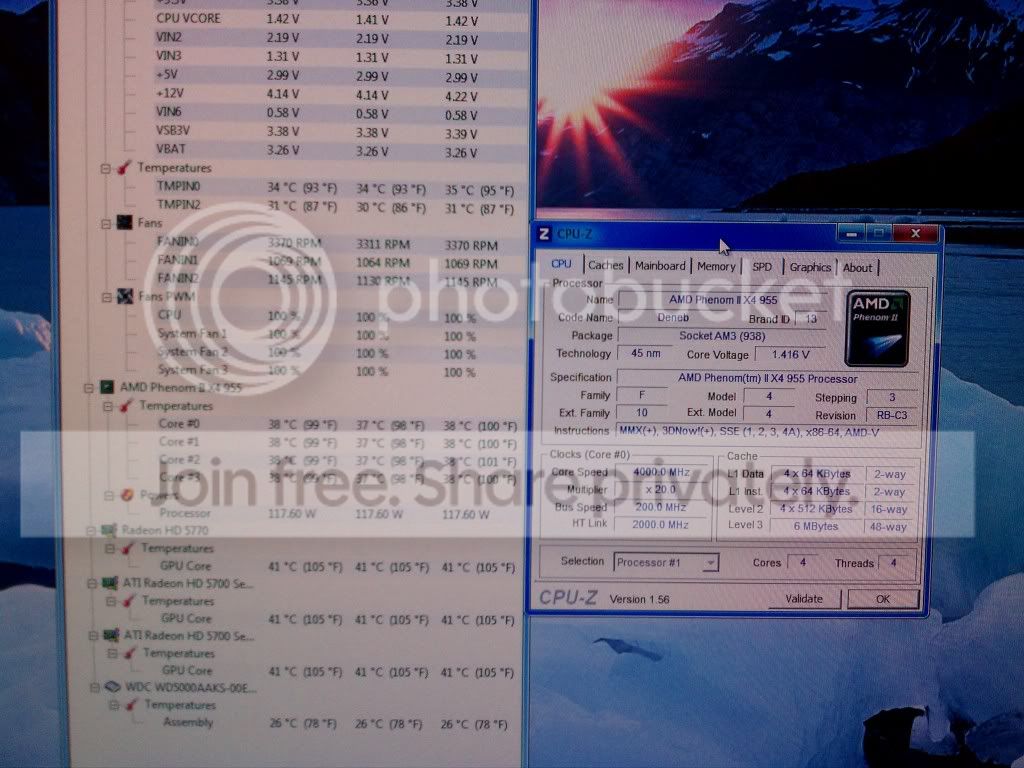
Now keep in mind I am brand new to OCing. This is with the multiplier to 19X and the CPU volts to 1.4. I haven't ran any benchmarks yet because I don't know which ones to use (Prime 95, Intelburn Test) or how to run them. With about 3 programs open, a few web pages and Microsoft Outllook the temps didn't get over 43*C and this is with a stock HS.
IMAG0184.jpg
 

My Computer

Computer type
PC/Desktop
Computer Manufacturer/Model Number
Custom Build
OS
Windows 7 Home Premium
CPU
AMD Phenom II 955 Black Edition Quad Core
Motherboard
MSI 870-G45
Memory
Corsair XMS3 8GB
Graphics Card(s)
ATI Eyefinity HD 5770 5 mini display ports
Sound Card
Realtek High Definition 6.1
Monitor(s) Displays
2 DELL E207WFP 21.5" - 1 Acer 21.5"
Screen Resolution
2 Dells 1680x1050 - Acer 1920x1080
Hard Drives
Intel 40GB SSD
WD 500GB internal
WD 500Gb external
PSU
Cooler Master 500w
Case
Cooler Master 430 Black Elite
Keyboard
HP
Mouse
MIBRU
Internet Speed
10 mbs
Antivirus
Trend Micro
Browser
Chrome
I know nothing about AMD processors, but for example, i7-900 series processors max voltages is somwhere around 1.35 volts max.

My point, make sure you know what the max voltage for your processor is and NEVER go above it!
Yes, there are exceptions - extreme overclocks with extreme cooling.
 

My Computer

Computer type
PC/Desktop
Computer Manufacturer/Model Number
Custom built by me.
OS
Windows 10 Pro
CPU
Intel Core i7-4770K (3.5Ghz)
Motherboard
Gigabyte G1 Sniper 5 (F10 Bios)
Memory
32 gig Corsair Dominator Platinum (4x8Gig)
Graphics Card(s)
Sapphire Tri-X R9 Fury
Sound Card
Soundblaster ZXR
Monitor(s) Displays
NEC PA242W 24" LCD Monitor
Screen Resolution
1920 x 1200
Hard Drives
Primary - Samsung 850 Pro (512gig), Samsung 840 Pro (256gig), 2TB WD Caviar Black.
PSU
EVGA Supernova 1000 G2
Case
Cooler Master HAF X
Cooling
Corsair H100i with Corsair Air Series SP120 Quiet Fans
Keyboard
Logitech Wireless Wave
Mouse
Logitech Performance MX
Internet Speed
High Speed Cable
Antivirus
Norton Security
Browser
IE11
Other Info
Memory Timings - 1866MHz @ 9-9-9-27-1T @ 1.5 volts
Now keep in mind I am brand new to OCing. This is with the multiplier to 19X and the CPU volts to 1.4. I haven't ran any benchmarks yet because I don't know which ones to use (Prime 95, Intelburn Test) or how to run them. With about 3 programs open, a few web pages and Microsoft Outllook the temps didn't get over 43*C and this is with a stock HS.

Run Prime 95 to test your OC.

Running a couple of programs may not increase the CPU to max frequency.

How to Stress Test your CPU for Stability and Heat Problems

Use Torture Test > Blend, enter the max number of cores.​
 

My Computer

Computer type
PC/Desktop
Computer Manufacturer/Model Number
76~2.0
OS
Windows 7 Ult x64 - SP1/ Windows 8 Pro x64
CPU
Intel Core i5-3570K 4.6GHz
Motherboard
Gigabyte GA-Z77X UD3H, f18
Memory
8GB (2X4GB) DDR3 1600 Corsair Vengeance CL8 1.5v
Graphics Card(s)
Sapphire HD 7770 Vapor-X OC 1GB DDR5
Sound Card
Onboard VIA VT2021
Monitor(s) Displays
22" LCD Dell
Screen Resolution
1680x1050
Hard Drives
Samsung 840Pro 128GB SSD,
Seagate Barracuda 500GB SATA2 7200rpm 32MB cache, Seagate Barracuda 1TB SATA2 7200rpm 32MB cache,
PSU
Corsair HX650W
Case
Cooler Master Storm Scout
Cooling
Corsair H80 2x12cm Noctua NF P12 , 2x14cm case fans
Keyboard
Logitech Wave
Mouse
CM Sentinel
Internet Speed
Dismal
Antivirus
Avast
Browser
Opera Next
Other Info
Haswell laptop: HP Envy 17t-j, i7-4700MQ, GeForce 740M 2GB DDR3, 17.3" Full HD 1920x1080, 16GB RAM, Samsung 840 Pro 128GB, 1TB Hitachi 7200 HDD,
Desktop: eSATA ports,
External eSATA Seagate 500GB SATA2 7200rpm,
External WD USB 500GB
Now keep in mind I am brand new to OCing. This is with the multiplier to 19X and the CPU volts to 1.4. I haven't ran any benchmarks yet because I don't know which ones to use (Prime 95, Intelburn Test) or how to run them. With about 3 programs open, a few web pages and Microsoft Outllook the temps didn't get over 43*C and this is with a stock HS.

Run Prime 95 to test your OC.

Running a couple of programs may not increase the CPU to max frequency.

How to Stress Test your CPU for Stability and Heat Problems

Use Torture Test > Blend, enter the max number of cores.​

The Stock HS would not suffice for 4ghz, so be careful and watch your temps when you do the stress test.
 

My Computer

Computer Manufacturer/Model Number
Custom Built/ Built by me, CR-48
OS
Windows 7 Ultimate x64
CPU
INTEL CORE I5 750 180x20 all powersaving 1.168v
Motherboard
MSI P55-GD55
Memory
OCZ 4GB DDR3 PC3-10666 (7-7-7-20-2t) @1.651v
Graphics Card(s)
ASUS 9800GT GLACIATOR FANSINK
Sound Card
ONBOARD REALTEK ALC889
Monitor(s) Displays
VIEWSONIC VX924, VIZIO VS420LF1A
Screen Resolution
VX924: 1280x1024 75hz, VS420LF1A: 1920x1080 60hz(1080p)
Hard Drives
HITACHI Deskstar HD31000 IDK/7K 1TB 7200RPM 32MB CACHE SATA II
PSU
OCZ MODXSTREAM PRO 700 WATT SEMI-MODULAR
Case
ANTEC 900
Cooling
CoolerMaster Hyper 212+
Keyboard
Logitech K520
Mouse
LOGITECH M310
Internet Speed
CHARTER PIPELINE 15MB DOWN/ 3MB UP
Other Info
ROUTER: DLINK DIR-655, Netgear WNR3500L (SamKnows)
MODEM: MOTOROLA SB6120
HTPC: AMD Athlon II x2 255 C3, Pegatron M2N78-LA (Violet 3.02) , Galaxy NVidia Geforce 210, HP OEM 300WATT PSU, Zalman Z7 Plus, SAMSUNG 3GB PC2-5300, SEAGATE 80GB SATA, Hauppauge WinTV-HVR-1800
Good point, forgot to mention that, always monitor core temps when running any test or stress test.

One loose CPU cooler could run your whole day.
 

My Computer

Computer type
PC/Desktop
Computer Manufacturer/Model Number
76~2.0
OS
Windows 7 Ult x64 - SP1/ Windows 8 Pro x64
CPU
Intel Core i5-3570K 4.6GHz
Motherboard
Gigabyte GA-Z77X UD3H, f18
Memory
8GB (2X4GB) DDR3 1600 Corsair Vengeance CL8 1.5v
Graphics Card(s)
Sapphire HD 7770 Vapor-X OC 1GB DDR5
Sound Card
Onboard VIA VT2021
Monitor(s) Displays
22" LCD Dell
Screen Resolution
1680x1050
Hard Drives
Samsung 840Pro 128GB SSD,
Seagate Barracuda 500GB SATA2 7200rpm 32MB cache, Seagate Barracuda 1TB SATA2 7200rpm 32MB cache,
PSU
Corsair HX650W
Case
Cooler Master Storm Scout
Cooling
Corsair H80 2x12cm Noctua NF P12 , 2x14cm case fans
Keyboard
Logitech Wave
Mouse
CM Sentinel
Internet Speed
Dismal
Antivirus
Avast
Browser
Opera Next
Other Info
Haswell laptop: HP Envy 17t-j, i7-4700MQ, GeForce 740M 2GB DDR3, 17.3" Full HD 1920x1080, 16GB RAM, Samsung 840 Pro 128GB, 1TB Hitachi 7200 HDD,
Desktop: eSATA ports,
External eSATA Seagate 500GB SATA2 7200rpm,
External WD USB 500GB

My Computer

Computer Manufacturer/Model Number
Hera
OS
Windows 7 Ultimate x64, Mint 9
CPU
Intel i5-2500k
Motherboard
ASUS P8P67 Pro
Memory
2x 4Gb Corsair VENGEANCE DDR3-1600
Graphics Card(s)
NVidia GeForce N260GTX Twin Frozr
Sound Card
Realtek HD OnBoard Audio
Monitor(s) Displays
ASUS 24" Monitor
Screen Resolution
1920x1080
Hard Drives
G.SKILL Phoenix Series 60GB SATA II MLC Internal Solid State Drive (SSD)
SAMSUNG Spinpoint F3R 1TB 7200 RPM 32MB Cache SATA II
PSU
Cooler Master Real Power Pro 750W
Case
Cooler Master Haf 932
Cooling
Fans
Keyboard
Razer Tarantula
Mouse
Razer Lachesis
Internet Speed
not fast enough
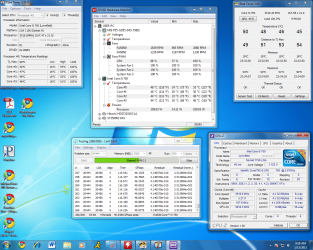
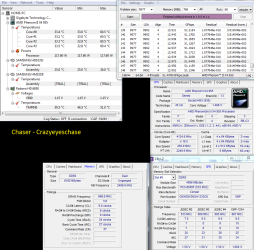
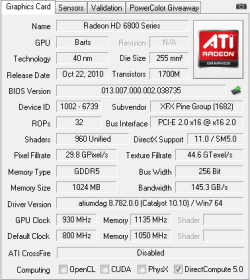
Well after many tries I finally got something I like what do yall think? I also got around to doing my GPU.

I know temps are a lot higher then I wanted myself I was looking for about 55 but I know I will never push my CPU this high.

Validated
http://valid.canardpc.com/show_oc.php?id=1604165
 

Attachments

  • OC2 specs.png
    OC2 specs.png
    56.6 KB · Views: 18
  • GPUOC.png
    GPUOC.png
    8.4 KB · Views: 3
Last edited:

My Computer

Computer Manufacturer/Model Number
Custome Build 1-1-2011
OS
Windows 7 OEM Home Pre. x64
CPU
Phenon II x4 n955 Black Ed.
Motherboard
GA 890FX UD5
Memory
Corsair XMS3 8GB (2x 4GB)
Graphics Card(s)
XFX Radeon HD 6850
Sound Card
On board
Monitor(s) Displays
ASUS 23"
Hard Drives
OCZ Agility 2 90GB SSD
Samsung Spinpoint F3 1TB
PSU
Rosewill 1000w
Case
CM Storm Scout
Cooling
5 case fans + Zalman 9900MAX
Status
Not open for further replies.
Back
Top