Post Your Overclock!

Status
Not open for further replies.
If you check some of these same sites listed above they have AMD OC guides and forums ;)

I've actually been registered on overclock.net for ages already, used it a few times to ask for help with overclocking my current setup.. I'll look more seriously at getting a decent overclock when I get myself a AMD Black Edition CPU.

To be honest, I'm not quite done with my build yet... Just have a few rather expensive things on my car to fix before I can do any more to my PC. Oooh... That actually reminds me, I need to update something in my PC system stats. Lol. I got a second 500GB drive for Christmas...


Actually, I have an interesting story to share, just a little boasting really. I figure this is probably the best place considering the fact that with any overclock the PSU does obviously take a little bit more strain than normal...

I took my PC over to a friend's place last weekend for a good network gaming session, and I don't really have the best PC when compared to my friends (their PC's at a glance: Phenom II 965BE with a decent OC, i5-something with a small OC, and a Phenom II x2 560 with no OC). Surprisingly enough, my little 5400+ kept up with them quite decently.

But the funniest part isn't that.. We had a few minor power dips, just enough to make the lights flicker slightly, nothing too serious. And every single computer, except mine, turned off.
picture.php
Suddenly I could justify the R1200 I spent on my 650w Cooler Master PSU.. Lol. I don't know what power supplies they have, but I know the i5 is powered by some fancy modular 850w. You gotta love CM quality..
 
Last edited:

My Computer

Computer type
PC/Desktop
OS
Win 10 x64 Pro x64 / Ubuntu 15.10 x64
CPU
Intel i7-4960X
Motherboard
Asus Rampage IV Black Edition
Memory
4x8GB Corsair Dominator Platinum @2400MHz 10-12-12-31
Graphics Card(s)
2x MSI GTX780Ti 3GB (SLI)
Sound Card
Onboard SupremeFX (Cirrus Logic CS4398)
Monitor(s) Displays
3x LG Cinema 27" IPS LED (27MP65)
Screen Resolution
[1920x1080]x3
Hard Drives
Crucial M500 120GB, Crucial M500 480GB, Toshiba DT01ACA200 2TB
PSU
CoolerMaster V1000
Case
Corsair Obsidian 750D
Cooling
ThermalTake Water 3.0 Extreme, 4xSP120, 3xAF120
Keyboard
Moshi Luna
Mouse
Logitech G700s / Roccat Tyon
Internet Speed
4Mb uncapped ADSL (Afrihost)
Antivirus
MS Security Essentials
Browser
Chrome... Duh. (:
I just bumped my speed up tonight ;)

(click image to see full version)

~Lordbob
 

My Computer

Computer Manufacturer/Model Number
Hera
OS
Windows 7 Ultimate x64, Mint 9
CPU
Intel i5-2500k
Motherboard
ASUS P8P67 Pro
Memory
2x 4Gb Corsair VENGEANCE DDR3-1600
Graphics Card(s)
NVidia GeForce N260GTX Twin Frozr
Sound Card
Realtek HD OnBoard Audio
Monitor(s) Displays
ASUS 24" Monitor
Screen Resolution
1920x1080
Hard Drives
G.SKILL Phoenix Series 60GB SATA II MLC Internal Solid State Drive (SSD)
SAMSUNG Spinpoint F3R 1TB 7200 RPM 32MB Cache SATA II
PSU
Cooler Master Real Power Pro 750W
Case
Cooler Master Haf 932
Cooling
Fans
Keyboard
Razer Tarantula
Mouse
Razer Lachesis
Internet Speed
not fast enough
Nice OC LB :cool:
 

My Computer

Computer type
PC/Desktop
Computer Manufacturer/Model Number
76~2.0
OS
Windows 7 Ult x64 - SP1/ Windows 8 Pro x64
CPU
Intel Core i5-3570K 4.6GHz
Motherboard
Gigabyte GA-Z77X UD3H, f18
Memory
8GB (2X4GB) DDR3 1600 Corsair Vengeance CL8 1.5v
Graphics Card(s)
Sapphire HD 7770 Vapor-X OC 1GB DDR5
Sound Card
Onboard VIA VT2021
Monitor(s) Displays
22" LCD Dell
Screen Resolution
1680x1050
Hard Drives
Samsung 840Pro 128GB SSD,
Seagate Barracuda 500GB SATA2 7200rpm 32MB cache, Seagate Barracuda 1TB SATA2 7200rpm 32MB cache,
PSU
Corsair HX650W
Case
Cooler Master Storm Scout
Cooling
Corsair H80 2x12cm Noctua NF P12 , 2x14cm case fans
Keyboard
Logitech Wave
Mouse
CM Sentinel
Internet Speed
Dismal
Antivirus
Avast
Browser
Opera Next
Other Info
Haswell laptop: HP Envy 17t-j, i7-4700MQ, GeForce 740M 2GB DDR3, 17.3" Full HD 1920x1080, 16GB RAM, Samsung 840 Pro 128GB, 1TB Hitachi 7200 HDD,
Desktop: eSATA ports,
External eSATA Seagate 500GB SATA2 7200rpm,
External WD USB 500GB
So that's how overclocking is done! I remember when I was still a kid with a Pentium3 350MHz PC, I used to overclock it to 450 without worrying about thermal paste and fans and stuff. Of course back then, I didn't know it's called overclocking so I had no clue until now.

Thanks Dave! :D
 

My Computer

OS
Windows 7 Home Basic 32bit
CPU
Intel Core i5-760
Motherboard
ASUS P7H55-M
Memory
2 GB DDR3 1333 Kingston
Graphics Card(s)
Redfox NVidia GeForce GTS 250
Sound Card
(Built-in)
Monitor(s) Displays
SamsungEX2020
Hard Drives
2x500 GB Seagate SATA
PSU
CoolerMaster 500W
Case
Gigabyte LUXO m1004
Your Welcome.

It's always changing, the new generation i5 & i7 OC differently from the ones we have.

Still fun though....:geek:
 

My Computer

Computer type
PC/Desktop
Computer Manufacturer/Model Number
76~2.0
OS
Windows 7 Ult x64 - SP1/ Windows 8 Pro x64
CPU
Intel Core i5-3570K 4.6GHz
Motherboard
Gigabyte GA-Z77X UD3H, f18
Memory
8GB (2X4GB) DDR3 1600 Corsair Vengeance CL8 1.5v
Graphics Card(s)
Sapphire HD 7770 Vapor-X OC 1GB DDR5
Sound Card
Onboard VIA VT2021
Monitor(s) Displays
22" LCD Dell
Screen Resolution
1680x1050
Hard Drives
Samsung 840Pro 128GB SSD,
Seagate Barracuda 500GB SATA2 7200rpm 32MB cache, Seagate Barracuda 1TB SATA2 7200rpm 32MB cache,
PSU
Corsair HX650W
Case
Cooler Master Storm Scout
Cooling
Corsair H80 2x12cm Noctua NF P12 , 2x14cm case fans
Keyboard
Logitech Wave
Mouse
CM Sentinel
Internet Speed
Dismal
Antivirus
Avast
Browser
Opera Next
Other Info
Haswell laptop: HP Envy 17t-j, i7-4700MQ, GeForce 740M 2GB DDR3, 17.3" Full HD 1920x1080, 16GB RAM, Samsung 840 Pro 128GB, 1TB Hitachi 7200 HDD,
Desktop: eSATA ports,
External eSATA Seagate 500GB SATA2 7200rpm,
External WD USB 500GB
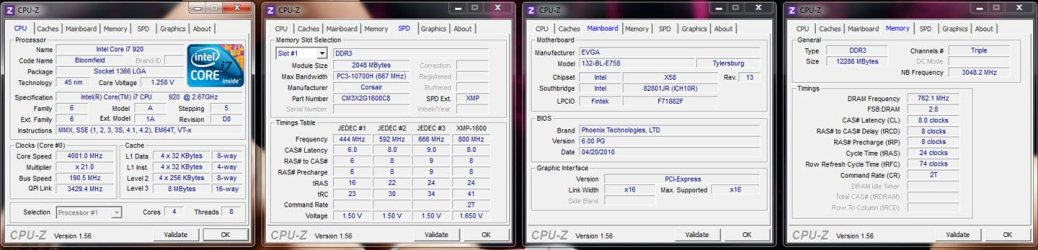
Here's my 24/7 overclock, it's been running at this for the past year or so.

Core i7 920 D0 Stepping
Batch 3850B189
1.258v Idle, 1.223v Full Load (VDroop Enabled)


How was it tested for stability?


Prime95

12 hours on Small FFT's
12 hours on In-Place Large FFT's
12 hours on Blend Test


LinX:

100 Passes using all available RAM (latest LinPack Library used)


Memtest86+

8 Passes
 

Attachments

  • OC_1.jpg
    OC_1.jpg
    109.8 KB · Views: 26

My Computer

Computer Manufacturer/Model Number
Custom
OS
Windows 8 x64
CPU
Intel Core i7 920 D0 @ 4 GHz, HT ON
Motherboard
EVGA X58 SLI E758
Memory
12 GB Corsair XMS3 DDR3 1600MHz (6x2GB)
Graphics Card(s)
EVGA GTX 570
Monitor(s) Displays
Dell 2407WFP + HP w2408h
Screen Resolution
3840 x 1200
Hard Drives
80 GB Intel X25-M Gen2 SSD | 2x 500 GB Western Digital Black RAID0 | 2x 1 TB Western Digital Green Power 7200RPM
PSU
Corsair HX1000
Case
Cooler Master ATCS 840 Black
Cooling
Noctua NH-D14
Nice. What are you getting for temps?
 

My Computer

Computer type
PC/Desktop
Computer Manufacturer/Model Number
Custom built by me.
OS
Windows 10 Pro
CPU
Intel Core i7-4770K (3.5Ghz)
Motherboard
Gigabyte G1 Sniper 5 (F10 Bios)
Memory
32 gig Corsair Dominator Platinum (4x8Gig)
Graphics Card(s)
Sapphire Tri-X R9 Fury
Sound Card
Soundblaster ZXR
Monitor(s) Displays
NEC PA242W 24" LCD Monitor
Screen Resolution
1920 x 1200
Hard Drives
Primary - Samsung 850 Pro (512gig), Samsung 840 Pro (256gig), 2TB WD Caviar Black.
PSU
EVGA Supernova 1000 G2
Case
Cooler Master HAF X
Cooling
Corsair H100i with Corsair Air Series SP120 Quiet Fans
Keyboard
Logitech Wireless Wave
Mouse
Logitech Performance MX
Internet Speed
High Speed Cable
Antivirus
Norton Security
Browser
IE11
Other Info
Memory Timings - 1866MHz @ 9-9-9-27-1T @ 1.5 volts
Nice. What are you getting for temps?

I recently installed the Noctua NH-D14 cooler so at about 20c ambient I'm getting around 67c on the hottest core during Prime95 Small FFT's, although that was only a 30 minute run. 67, 64, 63, 63 across all cores during that run.

My chip is one of those earlier batch 920 D0's that are said to hit high overclocks at low Vcore amounts, but in turn run a good bit hotter than most other 920 D0 chips. In-fact, I wouldn't be surprised if it was one of the hottest. I originally had the chip at 4.20GHz when I first got it but the temps were too high for my liking as it was beginning to hit the mid 80's during Prime95 alone.

I wouldn't be surprised if I could hit 4GHz 24/7 stable at a lower load Vcore than what I'm already at and who knows, I might be able to go for 4.20GHz again with decent temps.

Granted it's not by any means the best 920 D0 chip out there, but with the right cooling it is probably capable of 4.4/4.5GHz whilst maintaining a safe level of Vcore.
 

My Computer

Computer Manufacturer/Model Number
Custom
OS
Windows 8 x64
CPU
Intel Core i7 920 D0 @ 4 GHz, HT ON
Motherboard
EVGA X58 SLI E758
Memory
12 GB Corsair XMS3 DDR3 1600MHz (6x2GB)
Graphics Card(s)
EVGA GTX 570
Monitor(s) Displays
Dell 2407WFP + HP w2408h
Screen Resolution
3840 x 1200
Hard Drives
80 GB Intel X25-M Gen2 SSD | 2x 500 GB Western Digital Black RAID0 | 2x 1 TB Western Digital Green Power 7200RPM
PSU
Corsair HX1000
Case
Cooler Master ATCS 840 Black
Cooling
Noctua NH-D14
It sounds like a good chip.

Thanks.
 

My Computer

Computer type
PC/Desktop
Computer Manufacturer/Model Number
Custom built by me.
OS
Windows 10 Pro
CPU
Intel Core i7-4770K (3.5Ghz)
Motherboard
Gigabyte G1 Sniper 5 (F10 Bios)
Memory
32 gig Corsair Dominator Platinum (4x8Gig)
Graphics Card(s)
Sapphire Tri-X R9 Fury
Sound Card
Soundblaster ZXR
Monitor(s) Displays
NEC PA242W 24" LCD Monitor
Screen Resolution
1920 x 1200
Hard Drives
Primary - Samsung 850 Pro (512gig), Samsung 840 Pro (256gig), 2TB WD Caviar Black.
PSU
EVGA Supernova 1000 G2
Case
Cooler Master HAF X
Cooling
Corsair H100i with Corsair Air Series SP120 Quiet Fans
Keyboard
Logitech Wireless Wave
Mouse
Logitech Performance MX
Internet Speed
High Speed Cable
Antivirus
Norton Security
Browser
IE11
Other Info
Memory Timings - 1866MHz @ 9-9-9-27-1T @ 1.5 volts
Nice. What are you getting for temps?

I recently installed the Noctua NH-D14 cooler so at about 20c ambient I'm getting around 67c on the hottest core during Prime95 Small FFT's, although that was only a 30 minute run. 67, 64, 63, 63 across all cores during that run.

My chip is one of those earlier batch 920 D0's that are said to hit high overclocks at low Vcore amounts, but in turn run a good bit hotter than most other 920 D0 chips. In-fact, I wouldn't be surprised if it was one of the hottest. I originally had the chip at 4.20GHz when I first got it but the temps were too high for my liking as it was beginning to hit the mid 80's during Prime95 alone.

I wouldn't be surprised if I could hit 4GHz 24/7 stable at a lower load Vcore than what I'm already at and who knows, I might be able to go for 4.20GHz again with decent temps.

Granted it's not by any means the best 920 D0 chip out there, but with the right cooling it is probably capable of 4.4/4.5GHz whilst maintaining a safe level of Vcore.

I am wondering how I would know if the NH-D14 would fit in my case or not. I have a Cooler Master Elite 430 midtower case. Do I just need to measure it to see?
 

My Computer

Computer type
PC/Desktop
Computer Manufacturer/Model Number
Custom Build
OS
Windows 7 Home Premium
CPU
AMD Phenom II 955 Black Edition Quad Core
Motherboard
MSI 870-G45
Memory
Corsair XMS3 8GB
Graphics Card(s)
ATI Eyefinity HD 5770 5 mini display ports
Sound Card
Realtek High Definition 6.1
Monitor(s) Displays
2 DELL E207WFP 21.5" - 1 Acer 21.5"
Screen Resolution
2 Dells 1680x1050 - Acer 1920x1080
Hard Drives
Intel 40GB SSD
WD 500GB internal
WD 500Gb external
PSU
Cooler Master 500w
Case
Cooler Master 430 Black Elite
Keyboard
HP
Mouse
MIBRU
Internet Speed
10 mbs
Antivirus
Trend Micro
Browser
Chrome

My Computer

Computer type
PC/Desktop
Computer Manufacturer/Model Number
Custom built by me.
OS
Windows 10 Pro
CPU
Intel Core i7-4770K (3.5Ghz)
Motherboard
Gigabyte G1 Sniper 5 (F10 Bios)
Memory
32 gig Corsair Dominator Platinum (4x8Gig)
Graphics Card(s)
Sapphire Tri-X R9 Fury
Sound Card
Soundblaster ZXR
Monitor(s) Displays
NEC PA242W 24" LCD Monitor
Screen Resolution
1920 x 1200
Hard Drives
Primary - Samsung 850 Pro (512gig), Samsung 840 Pro (256gig), 2TB WD Caviar Black.
PSU
EVGA Supernova 1000 G2
Case
Cooler Master HAF X
Cooling
Corsair H100i with Corsair Air Series SP120 Quiet Fans
Keyboard
Logitech Wireless Wave
Mouse
Logitech Performance MX
Internet Speed
High Speed Cable
Antivirus
Norton Security
Browser
IE11
Other Info
Memory Timings - 1866MHz @ 9-9-9-27-1T @ 1.5 volts
I just want to brag a little bit...


Temps.JPG

This will be backed off as those temps are a bit higher than my liking (not to mention that voltage :eek:)

~Lordbob
 

My Computer

Computer Manufacturer/Model Number
Hera
OS
Windows 7 Ultimate x64, Mint 9
CPU
Intel i5-2500k
Motherboard
ASUS P8P67 Pro
Memory
2x 4Gb Corsair VENGEANCE DDR3-1600
Graphics Card(s)
NVidia GeForce N260GTX Twin Frozr
Sound Card
Realtek HD OnBoard Audio
Monitor(s) Displays
ASUS 24" Monitor
Screen Resolution
1920x1080
Hard Drives
G.SKILL Phoenix Series 60GB SATA II MLC Internal Solid State Drive (SSD)
SAMSUNG Spinpoint F3R 1TB 7200 RPM 32MB Cache SATA II
PSU
Cooler Master Real Power Pro 750W
Case
Cooler Master Haf 932
Cooling
Fans
Keyboard
Razer Tarantula
Mouse
Razer Lachesis
Internet Speed
not fast enough

My Computer

Computer type
PC/Desktop
Computer Manufacturer/Model Number
Custom built by me.
OS
Windows 10 Pro
CPU
Intel Core i7-4770K (3.5Ghz)
Motherboard
Gigabyte G1 Sniper 5 (F10 Bios)
Memory
32 gig Corsair Dominator Platinum (4x8Gig)
Graphics Card(s)
Sapphire Tri-X R9 Fury
Sound Card
Soundblaster ZXR
Monitor(s) Displays
NEC PA242W 24" LCD Monitor
Screen Resolution
1920 x 1200
Hard Drives
Primary - Samsung 850 Pro (512gig), Samsung 840 Pro (256gig), 2TB WD Caviar Black.
PSU
EVGA Supernova 1000 G2
Case
Cooler Master HAF X
Cooling
Corsair H100i with Corsair Air Series SP120 Quiet Fans
Keyboard
Logitech Wireless Wave
Mouse
Logitech Performance MX
Internet Speed
High Speed Cable
Antivirus
Norton Security
Browser
IE11
Other Info
Memory Timings - 1866MHz @ 9-9-9-27-1T @ 1.5 volts

My Computer

Computer Manufacturer/Model Number
Hera
OS
Windows 7 Ultimate x64, Mint 9
CPU
Intel i5-2500k
Motherboard
ASUS P8P67 Pro
Memory
2x 4Gb Corsair VENGEANCE DDR3-1600
Graphics Card(s)
NVidia GeForce N260GTX Twin Frozr
Sound Card
Realtek HD OnBoard Audio
Monitor(s) Displays
ASUS 24" Monitor
Screen Resolution
1920x1080
Hard Drives
G.SKILL Phoenix Series 60GB SATA II MLC Internal Solid State Drive (SSD)
SAMSUNG Spinpoint F3R 1TB 7200 RPM 32MB Cache SATA II
PSU
Cooler Master Real Power Pro 750W
Case
Cooler Master Haf 932
Cooling
Fans
Keyboard
Razer Tarantula
Mouse
Razer Lachesis
Internet Speed
not fast enough
Yeah if you do the math right that does equal 5gig all day long :D
 

My Computer

Computer type
PC/Desktop
Computer Manufacturer/Model Number
Custom built by me.
OS
Windows 10 Pro
CPU
Intel Core i7-4770K (3.5Ghz)
Motherboard
Gigabyte G1 Sniper 5 (F10 Bios)
Memory
32 gig Corsair Dominator Platinum (4x8Gig)
Graphics Card(s)
Sapphire Tri-X R9 Fury
Sound Card
Soundblaster ZXR
Monitor(s) Displays
NEC PA242W 24" LCD Monitor
Screen Resolution
1920 x 1200
Hard Drives
Primary - Samsung 850 Pro (512gig), Samsung 840 Pro (256gig), 2TB WD Caviar Black.
PSU
EVGA Supernova 1000 G2
Case
Cooler Master HAF X
Cooling
Corsair H100i with Corsair Air Series SP120 Quiet Fans
Keyboard
Logitech Wireless Wave
Mouse
Logitech Performance MX
Internet Speed
High Speed Cable
Antivirus
Norton Security
Browser
IE11
Other Info
Memory Timings - 1866MHz @ 9-9-9-27-1T @ 1.5 volts
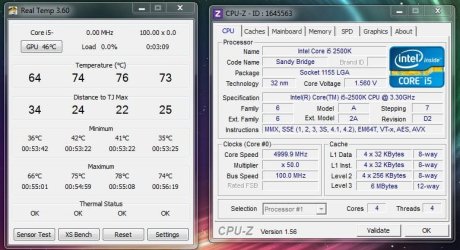
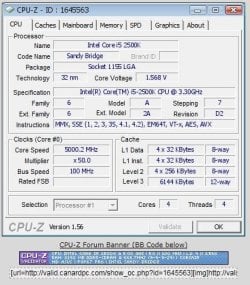
Oh wait! One says 4999.9.....

While CPU-Z validator says 5000.2....
I would grab that snip at 4999.9..... Though if you notice, the Bus speed is 100.0, and the clock multiplier is at 50x, which makes 5Ghz :shock:

~Lordbob

Heh.... 4999.9 or 5000.2... :huh: Either way, I'm jealous...


By the way, if you wake up one day and your PC has mysteriously 'vanished'.........
It wasn't me!
picture.php
Lol.​
 

My Computer

Computer type
PC/Desktop
OS
Win 10 x64 Pro x64 / Ubuntu 15.10 x64
CPU
Intel i7-4960X
Motherboard
Asus Rampage IV Black Edition
Memory
4x8GB Corsair Dominator Platinum @2400MHz 10-12-12-31
Graphics Card(s)
2x MSI GTX780Ti 3GB (SLI)
Sound Card
Onboard SupremeFX (Cirrus Logic CS4398)
Monitor(s) Displays
3x LG Cinema 27" IPS LED (27MP65)
Screen Resolution
[1920x1080]x3
Hard Drives
Crucial M500 120GB, Crucial M500 480GB, Toshiba DT01ACA200 2TB
PSU
CoolerMaster V1000
Case
Corsair Obsidian 750D
Cooling
ThermalTake Water 3.0 Extreme, 4xSP120, 3xAF120
Keyboard
Moshi Luna
Mouse
Logitech G700s / Roccat Tyon
Internet Speed
4Mb uncapped ADSL (Afrihost)
Antivirus
MS Security Essentials
Browser
Chrome... Duh. (:
Oh wait! One says 4999.9.....

While CPU-Z validator says 5000.2....
I would grab that snip at 4999.9..... Though if you notice, the Bus speed is 100.0, and the clock multiplier is at 50x, which makes 5Ghz :shock:

~Lordbob

Heh.... 4999.9 or 5000.2... :huh: Either way, I'm jealous...


By the way, if you wake up one day and your PC has mysteriously 'vanished'.........
It wasn't me!
picture.php
Lol.​
:roflmao:

~Lordbob
 

My Computer

Computer Manufacturer/Model Number
Hera
OS
Windows 7 Ultimate x64, Mint 9
CPU
Intel i5-2500k
Motherboard
ASUS P8P67 Pro
Memory
2x 4Gb Corsair VENGEANCE DDR3-1600
Graphics Card(s)
NVidia GeForce N260GTX Twin Frozr
Sound Card
Realtek HD OnBoard Audio
Monitor(s) Displays
ASUS 24" Monitor
Screen Resolution
1920x1080
Hard Drives
G.SKILL Phoenix Series 60GB SATA II MLC Internal Solid State Drive (SSD)
SAMSUNG Spinpoint F3R 1TB 7200 RPM 32MB Cache SATA II
PSU
Cooler Master Real Power Pro 750W
Case
Cooler Master Haf 932
Cooling
Fans
Keyboard
Razer Tarantula
Mouse
Razer Lachesis
Internet Speed
not fast enough
Windows 7 Pro x64
Intel i7-930 4Ghz 1.23V / Corsair H-70 push/pull
Gigabyte X58A-UD3R rev2.0
OCZ Vertex 2 SSD 240GB
Corsair XMS 6GB (3x2GB) DDR3-1600 7-8-7-20
XFX HD 5850 Black Edition 975/1130 Vcore 1.20v
Corsair-750HX
 

My Computer

OS
Windows 7 64 Professional
CPU
Intel i7-930 4Ghz 1.23V / Corsair H-70 push/pull
Motherboard
Gigabyte X58A-UD3R rev2.0
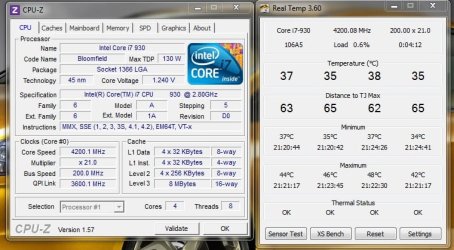
My overclock :)
 

Attachments

  • 4.2ghz.jpg
    4.2ghz.jpg
    65.4 KB · Views: 29
  • 4.2ghz bench.jpg
    4.2ghz bench.jpg
    281 KB · Views: 15

My Computer

Computer Manufacturer/Model Number
Custom 2.0
OS
Windows 7 Ultimate x64 / Win XP Pro x64
CPU
Intel i7-930 @ 4.20Ghz (200 BCLK @ 1.25V QPI 1.30V)
Motherboard
Asus P6X58D-E Motherboard
Memory
6GB Kingston HyperX DDR3 XMP=OFF Manual 1600Mhz OC
Graphics Card(s)
ATI XFX HD5770 1GB PCI-E Graphics Card
Sound Card
Onboard 7.1 Sound
Monitor(s) Displays
Hanns-G HL225DBB
Screen Resolution
1920 x 1080
Hard Drives
200GB SATA II - OS
1TB SATA II External
400GB IDE External
PSU
OCZ StealthXStream II 600w 80+ PSU
Case
Thermaltake Mozart TX
Cooling
Thermaltake Bigwater 745 (35c Idle / 69c Load)
Keyboard
Standard USB
Mouse
Standard USB
Internet Speed
100Mb Virgin Media Cable - 100Mbit Down / 10Mbit Up
Other Info
7x 120mm Thermaltake Case Fans
I've said it a million times - running at 4gig and running stable at 4gig is two different things.

What's your load temps?
 

My Computer

Computer type
PC/Desktop
Computer Manufacturer/Model Number
Custom built by me.
OS
Windows 10 Pro
CPU
Intel Core i7-4770K (3.5Ghz)
Motherboard
Gigabyte G1 Sniper 5 (F10 Bios)
Memory
32 gig Corsair Dominator Platinum (4x8Gig)
Graphics Card(s)
Sapphire Tri-X R9 Fury
Sound Card
Soundblaster ZXR
Monitor(s) Displays
NEC PA242W 24" LCD Monitor
Screen Resolution
1920 x 1200
Hard Drives
Primary - Samsung 850 Pro (512gig), Samsung 840 Pro (256gig), 2TB WD Caviar Black.
PSU
EVGA Supernova 1000 G2
Case
Cooler Master HAF X
Cooling
Corsair H100i with Corsair Air Series SP120 Quiet Fans
Keyboard
Logitech Wireless Wave
Mouse
Logitech Performance MX
Internet Speed
High Speed Cable
Antivirus
Norton Security
Browser
IE11
Other Info
Memory Timings - 1866MHz @ 9-9-9-27-1T @ 1.5 volts
Status
Not open for further replies.
Back
Top