Post Your Overclock!

Status
Not open for further replies.
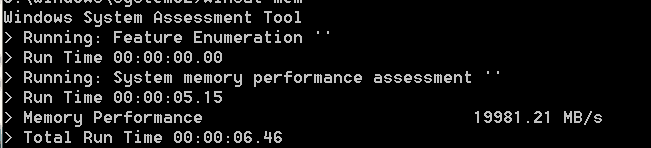
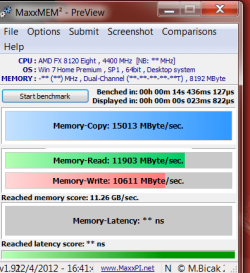
I changed my settings again I brought the Multiplyer down to 20 -upped the FSB to 220 mhz seems like the best settings so far WEI is the same but i do reconize a performance boost my Cinebench only went up .1 cpu 7.22 pts now and the Ram is now running 880mhz 1760 mhz
 

Attachments
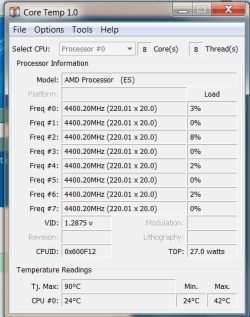
  • temp1.PNG
    temp1.PNG
    68.9 KB · Views: 2
  • mem1.PNG
    mem1.PNG
    9.2 KB · Views: 2
  • testmem.PNG
    testmem.PNG
    56.1 KB · Views: 1
Last edited:

My Computer

Computer type
PC/Desktop
Computer Manufacturer/Model Number
CoreI7-6700K MrFingerIII Special Builds
OS
Windows 10 Home Premium 64bit sp1
CPU
Intel I7-6700K @ 4.6 Ghz 1.344 volts everyday OC
Motherboard
Asrock Fatality K6 Z170 Socket 1151
Memory
32GB G-Skill TridentZ 3200mhz 16-18-18-38 DDR4
Graphics Card(s)
Sli Gigabyte Windforce GTX 980 G1
Sound Card
AC97 Creative Rage Tactic 3D Headphones Bluetooth
Monitor(s) Displays
27" Asus ROG Swift PG278Q G-Sync 48" Vizio Smart HD TV
Screen Resolution
2560x1440p 27"- 48" Currently Gaming at 2560x1440p Res 2K
Hard Drives
250GB Samsung Evo840SSD Seagate baracuda 500 GB WD Mybook 500Gb 1TB Seagate Barracuda
PSU
HX1050w Corsair Silver 80plus certified crosfire/sli
Case
Enthod Pro Full Tower
Cooling
Corsair H110i GT 280 mm High Performance WaterBlock
Keyboard
Logitech wireless keyboard
Mouse
Logitech wireless mouse
Internet Speed
Cox Cable 100+ mb
Antivirus
WebRoot Spysweeper with Antivirus
Browser
IE-10, Chrome, Opera
Other Info
My Other Rig is a AMD FX8320E @4.6Ghz 16GB Ballistic Sport Ram
Mobo Asrock Fatality 990FX 120GB OCZ SSD 1TB Seagate Barracuda Corsair H75 Cooling PSU Corsair CX750
GPU GTX Gigabyte 970G1
still 4.4 is nice chap :D my DRAM voltage is reading higher in windows than in the bios. in the bios its 1.65v but in windows its 1.667v should i knock it down a tad in the bios or will it be ok as is?
cheers folks

edit: that slight up of the vcore has stopped it from droppin every now n then and it also survived a few hours bf3 with no probs, max temp was 46c ingame

Leave it as is because it is at the proper voltage it might be bumped a tad because you used more v core to keep a overclock

Im just going to accept my wall is 4.4ghz and no other way around it it still does the trick and most people with the higher end BD chip 8150 most hang around 4.5 Ghz which pretty much im already in that ball park so im not to disapointed and the RAM oc i just done give it a extra gush of excitment if you know what i mean :p
 

My Computer

Computer type
PC/Desktop
Computer Manufacturer/Model Number
CoreI7-6700K MrFingerIII Special Builds
OS
Windows 10 Home Premium 64bit sp1
CPU
Intel I7-6700K @ 4.6 Ghz 1.344 volts everyday OC
Motherboard
Asrock Fatality K6 Z170 Socket 1151
Memory
32GB G-Skill TridentZ 3200mhz 16-18-18-38 DDR4
Graphics Card(s)
Sli Gigabyte Windforce GTX 980 G1
Sound Card
AC97 Creative Rage Tactic 3D Headphones Bluetooth
Monitor(s) Displays
27" Asus ROG Swift PG278Q G-Sync 48" Vizio Smart HD TV
Screen Resolution
2560x1440p 27"- 48" Currently Gaming at 2560x1440p Res 2K
Hard Drives
250GB Samsung Evo840SSD Seagate baracuda 500 GB WD Mybook 500Gb 1TB Seagate Barracuda
PSU
HX1050w Corsair Silver 80plus certified crosfire/sli
Case
Enthod Pro Full Tower
Cooling
Corsair H110i GT 280 mm High Performance WaterBlock
Keyboard
Logitech wireless keyboard
Mouse
Logitech wireless mouse
Internet Speed
Cox Cable 100+ mb
Antivirus
WebRoot Spysweeper with Antivirus
Browser
IE-10, Chrome, Opera
Other Info
My Other Rig is a AMD FX8320E @4.6Ghz 16GB Ballistic Sport Ram
Mobo Asrock Fatality 990FX 120GB OCZ SSD 1TB Seagate Barracuda Corsair H75 Cooling PSU Corsair CX750
GPU GTX Gigabyte 970G1
Here's my IBT Max run at 4.5GHz, temps are kind of high and cores 0 and 3 usually stayed 10 degrees apart. I am trying to get a bit lower Vcore, but this is the first setting that didn't BSOD.
IBt 4500.JPG


Oddly it won't downlcock and runs at 4.5 even with all Cstates enabled along with Turbo mode and SpeedStep.
Got it fixed with offset or something.:sarc:
Note the odd CPU name in Core Temp? Well look at the one below.:confused:
WTH.jpg
I don't think Core Temp is trustworthy anymore, when it is showing a temp of 75C, the CPU cooler feels only slightly warm to the touch.
 
Last edited:

My Computer

Computer type
PC/Desktop
Computer Manufacturer/Model Number
Home Built Desktop By DataTech
OS
Windows 7 Ultimate X64 SP1
CPU
Intel i5-2550K, Differing ~4.4-4.8GHz No built in GPU
Motherboard
ASUS P8Z68-V PRO/GEN3
Memory
16GB G.Skill Sniper 1866MHz @ 2133MHz 2x8GB
Graphics Card(s)
ASUS GTX650TIB-DC2OC-2GD5, (650TI Boost)
Sound Card
Onboard Realtek 5-1
Monitor(s) Displays
Samsung P2570HD
Screen Resolution
1920x1080
Hard Drives
Samsung 840 Pro 256GB SSD for OS, 500GB Seagate Constellation (Enterprise drive) for Data
PSU
Corsair HX650W
Case
Inwin Dragon Rider
Cooling
Hyper 212 EVO w/two Noctua fans, push-pull, @1300 RPM
Keyboard
E-Z Eyes, bright yellow keys with large characters
Mouse
steelseries SENSEI Laser Pro Gaming
Internet Speed
48-51Mbs Mbs down, 11 Mbs up Xfinity Cable
Antivirus
Norton Internet Security 2013
Browser
IE 10, Opera, Pale Moon if needed
Other Info
4 case fans, LG BluRay-RE, ASUS DVD-RW, Mr. Fusion power supply, 1.21 gigawatts.
Here's my IBT Max run at 4.5GHz, temps are kind of high and cores 0 and 3 usually stayed 10 degrees apart. I am trying to get a bit lower Vcore, but this is the first setting that didn't BSOD.
View attachment 208459


Oddly it won't downlcock and runs at 4.5 even with all Cstates enabled along with Turbo mode and SpeedStep.
Got it fixed with offset or something.:sarc:
Note the odd CPU name in Core Temp? Well look at the one below.:confused:
View attachment 208462
I don't think Core Temp is trustworthy anymore, when it is showing a temp of 75C, the CPU cooler feels only slightly warm to the touch.

That happened to me with the Bd chip update your core temp and it will update the chip by the way what you are seeing in the pic was a test chip code name mine was 8130p till i updated core temp and now it reads 8120

Also update the latest Cpuz
 
Last edited:

My Computer

Computer type
PC/Desktop
Computer Manufacturer/Model Number
CoreI7-6700K MrFingerIII Special Builds
OS
Windows 10 Home Premium 64bit sp1
CPU
Intel I7-6700K @ 4.6 Ghz 1.344 volts everyday OC
Motherboard
Asrock Fatality K6 Z170 Socket 1151
Memory
32GB G-Skill TridentZ 3200mhz 16-18-18-38 DDR4
Graphics Card(s)
Sli Gigabyte Windforce GTX 980 G1
Sound Card
AC97 Creative Rage Tactic 3D Headphones Bluetooth
Monitor(s) Displays
27" Asus ROG Swift PG278Q G-Sync 48" Vizio Smart HD TV
Screen Resolution
2560x1440p 27"- 48" Currently Gaming at 2560x1440p Res 2K
Hard Drives
250GB Samsung Evo840SSD Seagate baracuda 500 GB WD Mybook 500Gb 1TB Seagate Barracuda
PSU
HX1050w Corsair Silver 80plus certified crosfire/sli
Case
Enthod Pro Full Tower
Cooling
Corsair H110i GT 280 mm High Performance WaterBlock
Keyboard
Logitech wireless keyboard
Mouse
Logitech wireless mouse
Internet Speed
Cox Cable 100+ mb
Antivirus
WebRoot Spysweeper with Antivirus
Browser
IE-10, Chrome, Opera
Other Info
My Other Rig is a AMD FX8320E @4.6Ghz 16GB Ballistic Sport Ram
Mobo Asrock Fatality 990FX 120GB OCZ SSD 1TB Seagate Barracuda Corsair H75 Cooling PSU Corsair CX750
GPU GTX Gigabyte 970G1
Note the odd CPU name in Core Temp? Well look at the one below.:confused:

I don't think Core Temp is trustworthy anymore, when it is showing a temp of 75C, the CPU cooler feels only slightly warm to the touch.

Was this a fresh install of Seven, or an image backup?

If it's fresh - have you installed all the chipset drivers etc?

I noticed CPU-Z is also reporting your chip wrong.

Try double checking with other reporting apps like aidia, hwmonitor, realtemp etc.

If they all report the same, then Coretemp is reporting correctly. (I'm running the same 1.0RC3 and it matches all other apss, so the app itself is still okay)
 

My Computer

Computer type
PC/Desktop
Computer Manufacturer/Model Number
Systems by SmartEyeball
OS
8 Pro x64
CPU
i7 3770K 4.6GHz
Motherboard
ASUS P8Z77 WS
Memory
16GB G.Skill Trident X 2666mhz
Graphics Card(s)
x2 EVGA 780 Ti Superclocked SLI
Sound Card
SB X-FI Surround 5.1 PRO USB / ATH-AD900 Headphones
Monitor(s) Displays
x3 Dell U2410 / 58" Samsung
Screen Resolution
5760*1200/ 1920*1200
Hard Drives
2x Intel 520 240GB (RAID 0) * 2x WD Caviar Blacks 2TB (RAID 0) * 2TB WD Caviar Black * Sony Optirac DVD
PSU
Silverstone Strider Evolution 1200W
Case
Thermaltake Level 10 GT Snow Edition
Cooling
Noctua NH-D14
Keyboard
Topre Realforce // Ducky Shine MX Black // Filco Ninja TKL
Mouse
Thermaltake Theron (Highly Recommended) + Razer Imperator
Antivirus
MSE
Browser
IE, FF, WaterFox
Other Info
GT Extreme V2 Sim Racing Cockpit + 40" LCD and K/B Mouse stand ▼
Fanatec CSR Elite Wheel + Clubsport V1 Pedals + CSR shifter/7G-H ▼Saitek X52 Pro ▼ TrackIR 5 Pro
Buttkicker v2 Seat Rumbler with Dedicated 5.1 and Sub Woofer attached to frame ▼
=
Bloody Big Grin
Make sure you are only polling temps with one app, having two running at the same time will cause problem readings also.
 

My Computer

Computer Manufacturer/Model Number
My Build
OS
win7 Ult 64
CPU
i7 3930K & 3960X
Motherboard
ASUS P9X79 Deluxe
Memory
16GB G-Skill 2133MHz
Graphics Card(s)
Sapphire HD 7970
Sound Card
On-board
Monitor(s) Displays
ASUS 27 inch
Screen Resolution
1920X1080
Hard Drives
Crucial M4 256GB, 1.5TB WD Black for Data/Images
PSU
Corsair AX1200
Case
NZXT 810
Cooling
Custom Loop, Swiftech HDBlock
Keyboard
Mionix
Mouse
Mionix
Internet Speed
Cable
still 4.4 is nice chap :D my DRAM voltage is reading higher in windows than in the bios. in the bios its 1.65v but in windows its 1.667v should i knock it down a tad in the bios or will it be ok as is?
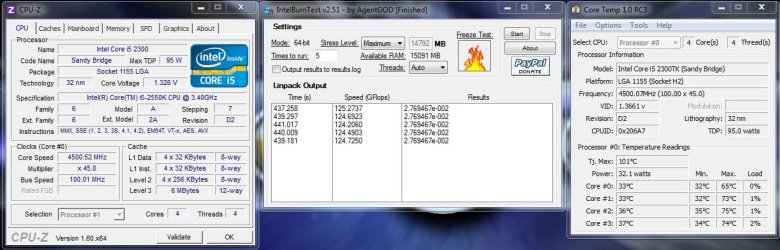
cheers folks

edit: that slight up of the vcore has stopped it from droppin every now n then and it also survived a few hours bf3 with no probs, max temp was 46c ingame

Leave it as is because it is at the proper voltage it might be bumped a tad because you used more v core to keep a overclock

Im just going to accept my wall is 4.4ghz and no other way around it it still does the trick and most people with the higher end BD chip 8150 most hang around 4.5 Ghz which pretty much im already in that ball park so im not to disapointed and the RAM oc i just done give it a extra gush of excitment if you know what i mean :p

okey dokey chap cheers :D ive noticed that when i type in a certain value in voltage say with the vcore i typed in 1.350 i hit enter and it changes to 1.344v.

as u say 4.4 is close enough. most reports ive seen are saying around 4.5/ 4.6. i havent seen many over that.

Here's my IBT Max run at 4.5GHz, temps are kind of high and cores 0 and 3 usually stayed 10 degrees apart. I am trying to get a bit lower Vcore, but this is the first setting that didn't BSOD.
View attachment 208459


Oddly it won't downlcock and runs at 4.5 even with all Cstates enabled along with Turbo mode and SpeedStep.
Got it fixed with offset or something.:sarc:
Note the odd CPU name in Core Temp? Well look at the one below.:confused:
View attachment 208462
I don't think Core Temp is trustworthy anymore, when it is showing a temp of 75C, the CPU cooler feels only slightly warm to the touch.

core temp isnt reading newer cpu's right. i stopped using it as it was telling me my cpu was 14c lower than it was so i had to set an offset which made me disstrust it. it also said my fx cpu was an engineering sample. after trawling loads of forums it turns out that the apps to trust with the bulldozer is aida x64, cpuid hw monitor(not open hardware monitor) amd overdrive. if u have an asus board the suprisingly asus ia suite II is bang on with volts and temps but i got rid of that too. more to have runnin in the background. which reminds me, if i had asus ai suite running n then opened hw monitor. ai suite would start chuckin out silly warnings to say my cpu/nb was @ -115c or a case fan was @ 0rpm
i just use aida x64 n hav it display all the important stuff on the onscreen display which i didnt know it could do untill the other day lol. been using it over a year too lol :o which reminds me i have a couple of engineer keys for it if anyone wants to use?
 

My Computer

Computer type
PC/Desktop
Computer Manufacturer/Model Number
Custom build
OS
Win7 Home Premium x64 SP1
CPU
i7 4770k
Motherboard
Asus maximus VI Hero
Memory
8Gb Kingston HyperX Beast 2400MHz @2133MHz 11-12-11-30
Graphics Card(s)
MSI GTX 780ti Gaming Oc x2
Sound Card
Onboard ROG SupremeFX
Monitor(s) Displays
Asus VG248QE
Screen Resolution
3840X1080 144Hz
Hard Drives
Samung Evo 256Gb, OCZ Agility4 128Gb
1x1TB hitachi storage
PSU
EVGA Supernova 1000w Platinum
Case
Corsair Air 540
Cooling
Corsair H100i
Keyboard
Coolermaster Quickfire Pro
Mouse
Corsair M65 RGB
Internet Speed
74mb dwn/16up
Antivirus
MSE,Malwarebytes
Browser
Chrome
core temp isnt reading newer AMD cpu's right.

Fixed :)

I don't know about Ivy Bridge, but it's fine with the Sandy bridge chips. these apps always tend to focus on intel chips and chipsets first.


Kipper said:
Make sure you are only polling temps with one app, having two running at the same time will cause problem readings also.

+ 1
 

My Computer

Computer type
PC/Desktop
Computer Manufacturer/Model Number
Systems by SmartEyeball
OS
8 Pro x64
CPU
i7 3770K 4.6GHz
Motherboard
ASUS P8Z77 WS
Memory
16GB G.Skill Trident X 2666mhz
Graphics Card(s)
x2 EVGA 780 Ti Superclocked SLI
Sound Card
SB X-FI Surround 5.1 PRO USB / ATH-AD900 Headphones
Monitor(s) Displays
x3 Dell U2410 / 58" Samsung
Screen Resolution
5760*1200/ 1920*1200
Hard Drives
2x Intel 520 240GB (RAID 0) * 2x WD Caviar Blacks 2TB (RAID 0) * 2TB WD Caviar Black * Sony Optirac DVD
PSU
Silverstone Strider Evolution 1200W
Case
Thermaltake Level 10 GT Snow Edition
Cooling
Noctua NH-D14
Keyboard
Topre Realforce // Ducky Shine MX Black // Filco Ninja TKL
Mouse
Thermaltake Theron (Highly Recommended) + Razer Imperator
Antivirus
MSE
Browser
IE, FF, WaterFox
Other Info
GT Extreme V2 Sim Racing Cockpit + 40" LCD and K/B Mouse stand ▼
Fanatec CSR Elite Wheel + Clubsport V1 Pedals + CSR shifter/7G-H ▼Saitek X52 Pro ▼ TrackIR 5 Pro
Buttkicker v2 Seat Rumbler with Dedicated 5.1 and Sub Woofer attached to frame ▼
=
Bloody Big Grin

My Computer

Computer type
PC/Desktop
Computer Manufacturer/Model Number
Custom build
OS
Win7 Home Premium x64 SP1
CPU
i7 4770k
Motherboard
Asus maximus VI Hero
Memory
8Gb Kingston HyperX Beast 2400MHz @2133MHz 11-12-11-30
Graphics Card(s)
MSI GTX 780ti Gaming Oc x2
Sound Card
Onboard ROG SupremeFX
Monitor(s) Displays
Asus VG248QE
Screen Resolution
3840X1080 144Hz
Hard Drives
Samung Evo 256Gb, OCZ Agility4 128Gb
1x1TB hitachi storage
PSU
EVGA Supernova 1000w Platinum
Case
Corsair Air 540
Cooling
Corsair H100i
Keyboard
Coolermaster Quickfire Pro
Mouse
Corsair M65 RGB
Internet Speed
74mb dwn/16up
Antivirus
MSE,Malwarebytes
Browser
Chrome
Was this a fresh install of Seven, or an image backup?

If it's fresh - have you installed all the chipset drivers etc?

I noticed CPU-Z is also reporting your chip wrong.

Try double checking with other reporting apps like aidia, hwmonitor, realtemp etc.

If they all report the same, then Coretemp is reporting correctly. (I'm running the same 1.0RC3 and it matches all other apss, so the app itself is still okay)

This is cloned from a larger drive with the OS from an AMD setup. I have removed all (I think) AMD drivers. I didn't catch CPUz's reporting wrong. All Intel chipset drivers installed.

Make sure you are only polling temps with one app, having two running at the same time will cause problem readings also.
Yup, I only had CoreTemp running.
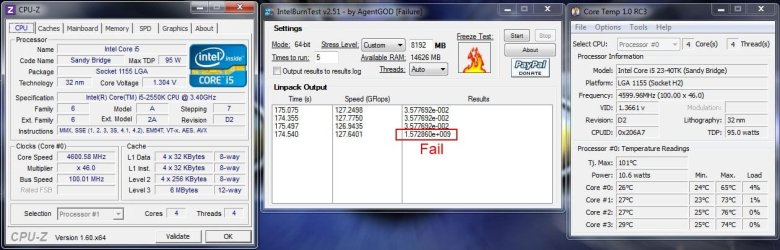
Here's a failed one. Offset at 0.03

46 fail.JPG
 

My Computer

Computer type
PC/Desktop
Computer Manufacturer/Model Number
Home Built Desktop By DataTech
OS
Windows 7 Ultimate X64 SP1
CPU
Intel i5-2550K, Differing ~4.4-4.8GHz No built in GPU
Motherboard
ASUS P8Z68-V PRO/GEN3
Memory
16GB G.Skill Sniper 1866MHz @ 2133MHz 2x8GB
Graphics Card(s)
ASUS GTX650TIB-DC2OC-2GD5, (650TI Boost)
Sound Card
Onboard Realtek 5-1
Monitor(s) Displays
Samsung P2570HD
Screen Resolution
1920x1080
Hard Drives
Samsung 840 Pro 256GB SSD for OS, 500GB Seagate Constellation (Enterprise drive) for Data
PSU
Corsair HX650W
Case
Inwin Dragon Rider
Cooling
Hyper 212 EVO w/two Noctua fans, push-pull, @1300 RPM
Keyboard
E-Z Eyes, bright yellow keys with large characters
Mouse
steelseries SENSEI Laser Pro Gaming
Internet Speed
48-51Mbs Mbs down, 11 Mbs up Xfinity Cable
Antivirus
Norton Internet Security 2013
Browser
IE 10, Opera, Pale Moon if needed
Other Info
4 case fans, LG BluRay-RE, ASUS DVD-RW, Mr. Fusion power supply, 1.21 gigawatts.
still 4.4 is nice chap :D my DRAM voltage is reading higher in windows than in the bios. in the bios its 1.65v but in windows its 1.667v should i knock it down a tad in the bios or will it be ok as is?
cheers folks

edit: that slight up of the vcore has stopped it from droppin every now n then and it also survived a few hours bf3 with no probs, max temp was 46c ingame

Leave it as is because it is at the proper voltage it might be bumped a tad because you used more v core to keep a overclock

Im just going to accept my wall is 4.4ghz and no other way around it it still does the trick and most people with the higher end BD chip 8150 most hang around 4.5 Ghz which pretty much im already in that ball park so im not to disapointed and the RAM oc i just done give it a extra gush of excitment if you know what i mean :p

okey dokey chap cheers :D ive noticed that when i type in a certain value in voltage say with the vcore i typed in 1.350 i hit enter and it changes to 1.344v.

as u say 4.4 is close enough. most reports ive seen are saying around 4.5/ 4.6. i havent seen many over that.

core temp isnt reading newer cpu's right. i stopped using it as it was telling me my cpu was 14c lower than it was so i had to set an offset which made me disstrust it. it also said my fx cpu was an engineering sample. after trawling loads of forums it turns out that the apps to trust with the bulldozer is aida x64, cpuid hw monitor(not open hardware monitor) amd overdrive. if u have an asus board the suprisingly asus ia suite II is bang on with volts and temps but i got rid of that too. more to have runnin in the background. which reminds me, if i had asus ai suite running n then opened hw monitor. ai suite would start chuckin out silly warnings to say my cpu/nb was @ -115c or a case fan was @ 0rpm
i just use aida x64 n hav it display all the important stuff on the onscreen display which i didnt know it could do untill the other day lol. been using it over a year too lol :o which reminds me i have a couple of engineer keys for it if anyone wants to use


Reason why i say it is my sweet spot because even though i disable C6 it will not give me extra v-core in order to get over 4.5 Ghz stable you need atleast 1.45 vlts

Im limited and trying to get a extra 200mhz isn't worth it me Oc'ing the ram will make it perform just as fast as it was 4.5 4.6 Ghz Besides if you read about the 8120 most of them Oc to 4.4 Ghz with no Headaches it is after that the headaches begin Besides i chose this chip because the specs were besicly the same as the 8150 which is $ 50.00 More


Which most people with the that chip getting at best 4.5 Ghz
Some of these post your reading of people getting sick overclocks is not what it looks like most of the time it is one or two cores while the others are shut down

These chips have a core control feature you can shut cores down for higher clockings and that is why you see such high clocks there not use-ing all cores

I got a legitimate Oc on all cores I hope i've gotten you curious lol

I still testing the best method to Oc besides use-ing just the Multiplyer I seem very solid with these settings Multi-20 Fsb-220mhz Ram Oc-from 1600mhz to 1760mhz via Fsb no voltage change on the Dimms they run fine at that speed any higher then i would need to bump the volts so far 24/7 running great WEI and stable prime all 8 cores ;)


By the way when you enter a value and it goes lower then set it is called V-droop or V-drop you have to increase more to give it the stable number you are looking to hit that is when the LLC and C1 C6 states come into play if your not familliar with them then dont bother them cause you will be asking for trouble

But if you up the voltage like 1.36 it will show 1.35- 1.34 or 1.33 depending on the droop
 

My Computer

Computer type
PC/Desktop
Computer Manufacturer/Model Number
CoreI7-6700K MrFingerIII Special Builds
OS
Windows 10 Home Premium 64bit sp1
CPU
Intel I7-6700K @ 4.6 Ghz 1.344 volts everyday OC
Motherboard
Asrock Fatality K6 Z170 Socket 1151
Memory
32GB G-Skill TridentZ 3200mhz 16-18-18-38 DDR4
Graphics Card(s)
Sli Gigabyte Windforce GTX 980 G1
Sound Card
AC97 Creative Rage Tactic 3D Headphones Bluetooth
Monitor(s) Displays
27" Asus ROG Swift PG278Q G-Sync 48" Vizio Smart HD TV
Screen Resolution
2560x1440p 27"- 48" Currently Gaming at 2560x1440p Res 2K
Hard Drives
250GB Samsung Evo840SSD Seagate baracuda 500 GB WD Mybook 500Gb 1TB Seagate Barracuda
PSU
HX1050w Corsair Silver 80plus certified crosfire/sli
Case
Enthod Pro Full Tower
Cooling
Corsair H110i GT 280 mm High Performance WaterBlock
Keyboard
Logitech wireless keyboard
Mouse
Logitech wireless mouse
Internet Speed
Cox Cable 100+ mb
Antivirus
WebRoot Spysweeper with Antivirus
Browser
IE-10, Chrome, Opera
Other Info
My Other Rig is a AMD FX8320E @4.6Ghz 16GB Ballistic Sport Ram
Mobo Asrock Fatality 990FX 120GB OCZ SSD 1TB Seagate Barracuda Corsair H75 Cooling PSU Corsair CX750
GPU GTX Gigabyte 970G1
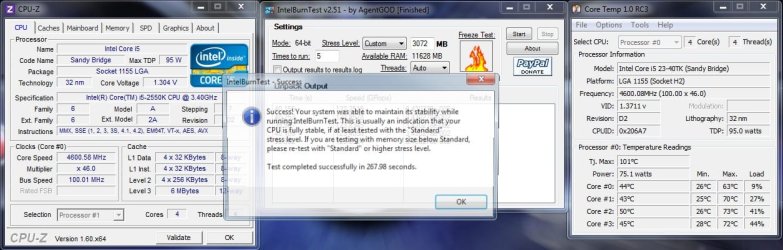
I think this is about the max for this CPU. But, it passed.

4.8 IBT.JPG
 

My Computers

System One System Two

  • Computer type
    PC/Desktop
    Computer Manufacturer/Model Number
    ALWAYS UNDER CONSTRUCTION
    OS
    Windows 11 Pro
    CPU
    Ryzen 9 5900X
    Motherboard
    Asus X570 Crosshair Viii Hero
    Memory
    32GB G Skill DDR4-3600
    Graphics Card(s)
    EVGA RTX 3080 FTW 3 Ultra
    Sound Card
    On Board/Sennheiser PC37X Headset
    Monitor(s) Displays
    3 X Asus 27"
    Screen Resolution
    2560x1440
    Hard Drives
    2 X 1 TB NVME drives
    PSU
    EVGA 850
    Case
    Phanteks Eclipse P400A
    Cooling
    EVGA 280 AIO
    Keyboard
    Logitech G510s/ Logitech G13
    Mouse
    Logitech G502
    Internet Speed
    24/1
    Antivirus
    ESET/MBAM Pro/SAS Pro
    Browser
    Chrome/ Firefox/ Edge
  • Computer type
    Laptop
    System Manufacturer/Model Number
    Dell 16 Plus
    OS
    Windows 11 Pro
    CPU
    Intel Ultra 9 288V
    Memory
    32 GB LPDDR5X 8533
    Monitor(s) Displays
    16" Mini-LED HDR600 Touch 90 Hz
    Screen Resolution
    2560X1600
    Hard Drives
    1 TB NVME

My Computer

Computer type
PC/Desktop
Computer Manufacturer/Model Number
CoreI7-6700K MrFingerIII Special Builds
OS
Windows 10 Home Premium 64bit sp1
CPU
Intel I7-6700K @ 4.6 Ghz 1.344 volts everyday OC
Motherboard
Asrock Fatality K6 Z170 Socket 1151
Memory
32GB G-Skill TridentZ 3200mhz 16-18-18-38 DDR4
Graphics Card(s)
Sli Gigabyte Windforce GTX 980 G1
Sound Card
AC97 Creative Rage Tactic 3D Headphones Bluetooth
Monitor(s) Displays
27" Asus ROG Swift PG278Q G-Sync 48" Vizio Smart HD TV
Screen Resolution
2560x1440p 27"- 48" Currently Gaming at 2560x1440p Res 2K
Hard Drives
250GB Samsung Evo840SSD Seagate baracuda 500 GB WD Mybook 500Gb 1TB Seagate Barracuda
PSU
HX1050w Corsair Silver 80plus certified crosfire/sli
Case
Enthod Pro Full Tower
Cooling
Corsair H110i GT 280 mm High Performance WaterBlock
Keyboard
Logitech wireless keyboard
Mouse
Logitech wireless mouse
Internet Speed
Cox Cable 100+ mb
Antivirus
WebRoot Spysweeper with Antivirus
Browser
IE-10, Chrome, Opera
Other Info
My Other Rig is a AMD FX8320E @4.6Ghz 16GB Ballistic Sport Ram
Mobo Asrock Fatality 990FX 120GB OCZ SSD 1TB Seagate Barracuda Corsair H75 Cooling PSU Corsair CX750
GPU GTX Gigabyte 970G1
Thanks. It took a while to get there though.
 

My Computers

System One System Two

  • Computer type
    PC/Desktop
    Computer Manufacturer/Model Number
    ALWAYS UNDER CONSTRUCTION
    OS
    Windows 11 Pro
    CPU
    Ryzen 9 5900X
    Motherboard
    Asus X570 Crosshair Viii Hero
    Memory
    32GB G Skill DDR4-3600
    Graphics Card(s)
    EVGA RTX 3080 FTW 3 Ultra
    Sound Card
    On Board/Sennheiser PC37X Headset
    Monitor(s) Displays
    3 X Asus 27"
    Screen Resolution
    2560x1440
    Hard Drives
    2 X 1 TB NVME drives
    PSU
    EVGA 850
    Case
    Phanteks Eclipse P400A
    Cooling
    EVGA 280 AIO
    Keyboard
    Logitech G510s/ Logitech G13
    Mouse
    Logitech G502
    Internet Speed
    24/1
    Antivirus
    ESET/MBAM Pro/SAS Pro
    Browser
    Chrome/ Firefox/ Edge
  • Computer type
    Laptop
    System Manufacturer/Model Number
    Dell 16 Plus
    OS
    Windows 11 Pro
    CPU
    Intel Ultra 9 288V
    Memory
    32 GB LPDDR5X 8533
    Monitor(s) Displays
    16" Mini-LED HDR600 Touch 90 Hz
    Screen Resolution
    2560X1600
    Hard Drives
    1 TB NVME
Leave it as is because it is at the proper voltage it might be bumped a tad because you used more v core to keep a overclock

Im just going to accept my wall is 4.4ghz and no other way around it it still does the trick and most people with the higher end BD chip 8150 most hang around 4.5 Ghz which pretty much im already in that ball park so im not to disapointed and the RAM oc i just done give it a extra gush of excitment if you know what i mean :p

okey dokey chap cheers :D ive noticed that when i type in a certain value in voltage say with the vcore i typed in 1.350 i hit enter and it changes to 1.344v.

as u say 4.4 is close enough. most reports ive seen are saying around 4.5/ 4.6. i havent seen many over that.

core temp isnt reading newer cpu's right. i stopped using it as it was telling me my cpu was 14c lower than it was so i had to set an offset which made me disstrust it. it also said my fx cpu was an engineering sample. after trawling loads of forums it turns out that the apps to trust with the bulldozer is aida x64, cpuid hw monitor(not open hardware monitor) amd overdrive. if u have an asus board the suprisingly asus ia suite II is bang on with volts and temps but i got rid of that too. more to have runnin in the background. which reminds me, if i had asus ai suite running n then opened hw monitor. ai suite would start chuckin out silly warnings to say my cpu/nb was @ -115c or a case fan was @ 0rpm
i just use aida x64 n hav it display all the important stuff on the onscreen display which i didnt know it could do untill the other day lol. been using it over a year too lol :o which reminds me i have a couple of engineer keys for it if anyone wants to use


Reason why i say it is my sweet spot because even though i disable C6 it will not give me extra v-core in order to get over 4.5 Ghz stable you need atleast 1.45 vlts

Im limited and trying to get a extra 200mhz isn't worth it me Oc'ing the ram will make it perform just as fast as it was 4.5 4.6 Ghz Besides if you read about the 8120 most of them Oc to 4.4 Ghz with no Headaches it is after that the headaches begin Besides i chose this chip because the specs were besicly the same as the 8150 which is $ 50.00 More


Which most people with the that chip getting at best 4.5 Ghz
Some of these post your reading of people getting sick overclocks is not what it looks like most of the time it is one or two cores while the others are shut down

These chips have a core control feature you can shut cores down for higher clockings and that is why you see such high clocks there not use-ing all cores

I got a legitimate Oc on all cores I hope i've gotten you curious lol

I still testing the best method to Oc besides use-ing just the Multiplyer I seem very solid with these settings Multi-20 Fsb-220mhz Ram Oc-from 1600mhz to 1760mhz via Fsb no voltage change on the Dimms they run fine at that speed any higher then i would need to bump the volts so far 24/7 running great WEI and stable prime all 8 cores ;)


By the way when you enter a value and it goes lower then set it is called V-droop or V-drop you have to increase more to give it the stable number you are looking to hit that is when the LLC and C1 C6 states come into play if your not familliar with them then dont bother them cause you will be asking for trouble

But if you up the voltage like 1.36 it will show 1.35- 1.34 or 1.33 depending on the droop

first of all apologies, id forgot it was the 8120 u have not the 8150 :o so i was well wrong on that one. dont get me wrong i wouldn't question anybodies knowledge around here. you have all been in this game a lot longer than me hense why i always come here for advice. i trust this forum
lol @ hope u got me curious :D i had read about it in a few forums but its not somethin id bother with. im not planning on trying to get mega high oc's i just wanted to get my cpu half decent as at stock its a bit sloooow and as you've said when it comes to delving into the likes of llc n what av ya is a bit beyond me at the moment. i have read up on it though but not 100% on it. i know its to adjust/compensate voltages in some way for better oc at high loads or something. more reading to do ;) and v-droop ive read about too but wasnt sure how to correct it. i thought this is where llc comes into play. i know im miles away on things but i shall keep reading even if i never plan on putting any of it into practice. one can never learn enough ;)
i know i will probaly go higher at some point but at the moment im enjoying learning it all from good peeps in the know. :D some of u must have real good patients cos i know im a pain in the ass when ive had a smoke nothin sinks in lol :D
there are way too many options in the bios of this new board that i have never seen before to go delving in and messing. eventough i know that id only kill things by giving too much power n getting too hot. im still really aprehensive about doing things lol. pratice makes perfect aye :D i think im not doing too bad considering id never had any dealings with pc's before 18months ago :D
cheers folks

edit toooo many smileys

nice oc essenbe :D
 

My Computer

Computer type
PC/Desktop
Computer Manufacturer/Model Number
Custom build
OS
Win7 Home Premium x64 SP1
CPU
i7 4770k
Motherboard
Asus maximus VI Hero
Memory
8Gb Kingston HyperX Beast 2400MHz @2133MHz 11-12-11-30
Graphics Card(s)
MSI GTX 780ti Gaming Oc x2
Sound Card
Onboard ROG SupremeFX
Monitor(s) Displays
Asus VG248QE
Screen Resolution
3840X1080 144Hz
Hard Drives
Samung Evo 256Gb, OCZ Agility4 128Gb
1x1TB hitachi storage
PSU
EVGA Supernova 1000w Platinum
Case
Corsair Air 540
Cooling
Corsair H100i
Keyboard
Coolermaster Quickfire Pro
Mouse
Corsair M65 RGB
Internet Speed
74mb dwn/16up
Antivirus
MSE,Malwarebytes
Browser
Chrome
I consider that pretty good I been playing with my own bought systems since 94 but played with machines since 10 years old 20+ years and still have tons to learn :p
 

My Computer

Computer type
PC/Desktop
Computer Manufacturer/Model Number
CoreI7-6700K MrFingerIII Special Builds
OS
Windows 10 Home Premium 64bit sp1
CPU
Intel I7-6700K @ 4.6 Ghz 1.344 volts everyday OC
Motherboard
Asrock Fatality K6 Z170 Socket 1151
Memory
32GB G-Skill TridentZ 3200mhz 16-18-18-38 DDR4
Graphics Card(s)
Sli Gigabyte Windforce GTX 980 G1
Sound Card
AC97 Creative Rage Tactic 3D Headphones Bluetooth
Monitor(s) Displays
27" Asus ROG Swift PG278Q G-Sync 48" Vizio Smart HD TV
Screen Resolution
2560x1440p 27"- 48" Currently Gaming at 2560x1440p Res 2K
Hard Drives
250GB Samsung Evo840SSD Seagate baracuda 500 GB WD Mybook 500Gb 1TB Seagate Barracuda
PSU
HX1050w Corsair Silver 80plus certified crosfire/sli
Case
Enthod Pro Full Tower
Cooling
Corsair H110i GT 280 mm High Performance WaterBlock
Keyboard
Logitech wireless keyboard
Mouse
Logitech wireless mouse
Internet Speed
Cox Cable 100+ mb
Antivirus
WebRoot Spysweeper with Antivirus
Browser
IE-10, Chrome, Opera
Other Info
My Other Rig is a AMD FX8320E @4.6Ghz 16GB Ballistic Sport Ram
Mobo Asrock Fatality 990FX 120GB OCZ SSD 1TB Seagate Barracuda Corsair H75 Cooling PSU Corsair CX750
GPU GTX Gigabyte 970G1
ima trying :D its thanks to you lot mostly. if i havent been able to suss somethin myself by either reading or youtube then i come ere and always get the help i need. which is always very much apreciated :D
 

My Computer

Computer type
PC/Desktop
Computer Manufacturer/Model Number
Custom build
OS
Win7 Home Premium x64 SP1
CPU
i7 4770k
Motherboard
Asus maximus VI Hero
Memory
8Gb Kingston HyperX Beast 2400MHz @2133MHz 11-12-11-30
Graphics Card(s)
MSI GTX 780ti Gaming Oc x2
Sound Card
Onboard ROG SupremeFX
Monitor(s) Displays
Asus VG248QE
Screen Resolution
3840X1080 144Hz
Hard Drives
Samung Evo 256Gb, OCZ Agility4 128Gb
1x1TB hitachi storage
PSU
EVGA Supernova 1000w Platinum
Case
Corsair Air 540
Cooling
Corsair H100i
Keyboard
Coolermaster Quickfire Pro
Mouse
Corsair M65 RGB
Internet Speed
74mb dwn/16up
Antivirus
MSE,Malwarebytes
Browser
Chrome
Last edited:

My Computer

Computer type
PC/Desktop
Computer Manufacturer/Model Number
Home Built Desktop By DataTech
OS
Windows 7 Ultimate X64 SP1
CPU
Intel i5-2550K, Differing ~4.4-4.8GHz No built in GPU
Motherboard
ASUS P8Z68-V PRO/GEN3
Memory
16GB G.Skill Sniper 1866MHz @ 2133MHz 2x8GB
Graphics Card(s)
ASUS GTX650TIB-DC2OC-2GD5, (650TI Boost)
Sound Card
Onboard Realtek 5-1
Monitor(s) Displays
Samsung P2570HD
Screen Resolution
1920x1080
Hard Drives
Samsung 840 Pro 256GB SSD for OS, 500GB Seagate Constellation (Enterprise drive) for Data
PSU
Corsair HX650W
Case
Inwin Dragon Rider
Cooling
Hyper 212 EVO w/two Noctua fans, push-pull, @1300 RPM
Keyboard
E-Z Eyes, bright yellow keys with large characters
Mouse
steelseries SENSEI Laser Pro Gaming
Internet Speed
48-51Mbs Mbs down, 11 Mbs up Xfinity Cable
Antivirus
Norton Internet Security 2013
Browser
IE 10, Opera, Pale Moon if needed
Other Info
4 case fans, LG BluRay-RE, ASUS DVD-RW, Mr. Fusion power supply, 1.21 gigawatts.
still 4.4 is nice chap :D my DRAM voltage is reading higher in windows than in the bios. in the bios its 1.65v but in windows its 1.667v should i knock it down a tad in the bios or will it be ok as is?
cheers folks

edit: that slight up of the vcore has stopped it from droppin every now n then and it also survived a few hours bf3 with no probs, max temp was 46c ingame
Set your DRAM volts to the stock value, should be of the sricks of RAM. But 1.667 is fine if the RAM is 1.65V. Curious, where does Windows give your RAM volts?:confused:
 

My Computer

Computer type
PC/Desktop
Computer Manufacturer/Model Number
Home Built Desktop By DataTech
OS
Windows 7 Ultimate X64 SP1
CPU
Intel i5-2550K, Differing ~4.4-4.8GHz No built in GPU
Motherboard
ASUS P8Z68-V PRO/GEN3
Memory
16GB G.Skill Sniper 1866MHz @ 2133MHz 2x8GB
Graphics Card(s)
ASUS GTX650TIB-DC2OC-2GD5, (650TI Boost)
Sound Card
Onboard Realtek 5-1
Monitor(s) Displays
Samsung P2570HD
Screen Resolution
1920x1080
Hard Drives
Samsung 840 Pro 256GB SSD for OS, 500GB Seagate Constellation (Enterprise drive) for Data
PSU
Corsair HX650W
Case
Inwin Dragon Rider
Cooling
Hyper 212 EVO w/two Noctua fans, push-pull, @1300 RPM
Keyboard
E-Z Eyes, bright yellow keys with large characters
Mouse
steelseries SENSEI Laser Pro Gaming
Internet Speed
48-51Mbs Mbs down, 11 Mbs up Xfinity Cable
Antivirus
Norton Internet Security 2013
Browser
IE 10, Opera, Pale Moon if needed
Other Info
4 case fans, LG BluRay-RE, ASUS DVD-RW, Mr. Fusion power supply, 1.21 gigawatts.
still 4.4 is nice chap :D my DRAM voltage is reading higher in windows than in the bios. in the bios its 1.65v but in windows its 1.667v should i knock it down a tad in the bios or will it be ok as is?
cheers folks

edit: that slight up of the vcore has stopped it from droppin every now n then and it also survived a few hours bf3 with no probs, max temp was 46c ingame
Set your DRAM volts to the stock value, should be of the sricks of RAM. But 1.667 is fine if the RAM is 1.65V. Curious, where does Windows give your RAM volts?:confused:

ello britton
yeah thats how id left it. i set it as 1.65v which is the rated voltage. when i say in windows i meant useing aida x64's on screen display. sorry :D occasionally it goes up to 1.67. i have ran it bellow the 1.65 before. about 1.63 i think and it was ok
 

My Computer

Computer type
PC/Desktop
Computer Manufacturer/Model Number
Custom build
OS
Win7 Home Premium x64 SP1
CPU
i7 4770k
Motherboard
Asus maximus VI Hero
Memory
8Gb Kingston HyperX Beast 2400MHz @2133MHz 11-12-11-30
Graphics Card(s)
MSI GTX 780ti Gaming Oc x2
Sound Card
Onboard ROG SupremeFX
Monitor(s) Displays
Asus VG248QE
Screen Resolution
3840X1080 144Hz
Hard Drives
Samung Evo 256Gb, OCZ Agility4 128Gb
1x1TB hitachi storage
PSU
EVGA Supernova 1000w Platinum
Case
Corsair Air 540
Cooling
Corsair H100i
Keyboard
Coolermaster Quickfire Pro
Mouse
Corsair M65 RGB
Internet Speed
74mb dwn/16up
Antivirus
MSE,Malwarebytes
Browser
Chrome
Status
Not open for further replies.
Back
Top