Post Your Overclock!

Status
Not open for further replies.
Maybe I see OCing a bit differently than some.

Meaning: I think theres a Difference between OCing, and benching for the fun of it, and to see what your rig is capable of ...

And a 24/7 OC are 2 different things.

For example:
Running a x8 Multi and 500FSB (4.0Ghz) on a 9650quad is nice :)

But hardly ideal IMO for a 24/7 OC

better off at x9 400 (3.6Ghz)... Far less heat, power consumption, and much less wear and tear.

And truth be told... In real world use, and most gaming, theres really not much of a differnce. not really worth it for 24/7 use.

Seems to me, anything over the 20% range results in greatly increased diminishing returns. At least in my exp.


OCing is a lot of fun however :)

just my 2c for what its worth.


Oh and BTW:

Nice OC TomPC3
 

My Computer

Computer Manufacturer/Model Number
Custom (Self Build)
OS
Windows 7 Home Premium 64bit
CPU
Intel Core i7 2700k
Motherboard
eVGA P67 SLI
Memory
8GB Mushkin Redline Ridgebacks @1866
Graphics Card(s)
EVGA GTX570 SC
Sound Card
XiFi Titanium HD
Monitor(s) Displays
LG W2453V
Screen Resolution
1920x1080
Hard Drives
Intel 320 80GB -- Intel X25-V 40GB --WD Black 1TB x2 -- WD Blue 640GB
PSU
Seasonic x750
Case
Corsair 600T SE White
Cooling
eVGA Superclocked CPU Cooler
Keyboard
Saitek Cyborg
Antivirus
Kaspersky
Browser
IE
Other Info
LG BD/DVD
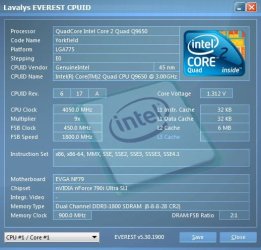
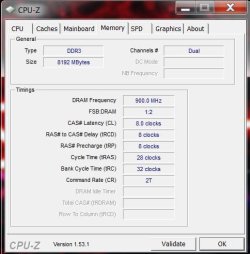
Here's mine Q9650 3GHz overclocked to 4050MHz (4.05GHz) stable and temps @ 40 degrees not one problem she's purring love my computer :p
too bad couldn't bump up FSB to 2GHz it's all good
 

Attachments

  • cpuid.jpg
    cpuid.jpg
    41.7 KB · Views: 7
  • cpu-z1.53.1.JPG
    cpu-z1.53.1.JPG
    51.7 KB · Views: 5
  • cpu-z ram.JPG
    cpu-z ram.JPG
    39.1 KB · Views: 3

My Computer

Computer Manufacturer/Model Number
custom of course...built by grimreaper
OS
Windows 7 Ultimate X64
CPU
Intel Core 2 Quad Q9650 3.0GHz (3.6GHz 24/7) maxed 4.05GHz
Motherboard
EVGA 790i Ultra SLi Model#132-CK-NF79-A1 BIOS P10
Memory
8GB OCZ DDR3 PC3-14400 @ 1800MHz NVIDIA SLi-Ready
Graphics Card(s)
2XBFG GeForce GTX 280 OC Edition SLi'd
Sound Card
SoundBlaster X-Fi Titanium Fatal1ty Pro Series
Monitor(s) Displays
Samsung 52" 1080P LCD HDTV (LN52B550)
Screen Resolution
1920X1080 @ 60Hz
Hard Drives
3xWestern Digital WD1001FALS Caviar Black 1TB Hard Drive(s) RAID 0 x2 encased in 3xMasscool KuFormula SHF1 HDD Cooler(s)
PSU
ThermalTake ToughPower 1200W P/N:W0133RU Modularized
Case
ThermalTake P/N: VH6000BWS Armor Full-Tower
Cooling
ThermalTake SpinQ P/N: P0466 CPU Cooler
Keyboard
Logitech cordless Y-RAJ56A piece of ****
Mouse
Logitech G7 Laser Cordless mouse black
Internet Speed
10 Mbps DL-1Mbps UL wirelessly DWA-552 extreme N
Other Info
1XSamsung DVD burner SH-S223Q/BEBN SATA
1XSamsung DVD burner SH-S223L/BEBN SATA
1XLG GGW-H20L Blu-Ray burner
4XCooler Master 120mm Blue LED SickleFlow 2000 RPM
1XBelkin UPS F6C1500TWRK) backup power supply
Running a x8 Multi and 500FSB (4.0Ghz) on a 9650quad is nice :)

But hardly ideal IMO for a 24/7 OC

I should know..:) love my 9650 but i do not run 24/7 what i posted
I run 3.6GHz (20% OC) 24/7 safe this cpu loves to be played with unreal

Note: OC ing not for novices...do not attempt unless you know what you're doing:) please get advice from someone who knows please for the sake of your machine (or lack of it).
 
Last edited:

My Computer

Computer Manufacturer/Model Number
custom of course...built by grimreaper
OS
Windows 7 Ultimate X64
CPU
Intel Core 2 Quad Q9650 3.0GHz (3.6GHz 24/7) maxed 4.05GHz
Motherboard
EVGA 790i Ultra SLi Model#132-CK-NF79-A1 BIOS P10
Memory
8GB OCZ DDR3 PC3-14400 @ 1800MHz NVIDIA SLi-Ready
Graphics Card(s)
2XBFG GeForce GTX 280 OC Edition SLi'd
Sound Card
SoundBlaster X-Fi Titanium Fatal1ty Pro Series
Monitor(s) Displays
Samsung 52" 1080P LCD HDTV (LN52B550)
Screen Resolution
1920X1080 @ 60Hz
Hard Drives
3xWestern Digital WD1001FALS Caviar Black 1TB Hard Drive(s) RAID 0 x2 encased in 3xMasscool KuFormula SHF1 HDD Cooler(s)
PSU
ThermalTake ToughPower 1200W P/N:W0133RU Modularized
Case
ThermalTake P/N: VH6000BWS Armor Full-Tower
Cooling
ThermalTake SpinQ P/N: P0466 CPU Cooler
Keyboard
Logitech cordless Y-RAJ56A piece of ****
Mouse
Logitech G7 Laser Cordless mouse black
Internet Speed
10 Mbps DL-1Mbps UL wirelessly DWA-552 extreme N
Other Info
1XSamsung DVD burner SH-S223Q/BEBN SATA
1XSamsung DVD burner SH-S223L/BEBN SATA
1XLG GGW-H20L Blu-Ray burner
4XCooler Master 120mm Blue LED SickleFlow 2000 RPM
1XBelkin UPS F6C1500TWRK) backup power supply
Here's mine Q9650 3GHz overclocked to 4050MHz (4.05GHz) stable and temps @ 40 degrees not one problem she's purring love my computer :p
too bad couldn't bump up FSB to 2GHz it's all good

nice clocks.......:)


my Q9450 is starting to grate on me now, my new GPU needs a faster throughput, but i cannot get my chip stable over 3.6ghz no matter what what voltages i chuck at it :(

the 9x multi certainly helps.....
 

My Computer

Computer Manufacturer/Model Number
myself
OS
SEVEN x64
CPU
Q9450 @ 3.6GHZ 1.34v
Motherboard
ASUS P5K PREMIUM P35
Memory
8GB 1066 buffalo firestix @ 1152mhz CL5
Graphics Card(s)
Sapphire HD 5970 + GTX260 (physX)
Sound Card
Creative X-FI Xtreme Gamer
Monitor(s) Displays
SAMSUNG 20'' & SAMSUNG 23'' (dual screens)
Screen Resolution
2048x1152 & 1680x1050
Hard Drives
1x seagate 160gb IDE & 1x seagate 160gb SATA
PSU
XCILIO 850w (78A)
Case
CM590 1x 120x38mm & 2x92x38mm / 4x 120x25mm
Cooling
AC7 PRO @ 92x38mm blower, Lamptron military bus bay controll
Keyboard
LOGITECH E110
Mouse
logitech NX5
Internet Speed
2MB
Other Info
its a continual ''work in progress''....
my Q9450 is starting to grate on me now, my new GPU needs a faster throughput, but i cannot get my chip stable over 3.6ghz no matter what what voltages i chuck at it :(

the 9x multi certainly helps.....

I want to kick mine in it's metaphoric balls.

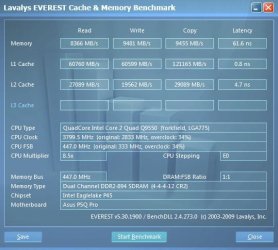
It will do 4.0ghz, with 'max' volts but not stable. It will not do over 448 FSB + 8Gb with any stability. Drop to 4GB and I may get up to 3.88ish :rolleyes:

447 FSB + 8GB and I can lower the timings to 4-4-4-12. Go to 448 FSb and BLAM not even loosing them to hooker standards will help :rolleyes:

I'm not using murderous volts just for extra bang.


I feel your frustration ;)
 

My Computer

Computer type
PC/Desktop
Computer Manufacturer/Model Number
Systems by SmartEyeball
OS
8 Pro x64
CPU
i7 3770K 4.6GHz
Motherboard
ASUS P8Z77 WS
Memory
16GB G.Skill Trident X 2666mhz
Graphics Card(s)
x2 EVGA 780 Ti Superclocked SLI
Sound Card
SB X-FI Surround 5.1 PRO USB / ATH-AD900 Headphones
Monitor(s) Displays
x3 Dell U2410 / 58" Samsung
Screen Resolution
5760*1200/ 1920*1200
Hard Drives
2x Intel 520 240GB (RAID 0) * 2x WD Caviar Blacks 2TB (RAID 0) * 2TB WD Caviar Black * Sony Optirac DVD
PSU
Silverstone Strider Evolution 1200W
Case
Thermaltake Level 10 GT Snow Edition
Cooling
Noctua NH-D14
Keyboard
Topre Realforce // Ducky Shine MX Black // Filco Ninja TKL
Mouse
Thermaltake Theron (Highly Recommended) + Razer Imperator
Antivirus
MSE
Browser
IE, FF, WaterFox
Other Info
GT Extreme V2 Sim Racing Cockpit + 40" LCD and K/B Mouse stand ▼
Fanatec CSR Elite Wheel + Clubsport V1 Pedals + CSR shifter/7G-H ▼Saitek X52 Pro ▼ TrackIR 5 Pro
Buttkicker v2 Seat Rumbler with Dedicated 5.1 and Sub Woofer attached to frame ▼
=
Bloody Big Grin
my Q9450 is starting to grate on me now, my new GPU needs a faster throughput, but i cannot get my chip stable over 3.6ghz no matter what what voltages i chuck at it :(

the 9x multi certainly helps.....

I want to kick mine in it's metaphoric balls.

It will do 4.0ghz, with 'max' volts but not stable. It will not do over 448 FSB + 8Gb with any stability. Drop to 4GB and I may get up to 3.88ish :rolleyes:

447 FSB + 8GB and I can lower the timings to 4-4-4-12. Go to 448 FSb and BLAM not even loosing them to hooker standards will help :rolleyes:

I'm not using murderous volts just for extra bang.


I feel your frustration ;)

lol....... now you've said that my issue could well be the 8gb im running, even though the RAM is underclocked with a 1-1 ratio, the memory controller may be struggling...:(

god..... my board has served me well, but she's starting to show her age....:p


i might whip out 4gb & see if she'll go higher, b/c like you i can post @ 4ghz (500fsb) but its not AT ALL stable.
 

My Computer

Computer Manufacturer/Model Number
myself
OS
SEVEN x64
CPU
Q9450 @ 3.6GHZ 1.34v
Motherboard
ASUS P5K PREMIUM P35
Memory
8GB 1066 buffalo firestix @ 1152mhz CL5
Graphics Card(s)
Sapphire HD 5970 + GTX260 (physX)
Sound Card
Creative X-FI Xtreme Gamer
Monitor(s) Displays
SAMSUNG 20'' & SAMSUNG 23'' (dual screens)
Screen Resolution
2048x1152 & 1680x1050
Hard Drives
1x seagate 160gb IDE & 1x seagate 160gb SATA
PSU
XCILIO 850w (78A)
Case
CM590 1x 120x38mm & 2x92x38mm / 4x 120x25mm
Cooling
AC7 PRO @ 92x38mm blower, Lamptron military bus bay controll
Keyboard
LOGITECH E110
Mouse
logitech NX5
Internet Speed
2MB
Other Info
its a continual ''work in progress''....
yep. I only got closer to stable when I trialled with only 4GB. (RAM speed was awesome with only 4GB)


Although, in the interim with a newer bios, I can actually use those 4-4-4-12 timings with 8GB. Before, I had to to lower right down to 6-6-6-18-60? So at least there has been 'some' improvement' :rolleyes:

Still can't get 8GB over 895mhz with errors though :(
 

My Computer

Computer type
PC/Desktop
Computer Manufacturer/Model Number
Systems by SmartEyeball
OS
8 Pro x64
CPU
i7 3770K 4.6GHz
Motherboard
ASUS P8Z77 WS
Memory
16GB G.Skill Trident X 2666mhz
Graphics Card(s)
x2 EVGA 780 Ti Superclocked SLI
Sound Card
SB X-FI Surround 5.1 PRO USB / ATH-AD900 Headphones
Monitor(s) Displays
x3 Dell U2410 / 58" Samsung
Screen Resolution
5760*1200/ 1920*1200
Hard Drives
2x Intel 520 240GB (RAID 0) * 2x WD Caviar Blacks 2TB (RAID 0) * 2TB WD Caviar Black * Sony Optirac DVD
PSU
Silverstone Strider Evolution 1200W
Case
Thermaltake Level 10 GT Snow Edition
Cooling
Noctua NH-D14
Keyboard
Topre Realforce // Ducky Shine MX Black // Filco Ninja TKL
Mouse
Thermaltake Theron (Highly Recommended) + Razer Imperator
Antivirus
MSE
Browser
IE, FF, WaterFox
Other Info
GT Extreme V2 Sim Racing Cockpit + 40" LCD and K/B Mouse stand ▼
Fanatec CSR Elite Wheel + Clubsport V1 Pedals + CSR shifter/7G-H ▼Saitek X52 Pro ▼ TrackIR 5 Pro
Buttkicker v2 Seat Rumbler with Dedicated 5.1 and Sub Woofer attached to frame ▼
=
Bloody Big Grin
yep. I only got closer to stable when I trialled with only 4GB. (RAM speed was awesome with only 4GB)


Although, in the interim with a newer bios, I can actually use those 4-4-4-12 timings with 8GB. Before, I had to to lower right down to 6-6-6-18-60? So at least there has been 'some' improvement' :rolleyes:

Still can't get 8GB over 895mhz with errors though :(

hmm....... i can run mine @ 1157mhz 6-6-6-18, but upon benching them i actually see no performance increase over 904mhz 5-5-5-18..??, so i think the 1-1 ratio is still the best bet in my case.

im sure its the chip though, a bad batch maybe..... i only payed £80 delivered in an OEM pack, so im thinking the guy realized the chip whouldnt clock well & sold it... :(

im in two minds with my next upgrade now due to this bloody ATI card...

do i...

buy an X48 board, use my current H/W & hope the PCIE 2.0 slots will open this card out.. i mean the C2Q is still plenty powerful enough for most things, its only this card that's making the bottleneck apparent.

or....

go ''i7'' (CPU/MOBO/RAM), swab out the lot.... this will be the best bet for the future, but not very practical on the wallet..

if my major problem here is bandwidth, will the X48 open the throughput enough to give me the performance i should be seeing, or is the lack of ''QPI'' the reason my card is choking..??

lol....its an annoying dilemma....:p
 

My Computer

Computer Manufacturer/Model Number
myself
OS
SEVEN x64
CPU
Q9450 @ 3.6GHZ 1.34v
Motherboard
ASUS P5K PREMIUM P35
Memory
8GB 1066 buffalo firestix @ 1152mhz CL5
Graphics Card(s)
Sapphire HD 5970 + GTX260 (physX)
Sound Card
Creative X-FI Xtreme Gamer
Monitor(s) Displays
SAMSUNG 20'' & SAMSUNG 23'' (dual screens)
Screen Resolution
2048x1152 & 1680x1050
Hard Drives
1x seagate 160gb IDE & 1x seagate 160gb SATA
PSU
XCILIO 850w (78A)
Case
CM590 1x 120x38mm & 2x92x38mm / 4x 120x25mm
Cooling
AC7 PRO @ 92x38mm blower, Lamptron military bus bay controll
Keyboard
LOGITECH E110
Mouse
logitech NX5
Internet Speed
2MB
Other Info
its a continual ''work in progress''....
With 4GB at a much higher mhz rate, i was getting better overall bandwidth - but the latency was the same.

With my current 8GB config, I see a slighly lower overall bandwidth, but am at least getting the equavilent latency with 8GB as i was with 4GB.

In real world usage, outside of benchmarks, I could not tell the difference :p


As for your current dilemma:

Cheap route - x48 : dubious improvement, however you would notice an improvement, but you are still CPU limited.

1366 x58 - Much more noticeable improvement.

Personally I'm holding off for a few more months and going the whole i7 route. The $$$ factor is the biggest problem though :confused:


For now, this will have to do - I'm already fed up with tweaking again :(

everest living with it..JPG
 

My Computer

Computer type
PC/Desktop
Computer Manufacturer/Model Number
Systems by SmartEyeball
OS
8 Pro x64
CPU
i7 3770K 4.6GHz
Motherboard
ASUS P8Z77 WS
Memory
16GB G.Skill Trident X 2666mhz
Graphics Card(s)
x2 EVGA 780 Ti Superclocked SLI
Sound Card
SB X-FI Surround 5.1 PRO USB / ATH-AD900 Headphones
Monitor(s) Displays
x3 Dell U2410 / 58" Samsung
Screen Resolution
5760*1200/ 1920*1200
Hard Drives
2x Intel 520 240GB (RAID 0) * 2x WD Caviar Blacks 2TB (RAID 0) * 2TB WD Caviar Black * Sony Optirac DVD
PSU
Silverstone Strider Evolution 1200W
Case
Thermaltake Level 10 GT Snow Edition
Cooling
Noctua NH-D14
Keyboard
Topre Realforce // Ducky Shine MX Black // Filco Ninja TKL
Mouse
Thermaltake Theron (Highly Recommended) + Razer Imperator
Antivirus
MSE
Browser
IE, FF, WaterFox
Other Info
GT Extreme V2 Sim Racing Cockpit + 40" LCD and K/B Mouse stand ▼
Fanatec CSR Elite Wheel + Clubsport V1 Pedals + CSR shifter/7G-H ▼Saitek X52 Pro ▼ TrackIR 5 Pro
Buttkicker v2 Seat Rumbler with Dedicated 5.1 and Sub Woofer attached to frame ▼
=
Bloody Big Grin
With 4GB at a much higher mhz rate, i was getting better overall bandwidth - but the latency was the same.

With my current 8GB config, I see a slighly lower overall bandwidth, but am at least getting the equavilent latency with 8GB as i was with 4GB.

In real world usage, outside of benchmarks, I could not tell the difference :p


As for your current dilemma:

Cheap route - x48 : dubious improvement, however you would notice an improvement, but you are still CPU limited.

1366 x58 - Much more noticeable improvement.

Personally I'm holding off for a few more months and going the whole i7 route. The $$$ factor is the biggest problem though :confused:


For now, this will have to do - I'm already fed up with tweaking again :(

View attachment 46112

yep.....your RAM is delivering much better bandwith than mine currently is, my ''read'' is around 7200mb/s (8gb 904mhz 5-5-5-18)

but CL4 is bloody good for nearly 900mhz....:)


i think i'll hold off on the X48, considering im gonna wanna be on i7 by 2011 anyway...;)
 

My Computer

Computer Manufacturer/Model Number
myself
OS
SEVEN x64
CPU
Q9450 @ 3.6GHZ 1.34v
Motherboard
ASUS P5K PREMIUM P35
Memory
8GB 1066 buffalo firestix @ 1152mhz CL5
Graphics Card(s)
Sapphire HD 5970 + GTX260 (physX)
Sound Card
Creative X-FI Xtreme Gamer
Monitor(s) Displays
SAMSUNG 20'' & SAMSUNG 23'' (dual screens)
Screen Resolution
2048x1152 & 1680x1050
Hard Drives
1x seagate 160gb IDE & 1x seagate 160gb SATA
PSU
XCILIO 850w (78A)
Case
CM590 1x 120x38mm & 2x92x38mm / 4x 120x25mm
Cooling
AC7 PRO @ 92x38mm blower, Lamptron military bus bay controll
Keyboard
LOGITECH E110
Mouse
logitech NX5
Internet Speed
2MB
Other Info
its a continual ''work in progress''....
In 4Gb config, the read is in the 9k+ area :(

It's the read that's important for game loading etc isn't it? I always forget which is responsible for which :rolleyes:

Can't complain though :p

Save your pennies mate - no point 'upgrading' and discovering you are disappointed with the results.

Remember, somebody, somewhere will always have a a much better rig - the so and so's :sick: Avoiding vsisiting overclocking forums can help with that ;)
 

My Computer

Computer type
PC/Desktop
Computer Manufacturer/Model Number
Systems by SmartEyeball
OS
8 Pro x64
CPU
i7 3770K 4.6GHz
Motherboard
ASUS P8Z77 WS
Memory
16GB G.Skill Trident X 2666mhz
Graphics Card(s)
x2 EVGA 780 Ti Superclocked SLI
Sound Card
SB X-FI Surround 5.1 PRO USB / ATH-AD900 Headphones
Monitor(s) Displays
x3 Dell U2410 / 58" Samsung
Screen Resolution
5760*1200/ 1920*1200
Hard Drives
2x Intel 520 240GB (RAID 0) * 2x WD Caviar Blacks 2TB (RAID 0) * 2TB WD Caviar Black * Sony Optirac DVD
PSU
Silverstone Strider Evolution 1200W
Case
Thermaltake Level 10 GT Snow Edition
Cooling
Noctua NH-D14
Keyboard
Topre Realforce // Ducky Shine MX Black // Filco Ninja TKL
Mouse
Thermaltake Theron (Highly Recommended) + Razer Imperator
Antivirus
MSE
Browser
IE, FF, WaterFox
Other Info
GT Extreme V2 Sim Racing Cockpit + 40" LCD and K/B Mouse stand ▼
Fanatec CSR Elite Wheel + Clubsport V1 Pedals + CSR shifter/7G-H ▼Saitek X52 Pro ▼ TrackIR 5 Pro
Buttkicker v2 Seat Rumbler with Dedicated 5.1 and Sub Woofer attached to frame ▼
=
Bloody Big Grin
In 4Gb config, the read is in the 9k+ area :(

It's the read that's important for game loading etc isn't it? I always forget which is responsible for which :rolleyes:

Can't complain though :p

Save your pennies mate - no point 'upgrading' and discovering you are disappointed with the results.

Remember, somebody, somewhere will always have a a much better rig - the so and so's :sick: Avoiding vsisiting overclocking forums can help with that ;)

LMAO........ yeah my eyes always get bigger than my belly when i see bench numbers :p

im also sure its the ''read'' that's most important (could be wrong)


.....X58 here i come :D
 

My Computer

Computer Manufacturer/Model Number
myself
OS
SEVEN x64
CPU
Q9450 @ 3.6GHZ 1.34v
Motherboard
ASUS P5K PREMIUM P35
Memory
8GB 1066 buffalo firestix @ 1152mhz CL5
Graphics Card(s)
Sapphire HD 5970 + GTX260 (physX)
Sound Card
Creative X-FI Xtreme Gamer
Monitor(s) Displays
SAMSUNG 20'' & SAMSUNG 23'' (dual screens)
Screen Resolution
2048x1152 & 1680x1050
Hard Drives
1x seagate 160gb IDE & 1x seagate 160gb SATA
PSU
XCILIO 850w (78A)
Case
CM590 1x 120x38mm & 2x92x38mm / 4x 120x25mm
Cooling
AC7 PRO @ 92x38mm blower, Lamptron military bus bay controll
Keyboard
LOGITECH E110
Mouse
logitech NX5
Internet Speed
2MB
Other Info
its a continual ''work in progress''....
Yeah, I'm perfectly fine until i start visiting those sites... Especially the 'voltage envy' :D

I've been trying to concentrate on the read speed and latency, but they are the two that cause so much bloody trouble... :rolleyes:

Plus I'm sick to death of the sight of memtest :roflmao:
 

My Computer

Computer type
PC/Desktop
Computer Manufacturer/Model Number
Systems by SmartEyeball
OS
8 Pro x64
CPU
i7 3770K 4.6GHz
Motherboard
ASUS P8Z77 WS
Memory
16GB G.Skill Trident X 2666mhz
Graphics Card(s)
x2 EVGA 780 Ti Superclocked SLI
Sound Card
SB X-FI Surround 5.1 PRO USB / ATH-AD900 Headphones
Monitor(s) Displays
x3 Dell U2410 / 58" Samsung
Screen Resolution
5760*1200/ 1920*1200
Hard Drives
2x Intel 520 240GB (RAID 0) * 2x WD Caviar Blacks 2TB (RAID 0) * 2TB WD Caviar Black * Sony Optirac DVD
PSU
Silverstone Strider Evolution 1200W
Case
Thermaltake Level 10 GT Snow Edition
Cooling
Noctua NH-D14
Keyboard
Topre Realforce // Ducky Shine MX Black // Filco Ninja TKL
Mouse
Thermaltake Theron (Highly Recommended) + Razer Imperator
Antivirus
MSE
Browser
IE, FF, WaterFox
Other Info
GT Extreme V2 Sim Racing Cockpit + 40" LCD and K/B Mouse stand ▼
Fanatec CSR Elite Wheel + Clubsport V1 Pedals + CSR shifter/7G-H ▼Saitek X52 Pro ▼ TrackIR 5 Pro
Buttkicker v2 Seat Rumbler with Dedicated 5.1 and Sub Woofer attached to frame ▼
=
Bloody Big Grin
Yeah, I'm perfectly fine until i start visiting those sites... Especially the 'voltage envy' :D

I've been trying to concentrate on the read speed and latency, but they are the two that cause so much bloody trouble... :rolleyes:

Plus I'm sick to death of the sight of memtest :roflmao:

:sick:..... i hate ''memtest'', i just use ''Orthos'' on ''blend & stress'' to test the sticks stability, its a damn site quicker, maybe not as thorougher...but its served my RAM OCs for years.

:(...in a few weeks i'll have to break the news to my missus about the X58 changeover.. (she thinks my rig has had enough maintenance, its more than she gets :p, so she's a little jealous)
 

My Computer

Computer Manufacturer/Model Number
myself
OS
SEVEN x64
CPU
Q9450 @ 3.6GHZ 1.34v
Motherboard
ASUS P5K PREMIUM P35
Memory
8GB 1066 buffalo firestix @ 1152mhz CL5
Graphics Card(s)
Sapphire HD 5970 + GTX260 (physX)
Sound Card
Creative X-FI Xtreme Gamer
Monitor(s) Displays
SAMSUNG 20'' & SAMSUNG 23'' (dual screens)
Screen Resolution
2048x1152 & 1680x1050
Hard Drives
1x seagate 160gb IDE & 1x seagate 160gb SATA
PSU
XCILIO 850w (78A)
Case
CM590 1x 120x38mm & 2x92x38mm / 4x 120x25mm
Cooling
AC7 PRO @ 92x38mm blower, Lamptron military bus bay controll
Keyboard
LOGITECH E110
Mouse
logitech NX5
Internet Speed
2MB
Other Info
its a continual ''work in progress''....
I find memtest is good for quick for timing test adjustments. Make a BIOS change, select an individual test, (usually test 5) do a pass or two, fail -start again. Success, let it run for 12hrs+.

Memtests weakness is that it only concentrates on the RAM, so no CPU stress is involved. That's where the advantage of Orthos and P95 come into it. It stresses both. Which I'm also sick of watching :D


As for the missues, start by casually dropping hints that the happier "dad" is, the more maintenance she'll get ;)
 

My Computer

Computer type
PC/Desktop
Computer Manufacturer/Model Number
Systems by SmartEyeball
OS
8 Pro x64
CPU
i7 3770K 4.6GHz
Motherboard
ASUS P8Z77 WS
Memory
16GB G.Skill Trident X 2666mhz
Graphics Card(s)
x2 EVGA 780 Ti Superclocked SLI
Sound Card
SB X-FI Surround 5.1 PRO USB / ATH-AD900 Headphones
Monitor(s) Displays
x3 Dell U2410 / 58" Samsung
Screen Resolution
5760*1200/ 1920*1200
Hard Drives
2x Intel 520 240GB (RAID 0) * 2x WD Caviar Blacks 2TB (RAID 0) * 2TB WD Caviar Black * Sony Optirac DVD
PSU
Silverstone Strider Evolution 1200W
Case
Thermaltake Level 10 GT Snow Edition
Cooling
Noctua NH-D14
Keyboard
Topre Realforce // Ducky Shine MX Black // Filco Ninja TKL
Mouse
Thermaltake Theron (Highly Recommended) + Razer Imperator
Antivirus
MSE
Browser
IE, FF, WaterFox
Other Info
GT Extreme V2 Sim Racing Cockpit + 40" LCD and K/B Mouse stand ▼
Fanatec CSR Elite Wheel + Clubsport V1 Pedals + CSR shifter/7G-H ▼Saitek X52 Pro ▼ TrackIR 5 Pro
Buttkicker v2 Seat Rumbler with Dedicated 5.1 and Sub Woofer attached to frame ▼
=
Bloody Big Grin
I find memtest is good for quick for timing test adjustments. Make a BIOS change, select an individual test, (usually test 5) do a pass or two, fail -start again. Success, let it run for 12hrs+.

Memtests weakness is that it only concentrates on the RAM, so no CPU stress is involved. That's where the advantage of Orthos and P95 come into it. It stresses both. Which I'm also sick of watching :D


As for the missues, start by casually dropping hints that the happier "dad" is, the more maintenance she'll get ;)

Good plan.....;)
 

My Computer

Computer Manufacturer/Model Number
myself
OS
SEVEN x64
CPU
Q9450 @ 3.6GHZ 1.34v
Motherboard
ASUS P5K PREMIUM P35
Memory
8GB 1066 buffalo firestix @ 1152mhz CL5
Graphics Card(s)
Sapphire HD 5970 + GTX260 (physX)
Sound Card
Creative X-FI Xtreme Gamer
Monitor(s) Displays
SAMSUNG 20'' & SAMSUNG 23'' (dual screens)
Screen Resolution
2048x1152 & 1680x1050
Hard Drives
1x seagate 160gb IDE & 1x seagate 160gb SATA
PSU
XCILIO 850w (78A)
Case
CM590 1x 120x38mm & 2x92x38mm / 4x 120x25mm
Cooling
AC7 PRO @ 92x38mm blower, Lamptron military bus bay controll
Keyboard
LOGITECH E110
Mouse
logitech NX5
Internet Speed
2MB
Other Info
its a continual ''work in progress''....
Here's mine Q9650 3GHz overclocked to 4050MHz (4.05GHz) stable and temps @ 40 degrees not one problem she's purring love my computer :p
too bad couldn't bump up FSB to 2GHz it's all good

nice clocks.......:)


my Q9450 is starting to grate on me now, my new GPU needs a faster throughput, but i cannot get my chip stable over 3.6ghz no matter what what voltages i chuck at it :(

the 9x multi certainly helps.....

Thank you skunksmash, i can feel your fustrations, it can cause you misery, but don't feel bad.
I had the Q9450 (on an evga 780i bios p07) loved it, and if my memory serves me correctly, I OC'd that baby from 2.66GHz to 3.4GHz max also as you know the ram has alot to do with it.
 

My Computer

Computer Manufacturer/Model Number
custom of course...built by grimreaper
OS
Windows 7 Ultimate X64
CPU
Intel Core 2 Quad Q9650 3.0GHz (3.6GHz 24/7) maxed 4.05GHz
Motherboard
EVGA 790i Ultra SLi Model#132-CK-NF79-A1 BIOS P10
Memory
8GB OCZ DDR3 PC3-14400 @ 1800MHz NVIDIA SLi-Ready
Graphics Card(s)
2XBFG GeForce GTX 280 OC Edition SLi'd
Sound Card
SoundBlaster X-Fi Titanium Fatal1ty Pro Series
Monitor(s) Displays
Samsung 52" 1080P LCD HDTV (LN52B550)
Screen Resolution
1920X1080 @ 60Hz
Hard Drives
3xWestern Digital WD1001FALS Caviar Black 1TB Hard Drive(s) RAID 0 x2 encased in 3xMasscool KuFormula SHF1 HDD Cooler(s)
PSU
ThermalTake ToughPower 1200W P/N:W0133RU Modularized
Case
ThermalTake P/N: VH6000BWS Armor Full-Tower
Cooling
ThermalTake SpinQ P/N: P0466 CPU Cooler
Keyboard
Logitech cordless Y-RAJ56A piece of ****
Mouse
Logitech G7 Laser Cordless mouse black
Internet Speed
10 Mbps DL-1Mbps UL wirelessly DWA-552 extreme N
Other Info
1XSamsung DVD burner SH-S223Q/BEBN SATA
1XSamsung DVD burner SH-S223L/BEBN SATA
1XLG GGW-H20L Blu-Ray burner
4XCooler Master 120mm Blue LED SickleFlow 2000 RPM
1XBelkin UPS F6C1500TWRK) backup power supply
.....X58 here i come :D

Amen, same here got it all planned out late this yr just saving $$ :( like everyone else out there im budgeting pretty large, and to be honest likely the last major upgrade in a long time.
 

My Computer

Computer Manufacturer/Model Number
custom of course...built by grimreaper
OS
Windows 7 Ultimate X64
CPU
Intel Core 2 Quad Q9650 3.0GHz (3.6GHz 24/7) maxed 4.05GHz
Motherboard
EVGA 790i Ultra SLi Model#132-CK-NF79-A1 BIOS P10
Memory
8GB OCZ DDR3 PC3-14400 @ 1800MHz NVIDIA SLi-Ready
Graphics Card(s)
2XBFG GeForce GTX 280 OC Edition SLi'd
Sound Card
SoundBlaster X-Fi Titanium Fatal1ty Pro Series
Monitor(s) Displays
Samsung 52" 1080P LCD HDTV (LN52B550)
Screen Resolution
1920X1080 @ 60Hz
Hard Drives
3xWestern Digital WD1001FALS Caviar Black 1TB Hard Drive(s) RAID 0 x2 encased in 3xMasscool KuFormula SHF1 HDD Cooler(s)
PSU
ThermalTake ToughPower 1200W P/N:W0133RU Modularized
Case
ThermalTake P/N: VH6000BWS Armor Full-Tower
Cooling
ThermalTake SpinQ P/N: P0466 CPU Cooler
Keyboard
Logitech cordless Y-RAJ56A piece of ****
Mouse
Logitech G7 Laser Cordless mouse black
Internet Speed
10 Mbps DL-1Mbps UL wirelessly DWA-552 extreme N
Other Info
1XSamsung DVD burner SH-S223Q/BEBN SATA
1XSamsung DVD burner SH-S223L/BEBN SATA
1XLG GGW-H20L Blu-Ray burner
4XCooler Master 120mm Blue LED SickleFlow 2000 RPM
1XBelkin UPS F6C1500TWRK) backup power supply
.....X58 here i come :D

Amen, same here got it all planned out late this yr just saving $$ :( like everyone else out there im budgeting pretty large, and to be honest likely the last major upgrade in a long time.


:p.....i said that last year when i bought the Quad, 8GB of RAM & a GTX260.

WHEN WILL IT END....LOL ;)
 

My Computer

Computer Manufacturer/Model Number
myself
OS
SEVEN x64
CPU
Q9450 @ 3.6GHZ 1.34v
Motherboard
ASUS P5K PREMIUM P35
Memory
8GB 1066 buffalo firestix @ 1152mhz CL5
Graphics Card(s)
Sapphire HD 5970 + GTX260 (physX)
Sound Card
Creative X-FI Xtreme Gamer
Monitor(s) Displays
SAMSUNG 20'' & SAMSUNG 23'' (dual screens)
Screen Resolution
2048x1152 & 1680x1050
Hard Drives
1x seagate 160gb IDE & 1x seagate 160gb SATA
PSU
XCILIO 850w (78A)
Case
CM590 1x 120x38mm & 2x92x38mm / 4x 120x25mm
Cooling
AC7 PRO @ 92x38mm blower, Lamptron military bus bay controll
Keyboard
LOGITECH E110
Mouse
logitech NX5
Internet Speed
2MB
Other Info
its a continual ''work in progress''....
At 400FSB 333/800 Strap and 8GB RAM at 960ish ..

mines showing a little over 8100Mb/s with 5-5-5-12
So far im happy with this as 24/7 OC, as it only needs 1.32NB core :) to be happy
and runs cool.
For my board, past this, with 8GB RAM things start really taking a lot more juice.


Ive seen some get theses Q9650s over 500FSB ... I couldnt with mine regardless how hard i tried to push it though :( Guess I dont have that "magical" chip

Best I could do was a x8 multi 485 FSB but that was only with 2 sticks (4GB)

But with all slots full, 450ish bout all I could manage :(
And at that it takes a good deal to get stable. Far more than Im comfy with for 24/7.


As far as stress , Im a HUGE fan of IBT. especially when your looking for that FSB wall etc.
5 minutes = something like 8hrs Prime 95 (or so they say)

I know it does tend to find instabilities really fast.
 

My Computer

Computer Manufacturer/Model Number
Custom (Self Build)
OS
Windows 7 Home Premium 64bit
CPU
Intel Core i7 2700k
Motherboard
eVGA P67 SLI
Memory
8GB Mushkin Redline Ridgebacks @1866
Graphics Card(s)
EVGA GTX570 SC
Sound Card
XiFi Titanium HD
Monitor(s) Displays
LG W2453V
Screen Resolution
1920x1080
Hard Drives
Intel 320 80GB -- Intel X25-V 40GB --WD Black 1TB x2 -- WD Blue 640GB
PSU
Seasonic x750
Case
Corsair 600T SE White
Cooling
eVGA Superclocked CPU Cooler
Keyboard
Saitek Cyborg
Antivirus
Kaspersky
Browser
IE
Other Info
LG BD/DVD
Status
Not open for further replies.
Back
Top