Post Your Overclock!

Status
Not open for further replies.
dont get me wrong, some of what you've said has merit....but its a little off for you to completely disregard ''prime'' as a viable app, its a tried & tested method.... proven to determine ALL OC's stability.

i personally dont use prime, i use Orthos...... this app is UBER intensive on ''priority 8 / blend & stress''

IMO, all in all....taking your rig to the brink of destruction, is not necessary for the majority of clockers.... ;)

I don't totally disregard Prime95 as a test at all. I used it everytime I start the OC process on any box. I used it as a base tool to determine if a particular CPU/FSB/MEMORY/Voltage setting merits further testing. I have just proven to myself that alone it does not ensure stability. No matter what it reports it simply does not use 100 percent of your CPU resources. But it is a good tool to find a starting point.

In final testing I MAX out all my subsystems at the same time to maximize heat and power consumption. My standard is that your machine should be able to run at 100 percent load accross all systems at once indefinately. 100 percent. Then you know your box is solid.

ALL PC's should be able to run at 100 percent...100 percent of the time. Other wise they are not designed correctly.

Overclocking is really just exploreing the margins or buffer built into design spec by manufacturers to ensure that the PC's can run under 100 percent load. I see no reason to lower the standard of reliability or performance to over-clock.

Once again in my mind its not "good enough", standard is 100 percent or failure.
 
Last edited:

My Computer

Computer Manufacturer/Model Number
HomeBuilt
OS
Win 7 64 Ultimate- Win 7 Home premium 64- XP- Adndroid 3.1 and 2.3 Ubantu- Vista Ultimate 64
CPU
Intel I7 920 OC'd 3.8
Motherboard
Asus Rampage Extreme 11
Memory
12 gigs Dominator 1600
Graphics Card(s)
2ea Nvidia 280's SLI superclocked version
Sound Card
XFI
Monitor(s) Displays
Twin HP 2745's
Hard Drives
2ea 1 TB internal Drives - 6 TB External NAS
PSU
Thermaltake toughpower 1200 watt
Case
Lain Li A70b
Cooling
Air Cooled
Internet Speed
15 down 3 up Comcast
Linpack is my prefered stress test as it can find stability issue really fast. This saves time.
I think 10 passes of IBT is = to 12+ hrs of prime 95? something like that.

However, i have seen IBT stable for 25 passes, yet fail Prime 95 at around the 8-9hr mark.

Also, some issues showing up in games etc. common to stabilty issues.

I use IBT for quick testing.
When Ive met my goal,I let it run 15 passes.
If it passes that, then ill let Prime 95 run overnight just to double check (9-10 hrs.)

if it passes both, Im comfortable its stable enough.


Bottom line: No single stress test is ever 100% accurate.
you can double up (as i do) but thats still no guarantee your 100% stable. Although the chances are you have a stable system at this point, its still no def. guarantee.

If this is something that bothers you, the solution is very simple: Dont OC.
 

My Computer

Computer Manufacturer/Model Number
Custom (Self Build)
OS
Windows 7 Home Premium 64bit
CPU
Intel Core i7 2700k
Motherboard
eVGA P67 SLI
Memory
8GB Mushkin Redline Ridgebacks @1866
Graphics Card(s)
EVGA GTX570 SC
Sound Card
XiFi Titanium HD
Monitor(s) Displays
LG W2453V
Screen Resolution
1920x1080
Hard Drives
Intel 320 80GB -- Intel X25-V 40GB --WD Black 1TB x2 -- WD Blue 640GB
PSU
Seasonic x750
Case
Corsair 600T SE White
Cooling
eVGA Superclocked CPU Cooler
Keyboard
Saitek Cyborg
Antivirus
Kaspersky
Browser
IE
Other Info
LG BD/DVD
Mr. Mooneyham, thanks for the update. So far I can see setting 1.49V vcore to get 3.6 is OK in my case. I was wondering if that Vcore wasn't too much... but you had reached 1.65V? oh boy, you're really brave!

you got really impressive NB and temperature values. I will look for your cooler review.
I am supposing you can get these high NB values because you're choose DDR3 instead DDR2, is that correct?

BTW don't you have a 3dmark06 score of your 3.6GHz setup to post us? or your WEI scores?

Do you think its ok to get 55ºC fully load on the hottest ambient temp - 32C?
Thanks a lot!

1.65 is average for suicide runs, and it takes 1.55volts to get 3.6ghz with 1.55volts but i can up it to 3.8ghz but not sure if stable. its about 19-18c ambient with the s1284 with a scythe ultra kaze but it is a med-high range cooler, if you want the best get the corsair h-50, megahalems, or venmous-x. not sure if i got the higher cpu-nb speeds because of ddr3. i have a 3dmark 06 score but what is WEI? 55c is the average wall where temperature becomes an issue with stability.

3dmark 06 score =
13890 3dmarks
sm2.0 score 5797
hdr/sm3.0 score 6929
cpu score3232
 

My Computer

Computer Manufacturer/Model Number
home made
OS
windows 7/windows vista 64bit
CPU
amd 720BE x3 3.6ghz
Motherboard
gigabyte ud3p am3
Memory
crucial ddr3 1600mhz 2x2gb ram
Graphics Card(s)
xfx ati radeon 4870 1gb
Monitor(s) Displays
asus 21.5inch 1920X1080
Hard Drives
western digital blue 500gb
western digital scorpio 250gb
PSU
corsair 550watt
Case
cooler master cm690
Cooling
xigmatek s1283 on processor
Phenom 720 unlocked to x4 and my G.skill ram OC

Attached. I'll show my 5850 when I get it in tomorrow.

The 720 is a stock tri-core @ 2.8ghz, managed to unlock it and ramp it up to 3.6 ghz on 1.44 vcore with 4 cores.

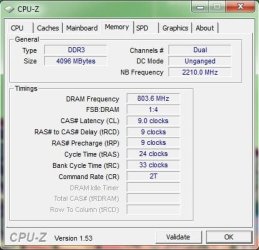
G.skill is 1333 8-8-8-21 1.6v stock, managed to OC it to 1600 9-9-9-24 1.65v.

Oh yeah and my northbridge is at 2.2 ghz from 2.0 stock. No voltage increase.
 

Attachments

  • G.Skill 4GB 1333 OC'd to 1600 9-9-9-24 cpuz 1-10-2010.JPG
    G.Skill 4GB 1333 OC'd to 1600 9-9-9-24 cpuz 1-10-2010.JPG
    35.6 KB · Views: 2
  • Phenom 720 unlocked CPUz 1-10-2010.JPG
    Phenom 720 unlocked CPUz 1-10-2010.JPG
    46.6 KB · Views: 8

My Computer

Computer Manufacturer/Model Number
Custom Rig
OS
Windows 7 Home Premium 64-Bit
CPU
AMD Phenom X3 720 (Unlocked Quad @ 3.6 Ghz 1.47v.)
Motherboard
Gigabyte 785gx Micro Atx Board
Memory
4 GB G.Skill 1333 DDR3 @ 1.6v
Graphics Card(s)
HIS HD 5850 @ Stock
Sound Card
Realtek Intergrated Sound
Monitor(s) Displays
24' Asus HDMI 1080p Monitor
Screen Resolution
1920X1080
Hard Drives
Seagate 500GB SATA II HD
PSU
550w Corsair ATXv 2.2 41a on the 12v rail.
Case
CoolerMaster 300 Mid-Tower
Cooling
3 Apevia 120mm Blue-LED Fans; Arctic Cooling Freezer Pro r2
Keyboard
Logitech Illuminated Keyboard
Mouse
Logitech G500
Internet Speed
DSL 7 Mbit down/ 1 Mbit Up
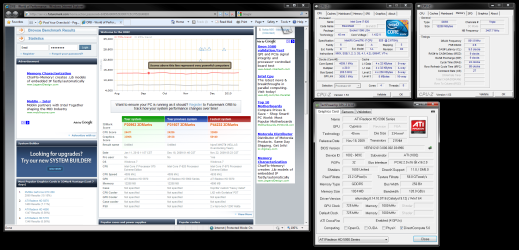
Here are my results
 

Attachments

  • Capture.PNG
    Capture.PNG
    155.6 KB · Views: 38

My Computer

Computer Manufacturer/Model Number
N/A
OS
Windows 7 Ultimate x64
CPU
Intel i7 [email protected]
Motherboard
Asus Maximus IV Extreme-Z
Memory
G Skill DDR3 12800 DDR3 RipJaws 16Gb
Graphics Card(s)
EVGA GTX480 Tri SLI
Sound Card
SoundBlaster X-Fi Surround 5.1 Pro
Monitor(s) Displays
3 * Dell U2711
Screen Resolution
7680x1440
Hard Drives
2 * OCZ Vertex 3 120Gb
4 * Seagate Barracuda XT 2Tb
1 * WD Caviar Black 1Tb
PSU
Silverstone ST1500
Case
Corsair Obsidian 800D
Cooling
Koolance CPU-360 : Koolance VID-480 : Koolance 360x3 + 120x1
Keyboard
Microsoft Sidewinder X4
Mouse
Logitech G1 Optical
Internet Speed
100Mb
What's Overclocking and how do you do it?
 

My Computer

Computer type
PC/Desktop
Computer Manufacturer/Model Number
Home Built
OS
Windows 7 Ultimate SP1 64- bit
CPU
Intel Core i7-3770K @3.50ghz
Motherboard
EVGA Z77 FTW
Memory
Kingston Technology 16GB (2x 8GB) 2133MHz DDR3 Non-ECC
Graphics Card(s)
EVGA GTX 670 4gb SC
Sound Card
Nil
Monitor(s) Displays
Samsung 22"
Screen Resolution
1920 x 1080 60hz
Hard Drives
OCZ Vertex 4 SSD 128GB
SAMSUNG Spinpoint F3 HD502HJ 500GB 7200 RPM
PSU
Enermax Platinax EPM1000EWT Special OC Edition
Case
Cooler Master HAF Full Tower nVIDIA Edition
Cooling
CoolerMaster Hyper 212 Plus
Keyboard
HP Wireless Keyboard
Mouse
Corsair Vengeance M90
Internet Speed
20 Mb
Other Info
ASUS DRW-24B1ST/BLK/B/AS Black SATA 24X DVD Burner
Overclocking is taking a CPU that is designed to run at one speed (say 2.5ghz) and instead try to make it run at 3.4ghz. It's to boost performance and to get higher performance out of lower end processors. There are many ways to do it, but generally speaking it involved increasing front side bus speeds and increasing voltages on the motherboard to support the higher speeds. Pushing hardware faster causes more heat and heat causes problems. So, it's imperative to work at cooling the chip as much as you can. Not all CPU's are great overclockers...and no two overclock exactly the same. Generally you can overclock motherboards from systems you build yourself, while pre-built systems like Dells and HP's often cannot be overclocked as these functions of the motherboard are locked out to prevent users from dabbling and breaking the machine causing a warranty issue.

For me, I overclocked an Intel Q9550 CPU ($209 at the time) from 2.83Ghz to 3.2ghz. The Q9650 which is the same chip but running at 3.0ghz is $325 today....and mine is running a bit faster than that. So, all in all, not a bad bump in performance. Although I rarely do anything with the machine which would really demonstrate a noticeable improvement either. :)
 

My Computer

Computer Manufacturer/Model Number
Self-Built in July 2009
OS
Windows 7 Ultimate x64
CPU
Intel Q9550 2.83Ghz OC'd to 3.40Ghz
Motherboard
Gigabyte GA-EP45-UD3R rev. 1.1, F12 BIOS
Memory
8GB G.Skill PI DDR2-800, 4-4-4-12 timings
Graphics Card(s)
EVGA 1280MB Nvidia GeForce GTX570
Sound Card
Realtek ALC899A 8 channel onboard audio
Monitor(s) Displays
23" Acer x233H
Screen Resolution
1920x1080
Hard Drives
Intel X25-M 80GB Gen 2 SSD
Western Digital 1TB Caviar Black, 32MB cache. WD1001FALS
PSU
Corsair 620HX modular
Case
Antec P182
Cooling
stock
Keyboard
ABS M1 Mechanical
Mouse
Logitech G9 Laser Mouse
Internet Speed
15/2 cable modem
Other Info
Windows and Linux enthusiast. Logitech G35 Headset.
Overclocking is taking a CPU that is designed to run at one speed (say 2.5ghz) and instead try to make it run at 3.4ghz. It's to boost performance and to get higher performance out of lower end processors. There are many ways to do it, but generally speaking it involved increasing front side bus speeds and increasing voltages on the motherboard to support the higher speeds. Pushing hardware faster causes more heat and heat causes problems. So, it's imperative to work at cooling the chip as much as you can. Not all CPU's are great overclockers...and no two overclock exactly the same. Generally you can overclock motherboards from systems you build yourself, while pre-built systems like Dells and HP's often cannot be overclocked as these functions of the motherboard are locked out to prevent users from dabbling and breaking the machine causing a warranty issue.

For me, I overclocked an Intel Q9550 CPU ($209 at the time) from 2.83Ghz to 3.2ghz. The Q9650 which is the same chip but running at 3.0ghz is $325 today....and mine is running a bit faster than that. So, all in all, not a bad bump in performance. Although I rarely do anything with the machine which would really demonstrate a noticeable improvement either. :)
Very interesting, alas I have a HP and I shan't bother then.
Thank you for an informative response.
 

My Computer

Computer type
PC/Desktop
Computer Manufacturer/Model Number
Home Built
OS
Windows 7 Ultimate SP1 64- bit
CPU
Intel Core i7-3770K @3.50ghz
Motherboard
EVGA Z77 FTW
Memory
Kingston Technology 16GB (2x 8GB) 2133MHz DDR3 Non-ECC
Graphics Card(s)
EVGA GTX 670 4gb SC
Sound Card
Nil
Monitor(s) Displays
Samsung 22"
Screen Resolution
1920 x 1080 60hz
Hard Drives
OCZ Vertex 4 SSD 128GB
SAMSUNG Spinpoint F3 HD502HJ 500GB 7200 RPM
PSU
Enermax Platinax EPM1000EWT Special OC Edition
Case
Cooler Master HAF Full Tower nVIDIA Edition
Cooling
CoolerMaster Hyper 212 Plus
Keyboard
HP Wireless Keyboard
Mouse
Corsair Vengeance M90
Internet Speed
20 Mb
Other Info
ASUS DRW-24B1ST/BLK/B/AS Black SATA 24X DVD Burner
Torture Tests

I have battle tested my OC at 100 percent load of all of all system drawing nearly 730 watts at the wall plug for hours! To do this I had to limit my OC to 3.8 Running only that weak sister of a test Prime 95 I could OC to 4.2 and still control heat.

How did you "Battle Test" your Overclock??

I had my CPU at 3.6Ghz (x4 940) for about 6 months based on it passing Prime and Orthos however when I tested it with AMD Overdrive a few months back it fell over in minutes.

This has resulted in my system being completely reset to stock. I will not keep the OC if it is unstable in anyway. Don't want it popping in the middle of a game.

I am well versed in the practices of overclocking however I do have the problem of not being able to find a proper torture program. Passmark's "Burn-in Test" is a nice all-round test but too light for testing an OC. "Heavyload" is a freeware tool I used which errored after 45 mins with an out of memory error due to the file size it got up to working with on my HDD.

I would appreciate any advice that can be provided on Torturing apps (Windows 7 tested) that would allow me to begin to push my core again.

I will be implementing a custom water loop very soon and want to return my clocks to their oc'd state but as previously stated I will not run them unstable.

Thank you in advance

Edit: I downloaded LinPack to look at it but it appears to be an Intel created Benchmark and not sure if the thread commands would be safe to run on my Phenom II
 

My Computer

Computer Manufacturer/Model Number
Me
OS
Windows 7 Ultimate x64
CPU
AMD Phenom II x940 (lapped)
Motherboard
Asus M3A79-T Deluxe
Memory
4GB (2x2GB) Corsiar Dominator 1066
Graphics Card(s)
XFX Radeon HD5870 XXX Edition
Sound Card
SoundBlaster Audigy 2 Platinum EX
Monitor(s) Displays
Samsung 22" Widescreen
Screen Resolution
1680x1050
Hard Drives
150GB WD Raptor (10,000RPM)
1TB Samsung Spinpoint F3
PSU
Zalman 750W Dual Heatpipe (Modular)
Case
Lian Li v2010 (Modded)
Cooling
Custom Water Loop
Keyboard
Saitek Eclipse II
Mouse
Logitech G5
Internet Speed
Wireless 5.5MB (802.11b Network)
I have battle tested my OC at 100 percent load of all of all system drawing nearly 730 watts at the wall plug for hours! To do this I had to limit my OC to 3.8 Running only that weak sister of a test Prime 95 I could OC to 4.2 and still control heat.

How did you "Battle Test" your Overclock??

I had my CPU at 3.6Ghz (x4 940) for about 6 months based on it passing Prime and Orthos however when I tested it with AMD Overdrive a few months back it fell over in minutes.

This has resulted in my system being completely reset to stock. I will not keep the OC if it is unstable in anyway. Don't want it popping in the middle of a game.

I am well versed in the practices of overclocking however I do have the problem of not being able to find a proper torture program. Passmark's "Burn-in Test" is a nice all-round test but too light for testing an OC. "Heavyload" is a freeware tool I used which errored after 45 mins with an out of memory error due to the file size it got up to working with on my HDD.

I would appreciate any advice that can be provided on Torturing apps (Windows 7 tested) that would allow me to begin to push my core again.

I will be implementing a custom water loop very soon and want to return my clocks to their oc'd state but as previously stated I will not run them unstable.

Thank you in advance

Edit: I downloaded LinPack to look at it but it appears to be an Intel created Benchmark and not sure if the thread commands would be safe to run on my Phenom II

I am at a loss to advise you on AMD chips. I USE Prime 95 Linpac OCCT furmark and other back ground apps first by themselves then in combination to blast my OC. But I have always used INTEL chips.
 

My Computer

Computer Manufacturer/Model Number
HomeBuilt
OS
Win 7 64 Ultimate- Win 7 Home premium 64- XP- Adndroid 3.1 and 2.3 Ubantu- Vista Ultimate 64
CPU
Intel I7 920 OC'd 3.8
Motherboard
Asus Rampage Extreme 11
Memory
12 gigs Dominator 1600
Graphics Card(s)
2ea Nvidia 280's SLI superclocked version
Sound Card
XFI
Monitor(s) Displays
Twin HP 2745's
Hard Drives
2ea 1 TB internal Drives - 6 TB External NAS
PSU
Thermaltake toughpower 1200 watt
Case
Lain Li A70b
Cooling
Air Cooled
Internet Speed
15 down 3 up Comcast
Mr. Mooneyham, thanks for the update. So far I can see setting 1.49V vcore to get 3.6 is OK in my case. I was wondering if that Vcore wasn't too much... but you had reached 1.65V? oh boy, you're really brave!

you got really impressive NB and temperature values. I will look for your cooler review.
I am supposing you can get these high NB values because you're choose DDR3 instead DDR2, is that correct?

BTW don't you have a 3dmark06 score of your 3.6GHz setup to post us? or your WEI scores?

Do you think its ok to get 55ºC fully load on the hottest ambient temp - 32C?
Thanks a lot!
1.65 is average for suicide runs, and it takes 1.55volts to get 3.6ghz with 1.55volts but i can up it to 3.8ghz but not sure if stable. its about 19-18c ambient with the s1284 with a scythe ultra kaze but it is a med-high range cooler, if you want the best get the corsair h-50, megahalems, or venmous-x. not sure if i got the higher cpu-nb speeds because of ddr3. i have a 3dmark 06 score but what is WEI? 55c is the average wall where temperature becomes an issue with stability.

3dmark 06 score =
13890 3dmarks
sm2.0 score 5797
hdr/sm3.0 score 6929
cpu score3232

Thanks again Mr. Mooneyham, that´s quality information for me since your values are in sync with mine.

WEI is the windows experience index. you can check my on my system specs info. its a easy way to compare specs... not so reliable but I dont want to spend your time.


QUOTING Lens Pirate:

"ALL PC's should be able to run at 100 percent...100 percent of the time. Other wise they are not designed correctly.
"


Mr. Lens Pirate (or any other who wants to help),

When I run prime95 I do clock monitoring with everest´s overclock tab.

As prime95 runs I can see minimal clock variations from 2.700 - 3500GHZ, but after 10 or 15 minutes I can notice a DROP from 200x16 to 200x4 giving me 800MHz only. that DROP remains only for a few seconds and go back again to 3500GHZ. prime95 looks unawared for that drop... everything seems fine including processor usage... I mean if I dont really pay attention on the everest monitoring I cannot see that variation.

so... here goes the question... it looks I am NOT running 100% ALL THE TIME. is that variations only happens with me / my system? can you guys be 100% positive your CLOCKS are 100% ALL THE TIME? in every second during prime95 stress test?

I think this drop is NOT temperature related or cool and quite related. also happens with other overclock settings: 200x16.5 (stock V) - 200x17.5 or 212*16.5 (+150mV).

should I live with that expecting I will never stress my pc like that while in a game? or should I move on my mother board and PSU?

comments will be appreciated.

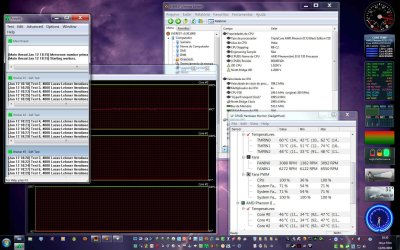
first screenshot: 15 minutes of prime95 - clock fluctuates from 2700 - 3492.3 MHz

second ss: 17 minutes of prime95 - clock drops down to 200 - 798.2 MHz just for 10-15 seconds.

the core temp log show the 15 sec clock variation. what can be causing that?
 

Attachments

  • SNAG-0003.jpg
    SNAG-0003.jpg
    278.9 KB · Views: 39
  • SNAG-0004.jpg
    SNAG-0004.jpg
    278.7 KB · Views: 18
  • SNAG-0008.jpg
    SNAG-0008.jpg
    39.7 KB · Views: 4
Last edited:

My Computer

Computer Manufacturer/Model Number
Personal Built (frankenstein) - WEI Here -> http://www.sevenforums.com/451826-post2094.html
OS
dual: windows 7 Ultimate x64 7600 and XP SP3
CPU
AMD PHENOM II 720 2800MHz
Motherboard
ASUS M4A78 sb700
Memory
2 X 2 OCZ REAPER 1066MHz
Graphics Card(s)
MSI 4850 1GB OC
Sound Card
REALTEK HD ONBOARD
Monitor(s) Displays
LCD SAMSUNG 21" T220
Screen Resolution
1680 x 1050 - 60Hz
Hard Drives
1.5 TB SEAGATE SATA II 7200 RPM
PSU
THERMALTAKE 430W PFC ACTIVE W0069
Case
SOLID FULL ATX
Cooling
COOLER MASTER TX-3 HEAT PIPES
Keyboard
logitech cordless keyboard
Mouse
microsoft wireless
Internet Speed
4Mb
Other Info
sound system: logitech x540 5.1
Zboard Fang gaming keyboard
PS2 joystick
Philips VOIP fone
This:
IntelBurnTest v2.3 download from Guru3D.com


Watch your temps!!

100% CPU use does NOT mean the CPU is being fully utilized.
Only that it is running at full speed. 2 different things.

Alot of people hat this app because there 12hr stable Prime OC fails IBT in 2 minutes, and produces MUCH MUCH more heat.
 

My Computer

Computer Manufacturer/Model Number
Custom (Self Build)
OS
Windows 7 Home Premium 64bit
CPU
Intel Core i7 2700k
Motherboard
eVGA P67 SLI
Memory
8GB Mushkin Redline Ridgebacks @1866
Graphics Card(s)
EVGA GTX570 SC
Sound Card
XiFi Titanium HD
Monitor(s) Displays
LG W2453V
Screen Resolution
1920x1080
Hard Drives
Intel 320 80GB -- Intel X25-V 40GB --WD Black 1TB x2 -- WD Blue 640GB
PSU
Seasonic x750
Case
Corsair 600T SE White
Cooling
eVGA Superclocked CPU Cooler
Keyboard
Saitek Cyborg
Antivirus
Kaspersky
Browser
IE
Other Info
LG BD/DVD
This:
IntelBurnTest v2.3 download from Guru3D.com


Watch your temps!! -definitely with IBT

100% CPU use does NOT mean the CPU is being fully utilized.
Only that it is running at full speed. 2 different things.

Alot of people hat this app because there 12hr stable Prime OC fails IBT in 2 minutes, and produces MUCH MUCH more heat.


OCCT / Orthos (based on P95) P95, IBT, Memetest86+ are all tools which have their strengths and weakness's.


The sad fact of Overclocking is that, none of them will ever 'fully guarantee' that an OC is ever 100% stable.

The best they can offer is clues that you're heading in the right or wrong setting adjustment direction or getting youas close to 100% stable you are ever going to get ;)

Every OC'er develops their own techniques / favourite apps. Like everything, it all becomes a matter off personal preference.
 

My Computer

Computer type
PC/Desktop
Computer Manufacturer/Model Number
Systems by SmartEyeball
OS
8 Pro x64
CPU
i7 3770K 4.6GHz
Motherboard
ASUS P8Z77 WS
Memory
16GB G.Skill Trident X 2666mhz
Graphics Card(s)
x2 EVGA 780 Ti Superclocked SLI
Sound Card
SB X-FI Surround 5.1 PRO USB / ATH-AD900 Headphones
Monitor(s) Displays
x3 Dell U2410 / 58" Samsung
Screen Resolution
5760*1200/ 1920*1200
Hard Drives
2x Intel 520 240GB (RAID 0) * 2x WD Caviar Blacks 2TB (RAID 0) * 2TB WD Caviar Black * Sony Optirac DVD
PSU
Silverstone Strider Evolution 1200W
Case
Thermaltake Level 10 GT Snow Edition
Cooling
Noctua NH-D14
Keyboard
Topre Realforce // Ducky Shine MX Black // Filco Ninja TKL
Mouse
Thermaltake Theron (Highly Recommended) + Razer Imperator
Antivirus
MSE
Browser
IE, FF, WaterFox
Other Info
GT Extreme V2 Sim Racing Cockpit + 40" LCD and K/B Mouse stand ▼
Fanatec CSR Elite Wheel + Clubsport V1 Pedals + CSR shifter/7G-H ▼Saitek X52 Pro ▼ TrackIR 5 Pro
Buttkicker v2 Seat Rumbler with Dedicated 5.1 and Sub Woofer attached to frame ▼
=
Bloody Big Grin
Well said :)
 

My Computer

Computer Manufacturer/Model Number
Custom (Self Build)
OS
Windows 7 Home Premium 64bit
CPU
Intel Core i7 2700k
Motherboard
eVGA P67 SLI
Memory
8GB Mushkin Redline Ridgebacks @1866
Graphics Card(s)
EVGA GTX570 SC
Sound Card
XiFi Titanium HD
Monitor(s) Displays
LG W2453V
Screen Resolution
1920x1080
Hard Drives
Intel 320 80GB -- Intel X25-V 40GB --WD Black 1TB x2 -- WD Blue 640GB
PSU
Seasonic x750
Case
Corsair 600T SE White
Cooling
eVGA Superclocked CPU Cooler
Keyboard
Saitek Cyborg
Antivirus
Kaspersky
Browser
IE
Other Info
LG BD/DVD
This:
IntelBurnTest v2.3 download from Guru3D.com


Watch your temps!!

100% CPU use does NOT mean the CPU is being fully utilized.
Only that it is running at full speed. 2 different things.

Alot of people hat this app because there 12hr stable Prime OC fails IBT in 2 minutes, and produces MUCH MUCH more heat.

I love this app. So much better than Prime95 for digging out weakness and crushing it. LOL
 

My Computer

Computer Manufacturer/Model Number
HomeBuilt
OS
Win 7 64 Ultimate- Win 7 Home premium 64- XP- Adndroid 3.1 and 2.3 Ubantu- Vista Ultimate 64
CPU
Intel I7 920 OC'd 3.8
Motherboard
Asus Rampage Extreme 11
Memory
12 gigs Dominator 1600
Graphics Card(s)
2ea Nvidia 280's SLI superclocked version
Sound Card
XFI
Monitor(s) Displays
Twin HP 2745's
Hard Drives
2ea 1 TB internal Drives - 6 TB External NAS
PSU
Thermaltake toughpower 1200 watt
Case
Lain Li A70b
Cooling
Air Cooled
Internet Speed
15 down 3 up Comcast

My Computer

Computer type
PC/Desktop
Computer Manufacturer/Model Number
Systems by SmartEyeball
OS
8 Pro x64
CPU
i7 3770K 4.6GHz
Motherboard
ASUS P8Z77 WS
Memory
16GB G.Skill Trident X 2666mhz
Graphics Card(s)
x2 EVGA 780 Ti Superclocked SLI
Sound Card
SB X-FI Surround 5.1 PRO USB / ATH-AD900 Headphones
Monitor(s) Displays
x3 Dell U2410 / 58" Samsung
Screen Resolution
5760*1200/ 1920*1200
Hard Drives
2x Intel 520 240GB (RAID 0) * 2x WD Caviar Blacks 2TB (RAID 0) * 2TB WD Caviar Black * Sony Optirac DVD
PSU
Silverstone Strider Evolution 1200W
Case
Thermaltake Level 10 GT Snow Edition
Cooling
Noctua NH-D14
Keyboard
Topre Realforce // Ducky Shine MX Black // Filco Ninja TKL
Mouse
Thermaltake Theron (Highly Recommended) + Razer Imperator
Antivirus
MSE
Browser
IE, FF, WaterFox
Other Info
GT Extreme V2 Sim Racing Cockpit + 40" LCD and K/B Mouse stand ▼
Fanatec CSR Elite Wheel + Clubsport V1 Pedals + CSR shifter/7G-H ▼Saitek X52 Pro ▼ TrackIR 5 Pro
Buttkicker v2 Seat Rumbler with Dedicated 5.1 and Sub Woofer attached to frame ▼
=
Bloody Big Grin
Yeah, IBT's previous versions had bugs when you selected various thread configurations for multicore cpus in a 64bit environment. That said, I find it to be the most stressful test out there. Realtemp's sensor test was also very valuable at exposing weaknesses in a processor.

My current i7 920 overclock is: 4.05GHz @ 1.265V, 1.35QPI, 1.65V DDR on an ASUS P6TSE. Its 100% stable even with power saving features like C1E and Windows 7 Power Management enabled (clocks down to 2.5GHz). Good enough for me, since it runs a lot faster than any retail processor you can buy excluding a couple Xeon workstation chips.

I have my Radeon 5850 (sapphire) running at 900/1250 @1.1V during demanding games, and reverting to defaults for some games and desktop environment.
 

My Computer

OS
Windows 7 Professional 64-bit
CPU
Core i7 920 D0 @4.05GHz
Motherboard
ASUS P6T SE
Memory
6GB DDR3 1600 G.Skill
Graphics Card(s)
Sapphire Radeon 5850
Monitor(s) Displays
Samsung SyncMaster 2253LW
Screen Resolution
1680x1050
Hard Drives
Western Digital Black 640GB
Seagate 7200.12 500GB
PSU
Antec TruePower Blue 750W
Case
Antec 902
Cooling
Thermalright Ultra 120 Extreme 1366
Internet Speed
Bell Aliant High-Speed Ultra 7Mbps
Other Info
Pioneer DVR-116DBK Burner
No overclocking here, just posting my Super PI time of 24 minutes and 27 seconds for 32 million places. :D You can use that as a laptop basemark or something.
 

My Computer

Computer Manufacturer/Model Number
Zen Productions
OS
Windows 7 Ultimate x64
CPU
Intel i7-860
Motherboard
Gigabyte GA-P55A-UD4P
Memory
Corsair Dominator 1600Mhz, 8-8-8-24 1.65v 2x2GB
Graphics Card(s)
ATI Radeon 5770 HD
Sound Card
Intel High Definition Sound
Monitor(s) Displays
Samsung P2570HD
Screen Resolution
1920x1080
Hard Drives
Western Digital Caviar Black 500gb
PSU
Corsair CMPSU-750HX 750W
Case
Antec p183
Cooling
Corsair H50 Water Cooler
Keyboard
Logitech G110
Mouse
Logitech MX Revolution
Internet Speed
768 mb/s
Nice OCs guys, you made me jump to the i7 and I don't regret it:) I do wish I could run my ram at a full 2000mhz but my uncore will just not pass 3.6ghz mark no matter what


My Computer

Computer type
PC/Desktop
Computer Manufacturer/Model Number
Elsa
OS
windows 8.1 Pro x64
CPU
intel [email protected]
Motherboard
msi mpower max ac
Memory
2x8gb ripjaws x @2133
Graphics Card(s)
asus r9-290@1100/1300
Sound Card
creative sbz
Monitor(s) Displays
dell u3011
Hard Drives
840 evo 250 & 8.5tb
PSU
evga supernova p2-1000
Case
corsair air 540
Cooling
corsair h100
Keyboard
logitech g710+
Mouse
logitech g502
Internet Speed
50/10
Antivirus
avg
Browser
firefox
Only pic i have currently
overclock.jpg
 

My Computer

OS
Win 7
CPU
i7 920 @ 4000MHZ
Motherboard
GIGABYTE GA-EX58-UD5
Memory
CORSAIR XMS3 X 6GB
Graphics Card(s)
ATI RADEON HD5870 (1024MB)
Monitor(s) Displays
LG FLATRON W2252S 22INCH LCD
Screen Resolution
1680 X 1050
Hard Drives
SAMSUNG SPINPOINT 1TB 7200RPM SATA2
PSU
ANTEC CP-850 MODULAR
Case
ANTEC 1200
Cooling
SCYTHE MUGEN 2
Keyboard
LOGITECH LX710 EASYCALL
Mouse
LOGITECH LX715 LASER
Internet Speed
20MB
Status
Not open for further replies.
Back
Top