Power DVD9 Ultra as default player?

vinylfreak

New member
Local time
6:20 PM
Messages
6
I really like the new up-scaling ability built into the latest version of PowerDVD9 Ultra.It really works well.

Is there any way to tell Media Center to use it as the default DVD player when I go to play a stored DVD on my hard drive?
Power DVD9 is already my default player for my BluRay isos. I would really like to use it for my SD DVDs also.

Thanks!:)
 

My Computer My Computer

Computer Manufacturer/Model Number
Homebuilt HTPC
OS
64 bit 7 RTM
CPU
AMD FX-60
Motherboard
Asus A8nsli
Memory
4gb
Graphics Card(s)
Nvidia 8600 GTS
Sound Card
Asus Xonar D2X
Monitor(s) Displays
32 inch Zenith HDTV CRT
Hard Drives
74gb Raptor/OS,1TBCaviar Black WD(Music),2 1TBCaviar Black WD Raid 0 (Recorded TV & Movies)
PSU
600 watt
Case
Silverstone LC-17 Black
Cooling
Zalman
Have I stumped the Panel?
Anyone have a solution to this?
I'm not afraid to hack around. :D
 

My Computer My Computer

Computer Manufacturer/Model Number
Homebuilt HTPC
OS
64 bit 7 RTM
CPU
AMD FX-60
Motherboard
Asus A8nsli
Memory
4gb
Graphics Card(s)
Nvidia 8600 GTS
Sound Card
Asus Xonar D2X
Monitor(s) Displays
32 inch Zenith HDTV CRT
Hard Drives
74gb Raptor/OS,1TBCaviar Black WD(Music),2 1TBCaviar Black WD Raid 0 (Recorded TV & Movies)
PSU
600 watt
Case
Silverstone LC-17 Black
Cooling
Zalman
just type 'Autoplay' without the quotes into the search bar under the start button, set it as default player for DVD Movie from there.
 

My Computer My Computer

OS
Windows 7 Ultimate 64Bit
CPU
AMD Athlon x4 650 3Ghz
Motherboard
ASUS
Memory
4gb
Graphics Card(s)
ATI Radeon 3000 series Onboard
Oh, if only it were that simple.:sarc:

I tried that a long time ago. Within MC7 it reverts back to the native MC DVD decoder.:(
 

My Computer My Computer

Computer Manufacturer/Model Number
Homebuilt HTPC
OS
64 bit 7 RTM
CPU
AMD FX-60
Motherboard
Asus A8nsli
Memory
4gb
Graphics Card(s)
Nvidia 8600 GTS
Sound Card
Asus Xonar D2X
Monitor(s) Displays
32 inch Zenith HDTV CRT
Hard Drives
74gb Raptor/OS,1TBCaviar Black WD(Music),2 1TBCaviar Black WD Raid 0 (Recorded TV & Movies)
PSU
600 watt
Case
Silverstone LC-17 Black
Cooling
Zalman
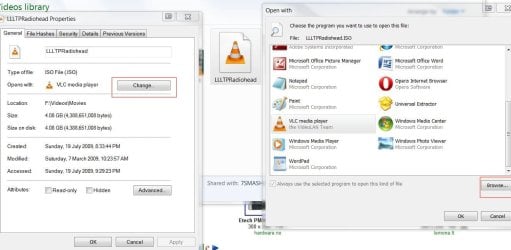
Have you tried right-clicking on the .iso :

Properties> General Tab > 'Change...' and then selecting PowerDVD 9 as the player? (browse to PowerDVD 9's folder/.exe if it doesn't show up in the program list)

iso vid.JPG
 

My Computer My Computer

Computer type
PC/Desktop
Computer Manufacturer/Model Number
Systems by SmartEyeball
OS
8 Pro x64
CPU
i7 3770K 4.6GHz
Motherboard
ASUS P8Z77 WS
Memory
16GB G.Skill Trident X 2666mhz
Graphics Card(s)
x2 EVGA 780 Ti Superclocked SLI
Sound Card
SB X-FI Surround 5.1 PRO USB / ATH-AD900 Headphones
Monitor(s) Displays
x3 Dell U2410 / 58" Samsung
Screen Resolution
5760*1200/ 1920*1200
Hard Drives
2x Intel 520 240GB (RAID 0) * 2x WD Caviar Blacks 2TB (RAID 0) * 2TB WD Caviar Black * Sony Optirac DVD
PSU
Silverstone Strider Evolution 1200W
Case
Thermaltake Level 10 GT Snow Edition
Cooling
Noctua NH-D14
Keyboard
Topre Realforce // Ducky Shine MX Black // Filco Ninja TKL
Mouse
Thermaltake Theron (Highly Recommended) + Razer Imperator
Antivirus
MSE
Browser
IE, FF, WaterFox
Other Info
GT Extreme V2 Sim Racing Cockpit + 40" LCD and K/B Mouse stand ▼
Fanatec CSR Elite Wheel + Clubsport V1 Pedals + CSR shifter/7G-H ▼Saitek X52 Pro ▼ TrackIR 5 Pro
Buttkicker v2 Seat Rumbler with Dedicated 5.1 and Sub Woofer attached to frame ▼
=
Bloody Big Grin
Disable Windows Mediacenter from running on your system

try this instead:​
  1. Click Start, click Default Programs, and click Set program access and computer defaults.
  2. Click on Custom, and scroll down to Choose a default media player.
  3. Uncheck Enable access to this program next to Windows Media Center.
  4. Click OK, and close all the windows we opened.
  5. This will prevent the Media Center from being launched or displayed any further.
  6. To undo this change simply check the field you previously cleared.


My Computer My Computer

OS
Windows 7 Ultimate 64Bit
CPU
AMD Athlon x4 650 3Ghz
Motherboard
ASUS
Memory
4gb
Graphics Card(s)
ATI Radeon 3000 series Onboard
I think people are a little confused with what he is trying to do. First, when Media Center is open it overrides the system autoplay handler with it's own. What I believe the OP is trying to do is setup PowerDVD to be the DVD player used by Movie Library when selecting DVDs and when movies are inserted into the disc.

@vinylfreak- Please let me know if I am correct in what you are trying to accomplish. If so, the good news is it can be done. The bad it requires a couple hacks but I can help with that =)
 

My Computer My Computer

Computer Manufacturer/Model Number
My HTPC
OS
6x W2K8 R2 (x64), 6x W7 7600 (x64), 2x Gentoo (x64), 1x Ubuntu 9.04 (x64), 1x pfSense (FreeBSD)
CPU
Core2 Duo E8400 3.0Ghz
Motherboard
ASUS P5E-VM
Memory
Corsair DDR-800 4GB RAM
Graphics Card(s)
EVGA NVidia GeForce GT240
Screen Resolution
1080p
Hard Drives
OCZ Vertex 60GB (C:\D: System\Apps)
WD 1TB x1 (G: Temp\Recorded TV)
WD 2TB x8 (On Server)
PSU
Corsair HX520w
Case
Antec Fusion Max
Cooling
Passive Thermalright HR-1 CPU Heatsink w/ Nexus Fan
I think people are a little confused with what he is trying to do. First, when Media Center is open it overrides the system autoplay handler with it's own. What I believe the OP is trying to do is setup PowerDVD to be the DVD player used by Movie Library when selecting DVDs and when movies are inserted into the disc.

@vinylfreak- Please let me know if I am correct in what you are trying to accomplish. If so, the good news is it can be done. The bad it requires a couple hacks but I can help with that =)

Yes! That is exactly what I want to do. While in the Media Center UI whether I go to the Movie Library, Media Browser, or My Movies I would like to use the PowerDVD9 decoder as my Default when playing SD DVDs.
Any help would be greatly appreciated. Thanks! to all who have chimed in on this issue. :D
 

My Computer My Computer

Computer Manufacturer/Model Number
Homebuilt HTPC
OS
64 bit 7 RTM
CPU
AMD FX-60
Motherboard
Asus A8nsli
Memory
4gb
Graphics Card(s)
Nvidia 8600 GTS
Sound Card
Asus Xonar D2X
Monitor(s) Displays
32 inch Zenith HDTV CRT
Hard Drives
74gb Raptor/OS,1TBCaviar Black WD(Music),2 1TBCaviar Black WD Raid 0 (Recorded TV & Movies)
PSU
600 watt
Case
Silverstone LC-17 Black
Cooling
Zalman
Yes! That is exactly what I want to do. While in the Media Center UI whether I go to the Movie Library, Media Browser, or My Movies I would like to use the PowerDVD9 decoder as my Default when playing SD DVDs.
Any help would be greatly appreciated. Thanks! to all who have chimed in on this issue. :D

Sorry just one more question. Do you want the decoder to be used or the external player?
 

My Computer My Computer

Computer Manufacturer/Model Number
My HTPC
OS
6x W2K8 R2 (x64), 6x W7 7600 (x64), 2x Gentoo (x64), 1x Ubuntu 9.04 (x64), 1x pfSense (FreeBSD)
CPU
Core2 Duo E8400 3.0Ghz
Motherboard
ASUS P5E-VM
Memory
Corsair DDR-800 4GB RAM
Graphics Card(s)
EVGA NVidia GeForce GT240
Screen Resolution
1080p
Hard Drives
OCZ Vertex 60GB (C:\D: System\Apps)
WD 1TB x1 (G: Temp\Recorded TV)
WD 2TB x8 (On Server)
PSU
Corsair HX520w
Case
Antec Fusion Max
Cooling
Passive Thermalright HR-1 CPU Heatsink w/ Nexus Fan
Sorry just one more question. Do you want the decoder to be used or the external player?
I would really like for it to display the same behavior it does when I play a BluRay that has been ripped to the hard drive as an iso. I hit play and Power DVD9 opens up and plays the BR movie.
I want to take advantage of the up-scaling properties for SD DVDs in Power DVD9 Ultra while within the Media Center UI.
I normally play my BR isos with Media Browser or My Movies within Media Center. So I guess the answer to the question is that I want both. If that is possible.
 

My Computer My Computer

Computer Manufacturer/Model Number
Homebuilt HTPC
OS
64 bit 7 RTM
CPU
AMD FX-60
Motherboard
Asus A8nsli
Memory
4gb
Graphics Card(s)
Nvidia 8600 GTS
Sound Card
Asus Xonar D2X
Monitor(s) Displays
32 inch Zenith HDTV CRT
Hard Drives
74gb Raptor/OS,1TBCaviar Black WD(Music),2 1TBCaviar Black WD Raid 0 (Recorded TV & Movies)
PSU
600 watt
Case
Silverstone LC-17 Black
Cooling
Zalman
I would really like for it to display the same behavior it does when I play a BluRay that has been ripped to the hard drive as an iso. I hit play and Power DVD9 opens up and plays the BR movie.
I want to take advantage of the up-scaling properties for SD DVDs in Power DVD9 Ultra while within the Media Center UI.
I normally play my BR isos with Media Browser or My Movies within Media Center. So I guess the answer to the question is that I want both. If that is possible.

Well if you use Media Browser I believe there is an option to launch external applications. I no longer use Media Browser so I can't be more specific where the option is located but it is in the config somewhere.

For MyMovies I am honestly not sure if that is an option or not. For Movie Library\Video Library I'll dig out my old plugin for doing this, might take me a while as I'm immobile for a couple days and I don't think it is on my server.
 

My Computer My Computer

Computer Manufacturer/Model Number
My HTPC
OS
6x W2K8 R2 (x64), 6x W7 7600 (x64), 2x Gentoo (x64), 1x Ubuntu 9.04 (x64), 1x pfSense (FreeBSD)
CPU
Core2 Duo E8400 3.0Ghz
Motherboard
ASUS P5E-VM
Memory
Corsair DDR-800 4GB RAM
Graphics Card(s)
EVGA NVidia GeForce GT240
Screen Resolution
1080p
Hard Drives
OCZ Vertex 60GB (C:\D: System\Apps)
WD 1TB x1 (G: Temp\Recorded TV)
WD 2TB x8 (On Server)
PSU
Corsair HX520w
Case
Antec Fusion Max
Cooling
Passive Thermalright HR-1 CPU Heatsink w/ Nexus Fan
Well if you use Media Browser I believe there is an option to launch external applications. I no longer use Media Browser so I can't be more specific where the option is located but it is in the config somewhere.

For MyMovies I am honestly not sure if that is an option or not. For Movie Library\Video Library I'll dig out my old plugin for doing this, might take me a while as I'm immobile for a couple days and I don't think it is on my server.
Take your time!
I really appreciate your help! I have been struggling with this one for awhile. In the meantime I will take a closer look at the config in MB.
 

My Computer My Computer

Computer Manufacturer/Model Number
Homebuilt HTPC
OS
64 bit 7 RTM
CPU
AMD FX-60
Motherboard
Asus A8nsli
Memory
4gb
Graphics Card(s)
Nvidia 8600 GTS
Sound Card
Asus Xonar D2X
Monitor(s) Displays
32 inch Zenith HDTV CRT
Hard Drives
74gb Raptor/OS,1TBCaviar Black WD(Music),2 1TBCaviar Black WD Raid 0 (Recorded TV & Movies)
PSU
600 watt
Case
Silverstone LC-17 Black
Cooling
Zalman
Power DVD 9 stopped working for me in Windows 7 x64 RTM - I have no idea why - I installed the latest nvidia drivers, but it crashes on each launch - even with compatibility. But I understand why you want it as default - videos look very nice with it.
 

My Computer My Computer

Computer Manufacturer/Model Number
Intel / Custom
OS
Windows 7 x64
CPU
Intel Core 2 Duo E4500 @2200 Mhz
Motherboard
Intel DG965WH
Memory
4GB (2x2) DDR 2 800
Graphics Card(s)
Geforce 8800 GTS 320 GDDR3
Sound Card
On Board IDT 7.1 Dolby
Monitor(s) Displays
Acer AL1717 / Philips 32PFL3403 (HDTV)
Screen Resolution
1280 * 1024 / 1280 * 768
Hard Drives
ST3250310AS Seagate Barracuda : 250 GB
SAMSUNG HD502HI Samsung SpinPoint F2EG : 500 GB
SAMSUNG HD502IJ SpinPoint F1 : 500 GB
WDC WD5000AAKS-22A7B0 : 500GB
PSU
500W
Case
Zebronics Peace Custom
Cooling
6 x Cooling Fans
Keyboard
Generic
Mouse
Generic - Profile Mouse
Internet Speed
Crap
Hi !!! This thread got some solution ?

I also would like to use PowerDVD9 as default player for my DVD Movie Library (within Windows 7 MediaCenter), anyone out there has found a solution ?

I looking around, but i have not found any response about this !!

Will be appreciate any answer about it.
BYe
 

My Computer My Computer

OS
Windows 7
Back
Top