
Hello All:
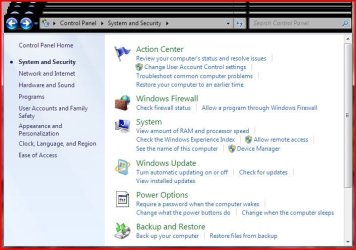
I just found out the power management components on my desktop has become completely corrupted. I have a Dell desktop runnin win 7 x64. When I go to Control panel, the Power Options original icon is missing, when I click on Power Options, I get essentially a blank window. Please see the screen captures.
The system is working normally in other respects as far as I can tell. I don't know when this occurred because I have not needed to adjust any power options for the last few months. I tried using system restore but there were no previous restore points available.
Any suggestions would be greatly appreciated.
I just found out the power management components on my desktop has become completely corrupted. I have a Dell desktop runnin win 7 x64. When I go to Control panel, the Power Options original icon is missing, when I click on Power Options, I get essentially a blank window. Please see the screen captures.
The system is working normally in other respects as far as I can tell. I don't know when this occurred because I have not needed to adjust any power options for the last few months. I tried using system restore but there were no previous restore points available.
Any suggestions would be greatly appreciated.
Attachments

My Computer
- OS
- Win 7 Ultimate X64


