Solved Power Options Not Working

priuscat

New member
I have Windows 7 Ultimate x64 on my laptop and my desktop. My monitor no longer turns off after 20 minutes (what I have set in "when to turn Monitor Off") So I set when to turn monitor of after 1 minute, Results: monitors stay on all the time, never turning off on both my Laptop and my Desktop.
 

My Computer

OS
windows 7 ultimate x64
Try going to Control Panel\All Control Panel Items\Power Options\Edit Plan Settings then click on Restore Default Setting For This Plan. Save changes, see what happens.
 

My Computer

Computer type
PC/Desktop
Computer Manufacturer/Model Number
Lenovo IdeaCenter 450
OS
Windows 10 Pro X64
CPU
Intel Quad Core i7-4770 @ 3.4Ghz
Memory
16.0GB PC3-12800 DDR3 SDRAM 1600 MHz
Graphics Card(s)
Intel Integrated HD Graphics
Sound Card
Realtek HD Audio
Monitor(s) Displays
HP 22" LCD
Screen Resolution
1680 x 1050
Hard Drives
250GB Samsung EVO SATA-3 SSD
2TB Seagate ST2000DM001 SATA-2
1.5TB Seagate ST3150041AS SATA
Keyboard
Dell USB
Mouse
Lenovo USB
Internet Speed
Cable via Road Runner 3MB Upload, 30MB Download
Antivirus
Windows Defender, MBAM Pro, MBAE
Browser
Seamonkey
Other Info
UEFI/GPT
PLDS DVD-RW DH16AERSH
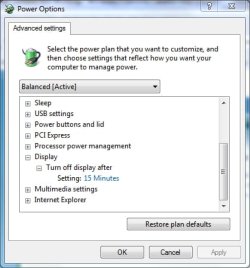
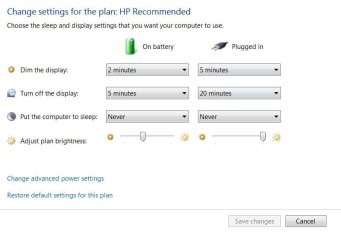
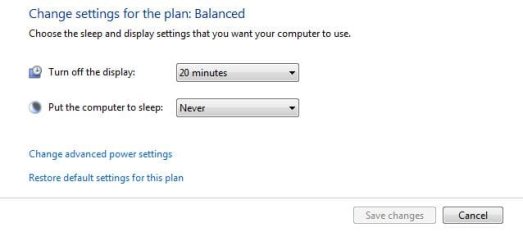
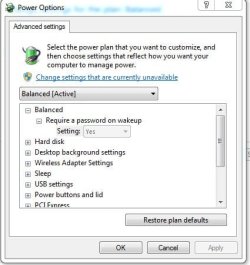
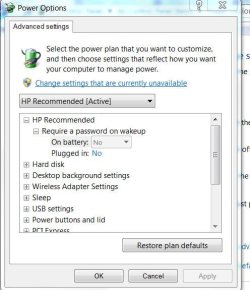
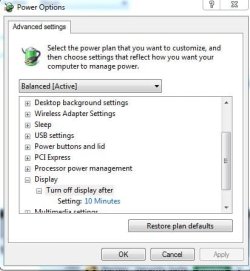
Does it show the same in both places?

PowerOP1.jpg

PowerOP2.jpg
 

My Computer

Computer type
PC/Desktop
Computer Manufacturer/Model Number
Lenovo IdeaCenter 450
OS
Windows 10 Pro X64
CPU
Intel Quad Core i7-4770 @ 3.4Ghz
Memory
16.0GB PC3-12800 DDR3 SDRAM 1600 MHz
Graphics Card(s)
Intel Integrated HD Graphics
Sound Card
Realtek HD Audio
Monitor(s) Displays
HP 22" LCD
Screen Resolution
1680 x 1050
Hard Drives
250GB Samsung EVO SATA-3 SSD
2TB Seagate ST2000DM001 SATA-2
1.5TB Seagate ST3150041AS SATA
Keyboard
Dell USB
Mouse
Lenovo USB
Internet Speed
Cable via Road Runner 3MB Upload, 30MB Download
Antivirus
Windows Defender, MBAM Pro, MBAE
Browser
Seamonkey
Other Info
UEFI/GPT
PLDS DVD-RW DH16AERSH
Thank you for your submittal to the NVIDIA Product Feedback Page.
We will carefully review your submission and may contact you for further information if needed as we attempt to reproduce your issue.
Sincerely,
NVIDIA Customer Care

To access your issue from our support site, click here.


Issue Reference #120329-000130
Summary: Monitors on both my laptop and desktop don't shut off after the prescribed 20 mi...
Product Level 1: GeForce graphics
Date Created: 03/29/2012 12:20 PM
Last Updated: 03/29/2012 12:20 PM
Status: New
Choose OS: Microsoft Windows 7 64bit
Product Name: GTX 580 GT9600M
Driver Version: 296.10

Discussion Thread
Customer By Web Form (RICHARD ZIMMERMAN) 03/29/2012 12:20 PM
Monitors on both my laptop and desktop don't shut off after the prescribed 20 minutes set in power options. Reverting back to driver 280.36 resolves this issue.

Update: After my monitor turned of after 30 minutes two different times, Now the monitor stays on all the time.
 
Last edited:

My Computer

OS
windows 7 ultimate x64
Sure sounds like a driver issue. Have you tried updating your Nvidia driver to the latest available version?

Also, with all the images you posted you didn't show what Display was set to under Advanced Options (my 2nd image and what I meant by the same in both places).
 

My Computer

Computer type
PC/Desktop
Computer Manufacturer/Model Number
Lenovo IdeaCenter 450
OS
Windows 10 Pro X64
CPU
Intel Quad Core i7-4770 @ 3.4Ghz
Memory
16.0GB PC3-12800 DDR3 SDRAM 1600 MHz
Graphics Card(s)
Intel Integrated HD Graphics
Sound Card
Realtek HD Audio
Monitor(s) Displays
HP 22" LCD
Screen Resolution
1680 x 1050
Hard Drives
250GB Samsung EVO SATA-3 SSD
2TB Seagate ST2000DM001 SATA-2
1.5TB Seagate ST3150041AS SATA
Keyboard
Dell USB
Mouse
Lenovo USB
Internet Speed
Cable via Road Runner 3MB Upload, 30MB Download
Antivirus
Windows Defender, MBAM Pro, MBAE
Browser
Seamonkey
Other Info
UEFI/GPT
PLDS DVD-RW DH16AERSH
Turn off display desktop.JPG
Sure sounds like a driver issue. Have you tried updating your Nvidia driver to the latest available version?

Also, with all the images you posted you didn't show what Display was set to under Advanced Options (my 2nd image and what I meant by the same in both places).

296.10 is the latest as I stated in my post I went to Microsoft's FIXIT program, which is the idiots fixit program because it just went to power options and reset the options to default which I already did by myself, it didn't "fix" anything
 
Last edited:

My Computer

OS
windows 7 ultimate x64

My Computer

Computer type
PC/Desktop
Computer Manufacturer/Model Number
Lenovo IdeaCenter 450
OS
Windows 10 Pro X64
CPU
Intel Quad Core i7-4770 @ 3.4Ghz
Memory
16.0GB PC3-12800 DDR3 SDRAM 1600 MHz
Graphics Card(s)
Intel Integrated HD Graphics
Sound Card
Realtek HD Audio
Monitor(s) Displays
HP 22" LCD
Screen Resolution
1680 x 1050
Hard Drives
250GB Samsung EVO SATA-3 SSD
2TB Seagate ST2000DM001 SATA-2
1.5TB Seagate ST3150041AS SATA
Keyboard
Dell USB
Mouse
Lenovo USB
Internet Speed
Cable via Road Runner 3MB Upload, 30MB Download
Antivirus
Windows Defender, MBAM Pro, MBAE
Browser
Seamonkey
Other Info
UEFI/GPT
PLDS DVD-RW DH16AERSH

My Computer

OS
windows 7 ultimate x64
I signed up for Comcast Signature Support. they scanned both my laptop and desktop for malware, spyware and ad ware found ad ware on both computers, removed it. Results: both monitors are shutting off after 15 minutes, we'll see if the problem comes back.
 

My Computer

OS
windows 7 ultimate x64
That's good news. I really didn't think this would be malware but I'll remember for the future.
 

My Computer

Computer type
PC/Desktop
Computer Manufacturer/Model Number
Lenovo IdeaCenter 450
OS
Windows 10 Pro X64
CPU
Intel Quad Core i7-4770 @ 3.4Ghz
Memory
16.0GB PC3-12800 DDR3 SDRAM 1600 MHz
Graphics Card(s)
Intel Integrated HD Graphics
Sound Card
Realtek HD Audio
Monitor(s) Displays
HP 22" LCD
Screen Resolution
1680 x 1050
Hard Drives
250GB Samsung EVO SATA-3 SSD
2TB Seagate ST2000DM001 SATA-2
1.5TB Seagate ST3150041AS SATA
Keyboard
Dell USB
Mouse
Lenovo USB
Internet Speed
Cable via Road Runner 3MB Upload, 30MB Download
Antivirus
Windows Defender, MBAM Pro, MBAE
Browser
Seamonkey
Other Info
UEFI/GPT
PLDS DVD-RW DH16AERSH
I give up. Monitor on laptop is staying on. but desktop monitor still shutting off as scheduled
 

My Computer

OS
windows 7 ultimate x64
Now my laptop is screwing with me. Turned on my laptop when I got home from work. Monitor dims as scheduled and shuts off too!

Update: moved mouse to turn on display, it's back to the display staying on all the time, touchpad on laptop is disabled, unplugged usb mouse for 2 hours, monitor still stays on.
 
Last edited:

My Computer

OS
windows 7 ultimate x64
Update: NVIDIA told me it's NORTON SECURITY. uninstalled NORTON. results: both monitors shut off as set in power options on my laptop and desktop. Re installed NORTON: results: issue returns. Currently working with NORTON. stay tuned.
 

My Computer

OS
windows 7 ultimate x64
Dump Norton, install Microsoft Security Essentials and never look back.
 

My Computer

Computer type
PC/Desktop
Computer Manufacturer/Model Number
Lenovo IdeaCenter 450
OS
Windows 10 Pro X64
CPU
Intel Quad Core i7-4770 @ 3.4Ghz
Memory
16.0GB PC3-12800 DDR3 SDRAM 1600 MHz
Graphics Card(s)
Intel Integrated HD Graphics
Sound Card
Realtek HD Audio
Monitor(s) Displays
HP 22" LCD
Screen Resolution
1680 x 1050
Hard Drives
250GB Samsung EVO SATA-3 SSD
2TB Seagate ST2000DM001 SATA-2
1.5TB Seagate ST3150041AS SATA
Keyboard
Dell USB
Mouse
Lenovo USB
Internet Speed
Cable via Road Runner 3MB Upload, 30MB Download
Antivirus
Windows Defender, MBAM Pro, MBAE
Browser
Seamonkey
Other Info
UEFI/GPT
PLDS DVD-RW DH16AERSH
Dump Norton, install Microsoft Security Essentials and never look back.

thanks for the suggestion, I uninstalled NORTON problem still there so I uninstalled Comcast Constant Guard, that fixed it, power options working now
 

My Computer

OS
windows 7 ultimate x64
Back
Top