Solved Power Supply Suggestion

monster528

New member
Member
VIP
Local time
5:54 AM
Messages
106
lately ive been having a lot of crashing and freezing and ive basically narrowed the problem down to my weak 500w power supply.

this is my current supply:
http://www.newegg.com/Product/Product.aspx?Item=N82E16817371035
and GPU: http://www.newegg.com/Product/Product.aspx?Item=N82E16814150550

needles to say i need a new one and have been looking around for some good deals.

ive narrowed it down to a few and was hoping to get some input from you guys. obviously if you guys have a better suggestion feel free to post a link

http://www.tigerdirect.com/applications/SearchTools/item-details.asp?EdpNo=1143938&CatId=5433

http://www.tigerdirect.com/applications/SearchTools/item-details.asp?EdpNo=7195038&CatId=2533

http://www.newegg.com/Product/Product.aspx?Item=N82E16817139025

the main thing I dont understand is how important are the 3.3v and 5v rails? i understand the 12v rail is the most important, but is it worth sacrificing the amps on the 3.3 and 5 to get a better 12v rating?
 
Last edited:

My Computer

Computer type
PC/Desktop
OS
Windows 7 64 Bit
CPU
Intel Core i5 4670K 3.4GHz Socket LGA 1150
Motherboard
MSI Z87-G41 PC Mate Socket LGA 1150 ATX Intel Motherboard
Memory
8GB
Graphics Card(s)
ATI HD 6950
Sound Card
ASUS GTX760-DC2OC-2GD5
Hard Drives
1TB
The Corsair TX750 will be more than enough for your system and it is priced right.
 

My Computer

Computer type
PC/Desktop
Computer Manufacturer/Model Number
Self Built Custom Computer.
OS
Windows 10 Pro x64
CPU
i7-4770K
Motherboard
Asus Z87 Sabertooth
Memory
16Gig DDR3-2400
Graphics Card(s)
Gigabyte GT740
Sound Card
Onboard
Monitor(s) Displays
Benq 27" - Dell 23' - Benq 22"
Screen Resolution
1680x1050
Hard Drives
Samsung 840 Pro 128g SSD
1xWestern Digital Caviar Green 1tb
2xWestern Digital Caviar Green 2 tb
PSU
Seasonic 760 watt Platinum
Case
Coolermaster Haf - X
Cooling
Noctua NH-C12P CPU Cooler
Keyboard
Logitech illuminated keyboard
Mouse
Logitech Perfomance MX
Internet Speed
Cable = speeds to 20Mbps downsteam and 512kbps upsteam
Antivirus
Avast Internet Security
Browser
Firefox
Of those you list, I would probably choose the XFX as it has a good chance of being made by Seasonic. Some Corsairs are also made by Seasonic, but I'm not sure which since that changes over time.

Or you could just try to find a Seasonic branded unit in your price range.

I would pay attention almost entirely to the 12 v rating. The chances of any decent PSU being too weak on the 3.3 or 5 volt rails is very small. Nowadays, all the power-hungry stuff gets power from the 12 volt rail.
 

My Computer

Computer type
PC/Desktop
Computer Manufacturer/Model Number
Ignatz Special; 4 speed manual gearbox; factory air conditioning; one of one
OS
Windows 7 Home Premium SP1, 64-bit
CPU
Intel Skylake i5-6600K, not overclocked
Motherboard
AsRock Z170M Extreme 4, micro ATX
Memory
8 GB HyperX DDR4-2666 (2 x 4 GB)
Graphics Card(s)
none; graphics are integrated on CPU
Sound Card
onboard: Realtek ALC1150; external: USB Behringer UF0-202
Monitor(s) Displays
Dell S2340M 23 inch IPS
Screen Resolution
1600 x 900
Hard Drives
System: Crucial MX100 series SSD, 128 GB;
Data: Samsung Spinpoint 103SJ, 1 TB;
Backup: WD Caviar Green WD30EZRX-00D8PB0, 3 TB
PSU
Rosewill SilentNight 500 watt fanless, semi-modular
Case
Antec Solo II
Cooling
Noctua NH-U12S; Noctua F12 intake, Noctua S12A exhaust
Keyboard
Microsoft 200 6JH-00001 USB
Mouse
Dell or Microsoft optical wired; USB
Antivirus
Microsoft Security Essentials and Malwarebytes Premium
Browser
Pale Moon
Other Info
All fans PWM; speeds at idle: CPU circa 500 rpm; intake circa 600 rpm; exhaust circa 600 rpm; CPU temps 27 idle and 47 C load in a warm room (27 C/81 F) when running Intel Extreme Tuning Utility stress test.
lately ive been having a lot of crashing and freezing and ive basically narrowed the problem down to my weak 500w power supply.

this is my current supply:
Newegg.com - Antec EarthWatts EA-500D Green 500W ATX12V v2.3 / EPS12V 80 PLUS BRONZE Certified Active PFC Power Supply
and GPU: Newegg.com - XFX HD-695X-CNDC Radeon HD 6950 2GB 256-bit GDDR5 PCI Express 2.1 x16 HDCP Ready CrossFireX Support Video Card with Eyefinity

needles to say i need a new one and have been looking around for some good deals.

ive narrowed it down to a few and was hoping to get some input from you guys. obviously if you guys have a better suggestion feel free to post a link

XFX P1750BNLG9 Pro Series XXX Edition ATX Semi-Modular Power Supply - 750W, 80 Plus Silver, 135mm Fan, Active PFC at TigerDirect.com

Corsair CMPSU-750TXV2 Enthusiast Series TX750 V2 Power Supply - 750 Watts, ATX, 140mm Fan, 80 Plus Bronze, SLI Ready, Active PFC at TigerDirect.com

Newegg.com - CORSAIR Gaming Series GS800 800W ATX12V v2.3 SLI Ready CrossFire Ready 80 PLUS Certified Active PFC High Performance Power Supply

the main thing I dont understand is how important are the 3.3v and 5v rails? i understand the 12v rail is the most important, but is it worth sacrificing the amps on the 3.3 and 5 to get a better 12v rating?

I hope that the new PSU fixes your problem.

I'm not optimistic that your PSU is the problem, though. See this:

The Truth About Graphics Power Requirements V2 - Atomic 3.0

They have a 6950 as drawing a maximum of 176W, fully loaded. A decent 500W supply (like your Antec) should have no trouble dealing with it, even if you have an overclocked CPU. Your PSU actually has more current available on the 12V lines than a cheap 600W PSU might.

Let us know how things work out, if you like.
 

My Computer

Computer Manufacturer/Model Number
homegrown
OS
Windows 7 Pro X64 SP1
CPU
Intel Core I7-3930k
Motherboard
Asus P9X79 Pro
Memory
16 GB Gskill DDR3-2133
Graphics Card(s)
eVGA GTX680
Sound Card
Creative X-Fi Titanium
Monitor(s) Displays
As PA246Q
Screen Resolution
1920 X 1200
Hard Drives
Corsair Force GT, 120 GB
WDC 1.5TB Caviar Black
PSU
PCP&C Silencer 750 Crossfire
Case
Silverstone FT02
Cooling
Noctua NH-D14
Keyboard
cheap Logitech USB
Mouse
Microsoft Intellimouse Explorer (old optical) USB
Internet Speed
6Mb cable
Other Info
Pioneer BDR-205
Samsung SH-203B
Monsoon 5.1 speakers
The TX750 V2 is made by Seasonic
The TX750 older version is made by Chanel Well -(which isn't bad)
The GS800 is made by Chanel Well
The XFX is made by Seasonic
http://whirlpool.net.au/wiki/psu_manufacturers

Personally, I would go with the TX V2, simply because I own 2 Corsair PSUs and have never had a problem
 

My Computers

System One System Two

  • Computer type
    PC/Desktop
    Computer Manufacturer/Model Number
    ALWAYS UNDER CONSTRUCTION
    OS
    Windows 11 Pro
    CPU
    Ryzen 9 5900X
    Motherboard
    Asus X570 Crosshair Viii Hero
    Memory
    32GB G Skill DDR4-3600
    Graphics Card(s)
    EVGA RTX 3080 FTW 3 Ultra
    Sound Card
    On Board/Sennheiser PC37X Headset
    Monitor(s) Displays
    3 X Asus 27"
    Screen Resolution
    2560x1440
    Hard Drives
    2 X 1 TB NVME drives
    PSU
    EVGA 850
    Case
    Phanteks Eclipse P400A
    Cooling
    EVGA 280 AIO
    Keyboard
    Logitech G510s/ Logitech G13
    Mouse
    Logitech G502
    Internet Speed
    24/1
    Antivirus
    ESET/MBAM Pro/SAS Pro
    Browser
    Chrome/ Firefox/ Edge
  • Computer type
    Laptop
    System Manufacturer/Model Number
    Dell 16 Plus
    OS
    Windows 11 Pro
    CPU
    Intel Ultra 9 288V
    Memory
    32 GB LPDDR5X 8533
    Monitor(s) Displays
    16" Mini-LED HDR600 Touch 90 Hz
    Screen Resolution
    2560X1600
    Hard Drives
    1 TB NVME
I have to agree with bobkn. Look at my system specs. EVGA recommends a 600 watt minimum for my 580. I think youre barking up the wrong tree here. Perhaps a bit more information for everyone here?
 

My Computer

Computer Manufacturer/Model Number
Home Made
OS
Windows 7 Home Premium x64
CPU
Intel 2500k @4.5ghz 66deg max P95/IBT
Motherboard
Gigabyte Z68A-D3-B3
Memory
8 Gigs Patriot Viper 2 Extreme @1600
Graphics Card(s)
EVGA GTX 580 3 GIG 35degrees idle
Sound Card
Nvidia HD audio via HDMI to 7.1 Receiver
Monitor(s) Displays
32" Olevia hdtv
Screen Resolution
1080p
Hard Drives
64gig SSD(OS/Apps)
250gig (Files and Dox)
1tb (imaging and backup)
PSU
Corsair vx550w
Case
Thermaltake V3 black
Cooling
CM 212+(push n pull) 4 case fans
Keyboard
Logitech wireless Combo, G13
Mouse
G300
Internet Speed
40mps
Other Info
Two others up and running; C2D E5200/MSI G41M-P26/Corsair XMS3 8gb/GTS 250 1gb and C2D E8200/xFx 750sli/8gb Corsair Dominator/2x EVGA 550ti
Working on; i2600 Build...
HP DV6
@Work I use a Lenovo 5536B8U + Lenovo U300s

My Computer

Computer type
PC/Desktop
OS
Windows 7 64 Bit
CPU
Intel Core i5 4670K 3.4GHz Socket LGA 1150
Motherboard
MSI Z87-G41 PC Mate Socket LGA 1150 ATX Intel Motherboard
Memory
8GB
Graphics Card(s)
ATI HD 6950
Sound Card
ASUS GTX760-DC2OC-2GD5
Hard Drives
1TB

My Computer

Computer Manufacturer/Model Number
Home Made
OS
Windows 7 Home Premium x64
CPU
Intel 2500k @4.5ghz 66deg max P95/IBT
Motherboard
Gigabyte Z68A-D3-B3
Memory
8 Gigs Patriot Viper 2 Extreme @1600
Graphics Card(s)
EVGA GTX 580 3 GIG 35degrees idle
Sound Card
Nvidia HD audio via HDMI to 7.1 Receiver
Monitor(s) Displays
32" Olevia hdtv
Screen Resolution
1080p
Hard Drives
64gig SSD(OS/Apps)
250gig (Files and Dox)
1tb (imaging and backup)
PSU
Corsair vx550w
Case
Thermaltake V3 black
Cooling
CM 212+(push n pull) 4 case fans
Keyboard
Logitech wireless Combo, G13
Mouse
G300
Internet Speed
40mps
Other Info
Two others up and running; C2D E5200/MSI G41M-P26/Corsair XMS3 8gb/GTS 250 1gb and C2D E8200/xFx 750sli/8gb Corsair Dominator/2x EVGA 550ti
Working on; i2600 Build...
HP DV6
@Work I use a Lenovo 5536B8U + Lenovo U300s
yea i already checked this before i even build the computer. its compatible. i also ran over 30 passes on my memory on BOTH memtest86 and windows memory diagnostic. im positive its not a memory problem.

i also ran a hard drive diagnostic and windows fix and everything turned out fine. the only other thing could be the graphics card.

the reason i believe its the PSU is because one of the problems ive been getting recently (1 week now) has been my second monitor gets dim on its own, however its not consistant, nothing triggers that, its completely random. on top of that it takes several tries to turn to computer back on after it crashes, so i have to wait like 2 minutes before trying until it successfully turns on. also sometimes after it does crash and turn it back on, then i leave the computer for about a minute (dont touch anything after it turns on and shows my desktop), ive actually had it turn back off on its own. not a normal turn off though, it looks like it turns off but the fan on my cpu and chassis is still on

also the crashes get worst and worst. once it happens once, it continues to happen as much as 5 times a day, however there are times when it wont crash for 3 or 4 days, its not consistent at all.

ive had this computer for almost a year now, if the PSU is cheaply built and the components are dying, then it could explain the issue.

heres my timeline:

5/30/2011 - computer built
7/13/2011 - added 4 LED fans
12/21/2011 - replaced my NVidia 460 gts with XFX Radeon HD6950
1/17/2012 - replaced my stock heatsink with coolmaster hyper 212 plus
2/15/2012 - crashes being about two per week
3/1/2012 - crashing now over 5 times a day, sometimes wont crash for 2 or 3 days
 
Last edited:

My Computer

Computer type
PC/Desktop
OS
Windows 7 64 Bit
CPU
Intel Core i5 4670K 3.4GHz Socket LGA 1150
Motherboard
MSI Z87-G41 PC Mate Socket LGA 1150 ATX Intel Motherboard
Memory
8GB
Graphics Card(s)
ATI HD 6950
Sound Card
ASUS GTX760-DC2OC-2GD5
Hard Drives
1TB
Is your BIOS up to date?

Also, if you install Hardware Monitor, you can monitor voltage to check for drops.
 

My Computer

Computer Manufacturer/Model Number
Home Made
OS
Windows 7 Home Premium x64
CPU
Intel 2500k @4.5ghz 66deg max P95/IBT
Motherboard
Gigabyte Z68A-D3-B3
Memory
8 Gigs Patriot Viper 2 Extreme @1600
Graphics Card(s)
EVGA GTX 580 3 GIG 35degrees idle
Sound Card
Nvidia HD audio via HDMI to 7.1 Receiver
Monitor(s) Displays
32" Olevia hdtv
Screen Resolution
1080p
Hard Drives
64gig SSD(OS/Apps)
250gig (Files and Dox)
1tb (imaging and backup)
PSU
Corsair vx550w
Case
Thermaltake V3 black
Cooling
CM 212+(push n pull) 4 case fans
Keyboard
Logitech wireless Combo, G13
Mouse
G300
Internet Speed
40mps
Other Info
Two others up and running; C2D E5200/MSI G41M-P26/Corsair XMS3 8gb/GTS 250 1gb and C2D E8200/xFx 750sli/8gb Corsair Dominator/2x EVGA 550ti
Working on; i2600 Build...
HP DV6
@Work I use a Lenovo 5536B8U + Lenovo U300s
yes bios is up to date. ill take a look at hardware monitor
 

My Computer

Computer type
PC/Desktop
OS
Windows 7 64 Bit
CPU
Intel Core i5 4670K 3.4GHz Socket LGA 1150
Motherboard
MSI Z87-G41 PC Mate Socket LGA 1150 ATX Intel Motherboard
Memory
8GB
Graphics Card(s)
ATI HD 6950
Sound Card
ASUS GTX760-DC2OC-2GD5
Hard Drives
1TB
what should i be looking at in hardware monitor? nothing really sticks out and the information provided isnt of any help since i can see the same things everywhere else
 

My Computer

Computer type
PC/Desktop
OS
Windows 7 64 Bit
CPU
Intel Core i5 4670K 3.4GHz Socket LGA 1150
Motherboard
MSI Z87-G41 PC Mate Socket LGA 1150 ATX Intel Motherboard
Memory
8GB
Graphics Card(s)
ATI HD 6950
Sound Card
ASUS GTX760-DC2OC-2GD5
Hard Drives
1TB
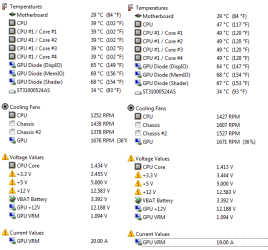
Voltages while under load.
 

My Computer

Computer Manufacturer/Model Number
Home Made
OS
Windows 7 Home Premium x64
CPU
Intel 2500k @4.5ghz 66deg max P95/IBT
Motherboard
Gigabyte Z68A-D3-B3
Memory
8 Gigs Patriot Viper 2 Extreme @1600
Graphics Card(s)
EVGA GTX 580 3 GIG 35degrees idle
Sound Card
Nvidia HD audio via HDMI to 7.1 Receiver
Monitor(s) Displays
32" Olevia hdtv
Screen Resolution
1080p
Hard Drives
64gig SSD(OS/Apps)
250gig (Files and Dox)
1tb (imaging and backup)
PSU
Corsair vx550w
Case
Thermaltake V3 black
Cooling
CM 212+(push n pull) 4 case fans
Keyboard
Logitech wireless Combo, G13
Mouse
G300
Internet Speed
40mps
Other Info
Two others up and running; C2D E5200/MSI G41M-P26/Corsair XMS3 8gb/GTS 250 1gb and C2D E8200/xFx 750sli/8gb Corsair Dominator/2x EVGA 550ti
Working on; i2600 Build...
HP DV6
@Work I use a Lenovo 5536B8U + Lenovo U300s
nothing happened. voltages stayed the same pretty much
 

Attachments

  • Untitled2.png
    Untitled2.png
    12.2 KB · Views: 8
  • Untitled.png
    Untitled.png
    11.3 KB · Views: 8

My Computer

Computer type
PC/Desktop
OS
Windows 7 64 Bit
CPU
Intel Core i5 4670K 3.4GHz Socket LGA 1150
Motherboard
MSI Z87-G41 PC Mate Socket LGA 1150 ATX Intel Motherboard
Memory
8GB
Graphics Card(s)
ATI HD 6950
Sound Card
ASUS GTX760-DC2OC-2GD5
Hard Drives
1TB
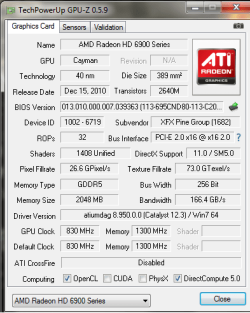
Okay, looking at this, I am now very interested in your GPU. If you don't have GPU-Z, download it and run. Post back screenshots for that as well. Please give the exact make/model of your GPU as well.

Your GPU readings appear "off".
 

My Computer

Computer Manufacturer/Model Number
Home Made
OS
Windows 7 Home Premium x64
CPU
Intel 2500k @4.5ghz 66deg max P95/IBT
Motherboard
Gigabyte Z68A-D3-B3
Memory
8 Gigs Patriot Viper 2 Extreme @1600
Graphics Card(s)
EVGA GTX 580 3 GIG 35degrees idle
Sound Card
Nvidia HD audio via HDMI to 7.1 Receiver
Monitor(s) Displays
32" Olevia hdtv
Screen Resolution
1080p
Hard Drives
64gig SSD(OS/Apps)
250gig (Files and Dox)
1tb (imaging and backup)
PSU
Corsair vx550w
Case
Thermaltake V3 black
Cooling
CM 212+(push n pull) 4 case fans
Keyboard
Logitech wireless Combo, G13
Mouse
G300
Internet Speed
40mps
Other Info
Two others up and running; C2D E5200/MSI G41M-P26/Corsair XMS3 8gb/GTS 250 1gb and C2D E8200/xFx 750sli/8gb Corsair Dominator/2x EVGA 550ti
Working on; i2600 Build...
HP DV6
@Work I use a Lenovo 5536B8U + Lenovo U300s
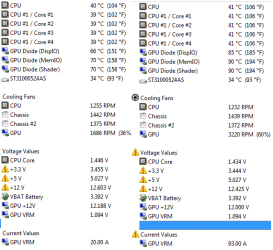
On the bottom right hand corner of the second snip, your GPU VRM draw shows 93amps. I'm no rocket scientist, but I'm pretty sure that's bad. You need a GPU specialist to chime in here.
 

My Computer

Computer Manufacturer/Model Number
Home Made
OS
Windows 7 Home Premium x64
CPU
Intel 2500k @4.5ghz 66deg max P95/IBT
Motherboard
Gigabyte Z68A-D3-B3
Memory
8 Gigs Patriot Viper 2 Extreme @1600
Graphics Card(s)
EVGA GTX 580 3 GIG 35degrees idle
Sound Card
Nvidia HD audio via HDMI to 7.1 Receiver
Monitor(s) Displays
32" Olevia hdtv
Screen Resolution
1080p
Hard Drives
64gig SSD(OS/Apps)
250gig (Files and Dox)
1tb (imaging and backup)
PSU
Corsair vx550w
Case
Thermaltake V3 black
Cooling
CM 212+(push n pull) 4 case fans
Keyboard
Logitech wireless Combo, G13
Mouse
G300
Internet Speed
40mps
Other Info
Two others up and running; C2D E5200/MSI G41M-P26/Corsair XMS3 8gb/GTS 250 1gb and C2D E8200/xFx 750sli/8gb Corsair Dominator/2x EVGA 550ti
Working on; i2600 Build...
HP DV6
@Work I use a Lenovo 5536B8U + Lenovo U300s
I'm not a GPU Specialist by any means, but that value for the GPU VRM has to be wrong. His PSU does not put out anywhere near 93A. A Corsair HX1050 only puts out 87.5A on the +12V.
 

My Computers

System One System Two

  • Computer type
    PC/Desktop
    Computer Manufacturer/Model Number
    ALWAYS UNDER CONSTRUCTION
    OS
    Windows 11 Pro
    CPU
    Ryzen 9 5900X
    Motherboard
    Asus X570 Crosshair Viii Hero
    Memory
    32GB G Skill DDR4-3600
    Graphics Card(s)
    EVGA RTX 3080 FTW 3 Ultra
    Sound Card
    On Board/Sennheiser PC37X Headset
    Monitor(s) Displays
    3 X Asus 27"
    Screen Resolution
    2560x1440
    Hard Drives
    2 X 1 TB NVME drives
    PSU
    EVGA 850
    Case
    Phanteks Eclipse P400A
    Cooling
    EVGA 280 AIO
    Keyboard
    Logitech G510s/ Logitech G13
    Mouse
    Logitech G502
    Internet Speed
    24/1
    Antivirus
    ESET/MBAM Pro/SAS Pro
    Browser
    Chrome/ Firefox/ Edge
  • Computer type
    Laptop
    System Manufacturer/Model Number
    Dell 16 Plus
    OS
    Windows 11 Pro
    CPU
    Intel Ultra 9 288V
    Memory
    32 GB LPDDR5X 8533
    Monitor(s) Displays
    16" Mini-LED HDR600 Touch 90 Hz
    Screen Resolution
    2560X1600
    Hard Drives
    1 TB NVME
Unless the VRM is bad...

The other three readings from the VRM are normal.
 

My Computer

Computer Manufacturer/Model Number
Home Made
OS
Windows 7 Home Premium x64
CPU
Intel 2500k @4.5ghz 66deg max P95/IBT
Motherboard
Gigabyte Z68A-D3-B3
Memory
8 Gigs Patriot Viper 2 Extreme @1600
Graphics Card(s)
EVGA GTX 580 3 GIG 35degrees idle
Sound Card
Nvidia HD audio via HDMI to 7.1 Receiver
Monitor(s) Displays
32" Olevia hdtv
Screen Resolution
1080p
Hard Drives
64gig SSD(OS/Apps)
250gig (Files and Dox)
1tb (imaging and backup)
PSU
Corsair vx550w
Case
Thermaltake V3 black
Cooling
CM 212+(push n pull) 4 case fans
Keyboard
Logitech wireless Combo, G13
Mouse
G300
Internet Speed
40mps
Other Info
Two others up and running; C2D E5200/MSI G41M-P26/Corsair XMS3 8gb/GTS 250 1gb and C2D E8200/xFx 750sli/8gb Corsair Dominator/2x EVGA 550ti
Working on; i2600 Build...
HP DV6
@Work I use a Lenovo 5536B8U + Lenovo U300s
Out of curiosity, you do have the GPU powered by a direct PCI-E plug from the PSU, correct? Not by a Molex adapter?
 

My Computer

Computer Manufacturer/Model Number
Home Made
OS
Windows 7 Home Premium x64
CPU
Intel 2500k @4.5ghz 66deg max P95/IBT
Motherboard
Gigabyte Z68A-D3-B3
Memory
8 Gigs Patriot Viper 2 Extreme @1600
Graphics Card(s)
EVGA GTX 580 3 GIG 35degrees idle
Sound Card
Nvidia HD audio via HDMI to 7.1 Receiver
Monitor(s) Displays
32" Olevia hdtv
Screen Resolution
1080p
Hard Drives
64gig SSD(OS/Apps)
250gig (Files and Dox)
1tb (imaging and backup)
PSU
Corsair vx550w
Case
Thermaltake V3 black
Cooling
CM 212+(push n pull) 4 case fans
Keyboard
Logitech wireless Combo, G13
Mouse
G300
Internet Speed
40mps
Other Info
Two others up and running; C2D E5200/MSI G41M-P26/Corsair XMS3 8gb/GTS 250 1gb and C2D E8200/xFx 750sli/8gb Corsair Dominator/2x EVGA 550ti
Working on; i2600 Build...
HP DV6
@Work I use a Lenovo 5536B8U + Lenovo U300s
i have the GPU plugged in directly from the PSU using 2x 8-pin PCI-E connections. one says PCI-E and the other says P3 thats attached to the PCI-E cable
 

Attachments

  • Untitled.png
    Untitled.png
    15.9 KB · Views: 3

My Computer

Computer type
PC/Desktop
OS
Windows 7 64 Bit
CPU
Intel Core i5 4670K 3.4GHz Socket LGA 1150
Motherboard
MSI Z87-G41 PC Mate Socket LGA 1150 ATX Intel Motherboard
Memory
8GB
Graphics Card(s)
ATI HD 6950
Sound Card
ASUS GTX760-DC2OC-2GD5
Hard Drives
1TB
Back
Top