Solved Power Supply Suggestion

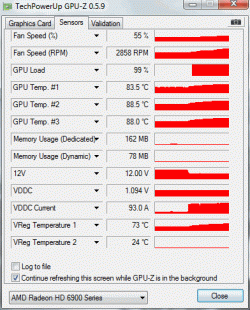
We need to see the Sensors Monster.
 

My Computer My Computer

Computer Manufacturer/Model Number
Home Made
OS
Windows 7 Home Premium x64
CPU
Intel 2500k @4.5ghz 66deg max P95/IBT
Motherboard
Gigabyte Z68A-D3-B3
Memory
8 Gigs Patriot Viper 2 Extreme @1600
Graphics Card(s)
EVGA GTX 580 3 GIG 35degrees idle
Sound Card
Nvidia HD audio via HDMI to 7.1 Receiver
Monitor(s) Displays
32" Olevia hdtv
Screen Resolution
1080p
Hard Drives
64gig SSD(OS/Apps)
250gig (Files and Dox)
1tb (imaging and backup)
PSU
Corsair vx550w
Case
Thermaltake V3 black
Cooling
CM 212+(push n pull) 4 case fans
Keyboard
Logitech wireless Combo, G13
Mouse
G300
Internet Speed
40mps
Other Info
Two others up and running; C2D E5200/MSI G41M-P26/Corsair XMS3 8gb/GTS 250 1gb and C2D E8200/xFx 750sli/8gb Corsair Dominator/2x EVGA 550ti
Working on; i2600 Build...
HP DV6
@Work I use a Lenovo 5536B8U + Lenovo U300s
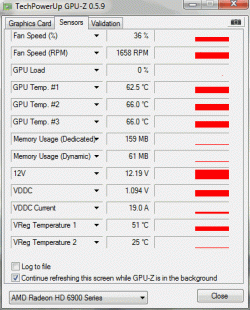
woops here
 

Attachments

  • Sensors 2.gif
    Sensors 2.gif
    16.9 KB · Views: 3
  • Sensors.gif
    Sensors.gif
    18.2 KB · Views: 4

My Computer My Computer

Computer type
PC/Desktop
OS
Windows 7 64 Bit
CPU
Intel Core i5 4670K 3.4GHz Socket LGA 1150
Motherboard
MSI Z87-G41 PC Mate Socket LGA 1150 ATX Intel Motherboard
Memory
8GB
Graphics Card(s)
ATI HD 6950
Sound Card
ASUS GTX760-DC2OC-2GD5
Hard Drives
1TB
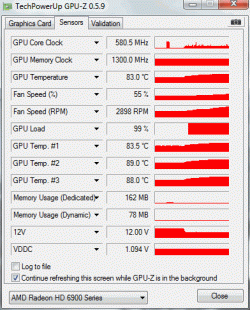
heres one when i start to put a load on it. u can see where it starts to ramp up
 

Attachments

  • 1.gif
    1.gif
    17.8 KB · Views: 4
  • 2.gif
    2.gif
    17.8 KB · Views: 4

My Computer My Computer

Computer type
PC/Desktop
OS
Windows 7 64 Bit
CPU
Intel Core i5 4670K 3.4GHz Socket LGA 1150
Motherboard
MSI Z87-G41 PC Mate Socket LGA 1150 ATX Intel Motherboard
Memory
8GB
Graphics Card(s)
ATI HD 6950
Sound Card
ASUS GTX760-DC2OC-2GD5
Hard Drives
1TB
This is an interesting and strange issue.

The monitor going dim has nothing to do with your PSU - your monitor is powered my the mains from a wall socket. However as with a few others here Im incredibly suspicious about your graphics card.

That current draw ramping up from 19A to 93A is crazy. When you put it under load can you see the draw rising from 19 to 93 steadily as the gpu temps go up or does it just flick traight to that?

there is literally no way 93 amps can go through a gfx card without the thing catching fire....thats 3 times the current of a high end electric shower! my cooker is only 30amps! (mind you thats at 240v and not 12v)

Still, do you have a mate who is happy to lend you his gfx card for a bit of a swap trial?

Matt
 

My Computer My Computer

Computer Manufacturer/Model Number
Manufacturer: Me
OS
W7 Home Prem, Vista home Prem
CPU
Intel E8600 3.3GHz dual core
Motherboard
Asus (need to find model)
Memory
4 Gb
Graphics Card(s)
Nvidia - GForce GTX 280 - 1Gb
Sound Card
Xonar Dx 5.1
Monitor(s) Displays
Hazro flatscreen
Screen Resolution
1920 x 1200
Hard Drives
1 x Samsung Spinpoint F1 300 gb
1 x Samsung Spinpoint F1 1 Tb
1 x Samsung Spinpoint F3 1 Tb
PSU
Later
Case
Infiniti Midi tower
Cooling
later
Keyboard
Logitech G11
Mouse
Logitech G9 Laser
Internet Speed
3mb/s - awful
Other Info
I built this three years ago. It was very fast at the time. Now it's about average but still runs any game I throw at it at max detail.

Currently
Yeah, it's still showing a 93amp draw. Also, your temps are reaching 90 degrees pretty quickly. I would contact xfx and share this with them and see what they say. They have a pretty good PM help service for pre RMA issues. Simply explain to them that you have had a reoccurring issue and checked the sensors on the GPU and share the results.

Also, put your old GPU in and run the same tests. I would go ahead and leave it in to see if your problem goes away. From your timeline, the GPU raises suspicion.
 

My Computer My Computer

Computer Manufacturer/Model Number
Home Made
OS
Windows 7 Home Premium x64
CPU
Intel 2500k @4.5ghz 66deg max P95/IBT
Motherboard
Gigabyte Z68A-D3-B3
Memory
8 Gigs Patriot Viper 2 Extreme @1600
Graphics Card(s)
EVGA GTX 580 3 GIG 35degrees idle
Sound Card
Nvidia HD audio via HDMI to 7.1 Receiver
Monitor(s) Displays
32" Olevia hdtv
Screen Resolution
1080p
Hard Drives
64gig SSD(OS/Apps)
250gig (Files and Dox)
1tb (imaging and backup)
PSU
Corsair vx550w
Case
Thermaltake V3 black
Cooling
CM 212+(push n pull) 4 case fans
Keyboard
Logitech wireless Combo, G13
Mouse
G300
Internet Speed
40mps
Other Info
Two others up and running; C2D E5200/MSI G41M-P26/Corsair XMS3 8gb/GTS 250 1gb and C2D E8200/xFx 750sli/8gb Corsair Dominator/2x EVGA 550ti
Working on; i2600 Build...
HP DV6
@Work I use a Lenovo 5536B8U + Lenovo U300s
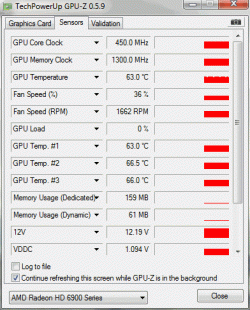
Matt, you can see from the sensors that its not a gradual gain, it immediately goes to 93 amps. im not familiar with any of this, so i don't know how much 93 amps really is. you guys say its high so i guess ill take your word for it.

anyway ill talk to XFX about the issue and see what they have to say, thanks for the help guys
 

My Computer My Computer

Computer type
PC/Desktop
OS
Windows 7 64 Bit
CPU
Intel Core i5 4670K 3.4GHz Socket LGA 1150
Motherboard
MSI Z87-G41 PC Mate Socket LGA 1150 ATX Intel Motherboard
Memory
8GB
Graphics Card(s)
ATI HD 6950
Sound Card
ASUS GTX760-DC2OC-2GD5
Hard Drives
1TB
Back
Top