
You are using an out of date browser. It may not display this or other websites correctly.
You should upgrade or use an alternative browser.
You should upgrade or use an alternative browser.
PowerPoint 2007 labels
- Thread starter ukthesis
- Start date

If Im understanding you correctly, and you have slides with text or image content and you just wish to add text title onto slide, then you can do so by going to the INSERT tab on the ribbon, select TEXT BOX, then use the cursor to "draw" your text box onto that slide. Then click inside text box and type...!!! 
My Computer
At a glance
Windows 7 Ultimate 64 bit Steve Ballmer Signa...Intel Core 2 Quad - Q9550 - 2.83GHz stock - O...4GB DDR2 800MHz (PC6400) OCZ ReaperNvidia GE Force 8800 GTS
- Computer Manufacturer/Model Number
- Homebrew PC - "Alpha_Dawg"
- OS
- Windows 7 Ultimate 64 bit Steve Ballmer Signature Edition
- CPU
- Intel Core 2 Quad - Q9550 - 2.83GHz stock - OC'd to 3.6GHz
- Motherboard
- Gigabyte EP45-UD3P
- Memory
- 4GB DDR2 800MHz (PC6400) OCZ Reaper
- Graphics Card(s)
- Nvidia GE Force 8800 GTS
- Sound Card
- Asus Xonar DX
- Monitor(s) Displays
- Samsung SyncMaster 2333HD
- Screen Resolution
- 1920 x 1080
- Hard Drives
- WD Caviar Black 750GB - 7200RPM - 32MB cache
WD Caviar Green 1.5TB - 5400RPM - 64MB cache
WD Caviar Green 2.0TB - 5400RPM - 64MB cache
- PSU
- PC Power & Cooling Silencer 750
- Case
- Gigabyte 3D Aurora
- Cooling
- Case is Air - 5ea. 120mm fans (mix of Arctic and Xigmatec)
- Keyboard
- MS Natural Wireless KB
- Mouse
- MS Wireless Mouse
- Internet Speed
- 50 mbps down/5 mbps up
- Other Info
- AVerMedia - AVerTVHD G2 Dual Tuner Card
seavixen32
New member
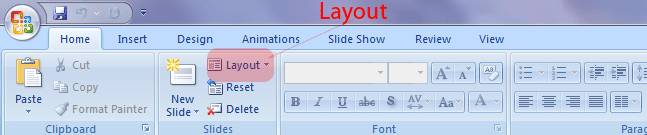
You can also go Slides on the Ribbon and click Layout, then choose a slide layout of your choice.
My Computer
At a glance
Windows 7 Ultimate SP1 64-BitIntel Core i7 870 @ 2.93GHz8Gb Dual-Channel DDR3 @ 664MHznVidia GeForce GTX 460 1024MB dedicated RAM
- Computer Manufacturer/Model Number
- HP Pavilion Elite 495UK
- OS
- Windows 7 Ultimate SP1 64-Bit
- CPU
- Intel Core i7 870 @ 2.93GHz
- Motherboard
- MSI 2A9C (CPU1)
- Memory
- 8Gb Dual-Channel DDR3 @ 664MHz
- Graphics Card(s)
- nVidia GeForce GTX 460 1024MB dedicated RAM
- Sound Card
- Realtek HD Audio
- Monitor(s) Displays
- HP2310i
- Screen Resolution
- 1920 x 1080
- Hard Drives
- 1x1954GB Hitachi HDS22020ALA 330 (RAID), 1x1954GB Hitachi External for backup and storage
- PSU
- 460W
- Case
- HP Elite
- Cooling
- Air cooled
- Keyboard
- Logitech K750 solar-powered keyboard
- Mouse
- Logitech Wireless M180 mouse
- Internet Speed
- 2Mb
- Other Info
- Pure Avanti Flow Internet Radio with iPod Dock, 64Gb iPod, HP USB Speakers, Sony MDR-V500 Headphones, Sony Vaio F-Series Laptop
I've done 6 slides, untitled. Now on the left hand side are "pictures" of the slides, as you know. So, in other to identify them without opening each one, I need to label the left hand ones. This would be without opening the slides, defeating the objective of seeing which is which without actually opening them.
My Computer
At a glance
64 bit
- OS
- 64 bit
On that second reply. I can see, in the left, "Slides" but I can't find Layout.
I want to label 6 slides without having to open them. They are already created. Presumably, I label them by labeling those small, left hand side, versions in some way.
I want to label 6 slides without having to open them. They are already created. Presumably, I label them by labeling those small, left hand side, versions in some way.
My Computer
At a glance
64 bit
- OS
- 64 bit

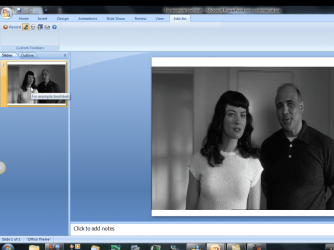
i guessing that the slides you have are of images and no txt ,if there was txt they would show the txt when you hovered the mouse over the slide.
i cant see a way to get txt on a slide as a title that will show in the left pane ,the slides will just show the numbers. but......
if you shrink the pic down and type the name you want for the slide then pull the pic back up over the txt then the txt is hidden on the slide but when you hover the mouse over the left prieview panes then the txt you have typed will pop up as you flow over each slide.
i cant see a way to get txt on a slide as a title that will show in the left pane ,the slides will just show the numbers. but......
if you shrink the pic down and type the name you want for the slide then pull the pic back up over the txt then the txt is hidden on the slide but when you hover the mouse over the left prieview panes then the txt you have typed will pop up as you flow over each slide.
My Computer
At a glance
Microsoft Windows 7 Home Premium 64-bit 7600IIx4 amd athelon 635 processor2x2gbati radeon HD 5450
- Computer Manufacturer/Model Number
- Hewlett packard/p6512uk
- OS
- Microsoft Windows 7 Home Premium 64-bit 7600
- CPU
- IIx4 amd athelon 635 processor
- Motherboard
- FOXCONN 2AA9
- Memory
- 2x2gb
- Graphics Card(s)
- ati radeon HD 5450
- Sound Card
- (1) Realtek High Definition Audio (2) AMD High Definition
- Monitor(s) Displays
- samsung lcd tv 32"
- Screen Resolution
- 1360x 768
- Hard Drives
- (1) WDC WD10 01FAES-60Z2A0 SATA Disk Device (2) Maxtor OneTouch USB Device (3) ST310003 33AS USB Device (4) WD My Book 1111 USB Device
- PSU
- ?
- Cooling
- air!
- Keyboard
- wireless hp
- Mouse
- wireless Hp,optical
- Internet Speed
- 1.10mb/s
- Antivirus
- MSE
- Browser
- Firefox
like i say you can name them and number them what you want if you hide the txt under the pic when you click or hover the mouse over each slide then it will show the name you chose.

My Computer
At a glance
Microsoft Windows 7 Home Premium 64-bit 7600IIx4 amd athelon 635 processor2x2gbati radeon HD 5450
- Computer Manufacturer/Model Number
- Hewlett packard/p6512uk
- OS
- Microsoft Windows 7 Home Premium 64-bit 7600
- CPU
- IIx4 amd athelon 635 processor
- Motherboard
- FOXCONN 2AA9
- Memory
- 2x2gb
- Graphics Card(s)
- ati radeon HD 5450
- Sound Card
- (1) Realtek High Definition Audio (2) AMD High Definition
- Monitor(s) Displays
- samsung lcd tv 32"
- Screen Resolution
- 1360x 768
- Hard Drives
- (1) WDC WD10 01FAES-60Z2A0 SATA Disk Device (2) Maxtor OneTouch USB Device (3) ST310003 33AS USB Device (4) WD My Book 1111 USB Device
- PSU
- ?
- Cooling
- air!
- Keyboard
- wireless hp
- Mouse
- wireless Hp,optical
- Internet Speed
- 1.10mb/s
- Antivirus
- MSE
- Browser
- Firefox
whatever you find easier,
what i thought you were wanting was a label to show when you clicked on or hovered over the left panes without opening them , i also thought as you have pictures and no txt on the slides you would want to keep it that way. of course adding a number to the slides is fine but it doesn't describe it .
in the pics i put up slide 1 is called for example boohbah , but you cant see the txt on the slide.
thats what i thought you were after, i guess the easy thing to do is type a name on them and dont hide it.
what i thought you were wanting was a label to show when you clicked on or hovered over the left panes without opening them , i also thought as you have pictures and no txt on the slides you would want to keep it that way. of course adding a number to the slides is fine but it doesn't describe it .
in the pics i put up slide 1 is called for example boohbah , but you cant see the txt on the slide.
thats what i thought you were after, i guess the easy thing to do is type a name on them and dont hide it.
My Computer
At a glance
Microsoft Windows 7 Home Premium 64-bit 7600IIx4 amd athelon 635 processor2x2gbati radeon HD 5450
- Computer Manufacturer/Model Number
- Hewlett packard/p6512uk
- OS
- Microsoft Windows 7 Home Premium 64-bit 7600
- CPU
- IIx4 amd athelon 635 processor
- Motherboard
- FOXCONN 2AA9
- Memory
- 2x2gb
- Graphics Card(s)
- ati radeon HD 5450
- Sound Card
- (1) Realtek High Definition Audio (2) AMD High Definition
- Monitor(s) Displays
- samsung lcd tv 32"
- Screen Resolution
- 1360x 768
- Hard Drives
- (1) WDC WD10 01FAES-60Z2A0 SATA Disk Device (2) Maxtor OneTouch USB Device (3) ST310003 33AS USB Device (4) WD My Book 1111 USB Device
- PSU
- ?
- Cooling
- air!
- Keyboard
- wireless hp
- Mouse
- wireless Hp,optical
- Internet Speed
- 1.10mb/s
- Antivirus
- MSE
- Browser
- Firefox
seavixen32
New member
On that second reply. I can see, in the left, "Slides" but I can't find Layout.
I want to label 6 slides without having to open them. They are already created. Presumably, I label them by labeling those small, left hand side, versions in some way.
Slide Layout:
My Computer
At a glance
Windows 7 Ultimate SP1 64-BitIntel Core i7 870 @ 2.93GHz8Gb Dual-Channel DDR3 @ 664MHznVidia GeForce GTX 460 1024MB dedicated RAM
- Computer Manufacturer/Model Number
- HP Pavilion Elite 495UK
- OS
- Windows 7 Ultimate SP1 64-Bit
- CPU
- Intel Core i7 870 @ 2.93GHz
- Motherboard
- MSI 2A9C (CPU1)
- Memory
- 8Gb Dual-Channel DDR3 @ 664MHz
- Graphics Card(s)
- nVidia GeForce GTX 460 1024MB dedicated RAM
- Sound Card
- Realtek HD Audio
- Monitor(s) Displays
- HP2310i
- Screen Resolution
- 1920 x 1080
- Hard Drives
- 1x1954GB Hitachi HDS22020ALA 330 (RAID), 1x1954GB Hitachi External for backup and storage
- PSU
- 460W
- Case
- HP Elite
- Cooling
- Air cooled
- Keyboard
- Logitech K750 solar-powered keyboard
- Mouse
- Logitech Wireless M180 mouse
- Internet Speed
- 2Mb
- Other Info
- Pure Avanti Flow Internet Radio with iPod Dock, 64Gb iPod, HP USB Speakers, Sony MDR-V500 Headphones, Sony Vaio F-Series Laptop
It seems a complicated way of going about it. Perhaps easier to create 6 new slides, and give them numbers. Then I cut and paste the untitled slides onto them? Wouldn't that be easier?
Slides are numbered by default, as you create them, so Im not sure what you are trying to acheive. Can you please be more detailed as to what the end result you want is???
My Computer
At a glance
Windows 7 Ultimate 64 bit Steve Ballmer Signa...Intel Core 2 Quad - Q9550 - 2.83GHz stock - O...4GB DDR2 800MHz (PC6400) OCZ ReaperNvidia GE Force 8800 GTS
- Computer Manufacturer/Model Number
- Homebrew PC - "Alpha_Dawg"
- OS
- Windows 7 Ultimate 64 bit Steve Ballmer Signature Edition
- CPU
- Intel Core 2 Quad - Q9550 - 2.83GHz stock - OC'd to 3.6GHz
- Motherboard
- Gigabyte EP45-UD3P
- Memory
- 4GB DDR2 800MHz (PC6400) OCZ Reaper
- Graphics Card(s)
- Nvidia GE Force 8800 GTS
- Sound Card
- Asus Xonar DX
- Monitor(s) Displays
- Samsung SyncMaster 2333HD
- Screen Resolution
- 1920 x 1080
- Hard Drives
- WD Caviar Black 750GB - 7200RPM - 32MB cache
WD Caviar Green 1.5TB - 5400RPM - 64MB cache
WD Caviar Green 2.0TB - 5400RPM - 64MB cache
- PSU
- PC Power & Cooling Silencer 750
- Case
- Gigabyte 3D Aurora
- Cooling
- Case is Air - 5ea. 120mm fans (mix of Arctic and Xigmatec)
- Keyboard
- MS Natural Wireless KB
- Mouse
- MS Wireless Mouse
- Internet Speed
- 50 mbps down/5 mbps up
- Other Info
- AVerMedia - AVerTVHD G2 Dual Tuner Card
Similar threads
- Replies
- 2
- Views
- 2K

- Replies
- 6
- Views
- 3K


- Replies
- 0
- Views
- 1K