
PowerPoint – Embed MP3 files
The problem
If you create a Power Point show and want to embed sound, you need to provide a .wav file for PP to accept it. Unfortunately .wav files are very large – as much as 10 times and more larger than e.g. .mp3 files. This will bloat your PP show significantly and makes it lengthy to upload and certainly impossible to attach to an Email.
Example
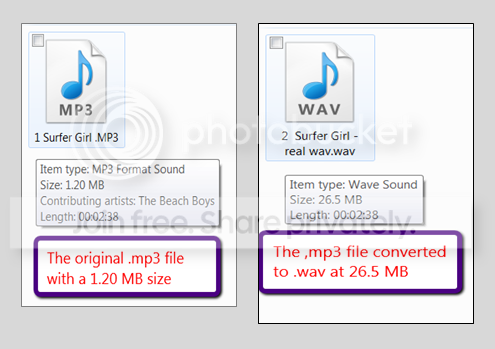
Compare the original .mp3 file on the left to the same file converted to .wav. The .wav file is nearly 25 times larger than the .mp3 file.
The Solution
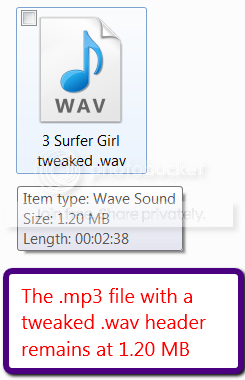
The solution is a tweak that puts a .wav header in front of the .mp3 file to make PP believe that it is dealing with an actual .wav file. As you can see, the same file appears as .wav but retains the .mp3 size.
The Tool
The tool we use to achieve this tweak is CDex. You can download and install it from here.
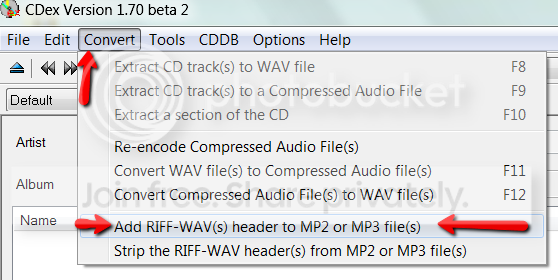
The operation of CDex is very simple. First you go to Convert and Add RIFF-WAV header.
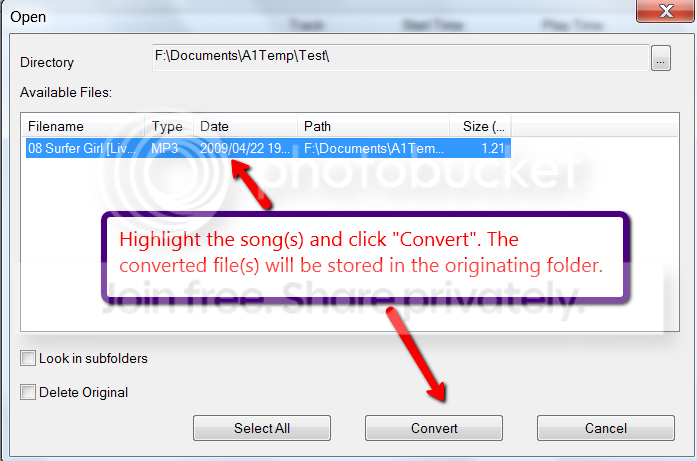
Then you get this window where you browse to your folder containing the .mp3 file (top right). You highlight the file and click Convert. The resulting .wav file will be in the originating folder.
It is advisable to present a folder that contains only those files that you want to convert – else you get a long list of files in the little window.
As shown above, you now have a .wav file in the size of the originating .mp3 file.
The problem
If you create a Power Point show and want to embed sound, you need to provide a .wav file for PP to accept it. Unfortunately .wav files are very large – as much as 10 times and more larger than e.g. .mp3 files. This will bloat your PP show significantly and makes it lengthy to upload and certainly impossible to attach to an Email.
Example
Compare the original .mp3 file on the left to the same file converted to .wav. The .wav file is nearly 25 times larger than the .mp3 file.
The Solution
The solution is a tweak that puts a .wav header in front of the .mp3 file to make PP believe that it is dealing with an actual .wav file. As you can see, the same file appears as .wav but retains the .mp3 size.
The Tool
The tool we use to achieve this tweak is CDex. You can download and install it from here.
The operation of CDex is very simple. First you go to Convert and Add RIFF-WAV header.
Then you get this window where you browse to your folder containing the .mp3 file (top right). You highlight the file and click Convert. The resulting .wav file will be in the originating folder.
It is advisable to present a folder that contains only those files that you want to convert – else you get a long list of files in the little window.
As shown above, you now have a .wav file in the size of the originating .mp3 file.
Last edited:


