Preparing SDD for HDD migration via cloning

stupid! Why not just move the bootmgr and bootmenu? pff....
Why not verify first if burned win7 installation disk is working??

anyway..
Went to boot up from wrd to carry out a repair however I can't boot from the disk.
How did you make the windows recovery disk?
What error do you get on (trying to) boot from that dvd?
Did you set CD/DVD drive as first boot device in BIOS? (or select it as one-time boot device during boot)

I did verify that the windows recovery disk worked but I selected the the dvd drive as a one time boot.

With the disc in drive when I switched and I thought I have pressed esc a number of times but then it did not work

HOWEVER

I have rebooted again and pressed the esc key more frequently and I was able to boot from the dvd and I have repaired the bootmgr and started windows successfully. The relief is truely palpable:D.

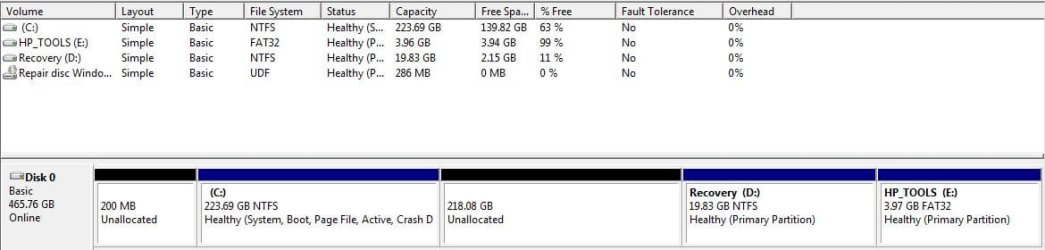
I do have a question though. When I launch disk manager I now have three partition and and then 2 blocks of disk (200mb and 218GB) unallocated. Should I extend the main partition (C:\) now to include these unallocated disks spaces?
 

My Computer My Computer

At a glance

Windows 7
Computer type
Laptop
Computer Manufacturer/Model Number
HP
OS
Windows 7
I have managed to extend c by 218GB. However the 200mb still shows as unallocated. Persumably I can just leave this as when I create a system image (to restore to the new SDD) this unallocated diskspace will be disregarded as it is not a partition?
 

My Computer My Computer

At a glance

Windows 7
Computer type
Laptop
Computer Manufacturer/Model Number
HP
OS
Windows 7
I do have a question though. When I launch disk manager I now have three partition and and then 2 blocks of disk (200mb and 218GB) unallocated. Should I extend the main partition (C:\) now to include these unallocated disks spaces?
Post a screenshot of it please
 

My Computer My Computer

At a glance

Microsoft Windows 7 Home Premium 64-bits 7601...Intel(R) Core(TM) i3 CPU M 370 @ 2.40GHz4,00 GBATI Mobility Radeon HD 5400 Series
Computer type
Laptop
Computer Manufacturer/Model Number
ACER ASPIRE 5742G
OS
Microsoft Windows 7 Home Premium 64-bits 7601 Multiprocessor Free Service Pack 1
CPU
Intel(R) Core(TM) i3 CPU M 370 @ 2.40GHz
Motherboard
Acer Aspire 5742G
Memory
4,00 GB
Graphics Card(s)
ATI Mobility Radeon HD 5400 Series
Sound Card
(1) AMD High Definition Audio Device (2) Realtek High Defi
Screen Resolution
1366 x 768 x 32 bits (4294967296 colors) @ 60 Hz
Hard Drives
WDC WD5000BEVT-22ZAT0
I have managed to extend c by 218GB. However the 200mb still shows as unallocated. Persumably I can just leave this as when I create a system image (to restore to the new SDD) this unallocated diskspace will be disregarded as it is not a partition?
You told:

Partition 1 System - Active - 200MB=>Deleted ... at least you told me that.
Partition 2 C:\ 223 GB (only 80GB used)=>marked ACTIVE I assume(?)
Partition 3 HP_Tools 4GB=>I don't care about it.
Partition 4 Recovery 20GB=>Do you know how to use it? Not important now anyway.

Why are you talking about 218GB ? Partition 3 and 4 are not needed (unless you don't make backups adn want to be able to "restore to factory settings"). I wouldn't put the 4GB and 20GB on SSD.... but it's up to you.

Unallocated space can be reused, either by extending a partition or creating a partition.'
As told before ... on clone you can extend or shrink a partition.
 

My Computer My Computer

At a glance

Microsoft Windows 7 Home Premium 64-bits 7601...Intel(R) Core(TM) i3 CPU M 370 @ 2.40GHz4,00 GBATI Mobility Radeon HD 5400 Series
Computer type
Laptop
Computer Manufacturer/Model Number
ACER ASPIRE 5742G
OS
Microsoft Windows 7 Home Premium 64-bits 7601 Multiprocessor Free Service Pack 1
CPU
Intel(R) Core(TM) i3 CPU M 370 @ 2.40GHz
Motherboard
Acer Aspire 5742G
Memory
4,00 GB
Graphics Card(s)
ATI Mobility Radeon HD 5400 Series
Sound Card
(1) AMD High Definition Audio Device (2) Realtek High Defi
Screen Resolution
1366 x 768 x 32 bits (4294967296 colors) @ 60 Hz
Hard Drives
WDC WD5000BEVT-22ZAT0
Sorry if I have not made myself clear!

Please see attached screenshot

I did delete partition earlier but it now shown as unallocated space. Earlier on today C: partition was over 400GB however only 80GB was used. So i shrank it to about 220GB.

So I think I will create a system image of the 3 current partitions.

Although keeping partition 3 and 4 is probably not critical I will take them across for the time being. If space becomes really short in supply then I can always remove / delete them later.
 

Attachments

  • disk.JPG
    disk.JPG
    45.6 KB · Views: 2

My Computer My Computer

At a glance

Windows 7
Computer type
Laptop
Computer Manufacturer/Model Number
HP
OS
Windows 7
Okay.... but for win7 only C is only important now. Be sure to clone that first, make it primary and active.
HP_TOOLS: primary partition size 4GB
Recovery: primary partition size 20GB

Detach the source disk after cloning and the perform a "startup repair" to repair the bootmenu on SSD.
After succesful boot from SSD you can reattach the old disk.
Be sure to boot from SSD!!!!! You can check in disk management.
 

My Computer My Computer

At a glance

Microsoft Windows 7 Home Premium 64-bits 7601...Intel(R) Core(TM) i3 CPU M 370 @ 2.40GHz4,00 GBATI Mobility Radeon HD 5400 Series
Computer type
Laptop
Computer Manufacturer/Model Number
ACER ASPIRE 5742G
OS
Microsoft Windows 7 Home Premium 64-bits 7601 Multiprocessor Free Service Pack 1
CPU
Intel(R) Core(TM) i3 CPU M 370 @ 2.40GHz
Motherboard
Acer Aspire 5742G
Memory
4,00 GB
Graphics Card(s)
ATI Mobility Radeon HD 5400 Series
Sound Card
(1) AMD High Definition Audio Device (2) Realtek High Defi
Screen Resolution
1366 x 768 x 32 bits (4294967296 colors) @ 60 Hz
Hard Drives
WDC WD5000BEVT-22ZAT0
Okay.... but for win7 only C is only important now. Be sure to clone that first, make it primary and active.
HP_TOOLS: primary partition size 4GB
Recovery: primary partition size 20GB

Detach the source disk after cloning and the perform a "startup repair" to repair the bootmenu on SSD.
After succesful boot from SSD you can reattach the old disk.
Be sure to boot from SSD!!!!! You can check in disk management.


I have decided to go the system image route (currently creating this via Acronis) and restore to the SSD. So I unless I misunderstood once the image is created I need to plug in the plus in both the external hard disk (which contains the image) and the SDD (via adapter). Once the restore is complete, remove the existing hard disk and replace with the SDD and then switch computer on the and it should hopefully boot up from the SDD or do I need to change the boot option to SDD?
 

My Computer My Computer

At a glance

Windows 7
Computer type
Laptop
Computer Manufacturer/Model Number
HP
OS
Windows 7
So you make an image and then restore it. You could have done it in one step.

Are you replacing internal HDD with SSD and use same connector on mainboard after cloning (i mean after restoring the image)? If so.... it should boot from SSD. There is probably no need to do a "startup repair". After reattaching old HDD or any other internal disk.... you probably have to change the boot order in BIOS, or swap the sata connectors.
 

My Computer My Computer

At a glance

Microsoft Windows 7 Home Premium 64-bits 7601...Intel(R) Core(TM) i3 CPU M 370 @ 2.40GHz4,00 GBATI Mobility Radeon HD 5400 Series
Computer type
Laptop
Computer Manufacturer/Model Number
ACER ASPIRE 5742G
OS
Microsoft Windows 7 Home Premium 64-bits 7601 Multiprocessor Free Service Pack 1
CPU
Intel(R) Core(TM) i3 CPU M 370 @ 2.40GHz
Motherboard
Acer Aspire 5742G
Memory
4,00 GB
Graphics Card(s)
ATI Mobility Radeon HD 5400 Series
Sound Card
(1) AMD High Definition Audio Device (2) Realtek High Defi
Screen Resolution
1366 x 768 x 32 bits (4294967296 colors) @ 60 Hz
Hard Drives
WDC WD5000BEVT-22ZAT0
I have decided to go the system image route (currently creating this via Acronis) and restore to the SSD

Smart move. Since your C partition is active (contains the bootmgr), there is nothing else you need to do. Just check the SSD alignment after you restored the image. I am not sure whether Acronis will take care of that. And set defrag off.
 

My Computer My Computer

At a glance

Vista, Windows7, Mint Mate, Zorin, Windows 8from 1.6GHz Duo to i7
Computer Manufacturer/Model Number
HP, Dell, Gateway, Toshiba - 4 laptops and 2 desktops
OS
Vista, Windows7, Mint Mate, Zorin, Windows 8
CPU
from 1.6GHz Duo to i7
Monitor(s) Displays
2x HP w2207
Hard Drives
5x HDD, 7x SSD, 12x Externals
Keyboard
with trackball - no mices
Mouse
Trackball mice
Internet Speed
DSL 6000
So you make an image and then restore it. You could have done it in one step.

Are you replacing internal HDD with SSD and use same connector on mainboard after cloning (i mean after restoring the image)? If so.... it should boot from SSD. There is probably no need to do a "startup repair". After reattaching old HDD or any other internal disk.... you probably have to change the boot order in BIOS, or swap the sata connectors.
Yes I am swapping one for the other - point noted really the startup repair.

I have decided to go the system image route (currently creating this via Acronis) and restore to the SSD

Smart move. Since your C partition is active (contains the bootmgr), there is nothing else you need to do. Just check the SSD alignment after you restored the image. I am not sure whether Acronis will take care of that. And set defrag off.
Defrag? - I am sure I read somewhere in the last day or so that you never Defrag an ssd?

I now have the disc image (80gb) so I just need the new ssd to arrive in the post, which should happen today. So relieved after my earlier hiccup and looking forward to using my new ssd?!
 

My Computer My Computer

At a glance

Windows 7
Computer type
Laptop
Computer Manufacturer/Model Number
HP
OS
Windows 7
For instance

You should never defrag an SSD. Don't even think about it. The reason is that physical data placement on an SSD is handled solely by the SSD's firmware, and what it reports to Windows is NOT how the data is actually stored on the SSD.

One other final thing, when I get the ssd do I need to do anything to it, eg format it, before I do the restore?
 

My Computer My Computer

At a glance

Windows 7
Computer type
Laptop
Computer Manufacturer/Model Number
HP
OS
Windows 7
That's why he said: Defrag OFF

Defrag is OFF by default for SSD in win7. After system boots successfully from SSD please do the following:
http://www.sevenforums.com/tutorials/81500-system-restore-enable-disable.html
Disable system restore on "missing" disks listed there. They point to the old disk (which is not attached). After disabling system restore there, they don't appear anymore in the list. Enable system restore on the new C!!
 

My Computer My Computer

At a glance

Microsoft Windows 7 Home Premium 64-bits 7601...Intel(R) Core(TM) i3 CPU M 370 @ 2.40GHz4,00 GBATI Mobility Radeon HD 5400 Series
Computer type
Laptop
Computer Manufacturer/Model Number
ACER ASPIRE 5742G
OS
Microsoft Windows 7 Home Premium 64-bits 7601 Multiprocessor Free Service Pack 1
CPU
Intel(R) Core(TM) i3 CPU M 370 @ 2.40GHz
Motherboard
Acer Aspire 5742G
Memory
4,00 GB
Graphics Card(s)
ATI Mobility Radeon HD 5400 Series
Sound Card
(1) AMD High Definition Audio Device (2) Realtek High Defi
Screen Resolution
1366 x 768 x 32 bits (4294967296 colors) @ 60 Hz
Hard Drives
WDC WD5000BEVT-22ZAT0
Sorry I thought he meant set it off!!
 

My Computer My Computer

At a glance

Windows 7
Computer type
Laptop
Computer Manufacturer/Model Number
HP
OS
Windows 7
Defrag? - I am sure I read somewhere in the last day or so that you never Defrag an ssd?

This is absolutely right - never defrag.

And do not forget to image and restore the 100MB system partition - if you have that one. Without it, your system cannot boot.


arrow_down.gif
 

My Computer My Computer

At a glance

Vista, Windows7, Mint Mate, Zorin, Windows 8from 1.6GHz Duo to i7
Computer Manufacturer/Model Number
HP, Dell, Gateway, Toshiba - 4 laptops and 2 desktops
OS
Vista, Windows7, Mint Mate, Zorin, Windows 8
CPU
from 1.6GHz Duo to i7
Monitor(s) Displays
2x HP w2207
Hard Drives
5x HDD, 7x SSD, 12x Externals
Keyboard
with trackball - no mices
Mouse
Trackball mice
Internet Speed
DSL 6000
One other final thing, when I get the ssd do I need to do anything to it, eg format it, before I do the restore?

No. The image restoration process would take care of that. All you need to do is connect it and then boot from the imaging application recovery disk, navigate to your stored image file, and choose the SSD as the target for the restoration.
 

My Computer My Computer

At a glance

Windows 7 Home Premium SP1, 64-bitIntel Skylake i5-6600K, not overclocked8 GB HyperX DDR4-2666 (2 x 4 GB)none; graphics are integrated on CPU
Computer type
PC/Desktop
Computer Manufacturer/Model Number
Ignatz Special; 4 speed manual gearbox; factory air conditioning; one of one
OS
Windows 7 Home Premium SP1, 64-bit
CPU
Intel Skylake i5-6600K, not overclocked
Motherboard
AsRock Z170M Extreme 4, micro ATX
Memory
8 GB HyperX DDR4-2666 (2 x 4 GB)
Graphics Card(s)
none; graphics are integrated on CPU
Sound Card
onboard: Realtek ALC1150; external: USB Behringer UF0-202
Monitor(s) Displays
Dell S2340M 23 inch IPS
Screen Resolution
1600 x 900
Hard Drives
System: Crucial MX100 series SSD, 128 GB;
Data: Samsung Spinpoint 103SJ, 1 TB;
Backup: WD Caviar Green WD30EZRX-00D8PB0, 3 TB
PSU
Rosewill SilentNight 500 watt fanless, semi-modular
Case
Antec Solo II
Cooling
Noctua NH-U12S; Noctua F12 intake, Noctua S12A exhaust
Keyboard
Microsoft 200 6JH-00001 USB
Mouse
Dell or Microsoft optical wired; USB
Antivirus
Microsoft Security Essentials and Malwarebytes Premium
Browser
Pale Moon
Other Info
All fans PWM; speeds at idle: CPU circa 500 rpm; intake circa 600 rpm; exhaust circa 600 rpm; CPU temps 27 idle and 47 C load in a warm room (27 C/81 F) when running Intel Extreme Tuning Utility stress test.
I would however check the alignment and make sure that defrag is off.
 

My Computer My Computer

At a glance

Vista, Windows7, Mint Mate, Zorin, Windows 8from 1.6GHz Duo to i7
Computer Manufacturer/Model Number
HP, Dell, Gateway, Toshiba - 4 laptops and 2 desktops
OS
Vista, Windows7, Mint Mate, Zorin, Windows 8
CPU
from 1.6GHz Duo to i7
Monitor(s) Displays
2x HP w2207
Hard Drives
5x HDD, 7x SSD, 12x Externals
Keyboard
with trackball - no mices
Mouse
Trackball mice
Internet Speed
DSL 6000
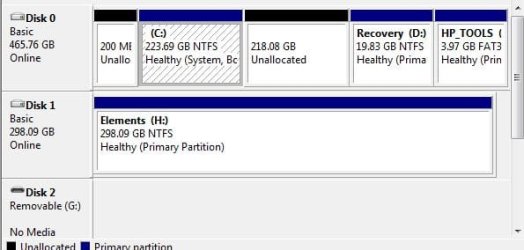
Ok so the ssd has arrived and I have plugged it in to usb port via a sata adaptor. It shows up in disk management - disk 2 (see screen shot) but when I launch acronis in recovery it does not show up as a selectable destination, see other screenshot??

Please help.
 

Attachments

  • diskman.JPG
    diskman.JPG
    30.5 KB · Views: 17
  • acronis.docx
    acronis.docx
    595.2 KB · Views: 3

My Computer My Computer

At a glance

Windows 7
Computer type
Laptop
Computer Manufacturer/Model Number
HP
OS
Windows 7

My Computer My Computer

At a glance

Vista, Windows7, Mint Mate, Zorin, Windows 8from 1.6GHz Duo to i7
Computer Manufacturer/Model Number
HP, Dell, Gateway, Toshiba - 4 laptops and 2 desktops
OS
Vista, Windows7, Mint Mate, Zorin, Windows 8
CPU
from 1.6GHz Duo to i7
Monitor(s) Displays
2x HP w2207
Hard Drives
5x HDD, 7x SSD, 12x Externals
Keyboard
with trackball - no mices
Mouse
Trackball mice
Internet Speed
DSL 6000
Thanks but i would prefer not macrium it is a very large file and I dont have unlimited broadband bandwidth! Plus it will take another 2 hour to create the disk image and there is no gurantee it will work.
 

My Computer My Computer

At a glance

Windows 7
Computer type
Laptop
Computer Manufacturer/Model Number
HP
OS
Windows 7
Easiest would be the Paragon Migration Tool. That does the whole migration job in 3 clicks and never fails. Makes all the settings too - alignment, defrag off, etc.
 

My Computer My Computer

At a glance

Vista, Windows7, Mint Mate, Zorin, Windows 8from 1.6GHz Duo to i7
Computer Manufacturer/Model Number
HP, Dell, Gateway, Toshiba - 4 laptops and 2 desktops
OS
Vista, Windows7, Mint Mate, Zorin, Windows 8
CPU
from 1.6GHz Duo to i7
Monitor(s) Displays
2x HP w2207
Hard Drives
5x HDD, 7x SSD, 12x Externals
Keyboard
with trackball - no mices
Mouse
Trackball mice
Internet Speed
DSL 6000
Back
Top