Preparing to delete from discovering items, is this a virus?

jumbovideo

New member
Local time
9:54 AM
Messages
31
Hi,

As of late, I've been getting this message every time when I start up windows, I had scanned before and after but nothing really comes to the surface regarding the message. Is this an internal issue? If so, what steps are there needed in going to resolving this matter?

Thanks in advance!
 

My Computer My Computer

At a glance

Ontarioi5-7504GBRadeon HD5700 series
Computer type
PC/Desktop
Computer Manufacturer/Model Number
Custom build
OS
Ontario
CPU
i5-750
Motherboard
gigabyte
Memory
4GB
Graphics Card(s)
Radeon HD5700 series
Hard Drives
500 gb 7200 rpm
Perhaps you installed a PUP (Potentially unwanted program) that is causing these messages? I myself have never seen anything as you describe,have a look in your control panel/uninstall programs and see if anything is hanging around that you don't want there.If this is a message within Windows itself,rather than a 3rd party utility,it is very possible you have come into contact with some form of malware that your antivirus wasn't able to stop,you could try free Malwarebytes Anti-Malware for a deeper scan.
 

My Computer My Computer

At a glance

Windows 7 Ultimate x64
Computer type
PC/Desktop
Computer Manufacturer/Model Number
HP
OS
Windows 7 Ultimate x64
Hi and welcome to SevenForums,
Use Clean boot as well see if the message repeats,
http://www.sevenforums.com/tutorial...ation-conflicts-performing-clean-startup.html
Click Start and type in the search box,
msconfig
Click on the suggestion on top or hit the Enter key,
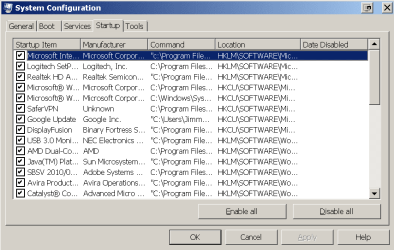
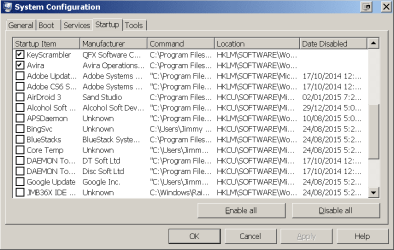
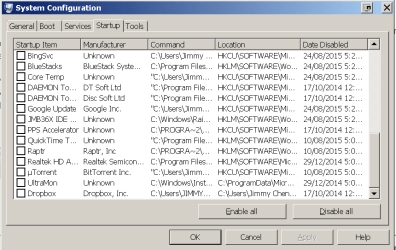
Go to the Startup section and take some screen shots for a complete list,
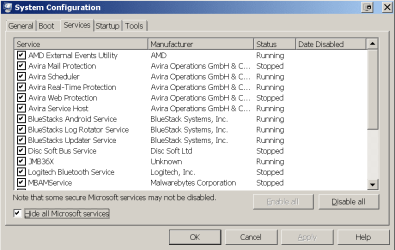
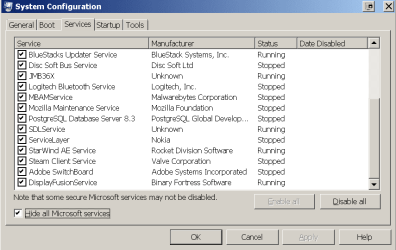
Go to the Services section and on the bottom left Check the box to Hide All Microsoft services,
Repeat the screen shots,
See the links above my signature on how to take and upload screen shots here,

Review Jacee’s instructions to run Adwcleaner here post #7,
Ignore the title of the thread,
http://www.sevenforums.com/system-security/316404-instant-savings-app.html
On the BleepingComputer site use the button that looks like this,
adwcleaner-button.JPG


Post the scan results.
 

My Computer My Computer

At a glance

Win-7-Pro64bit 7-H-Prem-64biti7-5930K 2nd i9-9940x both water blocked VRM'...Trident-z 3200C14 2nd Trident-z 3600C16EVGA 1080ti ftw3 2nd Titan Xp both water blocked
Computer type
PC/Desktop
Computer Manufacturer/Model Number
Custom assembled by me :}
OS
Win-7-Pro64bit 7-H-Prem-64bit
CPU
i7-5930K 2nd i9-9940x both water blocked VRM's too
Motherboard
ASUS SABERTOOTH X99 2nd ASUS x299 Apex
Memory
Trident-z 3200C14 2nd Trident-z 3600C16
Graphics Card(s)
EVGA 1080ti ftw3 2nd Titan Xp both water blocked
Sound Card
Built-in Realtek
Monitor(s) Displays
1-AOC G2460PG 24"G-Sync 144Hz/ 2nd 1-ASUS VG248QE 24" 144Hz
Screen Resolution
1920 x 1080 144Hz
Hard Drives
2-Samsung M.2 Evo & Evo Plus
2-Samsung 850 EVO 500GB SSD's/ 3-2.5 W.D. Black 1tb-&3-1tb/3-3.5 WD Black 1tb hdd's
PSU
EVGA SuperNOVA 1000-P2 2nd 1200-P2
Case
2-Corsair Obsidian Series 450D Black ATX Mid Tower
Cooling
Custom water loops
Keyboard
Logitech G710+/ 2nd Logitech G910
Mouse
2-RedDragon M901 Perdition 16400 dpi Gaming mouse = wired
Internet Speed
Comcast Ping 19ms 89.31mbps download speed 6.12mbps upload
Antivirus
Malwarebytes Pro/ Superantispyware Pro
Browser
FireFox & Pale moon
Other Info
2nd ASUS X299 Apex/Intel i9-9940x with Custom water loop/7H-Prem-x64/Corsair 450D case/Ram Trident-z 3600C16 4x8gb / Samsung970Evo plus 500gb SSD/Dual ssd EZ swap evo/PSU EVGA SuperNova 1200w-P2 80+Platinum/GPU Titan Xp /8-ML-140 on push-pull on 2-280GTX rads
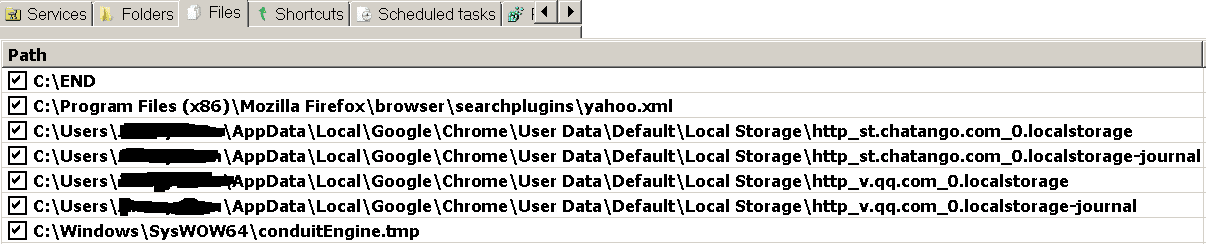
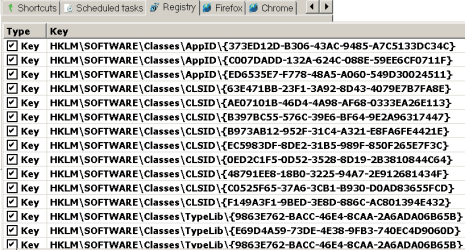
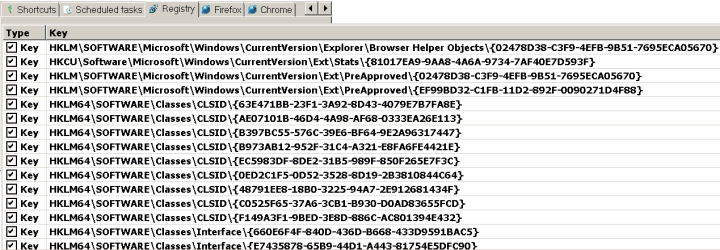
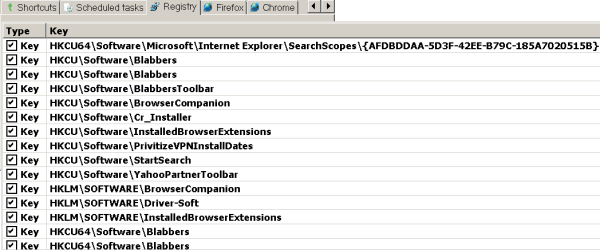
i have not cleaned these out yet, was going to wait for your reply first: here are the screenshots

scan1.png

scan2.png

scan3.png

scan4.png

scan5.png

scan6.png

scan7.png

scan9.png

startup1.png

startup2.png

startup3.png

services1.png

services2.png
 

My Computer My Computer

At a glance

Ontarioi5-7504GBRadeon HD5700 series
Computer type
PC/Desktop
Computer Manufacturer/Model Number
Custom build
OS
Ontario
CPU
i5-750
Motherboard
gigabyte
Memory
4GB
Graphics Card(s)
Radeon HD5700 series
Hard Drives
500 gb 7200 rpm
Perhaps you installed a PUP (Potentially unwanted program) that is causing these messages? I myself have never seen anything as you describe,have a look in your control panel/uninstall programs and see if anything is hanging around that you don't want there.If this is a message within Windows itself,rather than a 3rd party utility,it is very possible you have come into contact with some form of malware that your antivirus wasn't able to stop,you could try free Malwarebytes Anti-Malware for a deeper scan.

i have used avira and malwarebytes and the problem still continues :(
 

My Computer My Computer

At a glance

Ontarioi5-7504GBRadeon HD5700 series
Computer type
PC/Desktop
Computer Manufacturer/Model Number
Custom build
OS
Ontario
CPU
i5-750
Motherboard
gigabyte
Memory
4GB
Graphics Card(s)
Radeon HD5700 series
Hard Drives
500 gb 7200 rpm
Hi and thanks yes I would clean all Adwcleaner finds,
You can open Adwcleaner again same as before and use the Uninstall after cleaning.

Also use this,
Temp files delete,
Save it to your desktop,= very important !
Then right click it and click on Run this as administrator and Start the scanner,
Shut your machine down after it finishes if prompted to if not close button,
TFC - Temp File Cleaner by OldTimer Download - Geeks to Go Forum
Keep this little jewel and run it at least once a month :)
 

My Computer My Computer

At a glance

Win-7-Pro64bit 7-H-Prem-64biti7-5930K 2nd i9-9940x both water blocked VRM'...Trident-z 3200C14 2nd Trident-z 3600C16EVGA 1080ti ftw3 2nd Titan Xp both water blocked
Computer type
PC/Desktop
Computer Manufacturer/Model Number
Custom assembled by me :}
OS
Win-7-Pro64bit 7-H-Prem-64bit
CPU
i7-5930K 2nd i9-9940x both water blocked VRM's too
Motherboard
ASUS SABERTOOTH X99 2nd ASUS x299 Apex
Memory
Trident-z 3200C14 2nd Trident-z 3600C16
Graphics Card(s)
EVGA 1080ti ftw3 2nd Titan Xp both water blocked
Sound Card
Built-in Realtek
Monitor(s) Displays
1-AOC G2460PG 24"G-Sync 144Hz/ 2nd 1-ASUS VG248QE 24" 144Hz
Screen Resolution
1920 x 1080 144Hz
Hard Drives
2-Samsung M.2 Evo & Evo Plus
2-Samsung 850 EVO 500GB SSD's/ 3-2.5 W.D. Black 1tb-&3-1tb/3-3.5 WD Black 1tb hdd's
PSU
EVGA SuperNOVA 1000-P2 2nd 1200-P2
Case
2-Corsair Obsidian Series 450D Black ATX Mid Tower
Cooling
Custom water loops
Keyboard
Logitech G710+/ 2nd Logitech G910
Mouse
2-RedDragon M901 Perdition 16400 dpi Gaming mouse = wired
Internet Speed
Comcast Ping 19ms 89.31mbps download speed 6.12mbps upload
Antivirus
Malwarebytes Pro/ Superantispyware Pro
Browser
FireFox & Pale moon
Other Info
2nd ASUS X299 Apex/Intel i9-9940x with Custom water loop/7H-Prem-x64/Corsair 450D case/Ram Trident-z 3600C16 4x8gb / Samsung970Evo plus 500gb SSD/Dual ssd EZ swap evo/PSU EVGA SuperNova 1200w-P2 80+Platinum/GPU Titan Xp /8-ML-140 on push-pull on 2-280GTX rads
Back
Top