Presentation Mode - Change

How to Change the Windows 7 Display Presentation Mode

   Information
This will show you how to either display the Windows 7 desktop on the Computer only, Duplicate on both computer monitor and external display, Extend to all displays, or show only on a second screen or Projector.

   Note
The application file for this is located at:

C:\Windows\System32\DisplaySwitch.exe.


OPTION ONE

To Change Display Presentation Mode in GUI


1. Press the Windows Key + P.
A) Go to step 3.
OR

2. Open the Start Menu, then type displayswitch.exe in the search box and press Enter. (see screenshot below)
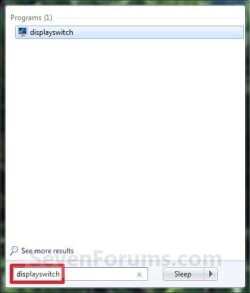
Start_Menu.jpg
3. Select the option that you want Windows 7 to be displayed on. (see screenshot below)


NOTE: If you wanted to cancel and close this without making or selecting an option, then you can just click on a empty area on your desktop to do so.
  • Computer only - This shows your desktop only on your main display screen.
  • Duplicate - This shows your same desktop on both your computer display screen(s) and a connected external projector.
  • Extend - This extends your desktop from your computer display screen(s) and a connected external projector.
  • Projector only - This shows your desktop only on an external projector.
switch.jpg


OPTION TWO

To Change Display Presentation Mode in Command Prompt


1. Open a command prompt.


2. In the command prompt, copy and paste the command in bold below for what you would like to do, and press Enter.
  • DisplaySwitch.exe /internal
    • (Computer only) This shows your desktop only on your main display screen.
  • DisplaySwitch.exe /clone
    • (Duplicate) This shows your same desktop on both your computer display screen(s) and a connected external display or projector.
  • DisplaySwitch.exe /extend
    • (Extend) This extends your desktop from your computer display screen(s) and a connected external display or projector.
  • DisplaySwitch.exe /external
    • (Projector only) This shows your desktop only on an external display or projector.
3. When finished, you can close the command prompt.
That's it,
Shawn


Last edited:
Another very nice feature. thanks John.
 

My Computer

Computer Manufacturer/Model Number
Home Brew
OS
Windows 7 Ultimate Vista Ultimate x64
CPU
Core 2 Duo E8500 3.16Ghz @ 3.8Ghz
Motherboard
eVGA 750i FTW
Memory
2x2Gigs Patriot PC2-6400 LL
Graphics Card(s)
Inno3D GeForce GTX260 216 SP
Monitor(s) Displays
ASUS VW222U 22" 2ms Response time
Screen Resolution
1680x1050
Hard Drives
SATA 150GB
SATA II 250GB
USB IDE 750GB Ext.
PSU
HYTEC 600W & Thermaltake 650W Toughpower Power Exp
Case
Thermaltake Armor LCS (Liquid Cooling System)
Cooling
Liquid Cooling System
Keyboard
Logitech G15 Gaming Keyboard
Mouse
Logitech G9 Gaming Mouse
My windows recognize my displays wrong.

My monitor is the "projector" (2) and my tv is my "monitor" (1), wtf? ^^
Anyone knows a way to change it?

I have tried swap the cables, swap the hdmi entrance, nothing works.

Currently using a ATI graphic card, so don't have the "display manager", driver beta, bla bla bla...

[]'s
 

My Computer

OS
6.1.7100
Hello Navossoc,

Are you using the 9.4 ATI driver version for Windows 7? I have NVIDIA instead for graphics, but you should have a setting in the Catalyst Center to change the monitor identity somewhere I would think.
 

My Computer

Computer type
PC/Desktop
Computer Manufacturer/Model Number
Self built custom
OS
64-bit Windows 11 Pro for Workstations
CPU
Intel i7-8700K OC'd to 5 GHz
Motherboard
ASUS ROG Maximus XI Formula Z390
Memory
64 GB (4x16GB) G.SKILL TridentZ RGB DDR4 3600 MHz
Graphics Card(s)
ASUS ROG-STRIX-GTX1080TI-O11G-GAMING
Sound Card
Integrated
Monitor(s) Displays
2 x Samsung Odyssey G7 27"
Screen Resolution
2560x1440
Hard Drives
1TB Samsung 990 PRO M.2,
4TB Samsung 990 PRO PRO M.2,
TerraMaster F8 SSD Plus NAS
PSU
Seasonic Prime Titanium 850W
Case
Thermaltake Core P3
Cooling
Corsair Hydro H115i
Keyboard
Logitech wireless K800
Mouse
Logitech MX Master 4
Internet Speed
2 Gb/s Download and 100 Mb/s Upload
Antivirus
Malwarebyte Anti-Malware Premium
Browser
Google Chrome
Other Info
Logitech Z625 speaker system,
Logitech BRIO 4K Pro webcam,
HP Color LaserJet Pro MFP M477fdn,
APC SMART-UPS RT 1000 XL - SURT1000XLI,
Galaxy S23 Plus phone
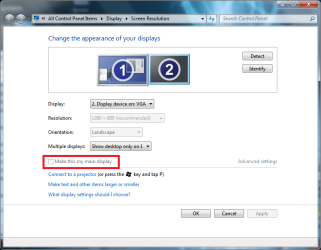
right click the desktop and then click screen resolution...
then on the your main display (the one you say is secondary...)
tick this...
display.PNG
and that should make it your main display...;)
 

My Computer

Computer Manufacturer/Model Number
Tx2500z Tablet Pc/Homemade Server
OS
Windows 7 Ult x64(x2), HomePrem x32(x4), Server 08 (+VM), 08 R2 (VM) , SuSe 11.2 (VM), XP 32 (VM)
CPU
Turion X2 ultra (oh well came with laptop)/P4 @3.2 (yes P4)
Motherboard
IDK HP Motherboard / Intel DG965SS
Memory
OCZ Dual Channel 4GB kit/ 1gb Dual Channel
Graphics Card(s)
HD 3200 graphics /GMA x3100 (yay for intergrated!!)
Sound Card
Realtek HD Audio(mic working, well sort of)/Siig IC-70012
Monitor(s) Displays
built-in Hp 12" laptop screen/ Acer 19"
Screen Resolution
1280x800 /1440x900
Cooling
All Air Cooled
Mouse
Logi MX Rev. /MS Wheel Optical 1.1A /Logitech Optical Mouse
Internet Speed
College baby but its still routed through vpn to 1536k...
Other Info
love my wacom pen and pressure sensitivity...
wished it worked in 7, SUSE for that matter though

My Computer

Computer type
PC/Desktop
Computer Manufacturer/Model Number
Self built custom
OS
64-bit Windows 11 Pro for Workstations
CPU
Intel i7-8700K OC'd to 5 GHz
Motherboard
ASUS ROG Maximus XI Formula Z390
Memory
64 GB (4x16GB) G.SKILL TridentZ RGB DDR4 3600 MHz
Graphics Card(s)
ASUS ROG-STRIX-GTX1080TI-O11G-GAMING
Sound Card
Integrated
Monitor(s) Displays
2 x Samsung Odyssey G7 27"
Screen Resolution
2560x1440
Hard Drives
1TB Samsung 990 PRO M.2,
4TB Samsung 990 PRO PRO M.2,
TerraMaster F8 SSD Plus NAS
PSU
Seasonic Prime Titanium 850W
Case
Thermaltake Core P3
Cooling
Corsair Hydro H115i
Keyboard
Logitech wireless K800
Mouse
Logitech MX Master 4
Internet Speed
2 Gb/s Download and 100 Mb/s Upload
Antivirus
Malwarebyte Anti-Malware Premium
Browser
Google Chrome
Other Info
Logitech Z625 speaker system,
Logitech BRIO 4K Pro webcam,
HP Color LaserJet Pro MFP M477fdn,
APC SMART-UPS RT 1000 XL - SURT1000XLI,
Galaxy S23 Plus phone
Thanks for the answer guys.

Hello Navossoc,

Are you using the 9.4 ATI driver version for Windows 7? I have NVIDIA instead for graphics, but you should have a setting in the Catalyst Center to change the monitor identity somewhere I would think.

Yes, currently using 9.4...
This feature it's not avaliable at this time on ATI cards...

See capture3.png

Here:
AMD Game Forums - "Display manager" tab - missing

I see another user with the same problem.

right click the desktop and then click screen resolution...
then on the your main display (the one you say is secondary...)
tick this...
View attachment 11178
and that should make it your main display...;)

Yes, i already have made this a long time ago.
Btw when i press WIN+P, i have to select "projector" as my screen, understand my problem? ^^

Isn't a really problem, btw is annoying!

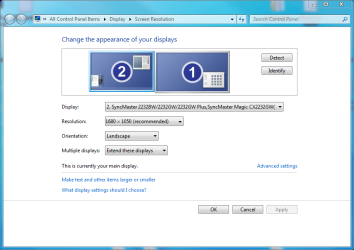
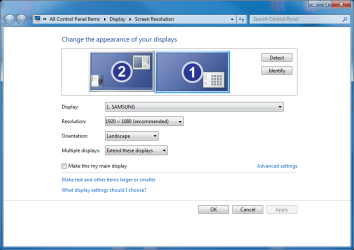
See capture.png and capture2.png.

I think he choose the tv because it has a higher resolution, i don't know...
Swap cables, etc, don't work :(

Any other ideas?

Thanks!
Ah Windows 7 build 7100

PS: I don't have that "link" connect to a projector, any ideias too? ^^ weird things happen with me hahahaa.
 

Attachments

  • Capture.PNG
    Capture.PNG
    37.3 KB · Views: 4,043
  • Capture2.PNG
    Capture2.PNG
    35.9 KB · Views: 1,572
  • Capture3.PNG
    Capture3.PNG
    33.6 KB · Views: 69,477

My Computer

OS
6.1.7100
Has anyone solved navossoc's problem?

I have the exact same problem as navossoc. Can anyone help me please?
 

My Computer

OS
Windows 7

My Computer

Computer type
PC/Desktop
Computer Manufacturer/Model Number
Self built custom
OS
64-bit Windows 11 Pro for Workstations
CPU
Intel i7-8700K OC'd to 5 GHz
Motherboard
ASUS ROG Maximus XI Formula Z390
Memory
64 GB (4x16GB) G.SKILL TridentZ RGB DDR4 3600 MHz
Graphics Card(s)
ASUS ROG-STRIX-GTX1080TI-O11G-GAMING
Sound Card
Integrated
Monitor(s) Displays
2 x Samsung Odyssey G7 27"
Screen Resolution
2560x1440
Hard Drives
1TB Samsung 990 PRO M.2,
4TB Samsung 990 PRO PRO M.2,
TerraMaster F8 SSD Plus NAS
PSU
Seasonic Prime Titanium 850W
Case
Thermaltake Core P3
Cooling
Corsair Hydro H115i
Keyboard
Logitech wireless K800
Mouse
Logitech MX Master 4
Internet Speed
2 Gb/s Download and 100 Mb/s Upload
Antivirus
Malwarebyte Anti-Malware Premium
Browser
Google Chrome
Other Info
Logitech Z625 speaker system,
Logitech BRIO 4K Pro webcam,
HP Color LaserJet Pro MFP M477fdn,
APC SMART-UPS RT 1000 XL - SURT1000XLI,
Galaxy S23 Plus phone
Catdog,

What happens when you use the tutorial to select Computer only?

Could you post a screenshot of your Screen Resolution window to see if it may help?
 

My Computer

Computer type
PC/Desktop
Computer Manufacturer/Model Number
Self built custom
OS
64-bit Windows 11 Pro for Workstations
CPU
Intel i7-8700K OC'd to 5 GHz
Motherboard
ASUS ROG Maximus XI Formula Z390
Memory
64 GB (4x16GB) G.SKILL TridentZ RGB DDR4 3600 MHz
Graphics Card(s)
ASUS ROG-STRIX-GTX1080TI-O11G-GAMING
Sound Card
Integrated
Monitor(s) Displays
2 x Samsung Odyssey G7 27"
Screen Resolution
2560x1440
Hard Drives
1TB Samsung 990 PRO M.2,
4TB Samsung 990 PRO PRO M.2,
TerraMaster F8 SSD Plus NAS
PSU
Seasonic Prime Titanium 850W
Case
Thermaltake Core P3
Cooling
Corsair Hydro H115i
Keyboard
Logitech wireless K800
Mouse
Logitech MX Master 4
Internet Speed
2 Gb/s Download and 100 Mb/s Upload
Antivirus
Malwarebyte Anti-Malware Premium
Browser
Google Chrome
Other Info
Logitech Z625 speaker system,
Logitech BRIO 4K Pro webcam,
HP Color LaserJet Pro MFP M477fdn,
APC SMART-UPS RT 1000 XL - SURT1000XLI,
Galaxy S23 Plus phone
i'm having the same issue. the tv and computer monitors are swapped. windows 7 identifies my tv as the "computer only" and my monitor as "projector only". its not really a problem but its pretty annoying. does anyone know how to change the setting?
 

My Computer

Computer Manufacturer/Model Number
Custom
OS
Windows 7 Ultimate 64-Bit
CPU
AMD Athlon 7850 Dual Core Processor
Motherboard
Asus M3N78-EM
Memory
4GB
Graphics Card(s)
Nvidia Geforce 8300 (Onboard)
Monitor(s) Displays
LG 17" & Panasonic 37" HDTV
Hard Drives
32GB Solid State Drive (Primary)
640GB Hard Drive
PSU
380w Antec
i also have this annoying problem, no solutions?
 

My Computer

OS
windows ultimate 7 x64
CPU
Intel Core 2 Duo
Ok guys,

See if this may help. :)

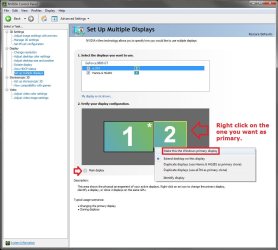
If you have a NIVIDIA graphics card or chip, then see if you can do this from the NVIDIA Control Panel (right click on desktop) below. I'm not sure what it would with ATI though.
NVIDIA.jpg

If not, then try this:
  • Unplug the TV cable from the back of the computer.
  • Restart the computer with only the monitor connected and running.
  • While the monitor is running, connect the TV to see if it will make it the second monitor and not the primary one.
 

My Computer

Computer type
PC/Desktop
Computer Manufacturer/Model Number
Self built custom
OS
64-bit Windows 11 Pro for Workstations
CPU
Intel i7-8700K OC'd to 5 GHz
Motherboard
ASUS ROG Maximus XI Formula Z390
Memory
64 GB (4x16GB) G.SKILL TridentZ RGB DDR4 3600 MHz
Graphics Card(s)
ASUS ROG-STRIX-GTX1080TI-O11G-GAMING
Sound Card
Integrated
Monitor(s) Displays
2 x Samsung Odyssey G7 27"
Screen Resolution
2560x1440
Hard Drives
1TB Samsung 990 PRO M.2,
4TB Samsung 990 PRO PRO M.2,
TerraMaster F8 SSD Plus NAS
PSU
Seasonic Prime Titanium 850W
Case
Thermaltake Core P3
Cooling
Corsair Hydro H115i
Keyboard
Logitech wireless K800
Mouse
Logitech MX Master 4
Internet Speed
2 Gb/s Download and 100 Mb/s Upload
Antivirus
Malwarebyte Anti-Malware Premium
Browser
Google Chrome
Other Info
Logitech Z625 speaker system,
Logitech BRIO 4K Pro webcam,
HP Color LaserJet Pro MFP M477fdn,
APC SMART-UPS RT 1000 XL - SURT1000XLI,
Galaxy S23 Plus phone
@Brink
your suggestin works... until the pc is restarted, then the pc monitor goes back to being the secondary display.
I think the problem is windows lists the displays in alphabetical order, that's why Panasonic-tv is number one and Syncmaster monitor is two. very anoying when you use the winkey+p menu.
thanks for your help
 

My Computer

OS
windows ultimate 7 x64
CPU
Intel Core 2 Duo
Um, back to the drawing board. :(
 

My Computer

Computer type
PC/Desktop
Computer Manufacturer/Model Number
Self built custom
OS
64-bit Windows 11 Pro for Workstations
CPU
Intel i7-8700K OC'd to 5 GHz
Motherboard
ASUS ROG Maximus XI Formula Z390
Memory
64 GB (4x16GB) G.SKILL TridentZ RGB DDR4 3600 MHz
Graphics Card(s)
ASUS ROG-STRIX-GTX1080TI-O11G-GAMING
Sound Card
Integrated
Monitor(s) Displays
2 x Samsung Odyssey G7 27"
Screen Resolution
2560x1440
Hard Drives
1TB Samsung 990 PRO M.2,
4TB Samsung 990 PRO PRO M.2,
TerraMaster F8 SSD Plus NAS
PSU
Seasonic Prime Titanium 850W
Case
Thermaltake Core P3
Cooling
Corsair Hydro H115i
Keyboard
Logitech wireless K800
Mouse
Logitech MX Master 4
Internet Speed
2 Gb/s Download and 100 Mb/s Upload
Antivirus
Malwarebyte Anti-Malware Premium
Browser
Google Chrome
Other Info
Logitech Z625 speaker system,
Logitech BRIO 4K Pro webcam,
HP Color LaserJet Pro MFP M477fdn,
APC SMART-UPS RT 1000 XL - SURT1000XLI,
Galaxy S23 Plus phone
it seems when theres a dual monitor setup with both digital and analog hookups, the identity # of the digital monitor is by default set to 1, regardless of which monitor is set as the primary. in windows 7 id#1 is labeled as the computer and id#2 as projector. for now there doesn't seem to be a way of changing the setting. digital is like a dominant gene over analog in the dna of windows 7.

if it's really bothering you the only solution would be to get a video card that supports 2 digital connections. the onboard geforce 8300 on my asus m3n78em motherboard has hdmi, dvi, and vga outputs, but doesn't support 2 digital connections at the same time. i threw in an old asus gts250dk that i'm not really able to use because after a couple days of use, reason unknown, it dies out. for the time that it did work however, i was able to correctly identify my monitors, and i have to say i enjoyed seeing the proper labels hehe.
 

My Computer

Computer Manufacturer/Model Number
Custom
OS
Windows 7 Ultimate 64-Bit
CPU
AMD Athlon 7850 Dual Core Processor
Motherboard
Asus M3N78-EM
Memory
4GB
Graphics Card(s)
Nvidia Geforce 8300 (Onboard)
Monitor(s) Displays
LG 17" & Panasonic 37" HDTV
Hard Drives
32GB Solid State Drive (Primary)
640GB Hard Drive
PSU
380w Antec
The display switch has the ability to actualy switch to a certain setting.

C:\Windows\System32\DisplaySwitch.exe /external
C:\Windows\System32\DisplaySwitch.exe /internal
C:\Windows\System32\DisplaySwitch.exe /clone
C:\Windows\System32\DisplaySwitch.exe /extend

Were in my case :( external is the screen wich is active during boot.
and internal the TV

@sadhuka
Changing videocards (geforce 8800GTS) is not realy an option!
 

My Computer

OS
7 x64 (well that's what they claim)
CPU
Q6700 @2.66
Motherboard
AB9pro
Memory
DDR2 4Gig 332.5
Graphics Card(s)
geforce 8800GTS
Sound Card
terratec EWS88MT
Monitor(s) Displays
Samsung 226; panasonic TV
Screen Resolution
1680:1050 // 1920:1080
Internet Speed
50Mb u/d
i have used (win + p) to toggle between my dual monitor setup and my hd forever. now all of a sudden, the console for choosing the display config (disconnect, duplicate, extended, projector only) only shows for a split second then disappears. i have no idea how this happened. i tried restarting, disconnecting... ddnt work. any ideas?
 

My Computer

OS
windows 7
Hello Homamkeh,

Does it work when opening the displayswitch.exe file? If so, you might see if creating a shortcut of it, then assigning your own keyboard shortcut to open this shortcut may work for you instead.

Hope this helps,
Shawn
 

My Computer

Computer type
PC/Desktop
Computer Manufacturer/Model Number
Self built custom
OS
64-bit Windows 11 Pro for Workstations
CPU
Intel i7-8700K OC'd to 5 GHz
Motherboard
ASUS ROG Maximus XI Formula Z390
Memory
64 GB (4x16GB) G.SKILL TridentZ RGB DDR4 3600 MHz
Graphics Card(s)
ASUS ROG-STRIX-GTX1080TI-O11G-GAMING
Sound Card
Integrated
Monitor(s) Displays
2 x Samsung Odyssey G7 27"
Screen Resolution
2560x1440
Hard Drives
1TB Samsung 990 PRO M.2,
4TB Samsung 990 PRO PRO M.2,
TerraMaster F8 SSD Plus NAS
PSU
Seasonic Prime Titanium 850W
Case
Thermaltake Core P3
Cooling
Corsair Hydro H115i
Keyboard
Logitech wireless K800
Mouse
Logitech MX Master 4
Internet Speed
2 Gb/s Download and 100 Mb/s Upload
Antivirus
Malwarebyte Anti-Malware Premium
Browser
Google Chrome
Other Info
Logitech Z625 speaker system,
Logitech BRIO 4K Pro webcam,
HP Color LaserJet Pro MFP M477fdn,
APC SMART-UPS RT 1000 XL - SURT1000XLI,
Galaxy S23 Plus phone
Back
Top