Presonus Firepod (FP10) won't work completely in w7 pro

deeaa

New member
Local time
1:01 PM
Messages
13
Hey,

I have a Presonus Firepod and latest 64-compatible drivers for it...and it works just fine in recording/audio programs, ASIO etc. and shows up in Windows just fine...

BUT windows won't play any audio through it other than via ASIO in the said programs. No system sounds, game sounds, nothing.

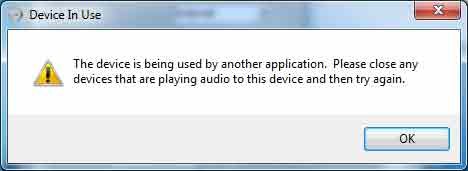
All the soundcard inputs and such show in Windows sound ctrl panel fine, look OK, no problems, BUT when I try to press 'test' or anything, it just reports that this hardware is being used by another application and please turn off the process first. It doesn't matter if it's set to default audio device or if there are other audio devices present.

Once I did all of a sudden manage to get it to sound, and it played via mediaplayer etc. just fine...but upon next boot, nothing. Again, used by another application.

Right now I've worked around the problem by using the internal Realtek card for windows/games sounds and just use headphones with them, but certainly it'd be easier to be able to use the presonus for also windows sounds, not only on audio programs, like it used to be in Xp.
 

My Computer My Computer

At a glance

win 7 64bitE84004GB 1066ATI HD8450
Computer Manufacturer/Model Number
none
OS
win 7 64bit
CPU
E8400
Motherboard
P5Q
Memory
4GB 1066
Graphics Card(s)
ATI HD8450
Sound Card
Presonus Firepod
Monitor(s) Displays
Viewsonic VX1000
Hard Drives
64G SSD, 1TB raid 0 sata
Case
Cooler Master Stacker
It has S/PDIF ins and outs along with multiple mix buses, so do this:

Connect a cable straight from S/PDIF out to S/PDIF in.

Use S/PDIF as default device under Windows. Point all software to output to S/PDIF.

Make S/PDIF in a mix, one of the inputs toward your "normal" outputs.

Problem solved.

PS - check my sound card specs. :D
 

My Computer My Computer

At a glance

7600.20510 x86P4 550 3.4 GHz HT running at 3.5 GHzOCZ 2 GB(2x1GB) DDR400mHz running @ 414 mHzHIS Radeon HD 3850 IceQ 3 Turbo HDMI Dual DL-...
Computer Manufacturer/Model Number
self built
OS
7600.20510 x86
CPU
P4 550 3.4 GHz HT running at 3.5 GHz
Motherboard
MSI PM8M3-V (MS-7211 v1.x) Micro-ATX mainboard
Memory
OCZ 2 GB(2x1GB) DDR400mHz running @ 414 mHz
Graphics Card(s)
HIS Radeon HD 3850 IceQ 3 Turbo HDMI Dual DL-DVI AGP
Sound Card
MOTU Traveler firewire studio interface 192 kHz 24 bit
Monitor(s) Displays
22" widescreen Acer X223W LCD, 17" Compaq P75 CRT
Screen Resolution
1680x1050 and 1280x1024
Hard Drives
SATA I x2 WD, 400 GB and 120 GB, SATA 2 WD Caviar Black 1 TB
PSU
350W generic
Case
Cybertronpc, it glows blue
Cooling
stock cpu fan, Ice-Q 3 gpu and system, many case fans
Keyboard
Logitch Classical Keyboard 200
Mouse
Logitech Mediaplay cordless
Internet Speed
1792/448 kbits/sec
Other Info
SATA II PCI fake RAID adapter, 1 GB Readyboost, original ATI Remote Wonder (even works with WMC perfectly), Logitech Rumblepad 2 game controller x2
Hello, thanks for the reply!

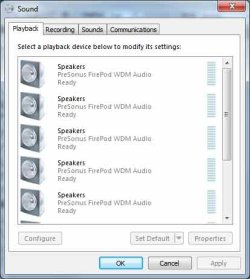
However, I'm not sure how to do that...I don't see SPdif in the windows sound devices list at all. It shows six instances of 'Speakers: PreSonus FirePod WDM Audio, Ready' on the playback side and 5(!) instances of LIne In PreSonus FirePod WDm Audio, Ready, but there's no info which is which and if I try to test them, it says:

'The device is being used...'

In Devicemanager it shows as PreSonus 11.9.2007 driver version 2.46.0.0, that's it.

So the problem is I can't tell between the card inputs and outputs in windows which is which and it won't let me test which is which, or select SPDIF...no sound is coming from any output as far as I can tell, except once it for some reason worked for one boot and then the audio was gone again. It was the fourth 'speaker' that played sound then.

Funny, because it works in Cubase etc. with no problems.
 

My Computer My Computer

At a glance

win 7 64bitE84004GB 1066ATI HD8450
Computer Manufacturer/Model Number
none
OS
win 7 64bit
CPU
E8400
Motherboard
P5Q
Memory
4GB 1066
Graphics Card(s)
ATI HD8450
Sound Card
Presonus Firepod
Monitor(s) Displays
Viewsonic VX1000
Hard Drives
64G SSD, 1TB raid 0 sata
Case
Cooler Master Stacker
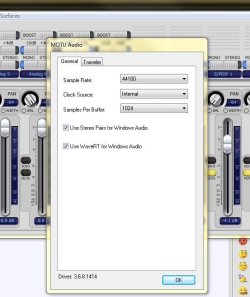
Look for some setting like this in your interface software (Wave RT) and enable if you find it. It's another method to acheive Windows' sounds over normal output:
 

Attachments

  • Capture.JPG
    Capture.JPG
    51.1 KB · Views: 245

My Computer My Computer

At a glance

7600.20510 x86P4 550 3.4 GHz HT running at 3.5 GHzOCZ 2 GB(2x1GB) DDR400mHz running @ 414 mHzHIS Radeon HD 3850 IceQ 3 Turbo HDMI Dual DL-...
Computer Manufacturer/Model Number
self built
OS
7600.20510 x86
CPU
P4 550 3.4 GHz HT running at 3.5 GHz
Motherboard
MSI PM8M3-V (MS-7211 v1.x) Micro-ATX mainboard
Memory
OCZ 2 GB(2x1GB) DDR400mHz running @ 414 mHz
Graphics Card(s)
HIS Radeon HD 3850 IceQ 3 Turbo HDMI Dual DL-DVI AGP
Sound Card
MOTU Traveler firewire studio interface 192 kHz 24 bit
Monitor(s) Displays
22" widescreen Acer X223W LCD, 17" Compaq P75 CRT
Screen Resolution
1680x1050 and 1280x1024
Hard Drives
SATA I x2 WD, 400 GB and 120 GB, SATA 2 WD Caviar Black 1 TB
PSU
350W generic
Case
Cybertronpc, it glows blue
Cooling
stock cpu fan, Ice-Q 3 gpu and system, many case fans
Keyboard
Logitch Classical Keyboard 200
Mouse
Logitech Mediaplay cordless
Internet Speed
1792/448 kbits/sec
Other Info
SATA II PCI fake RAID adapter, 1 GB Readyboost, original ATI Remote Wonder (even works with WMC perfectly), Logitech Rumblepad 2 game controller x2
Hello,

No luck...this is all I have:
 

Attachments

  • firecontrol.jpg
    firecontrol.jpg
    16.9 KB · Views: 45

My Computer My Computer

At a glance

win 7 64bitE84004GB 1066ATI HD8450
Computer Manufacturer/Model Number
none
OS
win 7 64bit
CPU
E8400
Motherboard
P5Q
Memory
4GB 1066
Graphics Card(s)
ATI HD8450
Sound Card
Presonus Firepod
Monitor(s) Displays
Viewsonic VX1000
Hard Drives
64G SSD, 1TB raid 0 sata
Case
Cooler Master Stacker
And this is how windows shows it, no spdif, nothing:
 

Attachments

  • firewin.jpg
    firewin.jpg
    17.8 KB · Views: 159

My Computer My Computer

At a glance

win 7 64bitE84004GB 1066ATI HD8450
Computer Manufacturer/Model Number
none
OS
win 7 64bit
CPU
E8400
Motherboard
P5Q
Memory
4GB 1066
Graphics Card(s)
ATI HD8450
Sound Card
Presonus Firepod
Monitor(s) Displays
Viewsonic VX1000
Hard Drives
64G SSD, 1TB raid 0 sata
Case
Cooler Master Stacker
...and this is what it says if I try to do anything to the soundcard settings in windows:
 

Attachments

  • firewrong.jpg
    firewrong.jpg
    7.8 KB · Views: 24

My Computer My Computer

At a glance

win 7 64bitE84004GB 1066ATI HD8450
Computer Manufacturer/Model Number
none
OS
win 7 64bit
CPU
E8400
Motherboard
P5Q
Memory
4GB 1066
Graphics Card(s)
ATI HD8450
Sound Card
Presonus Firepod
Monitor(s) Displays
Viewsonic VX1000
Hard Drives
64G SSD, 1TB raid 0 sata
Case
Cooler Master Stacker
Ya that's a normal error. Try closing all media players or anything to do with sound. Check task manager for any hanging.

As far as the outputs go - right click on one and choose to show disconnected devices and/or show disabled devices.
 

My Computer My Computer

At a glance

7600.20510 x86P4 550 3.4 GHz HT running at 3.5 GHzOCZ 2 GB(2x1GB) DDR400mHz running @ 414 mHzHIS Radeon HD 3850 IceQ 3 Turbo HDMI Dual DL-...
Computer Manufacturer/Model Number
self built
OS
7600.20510 x86
CPU
P4 550 3.4 GHz HT running at 3.5 GHz
Motherboard
MSI PM8M3-V (MS-7211 v1.x) Micro-ATX mainboard
Memory
OCZ 2 GB(2x1GB) DDR400mHz running @ 414 mHz
Graphics Card(s)
HIS Radeon HD 3850 IceQ 3 Turbo HDMI Dual DL-DVI AGP
Sound Card
MOTU Traveler firewire studio interface 192 kHz 24 bit
Monitor(s) Displays
22" widescreen Acer X223W LCD, 17" Compaq P75 CRT
Screen Resolution
1680x1050 and 1280x1024
Hard Drives
SATA I x2 WD, 400 GB and 120 GB, SATA 2 WD Caviar Black 1 TB
PSU
350W generic
Case
Cybertronpc, it glows blue
Cooling
stock cpu fan, Ice-Q 3 gpu and system, many case fans
Keyboard
Logitch Classical Keyboard 200
Mouse
Logitech Mediaplay cordless
Internet Speed
1792/448 kbits/sec
Other Info
SATA II PCI fake RAID adapter, 1 GB Readyboost, original ATI Remote Wonder (even works with WMC perfectly), Logitech Rumblepad 2 game controller x2
Ya that's a normal error. Try closing all media players or anything to do with sound. Check task manager for any hanging.

As far as the outputs go - right click on one and choose to show disconnected devices and/or show disabled devices.

There shouldn't be anything concerning sound going on. No running apps or hangs either...just did a clean windows install yesterday so it's pretty empty still.

I have show disabled and unused devices ticked, but that's all it shows anyway. Six counts of firepod audio devices ready, no spdif, nothing else, but 'test' and such just give 'used by another device' and marking any of them as default sound devices causes all mediaplayers to report something like 'error playing' or whatever.

Still works in Cubase etc. I guess I just must accept that Presonus cards don't work in 64bit win7.
 

My Computer My Computer

At a glance

win 7 64bitE84004GB 1066ATI HD8450
Computer Manufacturer/Model Number
none
OS
win 7 64bit
CPU
E8400
Motherboard
P5Q
Memory
4GB 1066
Graphics Card(s)
ATI HD8450
Sound Card
Presonus Firepod
Monitor(s) Displays
Viewsonic VX1000
Hard Drives
64G SSD, 1TB raid 0 sata
Case
Cooler Master Stacker
I have show disabled and unused devices ticked, but that's all it shows anyway. Six counts of firepod audio devices ready, no spdif, nothing else, but 'test' and such just give 'used by another device' and marking any of them as default sound devices causes all mediaplayers to report something like 'error playing' or whatever.

Still works in Cubase etc. I guess I just must accept that Presonus cards don't work in 64bit win7.

@deeaa - There is HOPE!! I went through the same thing the last few weeks. Ableton Live and Sony Vegas played audio fine, but my Windows system audio just WOULD NOT work...THEN....

Tonight I just stumbled across the solution...thanks to AndyPanda on the PreSonus Forums:

Windows audio will only work if the bit rate is 48K - so if your DAW uses a different bit rate, you'll have to use the Presonus Control to set it back to 48 after you quit your DAW - otherwise Windows will complain that the device is in use by another app.
PreSonus Forums - View Single Post - Windows 7 Firepod driver problems


So - Just open up the Firepod / FP10 Control Panel and select a Sample Rate of 48.0 kHz. You don't even have to unplug or restart or anything. Within seconds everything worked for me.

Good luck!
--bp
 

My Computer My Computer

At a glance

OS X 10.6 / Win 7 Ultimate 64-bit
OS
OS X 10.6 / Win 7 Ultimate 64-bit
Thanks BrandoJP...it almost worked this way for me too!

When I change to 48Khz it does stop bugging me about 'being used by another app' and will play the test tone OK but for some reason I don't hear it. It is possible I have set the levels of the output that is the correct one too low.

BUT at any rate, it won't then work in audio programs which in turn start to complain about device being used by another app - and apparently upon returning to the Firebox control panel, it had reverted to 41.1 by itself and now there was no sound at all anywhere :-) but I guess upon reboot the sounds will return to the way they were.

It's not such a big deal anyway, as long as ASIO works in proper audio programs, I can always use another soundcard and headphones for games and yet another for Skype etc. the only thing that bugs me is I need to open anything I want to listen to in Cubase and can't use mediaplayer, VLC etc. if I want to use speakers, not headphones.

But I guess one day there will be better drivers available. I have two other friends with Firepods as well who bought them as per my recommendation, so I'm feeling a bit responsible for their systems as well & have told them to stick with Xp for a little longer now.
 

My Computer My Computer

At a glance

win 7 64bitE84004GB 1066ATI HD8450
Computer Manufacturer/Model Number
none
OS
win 7 64bit
CPU
E8400
Motherboard
P5Q
Memory
4GB 1066
Graphics Card(s)
ATI HD8450
Sound Card
Presonus Firepod
Monitor(s) Displays
Viewsonic VX1000
Hard Drives
64G SSD, 1TB raid 0 sata
Case
Cooler Master Stacker
I'll have to try that with my Focusrite Saffire Pro 40. It works great with Sonar but that's all.
 

My Computer My Computer

At a glance

Windows 10 64 bitIntel i7 6700K16GB Corsair DominatorIntel CPU Graphics
Computer type
PC/Desktop
Computer Manufacturer/Model Number
My Own Build
OS
Windows 10 64 bit
CPU
Intel i7 6700K
Motherboard
ASUS ROG Maximus VIII Hero
Memory
16GB Corsair Dominator
Graphics Card(s)
Intel CPU Graphics
Sound Card
RealTek
Monitor(s) Displays
27" Dell S2719dgf
Screen Resolution
2560X1440
Hard Drives
1 TB Samsung 850 EVO SSD for Win 10 Pro
500GB Samsung 850 EVO SSD for Win 10 Insider
2 TB drive for backup
PSU
EVGA Supernova 750G2
Case
BeQuiet Silent Base 600
Cooling
Deepcool Captain 120EX
Keyboard
Microsoft Wireless 2000
Mouse
Microsoft wireless
Internet Speed
100 MB/sec (Cable)
Antivirus
Microsoft Defender and Malwarebytes
Browser
Edge/Firefox
Other Info
Cakewalk (Sonar) by BandLab and Studio One 4.1 Pro recording studio software. MOTU 896Mk3 Hybrid recording interface, Frontier Tranzport wireless control unit, Behringer X-Touch Control Surface.
Five USB connected optical drives for CD Audio production using Nero BurningROM
@deeaa - There is HOPE!! I went through the same thing the last few weeks. Ableton Live and Sony Vegas played audio fine, but my Windows system audio just WOULD NOT work...THEN....

Tonight I just stumbled across the solution...thanks to AndyPanda on the PreSonus Forums:


PreSonus Forums - View Single Post - Windows 7 Firepod driver problems


So - Just open up the Firepod / FP10 Control Panel and select a Sample Rate of 48.0 kHz. You don't even have to unplug or restart or anything. Within seconds everything worked for me.

Good luck!
--bp

THANK YOU!!!!!!
This solved my problem today with windows 10 cubase 6 and presonus firepod
 

My Computer My Computer

At a glance

Israel
Computer type
PC/Desktop
OS
Israel
Back
Top