Preventing pop ups

Jaydee58

New member
Local time
8:11 PM
Messages
1
Every time I click links contained in highlighted text I go through instead to an annoying pop up survey. The highlighted text shows as 'text enhanced'
http://bonus.playnwin.tv/template_16/step1.aspx
Theree doesn't seem to be a way of preventing this. Do you have any advice on how I can stop it?
 

My Computer

OS
Windows 64
Hello Jaydee58 and welcome to Seven Forums.

Couple of things you could do. Delete your temp files, cookies, and browsing history.

http://www.sevenforums.com/tutorials/162675-internet-explorer-delete-browsing-history-exit.html

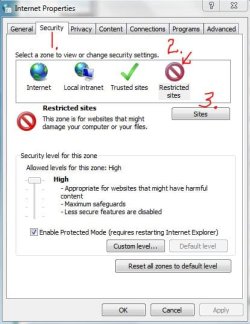
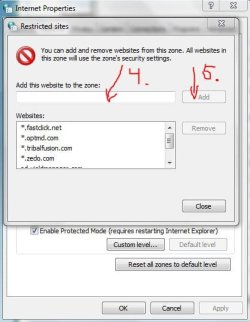
While you're in the Internet Options dialog box, click on the Security tab > Restricted Sites icon > Sites button and type in the www website address of any site you want to restrict. Close/OK your way back out of the dialog boxes.

RestrictedZone1.JPG restrictedzone2.JPG

You could also look into using a different browser (specifically, Firefox) and using a free add-on called NoScript.

NoScript - JavaScript/Java/Flash blocker for a safer Firefox experience! - what is it? - InformAction

There are other ad blockers available for IE but I'm not sure if any are free. Perhaps others will jump in with suggestions. I've been using AdMuncher for a couple of years with good success.

Ad Blocker: Ad Muncher
 

My Computer

Computer type
Laptop
Computer Manufacturer/Model Number
Sony Vaio VPCEB47GM Laptop
OS
Win 7 Pro 64-bit
CPU
Intel i5 2.4 Ghz
Memory
8GB DDR3
Graphics Card(s)
Intel HD 3000
Sound Card
IDT High Definition
Monitor(s) Displays
15.6 WGXA Anti-Glare LED
Screen Resolution
1280x800
Hard Drives
640Gb 7200rpm
Antivirus
MSE
Browser
Opera (primary) with IE9 backup
Back
Top