Preventing pop ups

Jaydee58

New member
Local time
9:31 AM
Messages
1
Every time I click links contained in highlighted text I go through instead to an annoying pop up survey. The highlighted text shows as 'text enhanced'
http://bonus.playnwin.tv/template_16/step1.aspx
Theree doesn't seem to be a way of preventing this. Do you have any advice on how I can stop it?
 

My Computer My Computer

OS
Windows 64
Hello Jaydee58 and welcome to Seven Forums.

Couple of things you could do. Delete your temp files, cookies, and browsing history.

http://www.sevenforums.com/tutorials/162675-internet-explorer-delete-browsing-history-exit.html

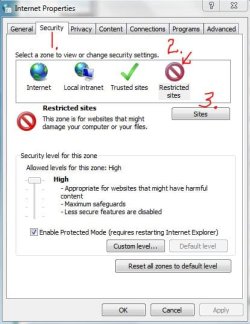
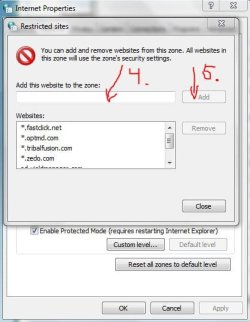
While you're in the Internet Options dialog box, click on the Security tab > Restricted Sites icon > Sites button and type in the www website address of any site you want to restrict. Close/OK your way back out of the dialog boxes.

RestrictedZone1.JPG restrictedzone2.JPG

You could also look into using a different browser (specifically, Firefox) and using a free add-on called NoScript.

NoScript - JavaScript/Java/Flash blocker for a safer Firefox experience! - what is it? - InformAction

There are other ad blockers available for IE but I'm not sure if any are free. Perhaps others will jump in with suggestions. I've been using AdMuncher for a couple of years with good success.

Ad Blocker: Ad Muncher
 

My Computer My Computer

Computer type
Laptop
Computer Manufacturer/Model Number
Sony Vaio VPCEB47GM Laptop
OS
Win 7 Pro 64-bit
CPU
Intel i5 2.4 Ghz
Memory
8GB DDR3
Graphics Card(s)
Intel HD 3000
Sound Card
IDT High Definition
Monitor(s) Displays
15.6 WGXA Anti-Glare LED
Screen Resolution
1280x800
Hard Drives
640Gb 7200rpm
Antivirus
MSE
Browser
Opera (primary) with IE9 backup
Back
Top