

Hello all...
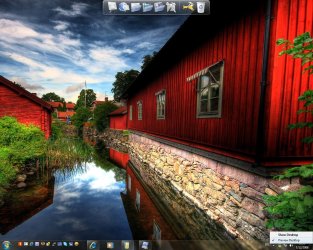
I see there's an option "Preview Desktop" checked on the bottom right little bar on my taskbar, and I read somewhere that if you hover your mouse over that bar, you can "preview" the desktop without actually showing it (minimizing all windows). This doesn't work on my Windows 7 Installation. Is it another locked featured? Has anyone seen it working? Does it have anything to do with aero peek? what is aero peek by the way? is it the thumbnail preview when we hover over the open programs on the taskbar?
Thank you all.
I see there's an option "Preview Desktop" checked on the bottom right little bar on my taskbar, and I read somewhere that if you hover your mouse over that bar, you can "preview" the desktop without actually showing it (minimizing all windows). This doesn't work on my Windows 7 Installation. Is it another locked featured? Has anyone seen it working? Does it have anything to do with aero peek? what is aero peek by the way? is it the thumbnail preview when we hover over the open programs on the taskbar?
Thank you all.
Attachments
Last edited:
My Computer
- Computer Manufacturer/Model Number
- ENIAC
- OS
- Windows 7 RC 7100 32bit/64bit
- CPU
- Intel Core2Duo E4500 2.20 GHz
- Motherboard
- ASUS P5LD2-X/1333
- Memory
- 2x1GB Kinsgston DDR2 800MHz
- Graphics Card(s)
- Nvidia 8500GT
- Sound Card
- Onboard High Definition Audio Device
- Monitor(s) Displays
- Sony Bravia 42"
- Case
- LINKW 2222
- Cooling
- Standard Intel
- Keyboard
- Some cheap one
- Mouse
- Microsoft Intellimouse something
- Internet Speed
- 24MBps ADSL


