JavaScript is disabled. For a better experience, please enable JavaScript in your browser before proceeding.
You are using an out of date browser. It may not display this or other websites correctly.
You should upgrade or use an
alternative browser .
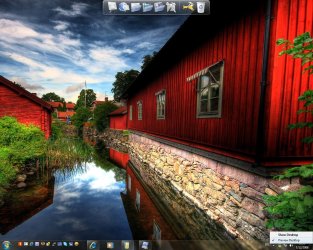
Preview Desktop not working?
Hello all...
Image1.jpg
328.2 KB
· Views: 360
Last edited: Dec 7, 2008
Computer Manufacturer/Model Number ENIAC OS Windows 7 RC 7100 32bit/64bit CPU Intel Core2Duo E4500 2.20 GHz Motherboard ASUS P5LD2-X/1333 Memory 2x1GB Kinsgston DDR2 800MHz Graphics Card(s) Nvidia 8500GT Sound Card Onboard High Definition Audio Device Monitor(s) Displays Sony Bravia 42" Case LINKW 2222 Cooling Standard Intel Keyboard Some cheap one Mouse Microsoft Intellimouse something Internet Speed 24MBps ADSL
Administrator
Staff member
Hello Limneos,
So far that option is not working yet in Windows 7. It probably will be in the next build or two though.
So far the only option is to click on the button to use it as Show Desktop.
Sorry,
Shawn
Computer type PC/Desktop Computer Manufacturer/Model Number Self built custom OS 64-bit Windows 11 Pro for Workstations CPU Intel i7-8700K OC'd to 5 GHz Motherboard ASUS ROG Maximus XI Formula Z390 Memory 64 GB (4x16GB) G.SKILL TridentZ RGB DDR4 3600 MHz Graphics Card(s) ASUS ROG-STRIX-GTX1080TI-O11G-GAMING Sound Card Integrated Monitor(s) Displays 2 x Samsung Odyssey G7 27" Screen Resolution 2560x1440 Hard Drives 1TB Samsung 990 PRO M.2, PSU Seasonic Prime Titanium 850W Case Thermaltake Core P3 Cooling Corsair Hydro H115i Keyboard Logitech wireless K800 Mouse Logitech MX Master 4 Internet Speed 2 Gb/s Download and 100 Mb/s Upload Antivirus Malwarebyte Anti-Malware Premium Browser Google Chrome Other Info Logitech Z625 speaker system,
Microsoft Geek
Power User
Computer Manufacturer/Model Number Dell XPS 400 / HP ProBook 4510s OS Windows 7 Build 7277 CPU Intel Pentium D @ 2.8/Intel Centrino @ 2.10GHz Motherboard Dell DXP051 Memory 2GB DDR2 Graphics Card(s) GeForce 7300 LE / Intel Integrated Graphics 4 Series Sound Card Realtek AC'97 Monitor(s) Displays 17" CRT (for now) / 15.6" LCD / 65" DLP Mitsubishi Screen Resolution 1280 x 768 / 1920 x 1080i Hard Drives 250GB WD IDE Case Dell XPS 400 Cooling 2 fans (1 case, 1 CPU) Keyboard Dell Slim Standard Keyboard / Full Keypad w/ number pad Mouse Dell 3-Button Mouse / Logitech Wireless Mouse Internet Speed 29mbps Down; 3.0mbps Up
R.I.P. August 13th 2014
SF Team
Hello JerzeyLegend, welcome to Se7en Forums!
Have a look
HERE
Later :shock: Ted
Computer Manufacturer/Model Number * BFK Customs * OS W 7 64-bit Ultimate CPU Intel Q9550 Yorkfield Motherboard ASUS P5Q Pro Memory 8GB Dominator 8500C5D Graphics Card(s) ATI : XFX 5870 Sound Card Realtek HD Audio 7-1 Monitor(s) Displays 1x 47" LCD HDMI & 3x 26" LCD HDMI Screen Resolution 1920x1080P & 1920x1200 Hard Drives 1x 80GB Intel X25-M G2 SSD : 1x 500GB & 1x 640GB WD Caviar Black(s) PSU Corsair 620HX Case Cooler Master RC-690 Cooling Tuniq Tower 120, 2x 140mm and 3x 120mm case fans Keyboard Microsoft 500 Mouse Razer Diamondback 3G Internet Speed 14 Mb/s Other Info 1x Koutech 3Gb/s SATA HDD Hot Swap Rack