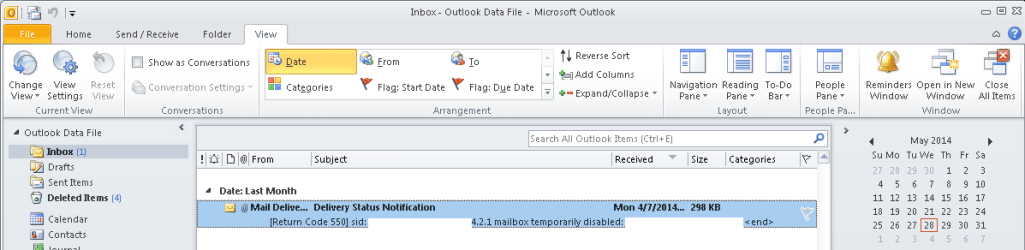
Preview view doesn't work

eomuno

New member
Local time
12:16 PM
Messages
8
NOT reading pane. Outlook 2010 Windows 7 I click preview view, it doesn't respond.
 

My Computer

Computer type
PC/Desktop
Computer Manufacturer/Model Number
HP
OS
Windows 7 64

My Computer

Computer type
Laptop
Computer Manufacturer/Model Number
Employer provided Dell Latitude
OS
W7 Pro SP1 64bit
CPU
i7
Memory
8GB
Graphics Card(s)
Intel HD Graphics
Hard Drives
crappy SSD
Antivirus
Employer mandated Symantec Endpoint Protection
Browser
Pale Moon 64bit, IE11 64bit & Chrome 64bit
Does the reading pane stay when you select the preview mode?
 

My Computer

Computer type
Laptop
Computer Manufacturer/Model Number
Employer provided Dell Latitude
OS
W7 Pro SP1 64bit
CPU
i7
Memory
8GB
Graphics Card(s)
Intel HD Graphics
Hard Drives
crappy SSD
Antivirus
Employer mandated Symantec Endpoint Protection
Browser
Pale Moon 64bit, IE11 64bit & Chrome 64bit
I turn reading pane off, preview still doesn't appear.
 

My Computer

Computer type
PC/Desktop
Computer Manufacturer/Model Number
HP
OS
Windows 7 64
When I turn on the preview mode, the reading pane automatically goes away.

This is what I see:
outlook.png


How/where did you turn off the reading pane?
 

My Computer

Computer type
Laptop
Computer Manufacturer/Model Number
Employer provided Dell Latitude
OS
W7 Pro SP1 64bit
CPU
i7
Memory
8GB
Graphics Card(s)
Intel HD Graphics
Hard Drives
crappy SSD
Antivirus
Employer mandated Symantec Endpoint Protection
Browser
Pale Moon 64bit, IE11 64bit & Chrome 64bit
Who's helping who? :geek: Click the drop down arrow in reading pane and choose Off.

Yes, that's how the preview should look. It doesn't for my user. ?? :huh:
 

My Computer

Computer type
PC/Desktop
Computer Manufacturer/Model Number
HP
OS
Windows 7 64
There are multiple ways to do things. I wanted to be sure that I turned off the reading pane that same way that you did. Perhaps you used a VBS file to setup Outlook.

Anyway, I turned off the reading pane the same way that you did. It had no impact on the preview pane. (Not that I expected it to - but since you mentioned that you had it turned off - I figured it best to replicate your setup).

The only thing that I can suggest is the Office repair process. If you have already done that, then maybe others can help you out. At least we have documented the issue well enough.

 

My Computer

Computer type
Laptop
Computer Manufacturer/Model Number
Employer provided Dell Latitude
OS
W7 Pro SP1 64bit
CPU
i7
Memory
8GB
Graphics Card(s)
Intel HD Graphics
Hard Drives
crappy SSD
Antivirus
Employer mandated Symantec Endpoint Protection
Browser
Pale Moon 64bit, IE11 64bit & Chrome 64bit
Back
Top