Solved Preview weirdness on dual monitor

inflatablemouse

New member
Local time
1:41 PM
Messages
7
Hey guys,

I've got something really weird and quite annoying. But first some details:
i7-2600k
8GB corsair
Asus 580GTX DC-II
Dell Ultrasharp 2407
Samsung SyncMaster 2343

The problem I have is that Windows Preview shows a yellow picture on the Samsung. on the Dell it shows correct with a white background.

The 2 monitors are nearly identical in color display. The Dell is a little brighter with better contrast.

So to explain, when I drag the preview window over to the other monitor, its colored yellow. Just the contents, not the title bar or other dialog features.

When I make a screenshot, the part on the 2nd monitor is yellow when the screenshot is displayed on the Dell monitor so its definitely not my monitor displaying it yellow. The preview window simply renders its contents yellow on the second monitor and I can't figure out why this is.

Also, this has been happening for a while now. i've reinstalled windows 7 (x64 ultimate) several times already. I't always been like this.

Second also, I've calibrated the Dell monitor with i1display 2 calibrator. Since I can't have 2 color profiles with this videocard I had to calibrate the Samsung manually with the monitor controls, hence why the I mention the color display is nearly identical on both monitors.

Final note, its been happening with 3 videocards; my first card MSI 295GTX, ATI 6950 and recently purchased 580GTX.

If anyone has any idea why this is happening and how to solve it I'd owe you a beer!

PreviewWindow7_2.jpg
 
Last edited:

My Computer My Computer

At a glance

Windows 7 Ultimate x64i7 2600K 4.5Ghz8GB CorsairAsus 580GTX DCU-II
Computer Manufacturer/Model Number
Home Built
OS
Windows 7 Ultimate x64
CPU
i7 2600K 4.5Ghz
Motherboard
MSI P67A-GD80
Memory
8GB Corsair
Graphics Card(s)
Asus 580GTX DCU-II
Sound Card
Integrated
Monitor(s) Displays
Dell Ultrasharp 2407WFP + Samsung SyncMaster 2343BWX
Hard Drives
1 x Intel 80GB G2 SSD
2 x Seagate 1,5TB
2 x Hitachi 2TB
PSU
Antec CP850
Case
Antec P183
Cooling
Mugen-2 + 4 x Nexus 120mm with Scythe fan controller
Keyboard
Razer Blackwidow
Mouse
Razer Lachesis
Internet Speed
120/10mbit
if everything you described is 100% factual, i can't see a possible route to the problem to occur. :shock:

unless somehow one is using internal filtering/color compinsation in addition to the windows standard, and they're somehow combining additively. just a shot in the dark aginst the wind...:rolleyes:

I want to hear what it is if you figure it out, please!

sincerely,
mike:D
 

My Computer My Computer

At a glance

MS Windows 7 Home Premium SP1 64-bit (Family ...AMD Phenom II X6: Black Ed 1090T - AM3 / 3.2G...2 dual ch sets OCZ DDR3 PC3-10666 Platinum 13...Onboard
Computer Manufacturer/Model Number
Custom self build - Desktop
OS
MS Windows 7 Home Premium SP1 64-bit (Family Pack Lic.) Upgrade
CPU
AMD Phenom II X6: Black Ed 1090T - AM3 / 3.2GHz / 8MB
Motherboard
Biostar TA790XE3
Memory
2 dual ch sets OCZ DDR3 PC3-10666 Platinum 1333MHz 8GB total
Graphics Card(s)
Onboard
Sound Card
Onboard 5.1 channel HD
Monitor(s) Displays
SyncMaster "Legal-sized" LCD (rotatable)
Screen Resolution
unknown (8.5"x15")? pixels are not known
Hard Drives
HDD1: WD RE3 Enterprize [p/n: WD500ABYS-NDW]
________SATA-II (3Gb/s) 500GB/7200rpm/16MB

HDD2: Deskstar 7K1000.C [p/n: HDS721010CLA332]
________SATA-II (3Gb/s) 1TB/7200rpm/32MB
PSU
Antec 900W mATX 20+4 w/6-8SATA;2MLX;4x6(+2)PCIe[p/n HCG-900]
Case
Mid 10-bay tower - free space design interior & well vented
Cooling
CPU HS cooler, 14.5" Case-sysfan1, dual sysfan2, exhaust
Keyboard
Blue Star Ergonomic - ps/2
Mouse
LED coorded w/v. roller wheel - ps/2
Internet Speed
GbLAN 10/100/1000 & WLAN - on T1 (Peer Network)
Other Info
Harmon-Karden speakers (L,R @ sub)

APC (Lead/Acid Batt backup UPC+Surge protector+etc)

Sony DVD SATA(300) - RW DVD/CD SATA-II(300)
what happens if you exchange the monitors, I mean take the cord from the Dell and plug it into the Samsung and vice versa?
 

My Computer My Computer

At a glance

Windows 7 Ultimate (x64)Q66008 GBATI Radeon HD 2600 XT
Computer Manufacturer/Model Number
Dell Inspiron 530
OS
Windows 7 Ultimate (x64)
CPU
Q6600
Memory
8 GB
Graphics Card(s)
ATI Radeon HD 2600 XT
Monitor(s) Displays
Samsung Syncmaster P2450
Screen Resolution
1920x1080
Hard Drives
Samsung HD103UJ
Samsung HD501LJ
Internet Speed
25 Mb/s
good question, all he said was:

...when I drag the preview window over to the other monitor, its colored yellow. Just the contents, not the title bar or other dialog features.

When I make a screenshot, the part on the 2nd monitor is yellow when the screenshot is displayed on the Dell monitor so its definitely not my monitor displaying it yellow. The preview window simply renders its contents yellow on the second monitor and I can't figure out why this is.

which is eather 2 seperate problems, unlikely (I'll cite Occumz's Razor):D but i cant imagine merely moving a window to the moniter would almost seem to spray a myst of yellow all over it!?

hats off unifex,
mike
 

My Computer My Computer

At a glance

MS Windows 7 Home Premium SP1 64-bit (Family ...AMD Phenom II X6: Black Ed 1090T - AM3 / 3.2G...2 dual ch sets OCZ DDR3 PC3-10666 Platinum 13...Onboard
Computer Manufacturer/Model Number
Custom self build - Desktop
OS
MS Windows 7 Home Premium SP1 64-bit (Family Pack Lic.) Upgrade
CPU
AMD Phenom II X6: Black Ed 1090T - AM3 / 3.2GHz / 8MB
Motherboard
Biostar TA790XE3
Memory
2 dual ch sets OCZ DDR3 PC3-10666 Platinum 1333MHz 8GB total
Graphics Card(s)
Onboard
Sound Card
Onboard 5.1 channel HD
Monitor(s) Displays
SyncMaster "Legal-sized" LCD (rotatable)
Screen Resolution
unknown (8.5"x15")? pixels are not known
Hard Drives
HDD1: WD RE3 Enterprize [p/n: WD500ABYS-NDW]
________SATA-II (3Gb/s) 500GB/7200rpm/16MB

HDD2: Deskstar 7K1000.C [p/n: HDS721010CLA332]
________SATA-II (3Gb/s) 1TB/7200rpm/32MB
PSU
Antec 900W mATX 20+4 w/6-8SATA;2MLX;4x6(+2)PCIe[p/n HCG-900]
Case
Mid 10-bay tower - free space design interior & well vented
Cooling
CPU HS cooler, 14.5" Case-sysfan1, dual sysfan2, exhaust
Keyboard
Blue Star Ergonomic - ps/2
Mouse
LED coorded w/v. roller wheel - ps/2
Internet Speed
GbLAN 10/100/1000 & WLAN - on T1 (Peer Network)
Other Info
Harmon-Karden speakers (L,R @ sub)

APC (Lead/Acid Batt backup UPC+Surge protector+etc)

Sony DVD SATA(300) - RW DVD/CD SATA-II(300)
... but i cant imagine merely moving a window to the moniter would almost seem to spray a myst of yellow all over it!?

That's exactly how it is.

Windows 7 Preview Weirdness - YouTube

I swapped the cables, no difference. The Samsung is still coloring yellow.

The *only* thing I can think of is that Preview is using some kind of Color Profile that doesn't work well with the Samsung for whatever reason. Browsing the color profiles doesn't make me a wiser man though, that just makes me dizzy.
 

My Computer My Computer

At a glance

Windows 7 Ultimate x64i7 2600K 4.5Ghz8GB CorsairAsus 580GTX DCU-II
Computer Manufacturer/Model Number
Home Built
OS
Windows 7 Ultimate x64
CPU
i7 2600K 4.5Ghz
Motherboard
MSI P67A-GD80
Memory
8GB Corsair
Graphics Card(s)
Asus 580GTX DCU-II
Sound Card
Integrated
Monitor(s) Displays
Dell Ultrasharp 2407WFP + Samsung SyncMaster 2343BWX
Hard Drives
1 x Intel 80GB G2 SSD
2 x Seagate 1,5TB
2 x Hitachi 2TB
PSU
Antec CP850
Case
Antec P183
Cooling
Mugen-2 + 4 x Nexus 120mm with Scythe fan controller
Keyboard
Razer Blackwidow
Mouse
Razer Lachesis
Internet Speed
120/10mbit
Second also, I've calibrated the Dell monitor with i1display 2 calibrator. Since I can't have 2 color profiles with this videocard I had to calibrate the Samsung manually with the monitor controls, hence why the I mention the color display is nearly identical on both monitors.
I suspect this is the root of your problem. If you had two video cards, and each monitor attached separately so that you could have two color profiles, you might have success. But using one video card, two monitors each of which has different color characteristics, I think you're doomed.

Have you tried completely eliminating the color profile for the Dell, and then just manually adjusting BOTH monitors so that they look the same?

I have a similar issue, with a single ATI HD4850 video card driving two very different monitors: (1) Eizo HD2441W LCD (16x9) and (2) IBM P275 CRT (4:3). I also gave "calibration" a shot with an Eye2 calibrator on my Eizo, but probably didn't do the right thing. I didn't like the way it looked (too "warm" with reddish yellowish instead of white, and I was used to "cool" with true white/blue in pictures).

Anyway, I eliminated all "interference" from the calibration color profiles and just manually adjusted both the Eizo and IBM monitors to be pretty much factory default plus just a bit of brightness/contrast adjustment. Colors on both are compatible, and I don't have your issue.


Of course... I also don't use Photo Viewer for looking at pictures. I use ACDSee, and work on them with Photoshop.

Photo Viewer is an extremely "low-end" image display program, and has known issues on lots of items (e.g. it distorts aspect ratio horribly if your HxW is a bit abnormal). I wouldn't be completely surprised if Photo Viewer itself is also partially responsible for your symptom. Do you have another image viewer (even a free one that's apparently highly regarded by other users though I can't swear to it, such as IrfanView) you can try? Same results? Or not?

Do you have the same symptom when using an image viewer other than Windows Photo Viewer? What about something simple, like dragging a browser window (say on a generic web site like CNN or Huffington Post, both of which have lots of pure white background), so that it sits partially across both screens. Does the pure white in those browser pages look white on both screens, or again yellow?
 

My Computer My Computer

At a glance

Windows 7 Pro x64 (1), Win7 Pro X64 (2)i5-3350p 3.1Ghz/6MB-cache (1); E8400 3.0Ghz/6...8GB PC3-12800 DDR3 (1); 4GB PC3-10600 DDR3 (2)ATI HD7750 (1), (see TV cards); ATI R7 250 (2)
Computer type
PC/Desktop
Computer Manufacturer/Model Number
Home-built, two systems (1) and (2)
OS
Windows 7 Pro x64 (1), Win7 Pro X64 (2)
CPU
i5-3350p 3.1Ghz/6MB-cache (1); E8400 3.0Ghz/6MB-cache (2)
Motherboard
ASUS P8Z77-V Pro (1); ASUS P5Q3 (2)
Memory
8GB PC3-12800 DDR3 (1); 4GB PC3-10600 DDR3 (2)
Graphics Card(s)
ATI HD7750 (1), (see TV cards); ATI R7 250 (2)
Sound Card
Realtek ALC892 HD Audio (1); Realtek ALC1200 HD Audio (2)
Monitor(s) Displays
Eizo HD2441W LCD, Eizo S2433W (1); Eizo 24" S2433W (2)
Screen Resolution
1920x1200, 1920x1200 (1); 1920x1200 (2)
Hard Drives
(1) 1TB SATA-II (7200RPM), 2x2TB SATA-III (7200RPM), 250GB SATA-III (10000RPM) for OS; 2x2TB external USB 3.0

(2) 320GB SATA-II (7200RPM), 750GB SATA-II (7200RPM), 150GB SATA-II (10000RPM) for OS; 2TB external USB 3.0
PSU
Nesteq ECS-6001 600W (1); Nesteq ECS-5001 500W (2)
Case
Acousti-Case 360 (1) and (2)
Cooling
Noctua NH-U12P SE2 for CPU, 2x120mm case fans (1) and (2)
Keyboard
IBM PS/2 (1) and (2)
Mouse
Logitech MX Revolution wireless (1); Microsoft wired (2)
Internet Speed
100mbps down / 10mbps up
Antivirus
Microsoft Security Essentials; Malwarebyte Anti-Malware Pro
Browser
Firefox
Other Info
Ceton InfiniTV 4-tuner cablecard-enabled TV card as well as Hauppauge HVR-2250 OTA/ATSC 2-tuner TV card in (1), running under Win7 WMC
Just took a look at your very informative video.

I see that when you dragged a Windows Explorer window (with its white background) across to the other monitor, you did NOT see a white-to-yellow color transformation. The white background remained white.

This now supports my suspicion that once again, for yet another problem, it appears to be Windows Photo Viewer which is really the lowest-end of image viewer software products. I'm guessing it is ENTIRELY because of using Photo Viewer for your image viewing needs that you see this problem... which is apparently confined to only the Photo Viewer window and not other windows from other programs.

I suspect that if you try dragging a web browser window across screens (like you did with your Windows Explorer window) that white will again remain white, double-confirming the villain/culprit as Windows Photo Viewer and Microsoft.


==>> try IrfanView, or ACDSee, or some other high-end image viewer product. I don't think you'll see this yellowing artifact.
 

My Computer My Computer

At a glance

Windows 7 Pro x64 (1), Win7 Pro X64 (2)i5-3350p 3.1Ghz/6MB-cache (1); E8400 3.0Ghz/6...8GB PC3-12800 DDR3 (1); 4GB PC3-10600 DDR3 (2)ATI HD7750 (1), (see TV cards); ATI R7 250 (2)
Computer type
PC/Desktop
Computer Manufacturer/Model Number
Home-built, two systems (1) and (2)
OS
Windows 7 Pro x64 (1), Win7 Pro X64 (2)
CPU
i5-3350p 3.1Ghz/6MB-cache (1); E8400 3.0Ghz/6MB-cache (2)
Motherboard
ASUS P8Z77-V Pro (1); ASUS P5Q3 (2)
Memory
8GB PC3-12800 DDR3 (1); 4GB PC3-10600 DDR3 (2)
Graphics Card(s)
ATI HD7750 (1), (see TV cards); ATI R7 250 (2)
Sound Card
Realtek ALC892 HD Audio (1); Realtek ALC1200 HD Audio (2)
Monitor(s) Displays
Eizo HD2441W LCD, Eizo S2433W (1); Eizo 24" S2433W (2)
Screen Resolution
1920x1200, 1920x1200 (1); 1920x1200 (2)
Hard Drives
(1) 1TB SATA-II (7200RPM), 2x2TB SATA-III (7200RPM), 250GB SATA-III (10000RPM) for OS; 2x2TB external USB 3.0

(2) 320GB SATA-II (7200RPM), 750GB SATA-II (7200RPM), 150GB SATA-II (10000RPM) for OS; 2TB external USB 3.0
PSU
Nesteq ECS-6001 600W (1); Nesteq ECS-5001 500W (2)
Case
Acousti-Case 360 (1) and (2)
Cooling
Noctua NH-U12P SE2 for CPU, 2x120mm case fans (1) and (2)
Keyboard
IBM PS/2 (1) and (2)
Mouse
Logitech MX Revolution wireless (1); Microsoft wired (2)
Internet Speed
100mbps down / 10mbps up
Antivirus
Microsoft Security Essentials; Malwarebyte Anti-Malware Pro
Browser
Firefox
Other Info
Ceton InfiniTV 4-tuner cablecard-enabled TV card as well as Hauppauge HVR-2250 OTA/ATSC 2-tuner TV card in (1), running under Win7 WMC
a screen capture app SHOULD act like that (including the screen(s) color profile in its algorithm) since it is designed to capture the DISPLAY as-you-see-it. But an Image Viewer app should be using the same color profile to display an image that appears to be the same color to the human eye when it is displayed on the paticular monitor. So If a screen cap was made similarly to the original image in this thread (yellow/white) across the two color profiles, lets say the white is to the left & yellow to the right, then the resultant image was rotated 90 degrees CW (now yellow @ bottom) and displayed across the two screens oriented the same way, the image should be a set of 4 squares. Now, assuming the white screen is the "good one" and not just being compensated for to look like it is, then the top left should still be the same colors pixel-per-pixel, the "correct colors", while the bottom right should be treated with this "yellowing" abnormality with twice the strength as it normally would be just from showing it on the yellow monitor. This way you can use a white (0x000000) image to easily calculate the change being made numerically (in this case it would be the second order since it was treated twice. The other two squares (top right & bottom left) should be compared for a control*, and if they are equal in value then used to give the first order equation. even with just two samples like this you can see if its a linear or exponential relationship and the color profiles can be adjusted using the same numerical offset algorithm to give matching profiles (assuming the monitors are within the range of possibility, or better put "there's not one much more BAD at displaying colors due to age or quality or display type."

confusing :sick: but should work if you are interested, and can manipulate color profiles correctly.
* the controls merely consist of single treatments by each color profile, differing only by the order of treatment (white capture displayed on yellow screen (top left) and a yellow capture displayed on the white screen. While they should agree I believe - this entire thread points out the fact that just because you think you have taken every variable into consideration, no one ever really is ever certian of this)

thanks for the insight
mike
 

My Computer My Computer

At a glance

MS Windows 7 Home Premium SP1 64-bit (Family ...AMD Phenom II X6: Black Ed 1090T - AM3 / 3.2G...2 dual ch sets OCZ DDR3 PC3-10666 Platinum 13...Onboard
Computer Manufacturer/Model Number
Custom self build - Desktop
OS
MS Windows 7 Home Premium SP1 64-bit (Family Pack Lic.) Upgrade
CPU
AMD Phenom II X6: Black Ed 1090T - AM3 / 3.2GHz / 8MB
Motherboard
Biostar TA790XE3
Memory
2 dual ch sets OCZ DDR3 PC3-10666 Platinum 1333MHz 8GB total
Graphics Card(s)
Onboard
Sound Card
Onboard 5.1 channel HD
Monitor(s) Displays
SyncMaster "Legal-sized" LCD (rotatable)
Screen Resolution
unknown (8.5"x15")? pixels are not known
Hard Drives
HDD1: WD RE3 Enterprize [p/n: WD500ABYS-NDW]
________SATA-II (3Gb/s) 500GB/7200rpm/16MB

HDD2: Deskstar 7K1000.C [p/n: HDS721010CLA332]
________SATA-II (3Gb/s) 1TB/7200rpm/32MB
PSU
Antec 900W mATX 20+4 w/6-8SATA;2MLX;4x6(+2)PCIe[p/n HCG-900]
Case
Mid 10-bay tower - free space design interior & well vented
Cooling
CPU HS cooler, 14.5" Case-sysfan1, dual sysfan2, exhaust
Keyboard
Blue Star Ergonomic - ps/2
Mouse
LED coorded w/v. roller wheel - ps/2
Internet Speed
GbLAN 10/100/1000 & WLAN - on T1 (Peer Network)
Other Info
Harmon-Karden speakers (L,R @ sub)

APC (Lead/Acid Batt backup UPC+Surge protector+etc)

Sony DVD SATA(300) - RW DVD/CD SATA-II(300)
...I'll cite Occumz's Razor
Not to be picky, but just to be correct it's actually spelled "Occam's Razor":

The most useful statement of the principle for scientists is: "when you have two competing theories that make exactly the same predictions, the simpler one is the better."
 

My Computer My Computer

At a glance

Windows 7 Pro x64 (1), Win7 Pro X64 (2)i5-3350p 3.1Ghz/6MB-cache (1); E8400 3.0Ghz/6...8GB PC3-12800 DDR3 (1); 4GB PC3-10600 DDR3 (2)ATI HD7750 (1), (see TV cards); ATI R7 250 (2)
Computer type
PC/Desktop
Computer Manufacturer/Model Number
Home-built, two systems (1) and (2)
OS
Windows 7 Pro x64 (1), Win7 Pro X64 (2)
CPU
i5-3350p 3.1Ghz/6MB-cache (1); E8400 3.0Ghz/6MB-cache (2)
Motherboard
ASUS P8Z77-V Pro (1); ASUS P5Q3 (2)
Memory
8GB PC3-12800 DDR3 (1); 4GB PC3-10600 DDR3 (2)
Graphics Card(s)
ATI HD7750 (1), (see TV cards); ATI R7 250 (2)
Sound Card
Realtek ALC892 HD Audio (1); Realtek ALC1200 HD Audio (2)
Monitor(s) Displays
Eizo HD2441W LCD, Eizo S2433W (1); Eizo 24" S2433W (2)
Screen Resolution
1920x1200, 1920x1200 (1); 1920x1200 (2)
Hard Drives
(1) 1TB SATA-II (7200RPM), 2x2TB SATA-III (7200RPM), 250GB SATA-III (10000RPM) for OS; 2x2TB external USB 3.0

(2) 320GB SATA-II (7200RPM), 750GB SATA-II (7200RPM), 150GB SATA-II (10000RPM) for OS; 2TB external USB 3.0
PSU
Nesteq ECS-6001 600W (1); Nesteq ECS-5001 500W (2)
Case
Acousti-Case 360 (1) and (2)
Cooling
Noctua NH-U12P SE2 for CPU, 2x120mm case fans (1) and (2)
Keyboard
IBM PS/2 (1) and (2)
Mouse
Logitech MX Revolution wireless (1); Microsoft wired (2)
Internet Speed
100mbps down / 10mbps up
Antivirus
Microsoft Security Essentials; Malwarebyte Anti-Malware Pro
Browser
Firefox
Other Info
Ceton InfiniTV 4-tuner cablecard-enabled TV card as well as Hauppauge HVR-2250 OTA/ATSC 2-tuner TV card in (1), running under Win7 WMC
The problem is an issue between Microsoft/Samsung. Hang on I'll get what is probably the solution. Photo Viewer is not the culprit, I've had the same problem before.


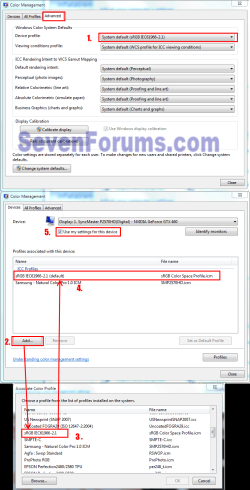
EDIT: Go to Control Panel\All Control Panel Items\Color Management\advanced tab\Device profile. On the drop-down menu scroll to the "sRGB IEC61966-2.1" profile and select it. Go back to the Devices tab under ICC Profiles and click Add, in the Associate Color Profile window, scroll to the "sRGB IEC61966-2.1" profile, click it then OK. Now it should be listed under the ICC Profiles, again click it then Set as Default Profile. Check the Use my Settings for This Device, close and check your Photo viewer. (I hope the snip below isn't confusing.)
Color Adv.PNG
 
Last edited:

My Computer My Computer

At a glance

Windows 7 Ultimate X64 SP1Intel i5-2550K, Differing ~4.4-4.8GHz No buil...16GB G.Skill Sniper 1866MHz @ 2133MHz 2x8GBASUS GTX650TIB-DC2OC-2GD5, (650TI Boost)
Computer type
PC/Desktop
Computer Manufacturer/Model Number
Home Built Desktop By DataTech
OS
Windows 7 Ultimate X64 SP1
CPU
Intel i5-2550K, Differing ~4.4-4.8GHz No built in GPU
Motherboard
ASUS P8Z68-V PRO/GEN3
Memory
16GB G.Skill Sniper 1866MHz @ 2133MHz 2x8GB
Graphics Card(s)
ASUS GTX650TIB-DC2OC-2GD5, (650TI Boost)
Sound Card
Onboard Realtek 5-1
Monitor(s) Displays
Samsung P2570HD
Screen Resolution
1920x1080
Hard Drives
Samsung 840 Pro 256GB SSD for OS, 500GB Seagate Constellation (Enterprise drive) for Data
PSU
Corsair HX650W
Case
Inwin Dragon Rider
Cooling
Hyper 212 EVO w/two Noctua fans, push-pull, @1300 RPM
Keyboard
E-Z Eyes, bright yellow keys with large characters
Mouse
steelseries SENSEI Laser Pro Gaming
Internet Speed
48-51Mbs Mbs down, 11 Mbs up Xfinity Cable
Antivirus
Norton Internet Security 2013
Browser
IE 10, Opera, Pale Moon if needed
Other Info
4 case fans, LG BluRay-RE, ASUS DVD-RW, Mr. Fusion power supply, 1.21 gigawatts.
off topic to - dsperber (thanks for the notice to the world!)

...I'll cite Occumz's Razor
Not to be picky, but just to be correct it's actually spelled "Occam's Razor":

The most useful statement of the principle for scientists is: "when you have two competing theories that make exactly the same predictions, the simpler one is the better."

I say...if that was the bulk of the spelling mistakes you picked up on my texts, I am grateful! but I can say with certitude I meant for no "Z"s to get used (or harmed) i likely didnt hit backspace as i type considerably fast w/ 2 fingers but the vowel thing I will cop to as i often switch em. HAPPY!:cry: It was meant to be a softcore joke! JOKESUCKER!;)

but (to be clear)..."AS I REMEMBER IT" ..."I THOUGHT A CRUDE INTERPRETATION OF ITS FUNDAMENTAL ROOT MEANING" would be more of a -->Entitiezs shall not be multiplied beoynd necessity.<-- (yes i put the "zs" inthere for you) but i guess that that stuff fades w/20+ years..


22 years ago: Ontogeny Recapitulates Phylogeny
25+ yearz ago: Humuhumunukunukuapua'a
oldest memory: Birth


(check them spellingz)

I win, sorry for the tangent, It's all tounge in cheek:D

thanks
mike
 

My Computer My Computer

At a glance

MS Windows 7 Home Premium SP1 64-bit (Family ...AMD Phenom II X6: Black Ed 1090T - AM3 / 3.2G...2 dual ch sets OCZ DDR3 PC3-10666 Platinum 13...Onboard
Computer Manufacturer/Model Number
Custom self build - Desktop
OS
MS Windows 7 Home Premium SP1 64-bit (Family Pack Lic.) Upgrade
CPU
AMD Phenom II X6: Black Ed 1090T - AM3 / 3.2GHz / 8MB
Motherboard
Biostar TA790XE3
Memory
2 dual ch sets OCZ DDR3 PC3-10666 Platinum 1333MHz 8GB total
Graphics Card(s)
Onboard
Sound Card
Onboard 5.1 channel HD
Monitor(s) Displays
SyncMaster "Legal-sized" LCD (rotatable)
Screen Resolution
unknown (8.5"x15")? pixels are not known
Hard Drives
HDD1: WD RE3 Enterprize [p/n: WD500ABYS-NDW]
________SATA-II (3Gb/s) 500GB/7200rpm/16MB

HDD2: Deskstar 7K1000.C [p/n: HDS721010CLA332]
________SATA-II (3Gb/s) 1TB/7200rpm/32MB
PSU
Antec 900W mATX 20+4 w/6-8SATA;2MLX;4x6(+2)PCIe[p/n HCG-900]
Case
Mid 10-bay tower - free space design interior & well vented
Cooling
CPU HS cooler, 14.5" Case-sysfan1, dual sysfan2, exhaust
Keyboard
Blue Star Ergonomic - ps/2
Mouse
LED coorded w/v. roller wheel - ps/2
Internet Speed
GbLAN 10/100/1000 & WLAN - on T1 (Peer Network)
Other Info
Harmon-Karden speakers (L,R @ sub)

APC (Lead/Acid Batt backup UPC+Surge protector+etc)

Sony DVD SATA(300) - RW DVD/CD SATA-II(300)
Please stay with the OP's issues.
 

My Computer My Computer

At a glance

Windows 7 Ultimate X64 SP1Intel i5-2550K, Differing ~4.4-4.8GHz No buil...16GB G.Skill Sniper 1866MHz @ 2133MHz 2x8GBASUS GTX650TIB-DC2OC-2GD5, (650TI Boost)
Computer type
PC/Desktop
Computer Manufacturer/Model Number
Home Built Desktop By DataTech
OS
Windows 7 Ultimate X64 SP1
CPU
Intel i5-2550K, Differing ~4.4-4.8GHz No built in GPU
Motherboard
ASUS P8Z68-V PRO/GEN3
Memory
16GB G.Skill Sniper 1866MHz @ 2133MHz 2x8GB
Graphics Card(s)
ASUS GTX650TIB-DC2OC-2GD5, (650TI Boost)
Sound Card
Onboard Realtek 5-1
Monitor(s) Displays
Samsung P2570HD
Screen Resolution
1920x1080
Hard Drives
Samsung 840 Pro 256GB SSD for OS, 500GB Seagate Constellation (Enterprise drive) for Data
PSU
Corsair HX650W
Case
Inwin Dragon Rider
Cooling
Hyper 212 EVO w/two Noctua fans, push-pull, @1300 RPM
Keyboard
E-Z Eyes, bright yellow keys with large characters
Mouse
steelseries SENSEI Laser Pro Gaming
Internet Speed
48-51Mbs Mbs down, 11 Mbs up Xfinity Cable
Antivirus
Norton Internet Security 2013
Browser
IE 10, Opera, Pale Moon if needed
Other Info
4 case fans, LG BluRay-RE, ASUS DVD-RW, Mr. Fusion power supply, 1.21 gigawatts.
The problem is an issue between Microsoft/Samsung. Hang on I'll get what is probably the solution. Photo Viewer is not the culprit, I've had the same problem before.


EDIT: Go to Control Panel\All Control Panel Items\Color Management\advanced tab\Device profile. On the drop-down menu scroll to the "sRGB IEC61966-2.1" profile and select it. Go back to the Devices tab under ICC Profiles and click Add, in the Associate Color Profile window, scroll to the "sRGB IEC61966-2.1" profile, click it then OK. Now it should be listed under the ICC Profiles, again click it then Set as Default Profile. Check the Use my Settings for This Device, close and check your Photo viewer. (I hope the snip below isn't confusing.)
View attachment 178219

That fixed it :D

Awesome man, thanks for sharing that.
 

My Computer My Computer

At a glance

Windows 7 Ultimate x64i7 2600K 4.5Ghz8GB CorsairAsus 580GTX DCU-II
Computer Manufacturer/Model Number
Home Built
OS
Windows 7 Ultimate x64
CPU
i7 2600K 4.5Ghz
Motherboard
MSI P67A-GD80
Memory
8GB Corsair
Graphics Card(s)
Asus 580GTX DCU-II
Sound Card
Integrated
Monitor(s) Displays
Dell Ultrasharp 2407WFP + Samsung SyncMaster 2343BWX
Hard Drives
1 x Intel 80GB G2 SSD
2 x Seagate 1,5TB
2 x Hitachi 2TB
PSU
Antec CP850
Case
Antec P183
Cooling
Mugen-2 + 4 x Nexus 120mm with Scythe fan controller
Keyboard
Razer Blackwidow
Mouse
Razer Lachesis
Internet Speed
120/10mbit
Good to hear!
 

My Computer My Computer

At a glance

Windows 7 Ultimate X64 SP1Intel i5-2550K, Differing ~4.4-4.8GHz No buil...16GB G.Skill Sniper 1866MHz @ 2133MHz 2x8GBASUS GTX650TIB-DC2OC-2GD5, (650TI Boost)
Computer type
PC/Desktop
Computer Manufacturer/Model Number
Home Built Desktop By DataTech
OS
Windows 7 Ultimate X64 SP1
CPU
Intel i5-2550K, Differing ~4.4-4.8GHz No built in GPU
Motherboard
ASUS P8Z68-V PRO/GEN3
Memory
16GB G.Skill Sniper 1866MHz @ 2133MHz 2x8GB
Graphics Card(s)
ASUS GTX650TIB-DC2OC-2GD5, (650TI Boost)
Sound Card
Onboard Realtek 5-1
Monitor(s) Displays
Samsung P2570HD
Screen Resolution
1920x1080
Hard Drives
Samsung 840 Pro 256GB SSD for OS, 500GB Seagate Constellation (Enterprise drive) for Data
PSU
Corsair HX650W
Case
Inwin Dragon Rider
Cooling
Hyper 212 EVO w/two Noctua fans, push-pull, @1300 RPM
Keyboard
E-Z Eyes, bright yellow keys with large characters
Mouse
steelseries SENSEI Laser Pro Gaming
Internet Speed
48-51Mbs Mbs down, 11 Mbs up Xfinity Cable
Antivirus
Norton Internet Security 2013
Browser
IE 10, Opera, Pale Moon if needed
Other Info
4 case fans, LG BluRay-RE, ASUS DVD-RW, Mr. Fusion power supply, 1.21 gigawatts.
Good to hear!
Wait... I want to understand more about this. Just to be clear, I don't have the problem described by OP. So I have a question on a theoretical level, just to clear up some misconceptions I might have have.

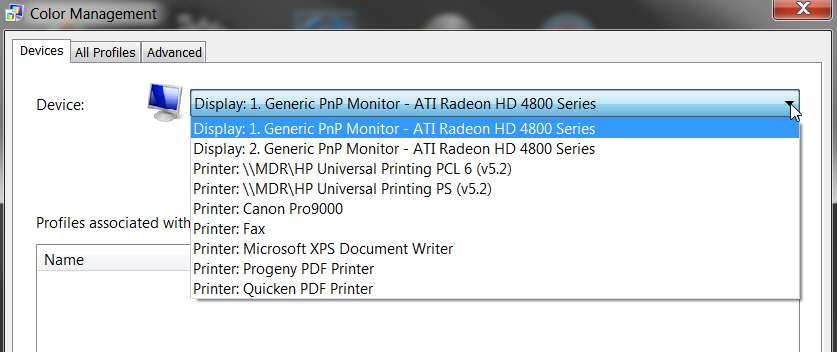
First, I'm suspecting this is very much a hardware-related issue for OP if your explanation is correct, since he's also using a Samsung monitor. I don't have a Samsung monitor and although I do have two monitors in my desktop setup I do not have the symptom described. I can drag the Photo Viewer preview window across the divide of both monitors and white is still white. Also, NEITHER of my two monitors specifies a color profile in Color Management. They are both running with the standard ATI Catalyst video driver for my HD4850 card, and both monitors are "generic PnP" devices with whatever default color profile comes with Win7 per the PnP information from the two devices.

Nevertheless, is the ability of using a proper specific ICC color profile for a given SPECIFIC monitor to be based on whether or not the monitor in question is (a) a generic PnP monitor in Device Manager, or (b) a specific monitor device as described by a Win7-compatible "driver"? Do the two monitors as shown in Device Manager have to be named differently, or is the mere fact that they are "display 1" and "display 2" sufficient to be able to assign a specific color profile to each monitor individually?

In my case, I have a dual-head ATI HD4850 video card, and two monitors: (1) Eizo HD2441W 16x9 LCD at 1920x1200 and 59hz refresh, and (2) IBM P275 4:3 CRT at 1280x960 and 85hz refresh. However they do not show up specified as such in Device Manager. Instead, they both show up as generic PnP devices:

monitors.jpg


At the moment, there are NO specific named color profiles associated with either monitor. But, assuming I wanted to (e.g. if I did a "color calibration"), is it possible for me to associate one specific color profile with one of these two monitors, and a second specific color profile with the other monitor?

And if so, is this something new with Win7? I thought that in the past (with WinXP and whatever WinXP video drivers for my same hardware supported it), assigning a color profile to one monitor would also get that color profile showing up on the second monitor? Or was I just mis-reading what I was seeing in Device Manager?


Second, in the case of the OP, the Samsung monitor (which apparently is the one that had the problem with Win7 and needed the specific sRGB profile you pointed out) was monitor 1. The Dell display was monitor 2.

And yet, he had calibrated the Dell monitor 2 with the Eye2 device and software (and created a color profile for it, presumably, rather than a color profile to be used by the Samsung monitor 1). He then manually adjusted the Samsung monitor 1 so that it looked good... which in my opinion is a pretty crucial piece of the story.

And then he saw the white/yellow symptom we're discussing.

And you now say that for the Samsung monitor he should select a particular ICC profile for that device. And OP says this solved his problem.

So, is he actually now using TWO DIFFERENT COLOR PROFILES thanks to the ability of the Win7 video drivers supporting this... one for the Dell monitor (from his Eye2 calibration process) and now a second different one for the Samsung monitor (from the manual selection process you walked him through with your tutorial and screenshot)?

In other words, was the problem all along that he actually had NOT also done a second color calibration with the Eye2 device specifically for the Samsung monitor?

If he can now associate one sRGB profile with the Samsung per your instructions, why couldn't he just have done an official Eye2 color calibration for that same monitor? Chances are it would have been the same or similar as the one you designated to be used, and would have been the same solution in the first place.


Bottom line: does Win7 actually support unique and separate ICC color profiles for individual specific monitors? Isn't this new with Win7, as I don't believe it was possible with WinXP (though I may be wrong here)?

And shouldn't the OP simply have also created a second color profile for the Samsung monitor (rather than manually adjusting it to match what the Dell monitor now looked like with its new color profile), as he'd already done with the Dell monitor, using the same Eye2 method?

Remember that in his original problem description, he mentioned:
Second also, I've calibrated the Dell monitor with i1display 2 calibrator. Since I can't have 2 color profiles with this videocard I had to calibrate the Samsung manually with the monitor controls, hence why the I mention the color display is nearly identical on both monitors.
Isn't this incorrect according to what the final solution actually was? If he still has the Dell profile operational from Eye2, and the new sRGB profile selected for the Samsung per your recipe, doesn't he now actually have two separate color profiles in place for this same video card... something he thought he could NOT do???

Or, is he now simply using the specified sRGB profile for the video card (and thus both monitors, including Dell as well as Samsung), which is "better for the Samsung display" than the one created by the Eye2 device and thus no longer exhibits the white/yellow symptom for Photo Viewer?

===> OP: Is only one color profile being used for both monitors (with the new one better for Samsung), or are two separate color profiles assigned to each of your two monitors? Please look into Color Management for each display, and let us know.
 

My Computer My Computer

At a glance

Windows 7 Pro x64 (1), Win7 Pro X64 (2)i5-3350p 3.1Ghz/6MB-cache (1); E8400 3.0Ghz/6...8GB PC3-12800 DDR3 (1); 4GB PC3-10600 DDR3 (2)ATI HD7750 (1), (see TV cards); ATI R7 250 (2)
Computer type
PC/Desktop
Computer Manufacturer/Model Number
Home-built, two systems (1) and (2)
OS
Windows 7 Pro x64 (1), Win7 Pro X64 (2)
CPU
i5-3350p 3.1Ghz/6MB-cache (1); E8400 3.0Ghz/6MB-cache (2)
Motherboard
ASUS P8Z77-V Pro (1); ASUS P5Q3 (2)
Memory
8GB PC3-12800 DDR3 (1); 4GB PC3-10600 DDR3 (2)
Graphics Card(s)
ATI HD7750 (1), (see TV cards); ATI R7 250 (2)
Sound Card
Realtek ALC892 HD Audio (1); Realtek ALC1200 HD Audio (2)
Monitor(s) Displays
Eizo HD2441W LCD, Eizo S2433W (1); Eizo 24" S2433W (2)
Screen Resolution
1920x1200, 1920x1200 (1); 1920x1200 (2)
Hard Drives
(1) 1TB SATA-II (7200RPM), 2x2TB SATA-III (7200RPM), 250GB SATA-III (10000RPM) for OS; 2x2TB external USB 3.0

(2) 320GB SATA-II (7200RPM), 750GB SATA-II (7200RPM), 150GB SATA-II (10000RPM) for OS; 2TB external USB 3.0
PSU
Nesteq ECS-6001 600W (1); Nesteq ECS-5001 500W (2)
Case
Acousti-Case 360 (1) and (2)
Cooling
Noctua NH-U12P SE2 for CPU, 2x120mm case fans (1) and (2)
Keyboard
IBM PS/2 (1) and (2)
Mouse
Logitech MX Revolution wireless (1); Microsoft wired (2)
Internet Speed
100mbps down / 10mbps up
Antivirus
Microsoft Security Essentials; Malwarebyte Anti-Malware Pro
Browser
Firefox
Other Info
Ceton InfiniTV 4-tuner cablecard-enabled TV card as well as Hauppauge HVR-2250 OTA/ATSC 2-tuner TV card in (1), running under Win7 WMC
Dsperber I'm not quite sure of your question(s) there. I have never used multiple monitors so I don't know if there are two profiles being used but, I think there is.
The solution I supplied with using the sRGB IEC61966-2.1 as the system default color profile was given to me by Essenbe and HopalongX, we all also have nVIDIA graphics cards and they also play into this.
The really stupid thing is that the only color malfunction is with the MS Picture Viewer, all else looked perfect.
 

My Computer My Computer

At a glance

Windows 7 Ultimate X64 SP1Intel i5-2550K, Differing ~4.4-4.8GHz No buil...16GB G.Skill Sniper 1866MHz @ 2133MHz 2x8GBASUS GTX650TIB-DC2OC-2GD5, (650TI Boost)
Computer type
PC/Desktop
Computer Manufacturer/Model Number
Home Built Desktop By DataTech
OS
Windows 7 Ultimate X64 SP1
CPU
Intel i5-2550K, Differing ~4.4-4.8GHz No built in GPU
Motherboard
ASUS P8Z68-V PRO/GEN3
Memory
16GB G.Skill Sniper 1866MHz @ 2133MHz 2x8GB
Graphics Card(s)
ASUS GTX650TIB-DC2OC-2GD5, (650TI Boost)
Sound Card
Onboard Realtek 5-1
Monitor(s) Displays
Samsung P2570HD
Screen Resolution
1920x1080
Hard Drives
Samsung 840 Pro 256GB SSD for OS, 500GB Seagate Constellation (Enterprise drive) for Data
PSU
Corsair HX650W
Case
Inwin Dragon Rider
Cooling
Hyper 212 EVO w/two Noctua fans, push-pull, @1300 RPM
Keyboard
E-Z Eyes, bright yellow keys with large characters
Mouse
steelseries SENSEI Laser Pro Gaming
Internet Speed
48-51Mbs Mbs down, 11 Mbs up Xfinity Cable
Antivirus
Norton Internet Security 2013
Browser
IE 10, Opera, Pale Moon if needed
Other Info
4 case fans, LG BluRay-RE, ASUS DVD-RW, Mr. Fusion power supply, 1.21 gigawatts.
Dsperber I'm not quite sure of your question(s) there. I have never used multiple monitors so I don't know if there are two profiles being used but, I think there is.
The solution I supplied with using the sRGB IEC61966-2.1 as the system default color profile was given to me by Essenbe and HopalongX, we all also have nVIDIA graphics cards and they also play into this.
The really stupid thing is that the only color malfunction is with the MS Picture Viewer, all else looked perfect.
Well now I'm REALLY confused. I thought the solution you prescribed was specifically for his problem, which specifically involved TWO monitors and MS Photo Viewer.

The OP problem description came from using the MS Picture Viewer (which is, as both you and I agree, a problematic program on lots of levels) and dragging the preview window across the divide of his two monitors... (1) Samsung, and (2) Dell, using his nVidia graphics card. He had calibrated the Dell monitor with the Eye2 device and software (which produces an ICC color profile that then gets used for that monitor), and then manually adjusted the Samsung monitor so that things looked good... except for this strange white/yellow transition with Photo Viewer when dragging its preview window across the divide between the two monitors.

Hence my earlier confusion and question. OP also (like me) thought that only one color profile could be used, even if you had two separate monitors and wanted to use a separate color profile for each one. That's why he approached his original goal by calibrating the Dell (2) and then manually adjusting the Samsung (1). In my mind, I personally believe that the Eye2-produced color profile (from calibrating the Dell) was used for BOTH machines, but I'm not sure.

Now when he followed your instructions, and instead used the other sRGB profile you pointed him to, that it was THIS profile now used for both monitors... unless in fact by associating it with the Samsung monitor he now really did have TWO SEPARATE COLOR PROFILES activated, the Eye2-produced one for the Dell and the sRGB you specified for the Samsung.

And, if this is actually the case (only would be known for sure if OP will provide the answer by looking in his Device Manager and Color Management for each display), then I can understand why he says that this "fixed" his white/yellow problem.

But again, if you really CAN have two separate profiles for two separate monitors, then why couldn't he simply have calibrated the Samsung monitor and produced an Eye2-generated profile, after calibrating the Dell monitor and producing its Eye2-generated profile in the first place, instead of manually adjusting the Samsung with no color profile used as he tried (but which resulted in the white/yellow symptom)?


==> I'd like to know what Color Management now shows on his machine. Is the Eye2-created profile actually in use for the Dell, and your sRGB profile actually in use for the Samsung? Or not?

I'm puzzled, because I cannot add a color profile for my monitor #2, but rather only for monitor #1. This suggests you can't have separate color profiles for each of your separate monitors, but again I don't know if this is really the case.

But OP's got a graphics card that supports two monitors, just like I do. And he's got two monitors on his desktop, just like I do. And yet I have no white/yellow problem using the same MS Photo Viewer program when dragging the preview window across the monitor divide. So why not??
 

My Computer My Computer

At a glance

Windows 7 Pro x64 (1), Win7 Pro X64 (2)i5-3350p 3.1Ghz/6MB-cache (1); E8400 3.0Ghz/6...8GB PC3-12800 DDR3 (1); 4GB PC3-10600 DDR3 (2)ATI HD7750 (1), (see TV cards); ATI R7 250 (2)
Computer type
PC/Desktop
Computer Manufacturer/Model Number
Home-built, two systems (1) and (2)
OS
Windows 7 Pro x64 (1), Win7 Pro X64 (2)
CPU
i5-3350p 3.1Ghz/6MB-cache (1); E8400 3.0Ghz/6MB-cache (2)
Motherboard
ASUS P8Z77-V Pro (1); ASUS P5Q3 (2)
Memory
8GB PC3-12800 DDR3 (1); 4GB PC3-10600 DDR3 (2)
Graphics Card(s)
ATI HD7750 (1), (see TV cards); ATI R7 250 (2)
Sound Card
Realtek ALC892 HD Audio (1); Realtek ALC1200 HD Audio (2)
Monitor(s) Displays
Eizo HD2441W LCD, Eizo S2433W (1); Eizo 24" S2433W (2)
Screen Resolution
1920x1200, 1920x1200 (1); 1920x1200 (2)
Hard Drives
(1) 1TB SATA-II (7200RPM), 2x2TB SATA-III (7200RPM), 250GB SATA-III (10000RPM) for OS; 2x2TB external USB 3.0

(2) 320GB SATA-II (7200RPM), 750GB SATA-II (7200RPM), 150GB SATA-II (10000RPM) for OS; 2TB external USB 3.0
PSU
Nesteq ECS-6001 600W (1); Nesteq ECS-5001 500W (2)
Case
Acousti-Case 360 (1) and (2)
Cooling
Noctua NH-U12P SE2 for CPU, 2x120mm case fans (1) and (2)
Keyboard
IBM PS/2 (1) and (2)
Mouse
Logitech MX Revolution wireless (1); Microsoft wired (2)
Internet Speed
100mbps down / 10mbps up
Antivirus
Microsoft Security Essentials; Malwarebyte Anti-Malware Pro
Browser
Firefox
Other Info
Ceton InfiniTV 4-tuner cablecard-enabled TV card as well as Hauppauge HVR-2250 OTA/ATSC 2-tuner TV card in (1), running under Win7 WMC
Back
Top