
Prime rounding error but no memtest error

leebeloola

New member
Local time
4:40 PM
Messages
19
I'm trying to figure out which hardware is responsible for the Prime errors I'm getting.

In Prime it passes the small FTT test, but I am getting “rounding was 0.5, expected less than 0.4” hardware errors within a few minutes of running the large FFT or Blend tests. I've run Memtest86+ several times overnight for 13 passes and I didn't get any errors. I've run tests on the HDDs and used intel diagnostic tool for the CPU, but haven't found anything. I've also been checking the CPU temp while testing and it's well below 40*C.

I was going to overclock it again, upgrade the RAM and get an SSD, but now I'm wondering if I need to replace the CPU and motherboard.
 

My Computer

Computer type
PC/Desktop
Computer Manufacturer/Model Number
Overclockers UK
OS
Windows 7 Pro x64
CPU
intel i3 530 2.93GHz
Motherboard
Gigabyte GA-H55M-UD2H
Memory
CMX4GX3M2A1600C9 (2x2GB)
Graphics Card(s)
AMD Radeon HD 5770 CuCore 1024MB GDDR5
Monitor(s) Displays
LG M2262D
Screen Resolution
1920 x 1080
Hard Drives
Seagate Barracuda 7200.12 500GB SATA-II 16MB Cache ST500DM002-1BD 142 ATA
Hitachi Deskstar HDP725050GLAT80 ATA
PSU
Corsair GS 600W Power supply (CMPSU-600GUK)
Case
Antec 300 Three Hundred Ultimate Gaming Case
Cooling
Akasa AK-CCX-4002HP Venom CPU Cooler
Antivirus
KIS 16
Browser
chrome
Other Info
currently not OC. RAM is running at 1333MHz
CPU used to be OC to 4.2 GHz, RAM running at 1600MHz
lost OC when I updated the BIOS to F11 (increased memory compatibility)
Before you buy a new CPU and motherboard, loosen the timings (slightly) on your RAM and test again with Prime. It might work better that way.
 

My Computer

Computer type
PC/Desktop
Computer Manufacturer/Model Number
Mellon Labs (custom build)
OS
Win 7 Pro x64/Win 10 Pro x64 dual boot
CPU
AMD FX 8350 Vishera @ 4200
Motherboard
ASUS M5A97 R2.0
Memory
16 GB Mushkin Blackline DDR3-2400 @ 1866 (9-10-10-10-31)
Graphics Card(s)
XFX Radeon R9 280 Double D Black Edition
Sound Card
Realtek HD Audio on MB. Sounds great.
Monitor(s) Displays
Acer 24", Acer 22"
Screen Resolution
3840 x 1080
Hard Drives
1 x Mushkin Chronos 120 GB SSD (Win 10)
1 x Samsung 850 EVO 250 GB SSD (Win 7)
1 x WD 1TB SATA Blue
1 x WD 1TB SATA Green
PSU
Corsair TX-750
Case
CoolerMaster HAF 912+
Cooling
Coolermaster Seidon 240M Liquid AIO. 6 case fans
Keyboard
Logitech G710+
Mouse
Logitech G500s
Internet Speed
Much better since I got fiber, but still way overpriced.
Antivirus
MSE, Malware Bytes for scanning
Browser
Firefox
Other Info
Corsair VOID USB headphones.

A Mellon Labs X-1 - LCD Smartie driven system status display.

Brought to you by the letter E
Boot into BIOS, look at your boot settings and your sata mode and remember them, set everything to Optimized defaults (F5 on most boards), set your boot settings and sata mode to what they are right now, save and exit. make no other changes. Then run Prime again.

Watch your CPU temps very closely. If it gets too hot, shut it down. Before you stop the test, please post a screenshot (http://www.sevenforums.com/tutorials/9733-screenshots-files-upload-post-seven-forums.html) of the Prime95 Window along with the CPU temp program you are using.
 

My Computers

System One System Two

  • Computer type
    PC/Desktop
    Computer Manufacturer/Model Number
    ALWAYS UNDER CONSTRUCTION
    OS
    Windows 11 Pro
    CPU
    Ryzen 9 5900X
    Motherboard
    Asus X570 Crosshair Viii Hero
    Memory
    32GB G Skill DDR4-3600
    Graphics Card(s)
    EVGA RTX 3080 FTW 3 Ultra
    Sound Card
    On Board/Sennheiser PC37X Headset
    Monitor(s) Displays
    3 X Asus 27"
    Screen Resolution
    2560x1440
    Hard Drives
    2 X 1 TB NVME drives
    PSU
    EVGA 850
    Case
    Phanteks Eclipse P400A
    Cooling
    EVGA 280 AIO
    Keyboard
    Logitech G510s/ Logitech G13
    Mouse
    Logitech G502
    Internet Speed
    24/1
    Antivirus
    ESET/MBAM Pro/SAS Pro
    Browser
    Chrome/ Firefox/ Edge
  • Computer type
    Laptop
    System Manufacturer/Model Number
    Dell 16 Plus
    OS
    Windows 11 Pro
    CPU
    Intel Ultra 9 288V
    Memory
    32 GB LPDDR5X 8533
    Monitor(s) Displays
    16" Mini-LED HDR600 Touch 90 Hz
    Screen Resolution
    2560X1600
    Hard Drives
    1 TB NVME
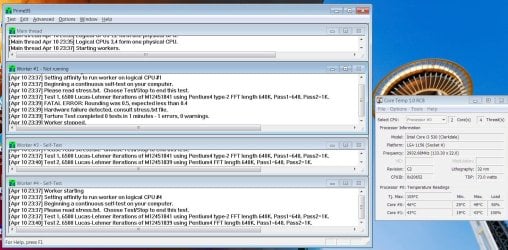
I switched to optimised defaults in the BIOS. I'm running Prime at the moment, with temperature about 40 to 49. Which is higher than before, but I did have the pc on for at least 10h. I got the same error (see screenshot) within 2min for Worker #1, but the others are still going. Previously I got that error on at least 2 of the workers (I really wish I'd made better notes).

I will try changing the RAM timings, but it might take 2 weeks before I can get back to you with the result.

capture_004_10042016_234127.jpg
 
Last edited:

My Computer

Computer type
PC/Desktop
Computer Manufacturer/Model Number
Overclockers UK
OS
Windows 7 Pro x64
CPU
intel i3 530 2.93GHz
Motherboard
Gigabyte GA-H55M-UD2H
Memory
CMX4GX3M2A1600C9 (2x2GB)
Graphics Card(s)
AMD Radeon HD 5770 CuCore 1024MB GDDR5
Monitor(s) Displays
LG M2262D
Screen Resolution
1920 x 1080
Hard Drives
Seagate Barracuda 7200.12 500GB SATA-II 16MB Cache ST500DM002-1BD 142 ATA
Hitachi Deskstar HDP725050GLAT80 ATA
PSU
Corsair GS 600W Power supply (CMPSU-600GUK)
Case
Antec 300 Three Hundred Ultimate Gaming Case
Cooling
Akasa AK-CCX-4002HP Venom CPU Cooler
Antivirus
KIS 16
Browser
chrome
Other Info
currently not OC. RAM is running at 1333MHz
CPU used to be OC to 4.2 GHz, RAM running at 1600MHz
lost OC when I updated the BIOS to F11 (increased memory compatibility)
leebeloola Your CPU is Hyperthreaded which means you actually have 2 cores, but there are 2 logical cores making a total of 4 threads. Prime95 is mainly a CPU stress test. It uses and tests some ram. The ram can and will make the test fail, but it is mainly a CPU stress test. You had 1 core fail which means 1 core and 1 logical core stopped. You will notice your screenshot. The main thread is a summary of the test, the workers are the cores and threads. thread 2 is not shown there. That, in itself, means nothing I don't believe except the layout of the window. In essence Worker 1 and 2 failed, core 3 and 4 continued the test. The test is very sensitive to BIOS settings and a small change can affect the results.

as Mellon Head explained, ram or ram timings can affect the test as well. I also agree with him that I would not buy a new CPU and Motherboard quite yet. It is quite rare for a CPU to fail unless it has been seriously abused, and usually over a long period of time.

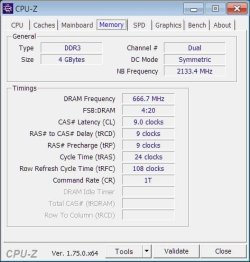
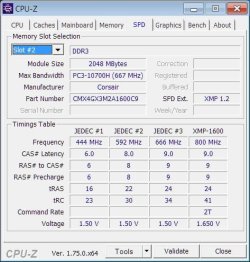
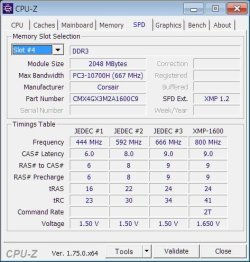
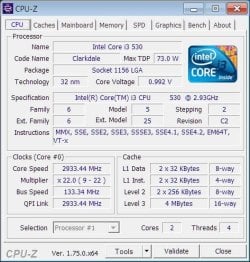
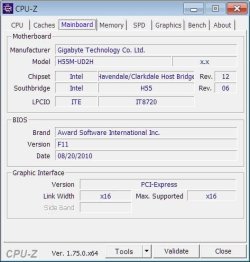
What I would like to see is if you don't have it, please download CPUz (CPU-Z | Softwares | CPUID) and post screenshots of the CPU, Mainboard, Memory and SPD tabs. On the SPD tabs you can select each Dimm slot from a dropdown box in the upper left of the screen. Just post screenshots of the Dimm slots populated with ram. Please post the screenshots here, this will tell you how.
http://www.sevenforums.com/tutorials/9733-screenshots-files-upload-post-seven-forums.html
 

My Computers

System One System Two

  • Computer type
    PC/Desktop
    Computer Manufacturer/Model Number
    ALWAYS UNDER CONSTRUCTION
    OS
    Windows 11 Pro
    CPU
    Ryzen 9 5900X
    Motherboard
    Asus X570 Crosshair Viii Hero
    Memory
    32GB G Skill DDR4-3600
    Graphics Card(s)
    EVGA RTX 3080 FTW 3 Ultra
    Sound Card
    On Board/Sennheiser PC37X Headset
    Monitor(s) Displays
    3 X Asus 27"
    Screen Resolution
    2560x1440
    Hard Drives
    2 X 1 TB NVME drives
    PSU
    EVGA 850
    Case
    Phanteks Eclipse P400A
    Cooling
    EVGA 280 AIO
    Keyboard
    Logitech G510s/ Logitech G13
    Mouse
    Logitech G502
    Internet Speed
    24/1
    Antivirus
    ESET/MBAM Pro/SAS Pro
    Browser
    Chrome/ Firefox/ Edge
  • Computer type
    Laptop
    System Manufacturer/Model Number
    Dell 16 Plus
    OS
    Windows 11 Pro
    CPU
    Intel Ultra 9 288V
    Memory
    32 GB LPDDR5X 8533
    Monitor(s) Displays
    16" Mini-LED HDR600 Touch 90 Hz
    Screen Resolution
    2560X1600
    Hard Drives
    1 TB NVME
I just resized the 1st thread in the screenshot, to show more than 2 lines of the error in thread 1. I just checked a different screenshot and thread 2 had an error at the same time as thread 1. Sorry about the confusion.

I did have the CPU overclocked to 4.2MHz for 4 years, does that count as abuse?

The RAM is only 1.5 years old and has been running at 1333 which is lower than its advertised 1600. I only have RAM in slots 2 & 4, so nothing in 1 & 3.
cpu-z memory.jpg
cpu-z spd 2.jpg
cpu-z spd 4.jpg

cpu-z cpu.jpg
cpu-z mainboard.jpg
 

My Computer

Computer type
PC/Desktop
Computer Manufacturer/Model Number
Overclockers UK
OS
Windows 7 Pro x64
CPU
intel i3 530 2.93GHz
Motherboard
Gigabyte GA-H55M-UD2H
Memory
CMX4GX3M2A1600C9 (2x2GB)
Graphics Card(s)
AMD Radeon HD 5770 CuCore 1024MB GDDR5
Monitor(s) Displays
LG M2262D
Screen Resolution
1920 x 1080
Hard Drives
Seagate Barracuda 7200.12 500GB SATA-II 16MB Cache ST500DM002-1BD 142 ATA
Hitachi Deskstar HDP725050GLAT80 ATA
PSU
Corsair GS 600W Power supply (CMPSU-600GUK)
Case
Antec 300 Three Hundred Ultimate Gaming Case
Cooling
Akasa AK-CCX-4002HP Venom CPU Cooler
Antivirus
KIS 16
Browser
chrome
Other Info
currently not OC. RAM is running at 1333MHz
CPU used to be OC to 4.2 GHz, RAM running at 1600MHz
lost OC when I updated the BIOS to F11 (increased memory compatibility)
OK, I'd like you to once more go into BIOS. Tell me the values of the +12V, +5V and +3.3V. I would also like you to see what your sata controller is set to (IDE,AHCI or Raid) and remember it. Look at your Boot options and see how they are set. Next, please set everything to Optimized Defaults (F5 on most boards) then make sure your sata controller is set to what it was when you looked at it. Check your boot options and set them the same as they were when you looked before and tell me the CPU voltage (Vcore) and Dram Voltage Save and exit, change nothing else.

Please open CPUz and open the CPU tab, open Core Temp and Prime95. Please Run Prime95 Blend test and let me see a screenshot of Prime, while it is running showing all 3 screens at the same time (Prime, CPUz and Core Temp). In the CPU tab of CPUz, please tell me the voltage ranges it goes through, basically high and low, as well as the max temps.

A 4.2 Overclock on a 2.9GHz 2 core CPU is a pretty healthy overclock. It would depend on how much voltage was necessary and how much it actually received. Obviously, if it begins to overheat during Prime, shut it down. Also, has it ever overheated in the past.
 

My Computers

System One System Two

  • Computer type
    PC/Desktop
    Computer Manufacturer/Model Number
    ALWAYS UNDER CONSTRUCTION
    OS
    Windows 11 Pro
    CPU
    Ryzen 9 5900X
    Motherboard
    Asus X570 Crosshair Viii Hero
    Memory
    32GB G Skill DDR4-3600
    Graphics Card(s)
    EVGA RTX 3080 FTW 3 Ultra
    Sound Card
    On Board/Sennheiser PC37X Headset
    Monitor(s) Displays
    3 X Asus 27"
    Screen Resolution
    2560x1440
    Hard Drives
    2 X 1 TB NVME drives
    PSU
    EVGA 850
    Case
    Phanteks Eclipse P400A
    Cooling
    EVGA 280 AIO
    Keyboard
    Logitech G510s/ Logitech G13
    Mouse
    Logitech G502
    Internet Speed
    24/1
    Antivirus
    ESET/MBAM Pro/SAS Pro
    Browser
    Chrome/ Firefox/ Edge
  • Computer type
    Laptop
    System Manufacturer/Model Number
    Dell 16 Plus
    OS
    Windows 11 Pro
    CPU
    Intel Ultra 9 288V
    Memory
    32 GB LPDDR5X 8533
    Monitor(s) Displays
    16" Mini-LED HDR600 Touch 90 Hz
    Screen Resolution
    2560X1600
    Hard Drives
    1 TB NVME
I'll preface this by saying that I'm not an Intel genius...

I'll add to the very good suggestions that essenbe made above. In addition to what he said, please also check the following in BIOS:

1. Check the status of the "EIST" parameter and set it to "Disabled" if it's on.
2. Make sure that "Load Line Calibration" is turned off. (The quickest way to screw up a CPU is to have it on)
3. Check that your DRAM voltage is 1.5V

If you don't have to do anything to the above settings, and after doing the things that essenbe said to do and it still crashes...

There are some things that you can try:

1. You can bump the Vcore voltage slightly (like 1 - 2 mV)
2. You can bump up the DRAM voltage 1 notch.
3. You can bump the Northbridge voltage 1 notch.

Getting to 4.2 GHz on that chip is a significant overclock. Now that you are running at stock speed, the CPU might be a little unstable from the stress of OCing it. It no doubt took a bit of extra voltage to sustain that OC, the CPU might have been slightly damaged and now requires a bit more Vcore to work properly. It does happen.

If I remember my Intel architecture correctly, core #1 is the physical core, and core #2 is the virtual core of core #1. It's similar for cores 3 & 4. What's happening here is that core #1 is having a rounding error, and is shutting down. Since core #2 is dependent on core #1, it also shuts down with a rounding error. This can be caused by three four factors:

1. Not enough Vcore
2. Not enough RAM voltage
3. The Northbridge running too fast
4. The Northbridge not having enough voltage for the speed it's running.

Given your OC, I would suspect the CPU Vcore first.

Try the things that essenbe said, and also what I said (if you can't get it running stable), and please post back the results so we can go further if we need to.
 

My Computer

Computer type
PC/Desktop
Computer Manufacturer/Model Number
Mellon Labs (custom build)
OS
Win 7 Pro x64/Win 10 Pro x64 dual boot
CPU
AMD FX 8350 Vishera @ 4200
Motherboard
ASUS M5A97 R2.0
Memory
16 GB Mushkin Blackline DDR3-2400 @ 1866 (9-10-10-10-31)
Graphics Card(s)
XFX Radeon R9 280 Double D Black Edition
Sound Card
Realtek HD Audio on MB. Sounds great.
Monitor(s) Displays
Acer 24", Acer 22"
Screen Resolution
3840 x 1080
Hard Drives
1 x Mushkin Chronos 120 GB SSD (Win 10)
1 x Samsung 850 EVO 250 GB SSD (Win 7)
1 x WD 1TB SATA Blue
1 x WD 1TB SATA Green
PSU
Corsair TX-750
Case
CoolerMaster HAF 912+
Cooling
Coolermaster Seidon 240M Liquid AIO. 6 case fans
Keyboard
Logitech G710+
Mouse
Logitech G500s
Internet Speed
Much better since I got fiber, but still way overpriced.
Antivirus
MSE, Malware Bytes for scanning
Browser
Firefox
Other Info
Corsair VOID USB headphones.

A Mellon Labs X-1 - LCD Smartie driven system status display.

Brought to you by the letter E
Thank you for the suggestions & explanations. I'm going to make lots of notes & screenshots and I'll get back to you in about 2 weeks.
 

My Computer

Computer type
PC/Desktop
Computer Manufacturer/Model Number
Overclockers UK
OS
Windows 7 Pro x64
CPU
intel i3 530 2.93GHz
Motherboard
Gigabyte GA-H55M-UD2H
Memory
CMX4GX3M2A1600C9 (2x2GB)
Graphics Card(s)
AMD Radeon HD 5770 CuCore 1024MB GDDR5
Monitor(s) Displays
LG M2262D
Screen Resolution
1920 x 1080
Hard Drives
Seagate Barracuda 7200.12 500GB SATA-II 16MB Cache ST500DM002-1BD 142 ATA
Hitachi Deskstar HDP725050GLAT80 ATA
PSU
Corsair GS 600W Power supply (CMPSU-600GUK)
Case
Antec 300 Three Hundred Ultimate Gaming Case
Cooling
Akasa AK-CCX-4002HP Venom CPU Cooler
Antivirus
KIS 16
Browser
chrome
Other Info
currently not OC. RAM is running at 1333MHz
CPU used to be OC to 4.2 GHz, RAM running at 1600MHz
lost OC when I updated the BIOS to F11 (increased memory compatibility)
Great. We'll be here.
 

My Computers

System One System Two

  • Computer type
    PC/Desktop
    Computer Manufacturer/Model Number
    ALWAYS UNDER CONSTRUCTION
    OS
    Windows 11 Pro
    CPU
    Ryzen 9 5900X
    Motherboard
    Asus X570 Crosshair Viii Hero
    Memory
    32GB G Skill DDR4-3600
    Graphics Card(s)
    EVGA RTX 3080 FTW 3 Ultra
    Sound Card
    On Board/Sennheiser PC37X Headset
    Monitor(s) Displays
    3 X Asus 27"
    Screen Resolution
    2560x1440
    Hard Drives
    2 X 1 TB NVME drives
    PSU
    EVGA 850
    Case
    Phanteks Eclipse P400A
    Cooling
    EVGA 280 AIO
    Keyboard
    Logitech G510s/ Logitech G13
    Mouse
    Logitech G502
    Internet Speed
    24/1
    Antivirus
    ESET/MBAM Pro/SAS Pro
    Browser
    Chrome/ Firefox/ Edge
  • Computer type
    Laptop
    System Manufacturer/Model Number
    Dell 16 Plus
    OS
    Windows 11 Pro
    CPU
    Intel Ultra 9 288V
    Memory
    32 GB LPDDR5X 8533
    Monitor(s) Displays
    16" Mini-LED HDR600 Touch 90 Hz
    Screen Resolution
    2560X1600
    Hard Drives
    1 TB NVME
essenbee Here's what I found in BIOS:
+12V 12.239
+5V 5.080
There was no +3.3V
Vcore 1.12250 which gets rounded both up and down in different places
DRAM V is 1.584
I took photos of the various BIOS screens, let me know if you'd like to see them. I've got 12, is that too many to post in this thread?

I set optimized defaults again, made sure SATA is running as IDE, the boot options are the same. I then ran the Blend test again. This time core 3 failed after 3m. Core 4 kept running, I stopped the test after another 5m.
Before Blend test: temp 38* vcore 0.928V
During BLend test: temp 46-48* vcore 1.2V - 1.216V

Mellon Head I also checked the BIOS for EIST & load line calibration and they are both on Auto. I'm going to change them and run the Blend test again to see if it changes anything. Then I'll try changing the DRAM V to 1.5. Unless you have another suggestion.
 

My Computer

Computer type
PC/Desktop
Computer Manufacturer/Model Number
Overclockers UK
OS
Windows 7 Pro x64
CPU
intel i3 530 2.93GHz
Motherboard
Gigabyte GA-H55M-UD2H
Memory
CMX4GX3M2A1600C9 (2x2GB)
Graphics Card(s)
AMD Radeon HD 5770 CuCore 1024MB GDDR5
Monitor(s) Displays
LG M2262D
Screen Resolution
1920 x 1080
Hard Drives
Seagate Barracuda 7200.12 500GB SATA-II 16MB Cache ST500DM002-1BD 142 ATA
Hitachi Deskstar HDP725050GLAT80 ATA
PSU
Corsair GS 600W Power supply (CMPSU-600GUK)
Case
Antec 300 Three Hundred Ultimate Gaming Case
Cooling
Akasa AK-CCX-4002HP Venom CPU Cooler
Antivirus
KIS 16
Browser
chrome
Other Info
currently not OC. RAM is running at 1333MHz
CPU used to be OC to 4.2 GHz, RAM running at 1600MHz
lost OC when I updated the BIOS to F11 (increased memory compatibility)
Do you have the option in bios to set the vcore to manual or offset?
 

My Computers

System One System Two

  • Computer type
    PC/Desktop
    Computer Manufacturer/Model Number
    ALWAYS UNDER CONSTRUCTION
    OS
    Windows 11 Pro
    CPU
    Ryzen 9 5900X
    Motherboard
    Asus X570 Crosshair Viii Hero
    Memory
    32GB G Skill DDR4-3600
    Graphics Card(s)
    EVGA RTX 3080 FTW 3 Ultra
    Sound Card
    On Board/Sennheiser PC37X Headset
    Monitor(s) Displays
    3 X Asus 27"
    Screen Resolution
    2560x1440
    Hard Drives
    2 X 1 TB NVME drives
    PSU
    EVGA 850
    Case
    Phanteks Eclipse P400A
    Cooling
    EVGA 280 AIO
    Keyboard
    Logitech G510s/ Logitech G13
    Mouse
    Logitech G502
    Internet Speed
    24/1
    Antivirus
    ESET/MBAM Pro/SAS Pro
    Browser
    Chrome/ Firefox/ Edge
  • Computer type
    Laptop
    System Manufacturer/Model Number
    Dell 16 Plus
    OS
    Windows 11 Pro
    CPU
    Intel Ultra 9 288V
    Memory
    32 GB LPDDR5X 8533
    Monitor(s) Displays
    16" Mini-LED HDR600 Touch 90 Hz
    Screen Resolution
    2560X1600
    Hard Drives
    1 TB NVME
Offset
 

My Computer

Computer type
PC/Desktop
Computer Manufacturer/Model Number
Overclockers UK
OS
Windows 7 Pro x64
CPU
intel i3 530 2.93GHz
Motherboard
Gigabyte GA-H55M-UD2H
Memory
CMX4GX3M2A1600C9 (2x2GB)
Graphics Card(s)
AMD Radeon HD 5770 CuCore 1024MB GDDR5
Monitor(s) Displays
LG M2262D
Screen Resolution
1920 x 1080
Hard Drives
Seagate Barracuda 7200.12 500GB SATA-II 16MB Cache ST500DM002-1BD 142 ATA
Hitachi Deskstar HDP725050GLAT80 ATA
PSU
Corsair GS 600W Power supply (CMPSU-600GUK)
Case
Antec 300 Three Hundred Ultimate Gaming Case
Cooling
Akasa AK-CCX-4002HP Venom CPU Cooler
Antivirus
KIS 16
Browser
chrome
Other Info
currently not OC. RAM is running at 1333MHz
CPU used to be OC to 4.2 GHz, RAM running at 1600MHz
lost OC when I updated the BIOS to F11 (increased memory compatibility)
should I be increasing both vcore & dram, since these were both raised in the original stable OC? Or do one at a time?
 

My Computer

Computer type
PC/Desktop
Computer Manufacturer/Model Number
Overclockers UK
OS
Windows 7 Pro x64
CPU
intel i3 530 2.93GHz
Motherboard
Gigabyte GA-H55M-UD2H
Memory
CMX4GX3M2A1600C9 (2x2GB)
Graphics Card(s)
AMD Radeon HD 5770 CuCore 1024MB GDDR5
Monitor(s) Displays
LG M2262D
Screen Resolution
1920 x 1080
Hard Drives
Seagate Barracuda 7200.12 500GB SATA-II 16MB Cache ST500DM002-1BD 142 ATA
Hitachi Deskstar HDP725050GLAT80 ATA
PSU
Corsair GS 600W Power supply (CMPSU-600GUK)
Case
Antec 300 Three Hundred Ultimate Gaming Case
Cooling
Akasa AK-CCX-4002HP Venom CPU Cooler
Antivirus
KIS 16
Browser
chrome
Other Info
currently not OC. RAM is running at 1333MHz
CPU used to be OC to 4.2 GHz, RAM running at 1600MHz
lost OC when I updated the BIOS to F11 (increased memory compatibility)
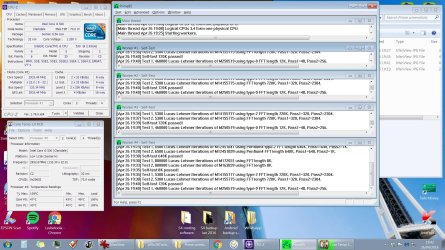
One at a time. Increase the vcore to 1.125 and run Prime again. Open CPUz to the CPU tab and Your Temp monitoring program. Run Prime and while it is running, post a screenshot here of all 3 windows. I would like to see core temp as a temp monitoring program. It has some info on it that others don't have. I would like to see the VID while Prime is running. Let us know the temp and voltage ranges it goes through. Only run 1 temp monitoring program at a time.
 

My Computers

System One System Two

  • Computer type
    PC/Desktop
    Computer Manufacturer/Model Number
    ALWAYS UNDER CONSTRUCTION
    OS
    Windows 11 Pro
    CPU
    Ryzen 9 5900X
    Motherboard
    Asus X570 Crosshair Viii Hero
    Memory
    32GB G Skill DDR4-3600
    Graphics Card(s)
    EVGA RTX 3080 FTW 3 Ultra
    Sound Card
    On Board/Sennheiser PC37X Headset
    Monitor(s) Displays
    3 X Asus 27"
    Screen Resolution
    2560x1440
    Hard Drives
    2 X 1 TB NVME drives
    PSU
    EVGA 850
    Case
    Phanteks Eclipse P400A
    Cooling
    EVGA 280 AIO
    Keyboard
    Logitech G510s/ Logitech G13
    Mouse
    Logitech G502
    Internet Speed
    24/1
    Antivirus
    ESET/MBAM Pro/SAS Pro
    Browser
    Chrome/ Firefox/ Edge
  • Computer type
    Laptop
    System Manufacturer/Model Number
    Dell 16 Plus
    OS
    Windows 11 Pro
    CPU
    Intel Ultra 9 288V
    Memory
    32 GB LPDDR5X 8533
    Monitor(s) Displays
    16" Mini-LED HDR600 Touch 90 Hz
    Screen Resolution
    2560X1600
    Hard Drives
    1 TB NVME
The vcore had a typo. it's 1.21250V and the other V options start at 0.5 so I guess it's manual. I thought manual meant I could type in the number, when actually I have to select an option from a list.

I increased vcore to the next option up which is 1.21875. Blend has been running without errors for 20 minutes now. The voltage is mostly staying at 1.2V this time, whereas before it kept going from 1.216 to 1.232. The temperature is the same.
screenshot 26-04-2016 19-42-07.jpg
 
Last edited:

My Computer

Computer type
PC/Desktop
Computer Manufacturer/Model Number
Overclockers UK
OS
Windows 7 Pro x64
CPU
intel i3 530 2.93GHz
Motherboard
Gigabyte GA-H55M-UD2H
Memory
CMX4GX3M2A1600C9 (2x2GB)
Graphics Card(s)
AMD Radeon HD 5770 CuCore 1024MB GDDR5
Monitor(s) Displays
LG M2262D
Screen Resolution
1920 x 1080
Hard Drives
Seagate Barracuda 7200.12 500GB SATA-II 16MB Cache ST500DM002-1BD 142 ATA
Hitachi Deskstar HDP725050GLAT80 ATA
PSU
Corsair GS 600W Power supply (CMPSU-600GUK)
Case
Antec 300 Three Hundred Ultimate Gaming Case
Cooling
Akasa AK-CCX-4002HP Venom CPU Cooler
Antivirus
KIS 16
Browser
chrome
Other Info
currently not OC. RAM is running at 1333MHz
CPU used to be OC to 4.2 GHz, RAM running at 1600MHz
lost OC when I updated the BIOS to F11 (increased memory compatibility)
worker 1 & 2 stopped after 1h 1m and 1h 9m. I'm going to increase vCore slightly to see if Blend will run for a bit longer. At what point do you think I should try increasing the DRAM voltage instead of the vCore?
 

My Computer

Computer type
PC/Desktop
Computer Manufacturer/Model Number
Overclockers UK
OS
Windows 7 Pro x64
CPU
intel i3 530 2.93GHz
Motherboard
Gigabyte GA-H55M-UD2H
Memory
CMX4GX3M2A1600C9 (2x2GB)
Graphics Card(s)
AMD Radeon HD 5770 CuCore 1024MB GDDR5
Monitor(s) Displays
LG M2262D
Screen Resolution
1920 x 1080
Hard Drives
Seagate Barracuda 7200.12 500GB SATA-II 16MB Cache ST500DM002-1BD 142 ATA
Hitachi Deskstar HDP725050GLAT80 ATA
PSU
Corsair GS 600W Power supply (CMPSU-600GUK)
Case
Antec 300 Three Hundred Ultimate Gaming Case
Cooling
Akasa AK-CCX-4002HP Venom CPU Cooler
Antivirus
KIS 16
Browser
chrome
Other Info
currently not OC. RAM is running at 1333MHz
CPU used to be OC to 4.2 GHz, RAM running at 1600MHz
lost OC when I updated the BIOS to F11 (increased memory compatibility)
I would leave the DRAM voltage alone, and loosen your timings.
 

My Computer

Computer type
PC/Desktop
Computer Manufacturer/Model Number
Mellon Labs (custom build)
OS
Win 7 Pro x64/Win 10 Pro x64 dual boot
CPU
AMD FX 8350 Vishera @ 4200
Motherboard
ASUS M5A97 R2.0
Memory
16 GB Mushkin Blackline DDR3-2400 @ 1866 (9-10-10-10-31)
Graphics Card(s)
XFX Radeon R9 280 Double D Black Edition
Sound Card
Realtek HD Audio on MB. Sounds great.
Monitor(s) Displays
Acer 24", Acer 22"
Screen Resolution
3840 x 1080
Hard Drives
1 x Mushkin Chronos 120 GB SSD (Win 10)
1 x Samsung 850 EVO 250 GB SSD (Win 7)
1 x WD 1TB SATA Blue
1 x WD 1TB SATA Green
PSU
Corsair TX-750
Case
CoolerMaster HAF 912+
Cooling
Coolermaster Seidon 240M Liquid AIO. 6 case fans
Keyboard
Logitech G710+
Mouse
Logitech G500s
Internet Speed
Much better since I got fiber, but still way overpriced.
Antivirus
MSE, Malware Bytes for scanning
Browser
Firefox
Other Info
Corsair VOID USB headphones.

A Mellon Labs X-1 - LCD Smartie driven system status display.

Brought to you by the letter E
Am I correct that the fist time, prime failed at 3 minutes? Then you bumped the Vcore and it ran for 1 hour? Try bumping your vcore one more time, the next option up. See how Prime runs then. If any core fails, stop the test then. There is no reason to keep running it.
 

My Computers

System One System Two

  • Computer type
    PC/Desktop
    Computer Manufacturer/Model Number
    ALWAYS UNDER CONSTRUCTION
    OS
    Windows 11 Pro
    CPU
    Ryzen 9 5900X
    Motherboard
    Asus X570 Crosshair Viii Hero
    Memory
    32GB G Skill DDR4-3600
    Graphics Card(s)
    EVGA RTX 3080 FTW 3 Ultra
    Sound Card
    On Board/Sennheiser PC37X Headset
    Monitor(s) Displays
    3 X Asus 27"
    Screen Resolution
    2560x1440
    Hard Drives
    2 X 1 TB NVME drives
    PSU
    EVGA 850
    Case
    Phanteks Eclipse P400A
    Cooling
    EVGA 280 AIO
    Keyboard
    Logitech G510s/ Logitech G13
    Mouse
    Logitech G502
    Internet Speed
    24/1
    Antivirus
    ESET/MBAM Pro/SAS Pro
    Browser
    Chrome/ Firefox/ Edge
  • Computer type
    Laptop
    System Manufacturer/Model Number
    Dell 16 Plus
    OS
    Windows 11 Pro
    CPU
    Intel Ultra 9 288V
    Memory
    32 GB LPDDR5X 8533
    Monitor(s) Displays
    16" Mini-LED HDR600 Touch 90 Hz
    Screen Resolution
    2560X1600
    Hard Drives
    1 TB NVME
Yes the first time it failed at 3m. The next step up is 1.2250V and that ran for 1h 13m.
 

My Computer

Computer type
PC/Desktop
Computer Manufacturer/Model Number
Overclockers UK
OS
Windows 7 Pro x64
CPU
intel i3 530 2.93GHz
Motherboard
Gigabyte GA-H55M-UD2H
Memory
CMX4GX3M2A1600C9 (2x2GB)
Graphics Card(s)
AMD Radeon HD 5770 CuCore 1024MB GDDR5
Monitor(s) Displays
LG M2262D
Screen Resolution
1920 x 1080
Hard Drives
Seagate Barracuda 7200.12 500GB SATA-II 16MB Cache ST500DM002-1BD 142 ATA
Hitachi Deskstar HDP725050GLAT80 ATA
PSU
Corsair GS 600W Power supply (CMPSU-600GUK)
Case
Antec 300 Three Hundred Ultimate Gaming Case
Cooling
Akasa AK-CCX-4002HP Venom CPU Cooler
Antivirus
KIS 16
Browser
chrome
Other Info
currently not OC. RAM is running at 1333MHz
CPU used to be OC to 4.2 GHz, RAM running at 1600MHz
lost OC when I updated the BIOS to F11 (increased memory compatibility)
Back
Top