Prime rounding error but no memtest error

Did you try bumping the vcore just 1 notch again?
 

My Computers

System One System Two

  • Computer type
    PC/Desktop
    Computer Manufacturer/Model Number
    ALWAYS UNDER CONSTRUCTION
    OS
    Windows 11 Pro
    CPU
    Ryzen 9 5900X
    Motherboard
    Asus X570 Crosshair Viii Hero
    Memory
    32GB G Skill DDR4-3600
    Graphics Card(s)
    EVGA RTX 3080 FTW 3 Ultra
    Sound Card
    On Board/Sennheiser PC37X Headset
    Monitor(s) Displays
    3 X Asus 27"
    Screen Resolution
    2560x1440
    Hard Drives
    2 X 1 TB NVME drives
    PSU
    EVGA 850
    Case
    Phanteks Eclipse P400A
    Cooling
    EVGA 280 AIO
    Keyboard
    Logitech G510s/ Logitech G13
    Mouse
    Logitech G502
    Internet Speed
    24/1
    Antivirus
    ESET/MBAM Pro/SAS Pro
    Browser
    Chrome/ Firefox/ Edge
  • Computer type
    Laptop
    System Manufacturer/Model Number
    Dell 16 Plus
    OS
    Windows 11 Pro
    CPU
    Intel Ultra 9 288V
    Memory
    32 GB LPDDR5X 8533
    Monitor(s) Displays
    16" Mini-LED HDR600 Touch 90 Hz
    Screen Resolution
    2560X1600
    Hard Drives
    1 TB NVME
I'm going to try that now.
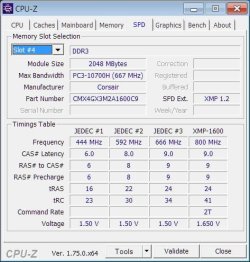
I got distracted by researching loosening the RAM. The next set of timings according to CPU-Z are 9 9 9 24 41 2T. Should I be increasing just one of these at a time or all of them? I was tempted to do 1 at a time but I have no idea which one to bump up first.
 

My Computer

Computer type
PC/Desktop
Computer Manufacturer/Model Number
Overclockers UK
OS
Windows 7 Pro x64
CPU
intel i3 530 2.93GHz
Motherboard
Gigabyte GA-H55M-UD2H
Memory
CMX4GX3M2A1600C9 (2x2GB)
Graphics Card(s)
AMD Radeon HD 5770 CuCore 1024MB GDDR5
Monitor(s) Displays
LG M2262D
Screen Resolution
1920 x 1080
Hard Drives
Seagate Barracuda 7200.12 500GB SATA-II 16MB Cache ST500DM002-1BD 142 ATA
Hitachi Deskstar HDP725050GLAT80 ATA
PSU
Corsair GS 600W Power supply (CMPSU-600GUK)
Case
Antec 300 Three Hundred Ultimate Gaming Case
Cooling
Akasa AK-CCX-4002HP Venom CPU Cooler
Antivirus
KIS 16
Browser
chrome
Other Info
currently not OC. RAM is running at 1333MHz
CPU used to be OC to 4.2 GHz, RAM running at 1600MHz
lost OC when I updated the BIOS to F11 (increased memory compatibility)
According to your CPUz screenshots in post #6, that is what you are running now, except for the 2T.
 

My Computers

System One System Two

  • Computer type
    PC/Desktop
    Computer Manufacturer/Model Number
    ALWAYS UNDER CONSTRUCTION
    OS
    Windows 11 Pro
    CPU
    Ryzen 9 5900X
    Motherboard
    Asus X570 Crosshair Viii Hero
    Memory
    32GB G Skill DDR4-3600
    Graphics Card(s)
    EVGA RTX 3080 FTW 3 Ultra
    Sound Card
    On Board/Sennheiser PC37X Headset
    Monitor(s) Displays
    3 X Asus 27"
    Screen Resolution
    2560x1440
    Hard Drives
    2 X 1 TB NVME drives
    PSU
    EVGA 850
    Case
    Phanteks Eclipse P400A
    Cooling
    EVGA 280 AIO
    Keyboard
    Logitech G510s/ Logitech G13
    Mouse
    Logitech G502
    Internet Speed
    24/1
    Antivirus
    ESET/MBAM Pro/SAS Pro
    Browser
    Chrome/ Firefox/ Edge
  • Computer type
    Laptop
    System Manufacturer/Model Number
    Dell 16 Plus
    OS
    Windows 11 Pro
    CPU
    Intel Ultra 9 288V
    Memory
    32 GB LPDDR5X 8533
    Monitor(s) Displays
    16" Mini-LED HDR600 Touch 90 Hz
    Screen Resolution
    2560X1600
    Hard Drives
    1 TB NVME
With vCore bumped up to 1.23125, Blend test errors started at 1h 20m which is 7m more than before. The max temperature got up to 51. Max temp seems to be increasing by 1 with every V increase.
Is it normal for one of the cores to always be hotter than the other? The difference seems to vary between 5-10 degrees.
 

My Computer

Computer type
PC/Desktop
Computer Manufacturer/Model Number
Overclockers UK
OS
Windows 7 Pro x64
CPU
intel i3 530 2.93GHz
Motherboard
Gigabyte GA-H55M-UD2H
Memory
CMX4GX3M2A1600C9 (2x2GB)
Graphics Card(s)
AMD Radeon HD 5770 CuCore 1024MB GDDR5
Monitor(s) Displays
LG M2262D
Screen Resolution
1920 x 1080
Hard Drives
Seagate Barracuda 7200.12 500GB SATA-II 16MB Cache ST500DM002-1BD 142 ATA
Hitachi Deskstar HDP725050GLAT80 ATA
PSU
Corsair GS 600W Power supply (CMPSU-600GUK)
Case
Antec 300 Three Hundred Ultimate Gaming Case
Cooling
Akasa AK-CCX-4002HP Venom CPU Cooler
Antivirus
KIS 16
Browser
chrome
Other Info
currently not OC. RAM is running at 1333MHz
CPU used to be OC to 4.2 GHz, RAM running at 1600MHz
lost OC when I updated the BIOS to F11 (increased memory compatibility)
Yes, that is normal. One core is always hotter than the rest. How often do you have the BSODs if not running Prime95?
 

My Computers

System One System Two

  • Computer type
    PC/Desktop
    Computer Manufacturer/Model Number
    ALWAYS UNDER CONSTRUCTION
    OS
    Windows 11 Pro
    CPU
    Ryzen 9 5900X
    Motherboard
    Asus X570 Crosshair Viii Hero
    Memory
    32GB G Skill DDR4-3600
    Graphics Card(s)
    EVGA RTX 3080 FTW 3 Ultra
    Sound Card
    On Board/Sennheiser PC37X Headset
    Monitor(s) Displays
    3 X Asus 27"
    Screen Resolution
    2560x1440
    Hard Drives
    2 X 1 TB NVME drives
    PSU
    EVGA 850
    Case
    Phanteks Eclipse P400A
    Cooling
    EVGA 280 AIO
    Keyboard
    Logitech G510s/ Logitech G13
    Mouse
    Logitech G502
    Internet Speed
    24/1
    Antivirus
    ESET/MBAM Pro/SAS Pro
    Browser
    Chrome/ Firefox/ Edge
  • Computer type
    Laptop
    System Manufacturer/Model Number
    Dell 16 Plus
    OS
    Windows 11 Pro
    CPU
    Intel Ultra 9 288V
    Memory
    32 GB LPDDR5X 8533
    Monitor(s) Displays
    16" Mini-LED HDR600 Touch 90 Hz
    Screen Resolution
    2560X1600
    Hard Drives
    1 TB NVME
The weird thing is I don't have any BSODs. I did have some random BSODs 2 years ago when I tried adding more RAM, but once I updated the BIOS and only used 1 of the 2x2GB sets, I never had them again. Even when I try playing videos while also having a 3D game in the background, or having lots of images open in photoshop it slows down or freezes but I don't get any BSODs.

I was told by Corsair that the RAM sets were incompatible because the new set has higher ICs than the previous set, despite them having the exact same product "name". So now I'm still only using the 2x2GB "new" set and the old set is living in someone else's desktop.

I tried enabling the XMP 1600MHz profile of the RAM because I couldn't remember what Prime does. It got an error at 0m. So I went back to optimized defaults and only changed the command rate to 2. I got an error after 3m, which is the same as on optimized defaults.
 

My Computer

Computer type
PC/Desktop
Computer Manufacturer/Model Number
Overclockers UK
OS
Windows 7 Pro x64
CPU
intel i3 530 2.93GHz
Motherboard
Gigabyte GA-H55M-UD2H
Memory
CMX4GX3M2A1600C9 (2x2GB)
Graphics Card(s)
AMD Radeon HD 5770 CuCore 1024MB GDDR5
Monitor(s) Displays
LG M2262D
Screen Resolution
1920 x 1080
Hard Drives
Seagate Barracuda 7200.12 500GB SATA-II 16MB Cache ST500DM002-1BD 142 ATA
Hitachi Deskstar HDP725050GLAT80 ATA
PSU
Corsair GS 600W Power supply (CMPSU-600GUK)
Case
Antec 300 Three Hundred Ultimate Gaming Case
Cooling
Akasa AK-CCX-4002HP Venom CPU Cooler
Antivirus
KIS 16
Browser
chrome
Other Info
currently not OC. RAM is running at 1333MHz
CPU used to be OC to 4.2 GHz, RAM running at 1600MHz
lost OC when I updated the BIOS to F11 (increased memory compatibility)
My main reason for running Prime is to figure out if I can slightly overclock it and get some 8GB RAM. That will probably be good enough for another year.

If I can't, then I will get new: CPU, RAM, MOBO. If the reason Prime won't run for very long is the previously overclocked CPU, then next time I buy a CPU I won't overclock it. If the Prime errors are more likely because of something else I will overclock it.
 
Last edited:

My Computer

Computer type
PC/Desktop
Computer Manufacturer/Model Number
Overclockers UK
OS
Windows 7 Pro x64
CPU
intel i3 530 2.93GHz
Motherboard
Gigabyte GA-H55M-UD2H
Memory
CMX4GX3M2A1600C9 (2x2GB)
Graphics Card(s)
AMD Radeon HD 5770 CuCore 1024MB GDDR5
Monitor(s) Displays
LG M2262D
Screen Resolution
1920 x 1080
Hard Drives
Seagate Barracuda 7200.12 500GB SATA-II 16MB Cache ST500DM002-1BD 142 ATA
Hitachi Deskstar HDP725050GLAT80 ATA
PSU
Corsair GS 600W Power supply (CMPSU-600GUK)
Case
Antec 300 Three Hundred Ultimate Gaming Case
Cooling
Akasa AK-CCX-4002HP Venom CPU Cooler
Antivirus
KIS 16
Browser
chrome
Other Info
currently not OC. RAM is running at 1333MHz
CPU used to be OC to 4.2 GHz, RAM running at 1600MHz
lost OC when I updated the BIOS to F11 (increased memory compatibility)
Prime95 is basically a CPU stress test but tests some ram too. It is the most used test for CPU Stability. If you can't run it at stock, forget ever overclocking it. From what you are telling me, it sounds like a ram problem of some type. Just an observation on my part, not a diagnosis.
 

My Computers

System One System Two

  • Computer type
    PC/Desktop
    Computer Manufacturer/Model Number
    ALWAYS UNDER CONSTRUCTION
    OS
    Windows 11 Pro
    CPU
    Ryzen 9 5900X
    Motherboard
    Asus X570 Crosshair Viii Hero
    Memory
    32GB G Skill DDR4-3600
    Graphics Card(s)
    EVGA RTX 3080 FTW 3 Ultra
    Sound Card
    On Board/Sennheiser PC37X Headset
    Monitor(s) Displays
    3 X Asus 27"
    Screen Resolution
    2560x1440
    Hard Drives
    2 X 1 TB NVME drives
    PSU
    EVGA 850
    Case
    Phanteks Eclipse P400A
    Cooling
    EVGA 280 AIO
    Keyboard
    Logitech G510s/ Logitech G13
    Mouse
    Logitech G502
    Internet Speed
    24/1
    Antivirus
    ESET/MBAM Pro/SAS Pro
    Browser
    Chrome/ Firefox/ Edge
  • Computer type
    Laptop
    System Manufacturer/Model Number
    Dell 16 Plus
    OS
    Windows 11 Pro
    CPU
    Intel Ultra 9 288V
    Memory
    32 GB LPDDR5X 8533
    Monitor(s) Displays
    16" Mini-LED HDR600 Touch 90 Hz
    Screen Resolution
    2560X1600
    Hard Drives
    1 TB NVME
You need to also accept the possibility it is not the ram or CPU. It could be the motherboard causing the errors.
 

My Computers

System One System Two

  • Computer type
    PC/Desktop
    Computer Manufacturer/Model Number
    ALWAYS UNDER CONSTRUCTION
    OS
    Windows 11 Pro
    CPU
    Ryzen 9 5900X
    Motherboard
    Asus X570 Crosshair Viii Hero
    Memory
    32GB G Skill DDR4-3600
    Graphics Card(s)
    EVGA RTX 3080 FTW 3 Ultra
    Sound Card
    On Board/Sennheiser PC37X Headset
    Monitor(s) Displays
    3 X Asus 27"
    Screen Resolution
    2560x1440
    Hard Drives
    2 X 1 TB NVME drives
    PSU
    EVGA 850
    Case
    Phanteks Eclipse P400A
    Cooling
    EVGA 280 AIO
    Keyboard
    Logitech G510s/ Logitech G13
    Mouse
    Logitech G502
    Internet Speed
    24/1
    Antivirus
    ESET/MBAM Pro/SAS Pro
    Browser
    Chrome/ Firefox/ Edge
  • Computer type
    Laptop
    System Manufacturer/Model Number
    Dell 16 Plus
    OS
    Windows 11 Pro
    CPU
    Intel Ultra 9 288V
    Memory
    32 GB LPDDR5X 8533
    Monitor(s) Displays
    16" Mini-LED HDR600 Touch 90 Hz
    Screen Resolution
    2560X1600
    Hard Drives
    1 TB NVME
I also suspect there to be a RAM/MOBO/CPU problem but there's so little information about the MOBO that I can't check. I think I'll start looking into new RAM, MOBO, CPU.

So there is no way to figure out whether where the problem is coming from?
Does the fact that it took longer for prime to stop once I increased the vCore doesn't mean it's more stable at that voltage? I had the impression that increasing the voltage so the test runs for longer was one way to overclock the cpu.
 

My Computer

Computer type
PC/Desktop
Computer Manufacturer/Model Number
Overclockers UK
OS
Windows 7 Pro x64
CPU
intel i3 530 2.93GHz
Motherboard
Gigabyte GA-H55M-UD2H
Memory
CMX4GX3M2A1600C9 (2x2GB)
Graphics Card(s)
AMD Radeon HD 5770 CuCore 1024MB GDDR5
Monitor(s) Displays
LG M2262D
Screen Resolution
1920 x 1080
Hard Drives
Seagate Barracuda 7200.12 500GB SATA-II 16MB Cache ST500DM002-1BD 142 ATA
Hitachi Deskstar HDP725050GLAT80 ATA
PSU
Corsair GS 600W Power supply (CMPSU-600GUK)
Case
Antec 300 Three Hundred Ultimate Gaming Case
Cooling
Akasa AK-CCX-4002HP Venom CPU Cooler
Antivirus
KIS 16
Browser
chrome
Other Info
currently not OC. RAM is running at 1333MHz
CPU used to be OC to 4.2 GHz, RAM running at 1600MHz
lost OC when I updated the BIOS to F11 (increased memory compatibility)
Increasing voltage to stabilize an overclock is the basic method. Only one problem. You are not overclocked. There is no reason you should have to increase voltage to run at stock. There is a problem somewhere. There is no test for a motherboard. It is possible that the voltage regulator for the motherboard is not distributing the voltage properly. There is also a possibility that your previous high overclocks of that CPU damaged it. There are other possibilities too such as the PSU not providing the power it should at high demands. The list is pretty extensive. Suffice it to say that your computer not running Prime at stock indicates something is definitely wrong.

It also seems that any changes to your ram causes problems. Simply changing from 1T to 2T (2T is more stable) causes it to crash right away. Even if you have done it already, do this again. Please follow the instructions exactly.

Please Run Memtest86+


picture.php

   Information
Please download from this site only http://www.memtest.org/ in the middle of the page are the Download links, you can download the ISO.zip or the Auto USB Flash Drive installer.zip


Extract the Zip file. If you chose the ISO image, burn it to a CD using Windows Disk Image Burner or any Image burner you may have. If you downloaded the Auto USB installer, extract it, insert your USB 2.0 Flash Drive and take note of the drive letter. Run the installer, select the Flash Drive Letter, check the format box and press next. It will install memtest86+ to a flash drive. You can use either V4.20 or V5.01. Boot from your selected media. If you use V5.01 it will tell you to press certain buttons at the start, please press no buttons. The test will begin on it's own and continue to run until you stop it. It needs to run for 8 complete passes or until you receive an error. If you receive an error, stop the test. Even 1 error is a fail. Each pass tests a different part of the ram and each of the 10 tests in each pass tests something different. It takes a minimum of 8 passes to completely test the ram, more passes are better. It is quite a long test and will take several hours depending on how much ram you have. Due to the time length it is best to run overnight. If you have any questions, please do not hesitate to ask.

Run it for 8 complete passes and lets try once more to see if it is a ram problem that will show itself.

 

My Computers

System One System Two

  • Computer type
    PC/Desktop
    Computer Manufacturer/Model Number
    ALWAYS UNDER CONSTRUCTION
    OS
    Windows 11 Pro
    CPU
    Ryzen 9 5900X
    Motherboard
    Asus X570 Crosshair Viii Hero
    Memory
    32GB G Skill DDR4-3600
    Graphics Card(s)
    EVGA RTX 3080 FTW 3 Ultra
    Sound Card
    On Board/Sennheiser PC37X Headset
    Monitor(s) Displays
    3 X Asus 27"
    Screen Resolution
    2560x1440
    Hard Drives
    2 X 1 TB NVME drives
    PSU
    EVGA 850
    Case
    Phanteks Eclipse P400A
    Cooling
    EVGA 280 AIO
    Keyboard
    Logitech G510s/ Logitech G13
    Mouse
    Logitech G502
    Internet Speed
    24/1
    Antivirus
    ESET/MBAM Pro/SAS Pro
    Browser
    Chrome/ Firefox/ Edge
  • Computer type
    Laptop
    System Manufacturer/Model Number
    Dell 16 Plus
    OS
    Windows 11 Pro
    CPU
    Intel Ultra 9 288V
    Memory
    32 GB LPDDR5X 8533
    Monitor(s) Displays
    16" Mini-LED HDR600 Touch 90 Hz
    Screen Resolution
    2560X1600
    Hard Drives
    1 TB NVME
I ran memtest overnight with no errors. I haven't tried loosening the RAM timings but seeing as the RAM is passing memtest again & again, I don't understand what that would prove. Also I don't know what to do about loosening RAM timings. Do I change 1 number at a time, in which sequence. There are so many possible combinations of numbers I could change... I would need some help with that
 

My Computer

Computer type
PC/Desktop
Computer Manufacturer/Model Number
Overclockers UK
OS
Windows 7 Pro x64
CPU
intel i3 530 2.93GHz
Motherboard
Gigabyte GA-H55M-UD2H
Memory
CMX4GX3M2A1600C9 (2x2GB)
Graphics Card(s)
AMD Radeon HD 5770 CuCore 1024MB GDDR5
Monitor(s) Displays
LG M2262D
Screen Resolution
1920 x 1080
Hard Drives
Seagate Barracuda 7200.12 500GB SATA-II 16MB Cache ST500DM002-1BD 142 ATA
Hitachi Deskstar HDP725050GLAT80 ATA
PSU
Corsair GS 600W Power supply (CMPSU-600GUK)
Case
Antec 300 Three Hundred Ultimate Gaming Case
Cooling
Akasa AK-CCX-4002HP Venom CPU Cooler
Antivirus
KIS 16
Browser
chrome
Other Info
currently not OC. RAM is running at 1333MHz
CPU used to be OC to 4.2 GHz, RAM running at 1600MHz
lost OC when I updated the BIOS to F11 (increased memory compatibility)
In my opinion, you don't need to worry about the timings in this case. Your timings are 9-9-9-24 which is standard for any motherboard.
 

My Computers

System One System Two

  • Computer type
    PC/Desktop
    Computer Manufacturer/Model Number
    ALWAYS UNDER CONSTRUCTION
    OS
    Windows 11 Pro
    CPU
    Ryzen 9 5900X
    Motherboard
    Asus X570 Crosshair Viii Hero
    Memory
    32GB G Skill DDR4-3600
    Graphics Card(s)
    EVGA RTX 3080 FTW 3 Ultra
    Sound Card
    On Board/Sennheiser PC37X Headset
    Monitor(s) Displays
    3 X Asus 27"
    Screen Resolution
    2560x1440
    Hard Drives
    2 X 1 TB NVME drives
    PSU
    EVGA 850
    Case
    Phanteks Eclipse P400A
    Cooling
    EVGA 280 AIO
    Keyboard
    Logitech G510s/ Logitech G13
    Mouse
    Logitech G502
    Internet Speed
    24/1
    Antivirus
    ESET/MBAM Pro/SAS Pro
    Browser
    Chrome/ Firefox/ Edge
  • Computer type
    Laptop
    System Manufacturer/Model Number
    Dell 16 Plus
    OS
    Windows 11 Pro
    CPU
    Intel Ultra 9 288V
    Memory
    32 GB LPDDR5X 8533
    Monitor(s) Displays
    16" Mini-LED HDR600 Touch 90 Hz
    Screen Resolution
    2560X1600
    Hard Drives
    1 TB NVME
What did you do immediately before this BSOD problem started? Are you having any problems with the computer other than running Prime?
 

My Computers

System One System Two

  • Computer type
    PC/Desktop
    Computer Manufacturer/Model Number
    ALWAYS UNDER CONSTRUCTION
    OS
    Windows 11 Pro
    CPU
    Ryzen 9 5900X
    Motherboard
    Asus X570 Crosshair Viii Hero
    Memory
    32GB G Skill DDR4-3600
    Graphics Card(s)
    EVGA RTX 3080 FTW 3 Ultra
    Sound Card
    On Board/Sennheiser PC37X Headset
    Monitor(s) Displays
    3 X Asus 27"
    Screen Resolution
    2560x1440
    Hard Drives
    2 X 1 TB NVME drives
    PSU
    EVGA 850
    Case
    Phanteks Eclipse P400A
    Cooling
    EVGA 280 AIO
    Keyboard
    Logitech G510s/ Logitech G13
    Mouse
    Logitech G502
    Internet Speed
    24/1
    Antivirus
    ESET/MBAM Pro/SAS Pro
    Browser
    Chrome/ Firefox/ Edge
  • Computer type
    Laptop
    System Manufacturer/Model Number
    Dell 16 Plus
    OS
    Windows 11 Pro
    CPU
    Intel Ultra 9 288V
    Memory
    32 GB LPDDR5X 8533
    Monitor(s) Displays
    16" Mini-LED HDR600 Touch 90 Hz
    Screen Resolution
    2560X1600
    Hard Drives
    1 TB NVME
Reading this thread several time I'm somewhat lost.

What is the ram timing and volts at this time?

I'm thinking its are 9 9 9 24 41 2T with 1.65 volts.
Is that correct?

From post #6

cpuz for today 5 7.jpg
 

My Computer

Computer type
PC/Desktop
Computer Manufacturer/Model Number
Home made Desktop
OS
Windows 10 Pro. 64/ version 1709 Windows 7 Pro/64
CPU
Intel i7-6800K @ 4.3
Motherboard
ASUS X-99 Deluxe II
Memory
Corsair Platinum 16 gig @2400
Graphics Card(s)
EVGA GTX 1070 OC
Monitor(s) Displays
Asus 27" LED LCD/VE278Q
Screen Resolution
1920-1080 or 1280-720 HDMI
Hard Drives
INTEL SSD 730-240 Gb Sata 3.0/
PSU
EVGA Platium 1200W
Case
Phanteks Luxe Tempered Glass 8 fans/ one radiator
Cooling
XSPC/ Water Cooled CPU
Keyboard
Das 4 Professional
Mouse
Logitech M705/MX Anywhere 2-S
Internet Speed
100 mbits
Antivirus
Microsoft Security Essentials/ Malwarebytes Premium 3.0/ SAS
Browser
I.E. 11 default/Firefox/ ISP Time Warner Cable/Spectrum
Other Info
LG BluRay Burner/
Sound system-KLipsch-THX/
Icy Dock ssd Hot Swap bays.
jack, it's 9-9-9-24 1T, but I think I had him change it to 2T @1333 1.5V. In the CPUz screenshot look at the memory tab.
 

My Computers

System One System Two

  • Computer type
    PC/Desktop
    Computer Manufacturer/Model Number
    ALWAYS UNDER CONSTRUCTION
    OS
    Windows 11 Pro
    CPU
    Ryzen 9 5900X
    Motherboard
    Asus X570 Crosshair Viii Hero
    Memory
    32GB G Skill DDR4-3600
    Graphics Card(s)
    EVGA RTX 3080 FTW 3 Ultra
    Sound Card
    On Board/Sennheiser PC37X Headset
    Monitor(s) Displays
    3 X Asus 27"
    Screen Resolution
    2560x1440
    Hard Drives
    2 X 1 TB NVME drives
    PSU
    EVGA 850
    Case
    Phanteks Eclipse P400A
    Cooling
    EVGA 280 AIO
    Keyboard
    Logitech G510s/ Logitech G13
    Mouse
    Logitech G502
    Internet Speed
    24/1
    Antivirus
    ESET/MBAM Pro/SAS Pro
    Browser
    Chrome/ Firefox/ Edge
  • Computer type
    Laptop
    System Manufacturer/Model Number
    Dell 16 Plus
    OS
    Windows 11 Pro
    CPU
    Intel Ultra 9 288V
    Memory
    32 GB LPDDR5X 8533
    Monitor(s) Displays
    16" Mini-LED HDR600 Touch 90 Hz
    Screen Resolution
    2560X1600
    Hard Drives
    1 TB NVME
ops I miss that one.
My thoughts and concern was running XMP 1600 and 1.5 volts. (??)

I have never had luck running XMP. Some times it does strange things.
I set things manually.
 

My Computer

Computer type
PC/Desktop
Computer Manufacturer/Model Number
Home made Desktop
OS
Windows 10 Pro. 64/ version 1709 Windows 7 Pro/64
CPU
Intel i7-6800K @ 4.3
Motherboard
ASUS X-99 Deluxe II
Memory
Corsair Platinum 16 gig @2400
Graphics Card(s)
EVGA GTX 1070 OC
Monitor(s) Displays
Asus 27" LED LCD/VE278Q
Screen Resolution
1920-1080 or 1280-720 HDMI
Hard Drives
INTEL SSD 730-240 Gb Sata 3.0/
PSU
EVGA Platium 1200W
Case
Phanteks Luxe Tempered Glass 8 fans/ one radiator
Cooling
XSPC/ Water Cooled CPU
Keyboard
Das 4 Professional
Mouse
Logitech M705/MX Anywhere 2-S
Internet Speed
100 mbits
Antivirus
Microsoft Security Essentials/ Malwarebytes Premium 3.0/ SAS
Browser
I.E. 11 default/Firefox/ ISP Time Warner Cable/Spectrum
Other Info
LG BluRay Burner/
Sound system-KLipsch-THX/
Icy Dock ssd Hot Swap bays.
I'm only having problems with Prime and there's a bit of a delay when opening programs. This game I'm playing (Dreamfall Chapters) keeps dropping frames and this improved a lot when I tried a small cpu overclock of 3.4GHz without the XMP profile. That's when I thought I should test the overclock. I got an error after 3m, so I tried testing the cpu at stock and got the exact same result.

Right now my RAM is set to the XMP 1600 at 1.65V. Previously the XMP wasn't on which is why it was running at 1.5V. I tried changing the comand rate and tRC, without the XMP profile. The comand rate at 2T change didn't make a difference, I got an error in 3m. Changing the tRC from 34 to 41 as well as the comand rate at 2T had an error at 0s, probably because I left it at 1.5V.
 

My Computer

Computer type
PC/Desktop
Computer Manufacturer/Model Number
Overclockers UK
OS
Windows 7 Pro x64
CPU
intel i3 530 2.93GHz
Motherboard
Gigabyte GA-H55M-UD2H
Memory
CMX4GX3M2A1600C9 (2x2GB)
Graphics Card(s)
AMD Radeon HD 5770 CuCore 1024MB GDDR5
Monitor(s) Displays
LG M2262D
Screen Resolution
1920 x 1080
Hard Drives
Seagate Barracuda 7200.12 500GB SATA-II 16MB Cache ST500DM002-1BD 142 ATA
Hitachi Deskstar HDP725050GLAT80 ATA
PSU
Corsair GS 600W Power supply (CMPSU-600GUK)
Case
Antec 300 Three Hundred Ultimate Gaming Case
Cooling
Akasa AK-CCX-4002HP Venom CPU Cooler
Antivirus
KIS 16
Browser
chrome
Other Info
currently not OC. RAM is running at 1333MHz
CPU used to be OC to 4.2 GHz, RAM running at 1600MHz
lost OC when I updated the BIOS to F11 (increased memory compatibility)
I would think that your dropping frames in a game would be more of a graphics thing than ram. Your system specs list a HD 5770, which is a quite old card, especially for a newer game. It could also be the game itself. If that is the only game you are dropping frames in, I would suspect the game. Some games are just that way.
 

My Computers

System One System Two

  • Computer type
    PC/Desktop
    Computer Manufacturer/Model Number
    ALWAYS UNDER CONSTRUCTION
    OS
    Windows 11 Pro
    CPU
    Ryzen 9 5900X
    Motherboard
    Asus X570 Crosshair Viii Hero
    Memory
    32GB G Skill DDR4-3600
    Graphics Card(s)
    EVGA RTX 3080 FTW 3 Ultra
    Sound Card
    On Board/Sennheiser PC37X Headset
    Monitor(s) Displays
    3 X Asus 27"
    Screen Resolution
    2560x1440
    Hard Drives
    2 X 1 TB NVME drives
    PSU
    EVGA 850
    Case
    Phanteks Eclipse P400A
    Cooling
    EVGA 280 AIO
    Keyboard
    Logitech G510s/ Logitech G13
    Mouse
    Logitech G502
    Internet Speed
    24/1
    Antivirus
    ESET/MBAM Pro/SAS Pro
    Browser
    Chrome/ Firefox/ Edge
  • Computer type
    Laptop
    System Manufacturer/Model Number
    Dell 16 Plus
    OS
    Windows 11 Pro
    CPU
    Intel Ultra 9 288V
    Memory
    32 GB LPDDR5X 8533
    Monitor(s) Displays
    16" Mini-LED HDR600 Touch 90 Hz
    Screen Resolution
    2560X1600
    Hard Drives
    1 TB NVME
I know the droping frames is due to the gpu too. The gpu only has 1GB and the sys rec ask for 2GB from the graphics.
The game is a few years old and it wasn't a big budget fps anyway. It stutters when it gets to places where there's a lot of different character animation and the light changes frequently. Like when the shadows vary a lot because of different objects and light sources. The rest of the time it runs ok when the visual settings are at high. I did try going down to the lowest settings possible and it didn't improve things that much. Overclocking the cpu helped more with the stuttering and increasing to high quality video didn't make a difference.
 

My Computer

Computer type
PC/Desktop
Computer Manufacturer/Model Number
Overclockers UK
OS
Windows 7 Pro x64
CPU
intel i3 530 2.93GHz
Motherboard
Gigabyte GA-H55M-UD2H
Memory
CMX4GX3M2A1600C9 (2x2GB)
Graphics Card(s)
AMD Radeon HD 5770 CuCore 1024MB GDDR5
Monitor(s) Displays
LG M2262D
Screen Resolution
1920 x 1080
Hard Drives
Seagate Barracuda 7200.12 500GB SATA-II 16MB Cache ST500DM002-1BD 142 ATA
Hitachi Deskstar HDP725050GLAT80 ATA
PSU
Corsair GS 600W Power supply (CMPSU-600GUK)
Case
Antec 300 Three Hundred Ultimate Gaming Case
Cooling
Akasa AK-CCX-4002HP Venom CPU Cooler
Antivirus
KIS 16
Browser
chrome
Other Info
currently not OC. RAM is running at 1333MHz
CPU used to be OC to 4.2 GHz, RAM running at 1600MHz
lost OC when I updated the BIOS to F11 (increased memory compatibility)
Back
Top