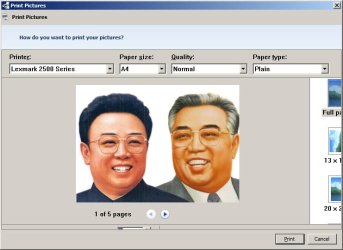
Print Pictures Window is wrong size

djeyewater

New member
Local time
7:47 AM
Messages
28
My Print Pictures window is smaller than the content of the window, but it can't be resized so I can't see all the options. (see attached image)

Anyone know how to fix this?

Thanks

Dave
 

Attachments

  • Untitled-1.jpg
    Untitled-1.jpg
    39.2 KB · Views: 13

My Computer

Computer type
PC/Desktop
OS
Windows 7 Pro x64
Hello
It sounds like you need to adjust your screen resolution.
If adjusted correctly, the window will fill the whole screen.

Capture.PNG
 

My Computer

Computer type
PC/Desktop
Computer Manufacturer/Model Number
Custom Build
OS
Windows 7 Home Premium 64 bit
CPU
Intel Core i7-4790
Motherboard
GA-Z87X-D3H
Memory
G.SKILL 8GB (2 x 4GB) DDR3 F3-10666CL9D-8GBNT
Graphics Card(s)
AMD Radeon R7 250
Sound Card
Realtek ALC892
Monitor(s) Displays
Samsung UN32EH5000, Dell 1703FPT
Screen Resolution
1920 x 1080, 1280 x 1024
Hard Drives
WD5003AZEX
WD10EZEX
Samsung HD103SJ
Samsung 128 GB 840 PRO
PSU
SeaSonic M12II SS-500GM
Case
Fractal Design Define R4
Cooling
Zalman CNPS9900ALED
Keyboard
Logitech K800
Mouse
Logitech M705
Internet Speed
16 Mbps
Antivirus
Avast
Browser
Firefox
Other Info
Bose Companion 2 Multimedia Speakers
Hello
It sounds like you need to adjust your screen resolution.
If adjusted correctly, the window will fill the whole screen.

View attachment 147381

There is plenty of space for the window, I screengrabbed only the window. I tried changing the screen resolution to 1600 x 1200 (my monitor's max resolution) and it didn't make any difference - the Print Picture window is still too small for its content.
 

My Computer

Computer type
PC/Desktop
OS
Windows 7 Pro x64
Did you ever find a solution to this, as I am having the exact same problem? It makes printing pictures in certain situations nearly impossible because I can't properly set the options. I've searched all over online, and this is the only place I've seen this problem mentioned.
 

My Computer

OS
Windows 7 Ultimate 64 bit
Resize the picture using Irfanview name and save it. Once saved, right click on the picture, then choose print. IrfanView - Official Homepage - one of the most popular viewers worldwide

*** Irfanview will decide it's your choice for taking over your pictures ... so, click a picture in your "Pictures" library folder, right click on it, choose "always open with" (make sure the box is checkmarked) and choose the default program you want. ;)
 

My Computer

Computer type
PC/Desktop
Computer Manufacturer/Model Number
Bruce ... somewhere in his 40's
OS
Windows 7 Ultimate 32bit SP1
CPU
Intel(R) Core(TM)2 Quad CPU @ 2.40GHz, 2400 MHz
Motherboard
INTEL/D975XBX2
Memory
4 GB
Graphics Card(s)
ATI Radeon HD 2600 Pro
Monitor(s) Displays
Samsung SyncMaster 914v
Screen Resolution
1280 x 1024
Hard Drives
2/500GB each ... ST3500630AS ATA Device.
One is not connected
PSU
Rocketfish 700 W
Case
G.Skill Gigabyte Chassis
Keyboard
Standard PS/2 Keyboard
Mouse
Microsoft PS/2 Mouse
Internet Speed
DSL
Antivirus
Avira Internet Security
Browser
IE 11
Other Info
ATI HDMI Audio
Thanks for the suggestion, but that is not a solution to the problem I'm having. The window for the dialogue box itself is the wrong size, so that I cannot see the printing options for printing pictures. What size to print the pictures is only one of the options. I need to know how to fix that problem.
 

My Computer

OS
Windows 7 Ultimate 64 bit
Did you ever find a solution to this, as I am having the exact same problem? It makes printing pictures in certain situations nearly impossible because I can't properly set the options. I've searched all over online, and this is the only place I've seen this problem mentioned.

No, sorry, I ended up just printing the picture using a different PC that didn't have this problem.

Try opening the picture in irfanview like Jacee suggested, then instead of resizing it, print from there. I just tried it, and it looks like it should work.
 

My Computer

Computer type
PC/Desktop
OS
Windows 7 Pro x64
Back
Top