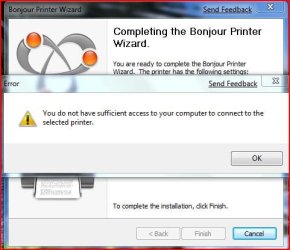
Print to Mac printer. sufficient access???

zerodegreec

New member
Local time
11:52 AM
Messages
73
Trying to print to a printer connected to my mac. It has been done in the past with a different laptop running vista but I cannot get it setup with my new HP running Se7en. I have installed the printers drivers, and tired using Bonjour to setup the printer. I get an error message regardless if I use the cannon drivers or Generic drivers. anyone have a way to set this up???

The error I get is this:
 

Attachments

  • Capture.JPG
    Capture.JPG
    34.9 KB · Views: 51

My Computer

Computer Manufacturer/Model Number
HP Pavilion dv7
OS
w7 dual boot vista32
CPU
Core2Duo T5800 2GHz
Motherboard
HP
Memory
4gig
Graphics Card(s)
NVIDIA GeForce 9600M GT

My Computer

Computer Manufacturer/Model Number
Gateway GT5692
OS
Windows 7 Ulti. x64
CPU
AMD Phenom 8450 triple-core 2.10 ghz
Memory
4GB
Graphics Card(s)
ATI Radion HD 3200
Monitor(s) Displays
Gateway FPD1775W
Screen Resolution
1280x720
Hard Drives
465.6613 Gibibytes
I had the same problem but managed to find a solution.

I have a HP LaserJet 1010 set up to an Airport Express and it gave me the same "sufficient access" error message when running the wizard in Windows 7 (after having to uninstall and re-install bonjour just to get the wizard to appear). The compability setting mentioned above didn't work btw.
Instead of using the wizard I added the printer manually, selecting local printer and the port IP_Rasta.local.9100 (TCP/IP) which I'm pretty sure appeared after installing Bonjour. "Rasta" is my airport express WLAN name. Installed on that port, clicked "have disk" to find the laserjet 1010 Vista drivers and voila, it works fine!

Cheers
 

My Computer

OS
win7
Back
Top