Solved Unable to access Yahoo mail with windows mail from Vista.

Hag

New member
Local time
4:57 PM
Messages
15
Have been using windows mail (6.1.7600) for years and from a couple of days ago when I try to access my Yahoo account I always get the error 0x800CCC0F. I have tried all solutioms from the web and I still cannot get it to connect.

New app password
Deleted and reinstalled the account.
All settings are correct
Added 2 step authorisation to the account.
Both my Gmail accounts are setup similarly and work perfectly.

Any Ideas ?

Thanks

Dave
 

My Computer My Computer

At a glance

Windows 7 PROF 64 bitAMD A816GB RAM
Computer type
PC/Desktop
Computer Manufacturer/Model Number
HP Pro 6305
OS
Windows 7 PROF 64 bit
CPU
AMD A8
Memory
16GB RAM
Hard Drives
samsung 850 Pro SSD
Tried sending a message using Yahoo and can send with this account fine.

Also tried a using my mobile as the internet connection (mobile hotspot) and this worked fine for Gmail but results the same for Yahoo
 

My Computer My Computer

At a glance

Windows 7 PROF 64 bitAMD A816GB RAM
Computer type
PC/Desktop
Computer Manufacturer/Model Number
HP Pro 6305
OS
Windows 7 PROF 64 bit
CPU
AMD A8
Memory
16GB RAM
Hard Drives
samsung 850 Pro SSD
AT&T

I have the exact same issue, but my email is att.net. AT&T blames microsoft; microsoft can't be contacted. I am using Windows 7. The emails I cannot access have been mine for twenty years and are associated with my credit cards, banks, and subscriptions. AT&T told me to use a browser. I have TEN accounts! (Yes, I know that att.net is now owned by yahoo!.) My issue started on 9 September 2025.
 

My Computers My Computers

  • At a glance

    Windows 7 Professional 64AMD Phenom II X4 840 3.2GHzBallistix Sport 16GB (2 x 8GB) DDR3 1600NVIDIA GeForce GT 610
    Computer type
    PC/Desktop
    Computer Manufacturer/Model Number
    Me
    OS
    Windows 7 Professional 64
    CPU
    AMD Phenom II X4 840 3.2GHz
    Motherboard
    MSI 970A-G43 Plus
    Memory
    Ballistix Sport 16GB (2 x 8GB) DDR3 1600
    Graphics Card(s)
    NVIDIA GeForce GT 610
    Hard Drives
    ST2000DM 008-2FR102 SATA Disk Device
  • At a glance

    Windows 10i5-45908GB DDR3Intel HD 4600
    Computer type
    PC/Desktop
    System Manufacturer/Model Number
    Dell Optiplex 3020
    OS
    Windows 10
    CPU
    i5-4590
    Motherboard
    0WMJ54
    Memory
    8GB DDR3
    Graphics Card(s)
    Intel HD 4600
    Monitor(s) Displays
    Samsung
    Hard Drives
    WD5000AAKX ATA Device
[FONT=&quot]I noticed the issue on the 10th Sept at about1200 GMT but it may have been there sooner as I switch my desktop off at night so could easily have been there on the 9th. I have 3 email accounts but yahoo is only my backup account and there are very few emails on it. Can still access it fine using a browser and everything works. It is only the POP3 that doesn't.
Will keep trying but if you have any success please post.[/FONT]

- - - Updated - - -

At about 1250 today the 16th Sept yahoo mail started to work again. It started to work after I closed and reopened windows mail. During fault finding this morning I found a MS article about enabling TLS1.2. This may have fixed it but not sure. Involves adding a key to the registry. As follows:
-------------------------
Windows Registry Editor Version 5.00
[HKEY_LOCAL_MACHINE\SYSTEM\CurrentControlSet\Control\SecurityProviders\SCHANNEL\Protocols\TLS 1.2]
[HKEY_LOCAL_MACHINE\SYSTEM\CurrentControlSet\Control\SecurityProviders\SCHANNEL\Protocols\TLS 1.2\Client]
"DisabledByDefault"=dword:00000000
"Enabled"=dword:00000001
[HKEY_LOCAL_MACHINE\SYSTEM\CurrentControlSet\Control\SecurityProviders\SCHANNEL\Protocols\TLS 1.2\Server]
"DisabledByDefault"=dword:00000000
"Enabled"=dword:00000001
------------------------

Dave
 

My Computer My Computer

At a glance

Windows 7 PROF 64 bitAMD A816GB RAM
Computer type
PC/Desktop
Computer Manufacturer/Model Number
HP Pro 6305
OS
Windows 7 PROF 64 bit
CPU
AMD A8
Memory
16GB RAM
Hard Drives
samsung 850 Pro SSD
Still Not Working

Windows Live Mail still gives the same error message.

I will follow the steps regarding the registry.

This is asinine. How many of us have relied on it? I used two other programs, but each requires that I manually enter each account. This requires new pass keys for EACH account.

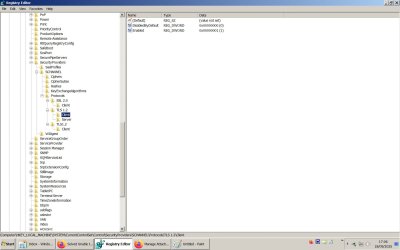
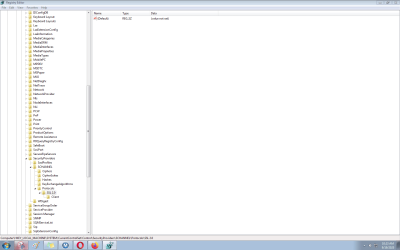
Following the first one - Under Protocols there is only SSL 2.0.
Windows Registry Editor Version 5.00
[HKEY_LOCAL_MACHINE\SYSTEM\CurrentControlSet\Control\SecurityProviders\SCHANNEL\Protocols\TLS 1.2]
 

My Computers My Computers

  • At a glance

    Windows 7 Professional 64AMD Phenom II X4 840 3.2GHzBallistix Sport 16GB (2 x 8GB) DDR3 1600NVIDIA GeForce GT 610
    Computer type
    PC/Desktop
    Computer Manufacturer/Model Number
    Me
    OS
    Windows 7 Professional 64
    CPU
    AMD Phenom II X4 840 3.2GHz
    Motherboard
    MSI 970A-G43 Plus
    Memory
    Ballistix Sport 16GB (2 x 8GB) DDR3 1600
    Graphics Card(s)
    NVIDIA GeForce GT 610
    Hard Drives
    ST2000DM 008-2FR102 SATA Disk Device
  • At a glance

    Windows 10i5-45908GB DDR3Intel HD 4600
    Computer type
    PC/Desktop
    System Manufacturer/Model Number
    Dell Optiplex 3020
    OS
    Windows 10
    CPU
    i5-4590
    Motherboard
    0WMJ54
    Memory
    8GB DDR3
    Graphics Card(s)
    Intel HD 4600
    Monitor(s) Displays
    Samsung
    Hard Drives
    WD5000AAKX ATA Device
[HKEY_LOCAL_MACHINE\SYSTEM\CurrentControlSet\Control\SecurityProviders\SCHANNEL\Protocols\TLS 1.2]

See pic for what my registry looks like.

Dave
 

Attachments

  • Registry.jpg
    Registry.jpg
    95.7 KB · Views: 0

My Computer My Computer

At a glance

Windows 7 PROF 64 bitAMD A816GB RAM
Computer type
PC/Desktop
Computer Manufacturer/Model Number
HP Pro 6305
OS
Windows 7 PROF 64 bit
CPU
AMD A8
Memory
16GB RAM
Hard Drives
samsung 850 Pro SSD
image.png
 

My Computers My Computers

  • At a glance

    Windows 7 Professional 64AMD Phenom II X4 840 3.2GHzBallistix Sport 16GB (2 x 8GB) DDR3 1600NVIDIA GeForce GT 610
    Computer type
    PC/Desktop
    Computer Manufacturer/Model Number
    Me
    OS
    Windows 7 Professional 64
    CPU
    AMD Phenom II X4 840 3.2GHz
    Motherboard
    MSI 970A-G43 Plus
    Memory
    Ballistix Sport 16GB (2 x 8GB) DDR3 1600
    Graphics Card(s)
    NVIDIA GeForce GT 610
    Hard Drives
    ST2000DM 008-2FR102 SATA Disk Device
  • At a glance

    Windows 10i5-45908GB DDR3Intel HD 4600
    Computer type
    PC/Desktop
    System Manufacturer/Model Number
    Dell Optiplex 3020
    OS
    Windows 10
    CPU
    i5-4590
    Motherboard
    0WMJ54
    Memory
    8GB DDR3
    Graphics Card(s)
    Intel HD 4600
    Monitor(s) Displays
    Samsung
    Hard Drives
    WD5000AAKX ATA Device
Think that you need to add the registry file. Have a look under:
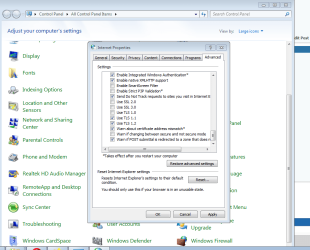
control panel > Internet Options > Advanced > Scroll down to security.
The box labelled Use TLS 1.2 should be ticked.
 

My Computer My Computer

At a glance

Windows 7 PROF 64 bitAMD A816GB RAM
Computer type
PC/Desktop
Computer Manufacturer/Model Number
HP Pro 6305
OS
Windows 7 PROF 64 bit
CPU
AMD A8
Memory
16GB RAM
Hard Drives
samsung 850 Pro SSD
Windows 7

It was ticked. I just need to access my email. "Two-factor authentication" is a nuisance.


image.png

Is it possible to add the lines to the registry? Rebooted and the lines are not there. Unclicked them, rebooted; not there. Clicked them, rebooted; not there. How do I determine the version of Windows Registry Editor? (Clicking "help" shows it to be Windows Registry Editor Version 6.1, I think, but it could be the version of Windows?)

I just want to ascertain that you know I'm using Windows 7.
 
Last edited:

My Computers My Computers

  • At a glance

    Windows 7 Professional 64AMD Phenom II X4 840 3.2GHzBallistix Sport 16GB (2 x 8GB) DDR3 1600NVIDIA GeForce GT 610
    Computer type
    PC/Desktop
    Computer Manufacturer/Model Number
    Me
    OS
    Windows 7 Professional 64
    CPU
    AMD Phenom II X4 840 3.2GHz
    Motherboard
    MSI 970A-G43 Plus
    Memory
    Ballistix Sport 16GB (2 x 8GB) DDR3 1600
    Graphics Card(s)
    NVIDIA GeForce GT 610
    Hard Drives
    ST2000DM 008-2FR102 SATA Disk Device
  • At a glance

    Windows 10i5-45908GB DDR3Intel HD 4600
    Computer type
    PC/Desktop
    System Manufacturer/Model Number
    Dell Optiplex 3020
    OS
    Windows 10
    CPU
    i5-4590
    Motherboard
    0WMJ54
    Memory
    8GB DDR3
    Graphics Card(s)
    Intel HD 4600
    Monitor(s) Displays
    Samsung
    Hard Drives
    WD5000AAKX ATA Device
I am running windows 7 x64 service pack 1
You can check yours by going to settings > control panel > System
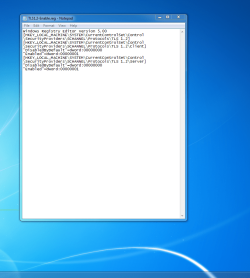
To add the file to the registry do the following:
On your desktop anywhere right click your mouse and select
NEW and then text document.

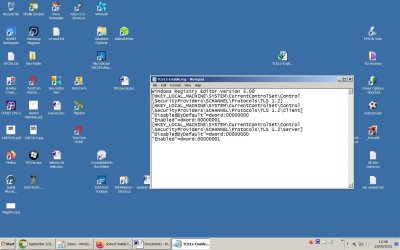
Open this text file and paste in to it the following info I gave earlier. NB the first line after paste shoul;d start with Windows Registry Editor Version 5.00 and the last line should be "Enabled"=dword:00000001

:

Windows Registry Editor Version 5.00

[HKEY_LOCAL_MACHINE\SYSTEM\CurrentControlSet\Control\SecurityProviders\SCHANNEL\Protocols\TLS 1.2]
[HKEY_LOCAL_MACHINE\SYSTEM\CurrentControlSet\Control\SecurityProviders\SCHANNEL\Protocols\TLS 1.2\Client]
"DisabledByDefault"=dword:00000000
"Enabled"=dword:00000001
[HKEY_LOCAL_MACHINE\SYSTEM\CurrentControlSet\Control\SecurityProviders\SCHANNEL\Protocols\TLS 1.2\Server]
"DisabledByDefault"=dword:00000000
"Enabled"=dword:00000001


Then click file > save and the close the file.

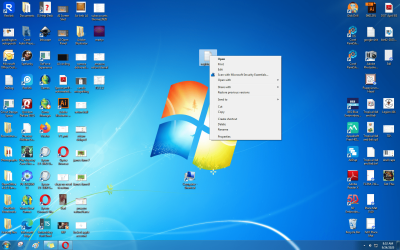
Next right click this file and Rename it to: TLS12-Enable.reg After this the icon will change.

Next double click the file to add it to the registry. There will be a warning message but click OK to add it. All I had to do to get Yahoo mail pop to work was to close and open windows mail though maybe a reboot as well.
Dave
 

Attachments

  • Reg file.jpg
    Reg file.jpg
    133.2 KB · Views: 2

My Computer My Computer

At a glance

Windows 7 PROF 64 bitAMD A816GB RAM
Computer type
PC/Desktop
Computer Manufacturer/Model Number
HP Pro 6305
OS
Windows 7 PROF 64 bit
CPU
AMD A8
Memory
16GB RAM
Hard Drives
samsung 850 Pro SSD
The icon for the text file did not change. A double-click just opens the text document.

I am running the same OS.

Thank you for all your assistance.


I am running windows 7 x64 service pack 1
You can check yours by going to settings > control panel > System
To add the file to the registry do the following:
On your desktop anywhere right click your mouse and select
NEW and then text document.

Open this text file and paste in to it the following info I gave earlier. NB the first line after paste shoul;d start with Windows Registry Editor Version 5.00 and the last line should be "Enabled"=dword:00000001

:

Windows Registry Editor Version 5.00

[HKEY_LOCAL_MACHINE\SYSTEM\CurrentControlSet\Control\SecurityProviders\SCHANNEL\Protocols\TLS 1.2]
[HKEY_LOCAL_MACHINE\SYSTEM\CurrentControlSet\Control\SecurityProviders\SCHANNEL\Protocols\TLS 1.2\Client]
"DisabledByDefault"=dword:00000000
"Enabled"=dword:00000001
[HKEY_LOCAL_MACHINE\SYSTEM\CurrentControlSet\Control\SecurityProviders\SCHANNEL\Protocols\TLS 1.2\Server]
"DisabledByDefault"=dword:00000000
"Enabled"=dword:00000001


Then click file > save and the close the file.

Next right click this file and Rename it to: TLS12-Enable.reg After this the icon will change.

Next double click the file to add it to the registry. There will be a warning message but click OK to add it. All I had to do to get Yahoo mail pop to work was to close and open windows mail though maybe a reboot as well.
Dave

- - - Updated - - -

The icon for the text file did not change. A double-click just opens the text document.

I am running the same OS.

Thank you for all your assistance.

By the way, I do not know the meaning of "NB".

image.png image.png

- - - Updated - - -

I have responded thrice. When I come back, the post is gone.
 

My Computers My Computers

  • At a glance

    Windows 7 Professional 64AMD Phenom II X4 840 3.2GHzBallistix Sport 16GB (2 x 8GB) DDR3 1600NVIDIA GeForce GT 610
    Computer type
    PC/Desktop
    Computer Manufacturer/Model Number
    Me
    OS
    Windows 7 Professional 64
    CPU
    AMD Phenom II X4 840 3.2GHz
    Motherboard
    MSI 970A-G43 Plus
    Memory
    Ballistix Sport 16GB (2 x 8GB) DDR3 1600
    Graphics Card(s)
    NVIDIA GeForce GT 610
    Hard Drives
    ST2000DM 008-2FR102 SATA Disk Device
  • At a glance

    Windows 10i5-45908GB DDR3Intel HD 4600
    Computer type
    PC/Desktop
    System Manufacturer/Model Number
    Dell Optiplex 3020
    OS
    Windows 10
    CPU
    i5-4590
    Motherboard
    0WMJ54
    Memory
    8GB DDR3
    Graphics Card(s)
    Intel HD 4600
    Monitor(s) Displays
    Samsung
    Hard Drives
    WD5000AAKX ATA Device
NB stands for nota bene which means take note
Take a look at Control panel > action centre > change user account control settings. Mine has been set at "Never Notify" from install as I hate getting pop up reminders. If it is set at a higher setting then this may be stopping you adding it. The other thing to try is to right click the file and select run as administrator. The file looks OK to me.
Dave
 

Attachments

  • action centre.jpg
    action centre.jpg
    106.2 KB · Views: 1
  • registry icon.jpg
    registry icon.jpg
    2 KB · Views: 4

My Computer My Computer

At a glance

Windows 7 PROF 64 bitAMD A816GB RAM
Computer type
PC/Desktop
Computer Manufacturer/Model Number
HP Pro 6305
OS
Windows 7 PROF 64 bit
CPU
AMD A8
Memory
16GB RAM
Hard Drives
samsung 850 Pro SSD
I remembered after I posted. I'm extremely stressed out, at the moment.

- - - Updated - - -

This is a right-click on the file:
image.png

I followed the instructions for changing the user account control settings.

One reason I'm upset, this is not the PC I built; it is one I bought already set up with Windows 7. No, it is not a new purchase. I've been using Windows Live Mail for six years on this PC.

It is still a text file.

I used my Win10 POS to create the text document and it, too, stayed a text document.

The problem when saving it, I did not save it as "all files"; saved it as text document.

It ran, I'm waiting to see what happens after I reboot.

- - - Updated - - -

IT WORKED!!! Thank you, thank you, thank you. Спасибо
 
Last edited:

My Computers My Computers

  • At a glance

    Windows 7 Professional 64AMD Phenom II X4 840 3.2GHzBallistix Sport 16GB (2 x 8GB) DDR3 1600NVIDIA GeForce GT 610
    Computer type
    PC/Desktop
    Computer Manufacturer/Model Number
    Me
    OS
    Windows 7 Professional 64
    CPU
    AMD Phenom II X4 840 3.2GHz
    Motherboard
    MSI 970A-G43 Plus
    Memory
    Ballistix Sport 16GB (2 x 8GB) DDR3 1600
    Graphics Card(s)
    NVIDIA GeForce GT 610
    Hard Drives
    ST2000DM 008-2FR102 SATA Disk Device
  • At a glance

    Windows 10i5-45908GB DDR3Intel HD 4600
    Computer type
    PC/Desktop
    System Manufacturer/Model Number
    Dell Optiplex 3020
    OS
    Windows 10
    CPU
    i5-4590
    Motherboard
    0WMJ54
    Memory
    8GB DDR3
    Graphics Card(s)
    Intel HD 4600
    Monitor(s) Displays
    Samsung
    Hard Drives
    WD5000AAKX ATA Device
Glad you got it sorted !

Dave
 

My Computer My Computer

At a glance

Windows 7 PROF 64 bitAMD A816GB RAM
Computer type
PC/Desktop
Computer Manufacturer/Model Number
HP Pro 6305
OS
Windows 7 PROF 64 bit
CPU
AMD A8
Memory
16GB RAM
Hard Drives
samsung 850 Pro SSD
Thank you for your patience. It was a pain transferring the accounts to thunderbird. (I really do not like to user interface of thunderbird.)

Each account required the original password followed by a "secure key" that had to be created after signing into a browser with the correct credentials and password. Ten accounts!!!

:)

Now, off to find a way to speed up my Windows 10 PC.
 

My Computers My Computers

  • At a glance

    Windows 7 Professional 64AMD Phenom II X4 840 3.2GHzBallistix Sport 16GB (2 x 8GB) DDR3 1600NVIDIA GeForce GT 610
    Computer type
    PC/Desktop
    Computer Manufacturer/Model Number
    Me
    OS
    Windows 7 Professional 64
    CPU
    AMD Phenom II X4 840 3.2GHz
    Motherboard
    MSI 970A-G43 Plus
    Memory
    Ballistix Sport 16GB (2 x 8GB) DDR3 1600
    Graphics Card(s)
    NVIDIA GeForce GT 610
    Hard Drives
    ST2000DM 008-2FR102 SATA Disk Device
  • At a glance

    Windows 10i5-45908GB DDR3Intel HD 4600
    Computer type
    PC/Desktop
    System Manufacturer/Model Number
    Dell Optiplex 3020
    OS
    Windows 10
    CPU
    i5-4590
    Motherboard
    0WMJ54
    Memory
    8GB DDR3
    Graphics Card(s)
    Intel HD 4600
    Monitor(s) Displays
    Samsung
    Hard Drives
    WD5000AAKX ATA Device
Back
Top