Printer connect problem with router

kustoM

New member
Local time
1:21 AM
Messages
17
Location
South Africa
Good day.

I need your assistance please.

I have a Canon MX494 printer that does not want to connect to a D-Link G413K LTE CAT6 AC1200 router.

My ISP is Telkom. I am from South Africa.

This is not a new printer, although the router is. I have used this printer before connecting to a different router with no problems.

Using the USB cable setup there is no problem, but I can not connect using the wireless option. I have tried all the online manuals and tutorials without success. The printer is identifying the router and showing in the printer control panel, but does not want to connect. I do not know if it is maybe a access point problem on the router.

Your assistance will be highly appreciated.

Best regards
Jan
 

Attachments

My Computer My Computer

At a glance

Windows 7 Ultimate x64
Computer type
Laptop
Computer Manufacturer/Model Number
LENOVO V570c
OS
Windows 7 Ultimate x64
Antivirus
AVG
Browser
Firefox
So what happens when you try and connect the printer to the wireless ie error message and you are giving correct password
 

My Computer My Computer

At a glance

win 8 32 bit
Computer type
PC/Desktop
OS
win 8 32 bit
Hi. That is just the problem. There are no error messages(except for time out) and it does not get to stage where a password or phrase is requested. It identify the router and then when pressing OK it just continuously show "connecting" until it gives a time out message
 

My Computer My Computer

At a glance

Windows 7 Ultimate x64
Computer type
Laptop
Computer Manufacturer/Model Number
LENOVO V570c
OS
Windows 7 Ultimate x64
Antivirus
AVG
Browser
Firefox
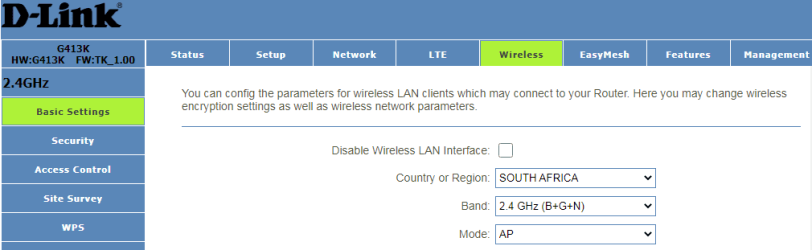
Have you connected via usb as you try and connect on the router is there an option to set wireless to N type the router is AC and you card is only N type which may be the problem
 

My Computer My Computer

At a glance

win 8 32 bit
Computer type
PC/Desktop
OS
win 8 32 bit
Hi.
Please confirm if this is what you are referring to?
image.png
 

My Computer My Computer

At a glance

Windows 7 Ultimate x64
Computer type
Laptop
Computer Manufacturer/Model Number
LENOVO V570c
OS
Windows 7 Ultimate x64
Antivirus
AVG
Browser
Firefox
yes that right
 

My Computer My Computer

At a glance

win 8 32 bit
Computer type
PC/Desktop
OS
win 8 32 bit
The following method will automatically connect the printer to the router.

On Canon MX494 printer:
  1. Go to LAN settings
  2. Select WPS (Push button)
On D-Link G413K router:
  1. On back of router find WPS button
  2. Press and hold for 5 seconds to activate WPS function

MX490 series Online Manual

D-Link G413K User Manual
 

My Computers My Computers

  • At a glance

    Windows 7 Professional 64bit / Windows 10 Hom...AMD FX-8350GSKILL Ripjaw-X PC3 12800 12GB (2x4GB, 2x2GB)ASUS ENGTX560 DCII OC/2DI/1GD5 1GB
    Computer type
    PC/Desktop
    Computer Manufacturer/Model Number
    Custom build
    OS
    Windows 7 Professional 64bit / Windows 10 Home 64bit
    CPU
    AMD FX-8350
    Motherboard
    Gigabyte GA-990FXA-UD3 (AM3+) Rev. 4.0
    Memory
    GSKILL Ripjaw-X PC3 12800 12GB (2x4GB, 2x2GB)
    Graphics Card(s)
    ASUS ENGTX560 DCII OC/2DI/1GD5 1GB
    Sound Card
    Integrated
    Monitor(s) Displays
    Asus VE228H (21.5-in)
    Screen Resolution
    1920x1080 60Hz
    Hard Drives
    SAMSUNG 870 EVO 1TB (2.5" SATA SSD)
    SAMSUNG 870 EVO 500GB (2.5" SATA SSD)
    PSU
    Antec TruePower (new) TP-650 (650 watts)
    Case
    Antec Three Hundred
    Cooling
    AMD stock (plan to upgrade to Cooler Master Hyper 212 EVO)
    Keyboard
    Logitech K540 (wireless)
    Mouse
    Logitech M310 (wireless)
    Internet Speed
    Comcast Gigabit X2 Internet (2100Mbps down / 300Mbps up)
    Browser
    Firefox, Edge, Chrome
    Other Info
    Optical drive: ASUS DRW-24B3ST/BLK/G (Black) (24X)
    External hard drives: 2TB & 6TB
    Internet Gateway: Comcast XB8
  • Computer type
    PC/Desktop
Hi, I really appreciate the feedback. I have tried as indicated, but is receiving a timeout error.
 

My Computer My Computer

At a glance

Windows 7 Ultimate x64
Computer type
Laptop
Computer Manufacturer/Model Number
LENOVO V570c
OS
Windows 7 Ultimate x64
Antivirus
AVG
Browser
Firefox
Hi, I really appreciate the feedback. I have tried as indicated, but is receiving a timeout error.
Did you do the following?

After you select the WPS mode on your printer you have to immediately go over to the router. You then have to hold down the WPS button on the router until the light starts flashing. Within two minutes the printer should automatically connect to the router.
 

My Computers My Computers

  • At a glance

    Windows 7 Professional 64bit / Windows 10 Hom...AMD FX-8350GSKILL Ripjaw-X PC3 12800 12GB (2x4GB, 2x2GB)ASUS ENGTX560 DCII OC/2DI/1GD5 1GB
    Computer type
    PC/Desktop
    Computer Manufacturer/Model Number
    Custom build
    OS
    Windows 7 Professional 64bit / Windows 10 Home 64bit
    CPU
    AMD FX-8350
    Motherboard
    Gigabyte GA-990FXA-UD3 (AM3+) Rev. 4.0
    Memory
    GSKILL Ripjaw-X PC3 12800 12GB (2x4GB, 2x2GB)
    Graphics Card(s)
    ASUS ENGTX560 DCII OC/2DI/1GD5 1GB
    Sound Card
    Integrated
    Monitor(s) Displays
    Asus VE228H (21.5-in)
    Screen Resolution
    1920x1080 60Hz
    Hard Drives
    SAMSUNG 870 EVO 1TB (2.5" SATA SSD)
    SAMSUNG 870 EVO 500GB (2.5" SATA SSD)
    PSU
    Antec TruePower (new) TP-650 (650 watts)
    Case
    Antec Three Hundred
    Cooling
    AMD stock (plan to upgrade to Cooler Master Hyper 212 EVO)
    Keyboard
    Logitech K540 (wireless)
    Mouse
    Logitech M310 (wireless)
    Internet Speed
    Comcast Gigabit X2 Internet (2100Mbps down / 300Mbps up)
    Browser
    Firefox, Edge, Chrome
    Other Info
    Optical drive: ASUS DRW-24B3ST/BLK/G (Black) (24X)
    External hard drives: 2TB & 6TB
    Internet Gateway: Comcast XB8
  • Computer type
    PC/Desktop
Hi MisterEd.

I have tried it a couple of times. It is indicating that it is connecting, but after some time showing the timeout error again
 

My Computer My Computer

At a glance

Windows 7 Ultimate x64
Computer type
Laptop
Computer Manufacturer/Model Number
LENOVO V570c
OS
Windows 7 Ultimate x64
Antivirus
AVG
Browser
Firefox
Back
Top