Printer does not show in "Devices & Printers"

Archie

New member
Local time
2:31 AM
Messages
23
Recently I tried to install an OKI C5250 Laser Printer on my Windows 7 x64 system. This printer is connected by USB. As instructed by OKI I used the Vista x64 drivers. These however would not install.

However I notice that when I select Print in Word or another app, one of the listed printers is the OKI C5250 but this printer does not appear in the Devices and Printers screen.

How can I find where this printer is installed and how do I get it uninstalled?

Any help greatly appreciated.
 

My Computer

OS
Windows 7 Professional x64
CPU
Intel i5 660
Motherboard
Asus P7H55D-M Evo
Memory
Crucial Ballistix 4GB
Hard Drives
Seagate 500GB
PSU
Antec
What I would do in this situation....
Use these drivers.....
http://www.c5250.co.uk/library/drivers/c3200/OKIC3200v64GB_2.0.0.exe

Make sure you follow the directions that the drivers tell you by the T!
and dot your I's

second... you are going to have to turn your sharing on since you are connecting it by USB

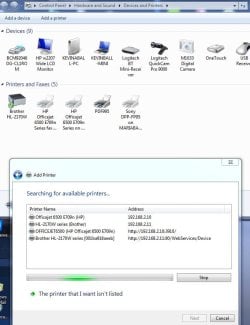
Once Sharing is enabled....through Windows 7... you use this function.
I will show you a picture.. and your printer, whatever you called it during the sharing will show up here.

DELETING THE DRIVER:
http://www.c5250.co.uk/index.asp?menumode=2&content=c5250maintenance

At the bottom....
 

Attachments

  • NetworkPrinterSetup.JPG
    NetworkPrinterSetup.JPG
    65.7 KB · Views: 140

My Computer

Computer Manufacturer/Model Number
HP Pavilion Elite HPE-410f
OS
Windows 7 Ultimate x64
CPU
AMD Phenom x6 1045t
Motherboard
N/A
Memory
8 GB
Graphics Card(s)
ATI Radeon HD 5570
Sound Card
Realtek Highdefinition Audio / 5.1 Dolby Setup
Monitor(s) Displays
HP w2207h Widescreen
Screen Resolution
1680*1050
Hard Drives
1 TB (fixed), 320 Portable maxtor, Server Hard drives
PSU
350 Watt
Case
HP CASE
Cooling
Bass
Keyboard
Logitech MX 5500
Mouse
Logitech MX 5500
Internet Speed
ROAD RUNNER 16MB D/512 U
Got my OKI 5250n installed ok using latest Vista Drivers. Problem had been the USB cable. I was using one about 5m long and when trying to install was getting and Unknown USB device and couldn't install the driver. Using a shorter cable solved the problem and the printer was recognised and drivers could be installed.

Can anyone advise if there is a limit to the length of USB cable that can be used?
 

My Computer

OS
Windows 7 Professional x64
CPU
Intel i5 660
Motherboard
Asus P7H55D-M Evo
Memory
Crucial Ballistix 4GB
Hard Drives
Seagate 500GB
PSU
Antec
Back
Top