printer help

debdedoos

New member
Local time
12:53 PM
Messages
29
I have been trying to install a canon mx526 on a computer with windows 7 professional. The printer installs ok and prints a test page but when you try and print anything else it comes up with a msg to say there is no default printer, when you try and make it the default printer it comes up with error msg OxOOOOO709 operation could not be completed. double check printer name and make sure that the printer is connected to the network. Does anyone know a solution to this problem.
 

My Computer

Computer type
Laptop
Computer Manufacturer/Model Number
TOSHIBA SATELLITE L500 PSLS9A=01U012
OS
WINDOWS 7 HOME PREMIUM 32 bit
CPU
INTEL (R) CORE (TM) i3 CPU M 330 @ 2.13GHz
Motherboard
TOSHIBA NSWAA VERSION 1.00
Memory
4.00 GB SODIMM
Graphics Card(s)
ATI MOBILITY RADEON HD 4500 SERIES (MICROSOFT)
Sound Card
MICROSOFT HIGH DEFINITION DEVICE
Monitor(s) Displays
GENERIC PnP MONITOR
Screen Resolution
1366 X 768 @ X 32 BITS (4294967296 COLORS) @ 59 Hz
Hard Drives
WDC WD5000BPKX-2HPJT0 ATA DEVICE 465.76 GB
Mouse
LOGITECH
Internet Speed
NO INTERNET
Antivirus
NOT INSTALLED YET
Browser
INTERNET EXPLORER WHEN INSTALLED
Maybe a stupid question but have you installed the utility program for the printer?
 

My Computer

Computer type
PC/Desktop
Computer Manufacturer/Model Number
Custom Build
OS
W7 Pro x64 SP1 | W10 Pro IP x64 | W8.1 Pro x64 VM | Linux Mint VM
CPU
i7-4790k @ 4GHz (4.4GHz Boost)
Motherboard
ASUS Sabertooth Z87 (BIOS Rev 2004)
Memory
16GB DDR3 Kingston HyperX Fury @ 1600MHz CL 9-9-9-27
Graphics Card(s)
EVGA GTX 980 Classified
Sound Card
Realtek Onboard
Monitor(s) Displays
Samsung S27D390
Screen Resolution
1920 x 1080
Hard Drives
240GB Intel 520 Series SSD |
Samsung 850 EVO 120GB SSD |
2TB WD Caviar Black |
2TB WD Caviar Green
PSU
Corsair HX850-80 Gold Modular
Case
Cooler Master Silencio 650
Cooling
Corsair H80i w/2 x Corsair SP120 | 2 x 120mm Noctua NF-S12B
Keyboard
Microsoft Sidewinder X4
Mouse
Gigabyte M6900 optical
Internet Speed
152mb
Antivirus
F-Secure
Browser
Firefox 38.0
Other Info
Backup Rig: Win 7 Pro 64-bit | AMD A10-5800k | ASUS F2A85-V Pro | 8GB Samsung DDR3 @1600MHz | 120GB Toshiba SDD | 2TB Seagate HDD | Cooler Master Silencio 550
Yes I have
 

My Computer

Computer type
Laptop
Computer Manufacturer/Model Number
TOSHIBA SATELLITE L500 PSLS9A=01U012
OS
WINDOWS 7 HOME PREMIUM 32 bit
CPU
INTEL (R) CORE (TM) i3 CPU M 330 @ 2.13GHz
Motherboard
TOSHIBA NSWAA VERSION 1.00
Memory
4.00 GB SODIMM
Graphics Card(s)
ATI MOBILITY RADEON HD 4500 SERIES (MICROSOFT)
Sound Card
MICROSOFT HIGH DEFINITION DEVICE
Monitor(s) Displays
GENERIC PnP MONITOR
Screen Resolution
1366 X 768 @ X 32 BITS (4294967296 COLORS) @ 59 Hz
Hard Drives
WDC WD5000BPKX-2HPJT0 ATA DEVICE 465.76 GB
Mouse
LOGITECH
Internet Speed
NO INTERNET
Antivirus
NOT INSTALLED YET
Browser
INTERNET EXPLORER WHEN INSTALLED
Try this. It may or may not help but it's free to try.
Start Orb and select Devices and Printers.
Right click on the printer you want to use and Set as Default Printer.
 

My Computer

Computer type
PC/Desktop
Computer Manufacturer/Model Number
Home made Desktop
OS
Windows 10 Pro. 64/ version 1709 Windows 7 Pro/64
CPU
Intel i7-6800K @ 4.3
Motherboard
ASUS X-99 Deluxe II
Memory
Corsair Platinum 16 gig @2400
Graphics Card(s)
EVGA GTX 1070 OC
Monitor(s) Displays
Asus 27" LED LCD/VE278Q
Screen Resolution
1920-1080 or 1280-720 HDMI
Hard Drives
INTEL SSD 730-240 Gb Sata 3.0/
PSU
EVGA Platium 1200W
Case
Phanteks Luxe Tempered Glass 8 fans/ one radiator
Cooling
XSPC/ Water Cooled CPU
Keyboard
Das 4 Professional
Mouse
Logitech M705/MX Anywhere 2-S
Internet Speed
100 mbits
Antivirus
Microsoft Security Essentials/ Malwarebytes Premium 3.0/ SAS
Browser
I.E. 11 default/Firefox/ ISP Time Warner Cable/Spectrum
Other Info
LG BluRay Burner/
Sound system-KLipsch-THX/
Icy Dock ssd Hot Swap bays.

My Computer

Computer type
PC/Desktop
Computer Manufacturer/Model Number
Skylake Special #666
OS
Windows 10 Pro x64
CPU
Intel Core i7 6700K
Motherboard
Asus Sabertooth Z170 Mark 1
Memory
GSkill TridentZ RGB 16GB 3600 16-16-16-36
Graphics Card(s)
EVGA GTX 980 Ti SC x2
Sound Card
Realtek High Definition
Monitor(s) Displays
AOC G2460PG
Screen Resolution
1920 x 1080 144Hz
Hard Drives
Samsung 860 Pro 256GB, Seagate Barracuda 4TB x2
PSU
EVGA 1000 P2, EVGA White Custom Braided Cables
Case
Corsair Vengeance C70 Gunmetal Black
Cooling
Corsair H100i v2, Corsair ML120 x2, Thermal Grizzly Kryonaut
Keyboard
Logitech G910 Orion Spectrum
Mouse
Logitech G700s
Internet Speed
Verizon Fios Quantum Gateway 75/75
Antivirus
Windows Defender, Malwarebytes Free 3.8.3
Browser
Chrome
Other Info
Corsair SP120 x4, LG Blu-ray Drive, Durabrand HT-395 100 Watt Dolby Digital Amp, Corsair H2100 Wireless 7.1 Headset
I used the cd that came with the printer and also went to the canon website and downloaded the drivers from there as well, you can't set it as the default printer, when you try to it comes up with the error msg in my first post
 

My Computer

Computer type
Laptop
Computer Manufacturer/Model Number
TOSHIBA SATELLITE L500 PSLS9A=01U012
OS
WINDOWS 7 HOME PREMIUM 32 bit
CPU
INTEL (R) CORE (TM) i3 CPU M 330 @ 2.13GHz
Motherboard
TOSHIBA NSWAA VERSION 1.00
Memory
4.00 GB SODIMM
Graphics Card(s)
ATI MOBILITY RADEON HD 4500 SERIES (MICROSOFT)
Sound Card
MICROSOFT HIGH DEFINITION DEVICE
Monitor(s) Displays
GENERIC PnP MONITOR
Screen Resolution
1366 X 768 @ X 32 BITS (4294967296 COLORS) @ 59 Hz
Hard Drives
WDC WD5000BPKX-2HPJT0 ATA DEVICE 465.76 GB
Mouse
LOGITECH
Internet Speed
NO INTERNET
Antivirus
NOT INSTALLED YET
Browser
INTERNET EXPLORER WHEN INSTALLED
I looked at the product description on NewEgg and on the disclaimers PDF, it said that .NET Framework 4 is necessary to install to a Windows OS. do you have that installed?

Also, does the printer and your router have a WPS button?
 

My Computer

Computer type
PC/Desktop
Computer Manufacturer/Model Number
Custom Build
OS
Win 7 Ultimate 64 bit
CPU
Intel i7-3930K
Motherboard
ASUS P9X79 WS
Memory
Kingston HyperX Genesis 32GB Kit (8x4GB Modules) 1600MHz DDR
Graphics Card(s)
MSI R7850 Twin Frozr 2GD5/OC Radeon HD 7850 2GB 256-bit GDDR
Sound Card
Asus Xonar Essence STX
Monitor(s) Displays
3x Asus VG248QE 24", Vizio 32" TV
Screen Resolution
1920 x 1080, ?
Hard Drives
Samsung 128GB 840 Pro SSD (1),
Samsung 4TB 850 EVO SSDs (4)
Samsung 4TB 850 EVO SSDs (16) external backup drives used in 2.5" hot swap bays in the computer.
PSU
Corsair HX750w
Case
Antec Two Hundred v2 (modified)
Cooling
Cooler Master GeminII S524 120mm (fan replaced with a 140mm)
Keyboard
Logitech G510s
Mouse
Logitech M525 (two in use)
Internet Speed
=< 32Mbps down, 8Mbps up
Antivirus
AVAST!, MBAM, SAS, Spybot S&D (all but MBAM free) Glary Util
Browser
IE11
Other Info
LSI 9211-8i HBA card (8 SATA III ports), 2.5" & 3.5" Hot Swap Bays, HooToo HT-CR001 PCI-E to USB 3.0 Internal Hub + 6 Slot Card Reader, and LG Model CH12LS28 BD-ROM Optical Drive. Also, ScanSnap S1500 ADF duplexing scanner, Canon 9000F flat bed scanner, Corsair SP2500 2.1 speakers, Samsung CLP 415nw laser color printer, Cyberpower PP2200SW UPS
I have .net framework 4 and I also tried to do the wps installation from the router but it still comes up with the same error msg
 

My Computer

Computer type
Laptop
Computer Manufacturer/Model Number
TOSHIBA SATELLITE L500 PSLS9A=01U012
OS
WINDOWS 7 HOME PREMIUM 32 bit
CPU
INTEL (R) CORE (TM) i3 CPU M 330 @ 2.13GHz
Motherboard
TOSHIBA NSWAA VERSION 1.00
Memory
4.00 GB SODIMM
Graphics Card(s)
ATI MOBILITY RADEON HD 4500 SERIES (MICROSOFT)
Sound Card
MICROSOFT HIGH DEFINITION DEVICE
Monitor(s) Displays
GENERIC PnP MONITOR
Screen Resolution
1366 X 768 @ X 32 BITS (4294967296 COLORS) @ 59 Hz
Hard Drives
WDC WD5000BPKX-2HPJT0 ATA DEVICE 465.76 GB
Mouse
LOGITECH
Internet Speed
NO INTERNET
Antivirus
NOT INSTALLED YET
Browser
INTERNET EXPLORER WHEN INSTALLED
Ok, I'm probably insulting your intelligence (if so, I apologize) but to connect via WPS, you have to press and hold the WPS button down on the printer until it tells you to press the WPS button on the router, then press the WPS button on the router. Once the router and the printer are recognize each other, then you install the printer driver. The directions that came with my Samsung printer did not specify you had to hold down the WPS button on the printer until the stupid thing woke up and it took me awhile to figure it out.
 

My Computer

Computer type
PC/Desktop
Computer Manufacturer/Model Number
Custom Build
OS
Win 7 Ultimate 64 bit
CPU
Intel i7-3930K
Motherboard
ASUS P9X79 WS
Memory
Kingston HyperX Genesis 32GB Kit (8x4GB Modules) 1600MHz DDR
Graphics Card(s)
MSI R7850 Twin Frozr 2GD5/OC Radeon HD 7850 2GB 256-bit GDDR
Sound Card
Asus Xonar Essence STX
Monitor(s) Displays
3x Asus VG248QE 24", Vizio 32" TV
Screen Resolution
1920 x 1080, ?
Hard Drives
Samsung 128GB 840 Pro SSD (1),
Samsung 4TB 850 EVO SSDs (4)
Samsung 4TB 850 EVO SSDs (16) external backup drives used in 2.5" hot swap bays in the computer.
PSU
Corsair HX750w
Case
Antec Two Hundred v2 (modified)
Cooling
Cooler Master GeminII S524 120mm (fan replaced with a 140mm)
Keyboard
Logitech G510s
Mouse
Logitech M525 (two in use)
Internet Speed
=< 32Mbps down, 8Mbps up
Antivirus
AVAST!, MBAM, SAS, Spybot S&D (all but MBAM free) Glary Util
Browser
IE11
Other Info
LSI 9211-8i HBA card (8 SATA III ports), 2.5" & 3.5" Hot Swap Bays, HooToo HT-CR001 PCI-E to USB 3.0 Internal Hub + 6 Slot Card Reader, and LG Model CH12LS28 BD-ROM Optical Drive. Also, ScanSnap S1500 ADF duplexing scanner, Canon 9000F flat bed scanner, Corsair SP2500 2.1 speakers, Samsung CLP 415nw laser color printer, Cyberpower PP2200SW UPS
I did that, I have tried installing it wireless with the wps exactly how you said and with the usb cable but each time it says it is installed successfully and prints the test page but when you try and print a document it comes up with the choice of the old printer which has been removed and the new printer isn't showing, when you go into devices and printers it doesn't show the old one, only the new one and when you try and make it the default printer it comes up with that error msg OxOOOOO709
 

My Computer

Computer type
Laptop
Computer Manufacturer/Model Number
TOSHIBA SATELLITE L500 PSLS9A=01U012
OS
WINDOWS 7 HOME PREMIUM 32 bit
CPU
INTEL (R) CORE (TM) i3 CPU M 330 @ 2.13GHz
Motherboard
TOSHIBA NSWAA VERSION 1.00
Memory
4.00 GB SODIMM
Graphics Card(s)
ATI MOBILITY RADEON HD 4500 SERIES (MICROSOFT)
Sound Card
MICROSOFT HIGH DEFINITION DEVICE
Monitor(s) Displays
GENERIC PnP MONITOR
Screen Resolution
1366 X 768 @ X 32 BITS (4294967296 COLORS) @ 59 Hz
Hard Drives
WDC WD5000BPKX-2HPJT0 ATA DEVICE 465.76 GB
Mouse
LOGITECH
Internet Speed
NO INTERNET
Antivirus
NOT INSTALLED YET
Browser
INTERNET EXPLORER WHEN INSTALLED
I looked up the error code and found this thread on a Vista forum that might help you. The suggestions should work with Win 7 as well as Vista, if they work at all.
 

My Computer

Computer type
PC/Desktop
Computer Manufacturer/Model Number
Custom Build
OS
Win 7 Ultimate 64 bit
CPU
Intel i7-3930K
Motherboard
ASUS P9X79 WS
Memory
Kingston HyperX Genesis 32GB Kit (8x4GB Modules) 1600MHz DDR
Graphics Card(s)
MSI R7850 Twin Frozr 2GD5/OC Radeon HD 7850 2GB 256-bit GDDR
Sound Card
Asus Xonar Essence STX
Monitor(s) Displays
3x Asus VG248QE 24", Vizio 32" TV
Screen Resolution
1920 x 1080, ?
Hard Drives
Samsung 128GB 840 Pro SSD (1),
Samsung 4TB 850 EVO SSDs (4)
Samsung 4TB 850 EVO SSDs (16) external backup drives used in 2.5" hot swap bays in the computer.
PSU
Corsair HX750w
Case
Antec Two Hundred v2 (modified)
Cooling
Cooler Master GeminII S524 120mm (fan replaced with a 140mm)
Keyboard
Logitech G510s
Mouse
Logitech M525 (two in use)
Internet Speed
=< 32Mbps down, 8Mbps up
Antivirus
AVAST!, MBAM, SAS, Spybot S&D (all but MBAM free) Glary Util
Browser
IE11
Other Info
LSI 9211-8i HBA card (8 SATA III ports), 2.5" & 3.5" Hot Swap Bays, HooToo HT-CR001 PCI-E to USB 3.0 Internal Hub + 6 Slot Card Reader, and LG Model CH12LS28 BD-ROM Optical Drive. Also, ScanSnap S1500 ADF duplexing scanner, Canon 9000F flat bed scanner, Corsair SP2500 2.1 speakers, Samsung CLP 415nw laser color printer, Cyberpower PP2200SW UPS
Hi there .. If the above solution does not work .. Then you should try Uninstalling the printer . Then reboot with out net connection using the USB cable to connect your printer .. Then Install the Drivers make it the Default printer try printing . Then try to setup your WiFi
 

My Computer

Computer Manufacturer/Model Number
W530-3630QM1
OS
windows 7 home 64bit
CPU
INTEL-CORE I7
Memory
16GB
Hard Drives
750GB
Browser
Chrome
Hi debdedoos, congratulations on your upcoming 3rd year anniversary in being a SevenForums Member! :thumbsup::dinesh: :party: :grouphug:

After some research this may be a permissions error, it will take some doing on your part, but I will try to lay it out as painlessly as possible.

You will need to open the Registry editor, the beginning of this tutorial will show how: Registry Editor - Find and Find Next . Once open you may want to backup your Registry before proceeding. http://www.sevenforums.com/tutorials/4230-registry-backup-restore.html

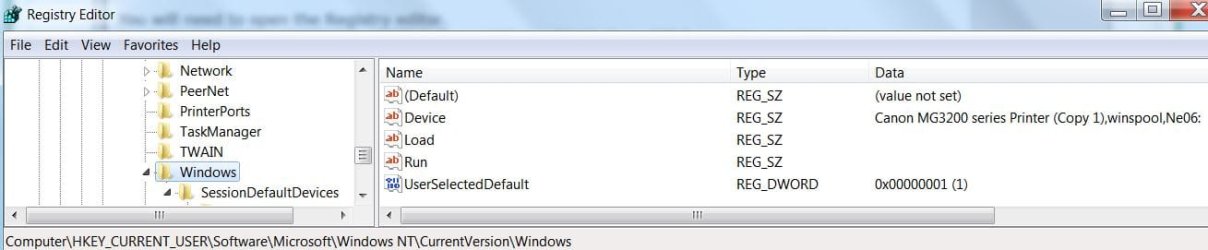
Then navigate to - HKEY_CURRENT_USER\Software\Microsoft\Windows NT\CurrentVersion\Windows - or you can use the Registry Editor - Find and Find Next Tool. Copy/paste the above key into the Find Box that opens.

   Note
Please verify that, that is the key. You should see your Canon MX526 listed similarly to what my Canon MG3200 series shows.

cpdede2.JPG


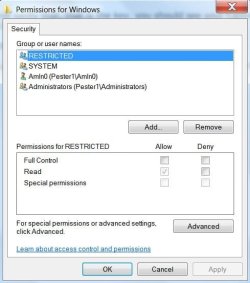
Right click on Windows in the left pane, move your cursor down to Permissions and left click on it. You may probably see, Registered with only Read Permissions checked:
cpdede3.JPG

, But you should see Full control, and Read permissions checked when you try any of the other groups or users cpdede4.JPG


I will stop at this point to wait to hear from you as to what you permissions are before we proceed any further.
 

My Computer

Computer type
PC/Desktop
Computer Manufacturer/Model Number
Gateway DX4831-01e (Mid-Tower Desktop)
OS
Originally Win 7 Hm Prem x64 Ver 6.1.7600 Build 7601-SP1 | Upgraded to Windows 10 December 14, 2019
CPU
Intel i3 530 2.93GHz, 2933MHz 2 Cores 4 Logical Processors
Motherboard
Gateway H57M01 133 megahertz
Memory
6GB of 1,333MHz DDR3 SDRAM
Graphics Card(s)
32MB Intel Graphics Media Accelerator HD IGChip
Sound Card
Realtek High Definition Audio
Monitor(s) Displays
Gateway HX2000 20inch TFT active matrix TN
Screen Resolution
1600 x 900 x 59 hertz
Hard Drives
WDC WD10EADS-00M2B0 [HDD] (1000.20 GB) -- drive 0,
HL-DT-ST DVDRAM GH41N [CD-ROM dr]
Four card readers, and Four USB 2.0
PSU
300watts.
Case
Mid-Tower Desktop
Cooling
Stock from Gateway
Keyboard
Natural Ergonomic Keyboard 4000, see Other Info
Mouse
Orig. Gateway wore out now using Insignia USB wired optical
Internet Speed
Vz FIOS 10ms png 57.64Mbps down 65.53Mbps up Speedtest.org
Antivirus
Zamana Anti-logger with Anti-malware, MSE, Windows Firewall,
Browser
IE11.0.9600.19399-Upd ver11.0.135, Firefox 68.0.1 x64
Other Info
System Specs by Belarc.

BIOS: American Megatrends Inc. P01-A0 11/17/2009

Replaced the MS 'Natural' Standard PS/2 Enhanced 101-102 Keyboard with a new Natural Ergonomic Keyboard 4000 on August 1st 2014.

Canon Pixma MG3222 Printer.

Updated to IE11 on 12102015 | Fios Quantum Router g1100

Additional AV: SpywareBlaster, manual Mbam, SAS
Just a thought.
debdedoos you have posted that you have removed the old printer but it appears that you haven't removed the old printer program. If you remove the old printer programs then the choice of using the old printer will not be there.
 

My Computer

Computer type
PC/Desktop
Computer Manufacturer/Model Number
Home made Desktop
OS
Windows 10 Pro. 64/ version 1709 Windows 7 Pro/64
CPU
Intel i7-6800K @ 4.3
Motherboard
ASUS X-99 Deluxe II
Memory
Corsair Platinum 16 gig @2400
Graphics Card(s)
EVGA GTX 1070 OC
Monitor(s) Displays
Asus 27" LED LCD/VE278Q
Screen Resolution
1920-1080 or 1280-720 HDMI
Hard Drives
INTEL SSD 730-240 Gb Sata 3.0/
PSU
EVGA Platium 1200W
Case
Phanteks Luxe Tempered Glass 8 fans/ one radiator
Cooling
XSPC/ Water Cooled CPU
Keyboard
Das 4 Professional
Mouse
Logitech M705/MX Anywhere 2-S
Internet Speed
100 mbits
Antivirus
Microsoft Security Essentials/ Malwarebytes Premium 3.0/ SAS
Browser
I.E. 11 default/Firefox/ ISP Time Warner Cable/Spectrum
Other Info
LG BluRay Burner/
Sound system-KLipsch-THX/
Icy Dock ssd Hot Swap bays.
Printer help

Hi Anak, Thanks for your help, I will let you know what administrator rights are there when I can get back to the computer.
 
Last edited:

My Computer

Computer type
Laptop
Computer Manufacturer/Model Number
TOSHIBA SATELLITE L500 PSLS9A=01U012
OS
WINDOWS 7 HOME PREMIUM 32 bit
CPU
INTEL (R) CORE (TM) i3 CPU M 330 @ 2.13GHz
Motherboard
TOSHIBA NSWAA VERSION 1.00
Memory
4.00 GB SODIMM
Graphics Card(s)
ATI MOBILITY RADEON HD 4500 SERIES (MICROSOFT)
Sound Card
MICROSOFT HIGH DEFINITION DEVICE
Monitor(s) Displays
GENERIC PnP MONITOR
Screen Resolution
1366 X 768 @ X 32 BITS (4294967296 COLORS) @ 59 Hz
Hard Drives
WDC WD5000BPKX-2HPJT0 ATA DEVICE 465.76 GB
Mouse
LOGITECH
Internet Speed
NO INTERNET
Antivirus
NOT INSTALLED YET
Browser
INTERNET EXPLORER WHEN INSTALLED
Hi Anak,I have checked and I have full access permission, I have also removed all of the other printer drivers and package through printui. I created a new user and the printer showed up as the default printer and I was able to print, but you still can't make it the default printer or print when logged on as administrator. It is getting quite frustrating, when you look in the printer properties it says it is working properly and will print a test page but when you try and print a document, it say's there is no printer installed. :(
 
Last edited:

My Computer

Computer type
Laptop
Computer Manufacturer/Model Number
TOSHIBA SATELLITE L500 PSLS9A=01U012
OS
WINDOWS 7 HOME PREMIUM 32 bit
CPU
INTEL (R) CORE (TM) i3 CPU M 330 @ 2.13GHz
Motherboard
TOSHIBA NSWAA VERSION 1.00
Memory
4.00 GB SODIMM
Graphics Card(s)
ATI MOBILITY RADEON HD 4500 SERIES (MICROSOFT)
Sound Card
MICROSOFT HIGH DEFINITION DEVICE
Monitor(s) Displays
GENERIC PnP MONITOR
Screen Resolution
1366 X 768 @ X 32 BITS (4294967296 COLORS) @ 59 Hz
Hard Drives
WDC WD5000BPKX-2HPJT0 ATA DEVICE 465.76 GB
Mouse
LOGITECH
Internet Speed
NO INTERNET
Antivirus
NOT INSTALLED YET
Browser
INTERNET EXPLORER WHEN INSTALLED
Back
Top