Printer Icons

hardwarefailure

New member
Local time
3:14 PM
Messages
5
Sorry if this has been discussed, "search" was not very friendly to me.

How can I assign custom printer icons to each of my printers?

Thanks.
 

My Computer

OS
Duh?
Its a bit tricky but I know of only one way. Goto
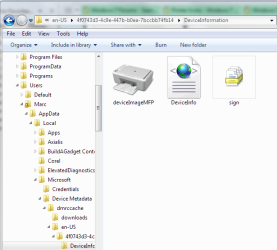
C:\Users\YOURNAME\AppData\Local\Microsoft\Device Metadata\dmrccache\en-US

Where YOURNAME is your user account name. There you will see subfolders corresponding to your installed devices. Within each sub folder you'll see a folder named 'DeviceInformation'. Within that folder is the icon for your device.

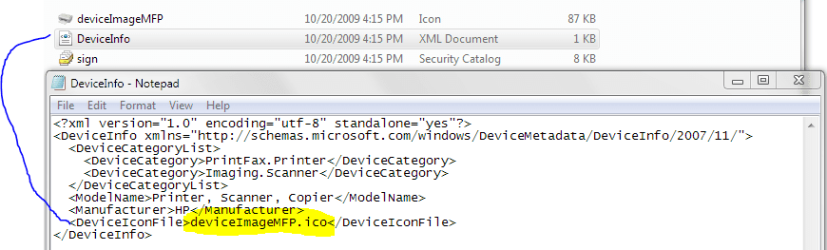
You can either replace the icon itself. Or, you can edit the DeviceInfo.xml file and specify a different icon to use.

Let me know if I need to clarify any steps.
 

Attachments

  • Device Icon.PNG
    Device Icon.PNG
    27.2 KB · Views: 1,130
  • Device Icon2.PNG
    Device Icon2.PNG
    16 KB · Views: 1,752

My Computer

Computer Manufacturer/Model Number
Dell Dimension E520
OS
Windows 7 Ultimate (x86)
CPU
Intel 2.20 Dual Core
Memory
4 GB
Graphics Card(s)
nVidia 9400 GT (512 MB)
Sound Card
Sigmatel C Major HD
Monitor(s) Displays
22" Samsung 2232 bw
Screen Resolution
1680x1050
Mouse
Microsoft Arc
Other Info
Wacom Graphire 4 (6x8) Tablet
Disk4mat - you are the man!

Worked perfectly! Well, almost. When I replaced the "default" device.ico with a new icon with the same name, the new device.ico actually changed to the old printer icon. Weird. Maybe something to do with something open. :huh:

At any rate, editing the .xml to a different name, the name of the original new .ico that I moved into the folder, worked like a charm.

Thanks again!
 

My Computer

OS
Duh?
Your welcome! The reason the icon didnt change with the same name is a bug actually that existed in Vista. When the same name is used Windows renders the icon from the icon cache.

But glad you got that working :) and thanks for the rep. Much appreciated.
 

My Computer

Computer Manufacturer/Model Number
Dell Dimension E520
OS
Windows 7 Ultimate (x86)
CPU
Intel 2.20 Dual Core
Memory
4 GB
Graphics Card(s)
nVidia 9400 GT (512 MB)
Sound Card
Sigmatel C Major HD
Monitor(s) Displays
22" Samsung 2232 bw
Screen Resolution
1680x1050
Mouse
Microsoft Arc
Other Info
Wacom Graphire 4 (6x8) Tablet
Same problem

Hello, I am having the same problem, but I can't seem to find my printer in that folder. I just added a wireless printer to my network and when I pull up the CP the old printer that was a HP Deskjet 3940 (small printer) now has the Multifunction printer icon, which should be for the new Epson Workforce printer and the Epson was given the small printer icon of the old HP. I went to the en-us folder as you described, but only found my old printer info there with the MF icon. I could not find my new Epson in there at all. I found: my laptop, my mouse, my old printer, a scandisk, and a generic receiver (I think this is the router?)
Also, if I could find that folder, can you explain just how you go about changing the icon? I noticed you talked about editing the xml. file, but where do I find the other icon to exchange?
Thanks, Meri

 

My Computer

Computer Manufacturer/Model Number
Acer Aspire 5740-6378
OS
Windows 7
CPU
Intel Core i5 processor 430M
Memory
4 GB memory
Graphics Card(s)
Integrated Intel® HD Graphics
Sound Card
Realtek HD Audio
Monitor(s) Displays
Acer® CineCrystal full HD 15.6" WXGA
Screen Resolution
1366 x 768
Hard Drives
320 GB SATA HDD
Cooling
Fan
Keyboard
103 key with independent numeric keypad
Mouse
Microsoft wireless 3000
Internet Speed
802.11b/g/n wireless LAN
Well, to start. You only have to edit the XML file if you want to use an icon located some place else. Otherwise, you ony need replace the existing icon.

Its hard to say which folder will hold the device (your printer) in what folder. It will be one of the ones listed under...

C:\Users\YOURNAME\AppData\Local\Microsoft\Device Metadata\dmrccache\en-US

The Epson should be there. Even if the printer is offline or not connected.
 

My Computer

Computer Manufacturer/Model Number
Dell Dimension E520
OS
Windows 7 Ultimate (x86)
CPU
Intel 2.20 Dual Core
Memory
4 GB
Graphics Card(s)
nVidia 9400 GT (512 MB)
Sound Card
Sigmatel C Major HD
Monitor(s) Displays
22" Samsung 2232 bw
Screen Resolution
1680x1050
Mouse
Microsoft Arc
Other Info
Wacom Graphire 4 (6x8) Tablet
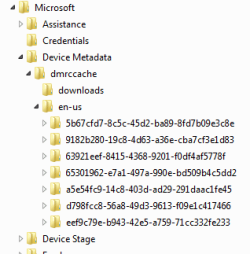
I found 2 entries (folders) at this location.
1. b3004f87-774a-4cc6-9c51-89264da4ed5a for <DeviceCategory>Media.Storage.Flash</DeviceCategory>
2. 63921eef-8415-4368-9201-f0df4af5778f for <DeviceCategory>PrintFax.Printer</DeviceCategory>

Neither of these are for my HP printers. I could find not folders for HP within users or Program Files.
 

My Computer

Computer Manufacturer/Model Number
Dell Studio XPS
OS
Windows 7 Ultimate x64,
CPU
i7 CPU Q720 @1.6 GHz
Motherboard
Intel 82802
Memory
6 GB
Graphics Card(s)
ATI Mobility Radeon HD 5730
Sound Card
ATI High Definition Audio Device
Monitor(s) Displays
Laptop
Hard Drives
ST9500420ASG 500 GB
PSU
ACPI
Cooling
ACPI
All Users setup

How do you make the xml changes to affect all users when they log in?
 

My Computer

Computer Manufacturer/Model Number
HP
OS
Win7 Pro x64
CPU
Intel E6500
Motherboard
OEM
Memory
2GB
Graphics Card(s)
Integrated
Sound Card
Integrated
Monitor(s) Displays
1-2
Hard Drives
160GB
PSU
OEM
Case
OEM
Cooling
OEM
And what if the AppData folder doesn't show? Where is the folder options option?

Ok, nevermind. I found it.

Now back to the previous question. : )
 

My Computer

Computer Manufacturer/Model Number
HP
OS
Win7 Pro x64
CPU
Intel E6500
Motherboard
OEM
Memory
2GB
Graphics Card(s)
Integrated
Sound Card
Integrated
Monitor(s) Displays
1-2
Hard Drives
160GB
PSU
OEM
Case
OEM
Cooling
OEM
And, there are only 4 entries in the en-US folder with 2 having to do with installed printers. THere are 8 printers/copiers installed now. How can one determine which printer/copier icon one is working with?
 

My Computer

Computer Manufacturer/Model Number
HP
OS
Win7 Pro x64
CPU
Intel E6500
Motherboard
OEM
Memory
2GB
Graphics Card(s)
Integrated
Sound Card
Integrated
Monitor(s) Displays
1-2
Hard Drives
160GB
PSU
OEM
Case
OEM
Cooling
OEM
Just an FYI for those trying to do this with direct TCP/IP port connected printers: it's doesn't list them here. It only lists printers installed locally and over a network, but not directly to the network card/port of the printer itself.
 

My Computer

Computer Manufacturer/Model Number
custom build
OS
Windows 7 Ultimate 64-bit RTM
CPU
Intel Core i7 920 (D0), overclocked @ 3.6GHz (4.2GHz stable)
Motherboard
EVGA X58 A1
Memory
6GB of OCZ DDR3-1600 triple channel @ 7-7-7-20
Graphics Card(s)
EVGA GTX 295 Co-Op
Sound Card
Auzentech X Meridian 7.1
Monitor(s) Displays
(3x) Samsung 943BX, (1x) Samsung 2333HD, (1x) BenQ FP202W
Screen Resolution
3840x1024 + 1920x1080 + 1680x1050
Hard Drives
(4x) OCZ Vertex 30GB SATA2 SSDs on RAID 0 for 120GB total
(2x) Western Digital Black 1TB SATA2 on RAID 0
(1x) Lite-on DVD Burner and Blu-Ray player
PSU
PC Power & Cooling Super-quiet Silencer 910
Case
(modified) Tagan Black Pearl full tower, WCR edition
Cooling
Scythe Mugen2 CPU cooler, (5x) Scythe SFF21F, Zalaman cntrl.
Keyboard
Logitech G19
Mouse
Logitech G9x
Internet Speed
Comcast Cable, 22Mbps down and 5Mbps up
Other Info
Logitech Z-5500 Digital speaker system
And, there are only 4 entries in the en-US folder with 2 having to do with installed printers. THere are 8 printers/copiers installed now. How can one determine which printer/copier icon one is working with?


Right click on the one you want and set as default printer.
 

My Computer

Computer Manufacturer/Model Number
HP M9077c
OS
Windows 7 Home Premium 64bit
CPU
Intel(R)Core(TM)2 quad [email protected] 2.39GHz
Motherboard
ASUSeK
Memory
6GB DDR2 6400
Graphics Card(s)
GeForce 8500/512MB
Sound Card
Realtek High Def Audio
Monitor(s) Displays
HP w2408 LCD 24" widescreen
Screen Resolution
1920x1200
Cooling
6 pack of Bud
Keyboard
MS wireless Inteli
Mouse
MS wireless Inteli
Does not work

Tried the above, attempts to do the following failed to change icon:

1) changed the XML file to different icon file
2) replace the icon file with different icon as listed in the XML file

Interestingly, the printer is "printfax.printer" and the icon that showed in the folder was not the same icon showing in Windows. Further, it seemed to be the default printer icon from Win7.

Nowhere can I find where that icon comes from. I have 2 printers installed, the other has a custom icon and shows properly.
 

My Computer

OS
Windows 98, Windows XP, Windows 7 32bit, Windows 7 64bit
Disk4mat - you are the man!
Thank you very much !!!
 

My Computer

OS
Windows 7 Ultimate x64
CPU
AMD Athlon 64 X2 6000+ Windsor (90 nm)
Motherboard
GA-M51-S2G
Memory
OCZ DDR2 800MHz 2x1GB
Graphics Card(s)
nVidia GeForce 7300 GT
More printer Icon issues

Ok, I've done what Disk4Mat suggested and it worked, sort of.
I have multiple printers but only find two printer entries under the dmrccache\en-US subdirectory. If I put in an icon for my laser printer, Win 7 uses that same icon for my HP inkjet printer also. And if I put in an icon for one of my Xerox printer, win 7 uses that icon for a different Xerox printer I have. One printer I have doesn't even have an entry in the subdirectory. So now what? Is there a way to totally create a subdirectory with the correct DeviceInfo data for missing hardware? Of the subdirectories, most are for windows components, only two are for printers and I have 6 printers attached. See photo.
 

Attachments

  • dmtccache en-US subdirectories.png
    dmtccache en-US subdirectories.png
    6.5 KB · Views: 2,285

My Computer

Computer Manufacturer/Model Number
Dell Inspiron 5150
OS
Win 7 32
CPU
Pentium 3.0
Motherboard
Dell
Memory
4 gb
Graphics Card(s)
Radeon ?
Sound Card
Diamond
Monitor(s) Displays
Samsung 2333
Hard Drives
Two WD 250 GB
Im pretty sure you would have to point any created folder to the registry. Which off the top of my head I cant remember the key they are stored under.
 

My Computer

Computer Manufacturer/Model Number
Dell Dimension E520
OS
Windows 7 Ultimate (x86)
CPU
Intel 2.20 Dual Core
Memory
4 GB
Graphics Card(s)
nVidia 9400 GT (512 MB)
Sound Card
Sigmatel C Major HD
Monitor(s) Displays
22" Samsung 2232 bw
Screen Resolution
1680x1050
Mouse
Microsoft Arc
Other Info
Wacom Graphire 4 (6x8) Tablet

My Computer

Computer type
PC/Desktop
OS
Windows 10 Home x64
CPU
INTEL Core i5-750 Quad-Core 3.37GHz
Motherboard
ASUS P7P55D
Memory
HyperX Fury Black Series 8GB (2 x 4GB) 1866Mhz
Graphics Card(s)
EVGA GeForce GTX 750 Superclocked 1GB 128-Bit GDDR5
Monitor(s) Displays
LG 32MA68HY 32" IPS
Screen Resolution
1920 x 1080
Hard Drives
Samsung 840 Evo 120GB, SEAGATE 500GB Barracuda® 7200.12, SATA 3 Gb/s, 7200 RPM, 16MB cache
PSU
ANTEC TruePower New TP-550, 80 PLUS, 550W
Case
ANTEC Three Hundred Illusion
Cooling
COOLER MASTER Hyper 212 Plus, 4 x 120mm 1 x 140mm Noctua's
Internet Speed
85 + Mbps
Antivirus
Avast
Browser
Vivaldi
Back
Top