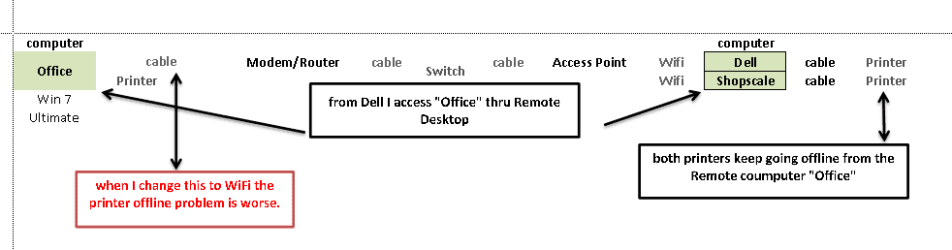
I have 2 computers networked, office and shop. the printer, Brother 2140, is on the shop. I use Remote Desktop (RD) from shop to access a program on the office computer and want to print to the shop. :shock:
I know that sounds confusing. In other words i want to print from the office computer to the shop printer and I do this though RD. I have done this setup for many years with no printing problems. On Jan 5 of this year, the internet stopped working, I called to have the phone company fix it who i have my service through. They replaced my modem/router and said they had to replace a "card" somewhere at a junction box about a mile from here. since then my printer goes offline daily. If I restart the office computer the printer is online and the pending print jobs print. I have uninstalled the printer. I have went into CMD and through the printui have removed drivers on both computers at the same time. re-installed and still goes off at random. through a internet search led me to go into the port properties to un-check a SMNP setting (I think that is the right acronym) but when I try to access that it says that is not supported. both computers have current updates. I have went to Brother website and downloaded latest driver. I keep viruses and spyware in check.
Any ideas would be appreciated.
office and shop. the printer, Brother 2140, is on the shop. I use Remote Desktop (RD) from shop to access a program on the office computer and want to print to the shop. :shock:I know that sounds confusing. In other words i want to print from the office computer to the shop printer and I do this though RD. I have done this setup for many years with no printing problems. On Jan 5 of this year, the internet stopped working, I called to have the phone company fix it who i have my service through. They replaced my modem/router and said they had to replace a "card" somewhere at a junction box about a mile from here. since then my printer goes offline daily. If I restart the office computer the printer is online and the pending print jobs print. I have uninstalled the printer. I have went into CMD and through the printui have removed drivers on both computers at the same time. re-installed and still goes off at random. through a internet search led me to go into the port properties to un-check a SMNP setting (I think that is the right acronym) but when I try to access that it says that is not supported.
both computers have current updates. I have went to Brother website and downloaded latest driver. I keep viruses and spyware in check.Any ideas would be appreciated.
My Computer
- Computer type
- PC/Desktop
- Computer Manufacturer/Model Number
- Dell
- OS
- Win 7 64 bit Ult and Win 7 64 bit Pro