

Kamrul08
New member
I have a HP Printer (HP LaserJet1020) installed and I use it as default printer. I can print all office document with it.

But I don’t get the printer in the list when I want to print an image with Microsoft Office Picture Manager, Windows Photo Viewer like XP. So I use Photoshop, MS Paint to print an image.

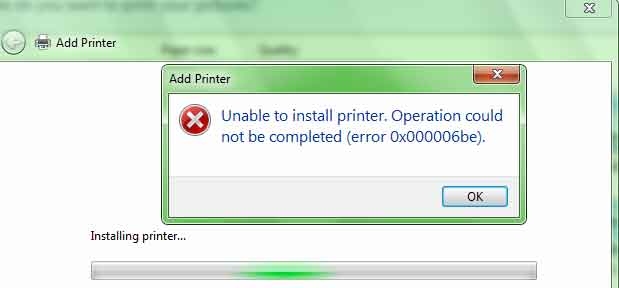
I tried to add the existing HP LaserJet1020 printer with Install Printer option but windows shows error massage.
How can I print an image with Windows Photo Viewer? I use Win 7- SP1.
But I don’t get the printer in the list when I want to print an image with Microsoft Office Picture Manager, Windows Photo Viewer like XP. So I use Photoshop, MS Paint to print an image.
I tried to add the existing HP LaserJet1020 printer with Install Printer option but windows shows error massage.
How can I print an image with Windows Photo Viewer? I use Win 7- SP1.
My Computer
- Computer type
- PC/Desktop
- Computer Manufacturer/Model Number
- Gigabyte g41 Combo
- OS
- Windows 8.1 x64 Enterprise & Windows 7 x86 Ultimate Dual boot.
- CPU
- Core™2 Duo E8400
- Motherboard
- Gigabyte g41m combo
- Memory
- 4GB
- Graphics Card(s)
- built in
- Sound Card
- built in
- Monitor(s) Displays
- Samsung syncmaster 794mg
- Screen Resolution
- 1024x768
- Hard Drives
- WD-500GB
- Antivirus
- MSE
- Browser
- Firefox and chrome.


