
Printer Problem

Kamrul08

New member
I have a HP Printer (HP LaserJet1020) installed and I use it as default printer. I can print all office document with it.
Printer-List.jpg

But I don’t get the printer in the list when I want to print an image with Microsoft Office Picture Manager, Windows Photo Viewer like XP. So I use Photoshop, MS Paint to print an image.
No-Printer-list.jpg


I tried to add the existing HP LaserJet1020 printer with Install Printer option but windows shows error massage.
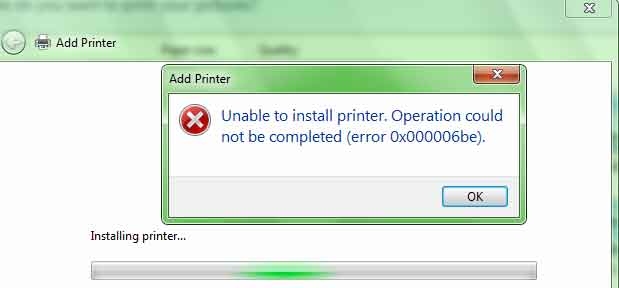
Error.jpg

How can I print an image with Windows Photo Viewer? I use Win 7- SP1.
 

My Computer

Computer type
PC/Desktop
Computer Manufacturer/Model Number
Gigabyte g41 Combo
OS
Windows 8.1 x64 Enterprise & Windows 7 x86 Ultimate Dual boot.
CPU
Core™2 Duo E8400
Motherboard
Gigabyte g41m combo
Memory
4GB
Graphics Card(s)
built in
Sound Card
built in
Monitor(s) Displays
Samsung syncmaster 794mg
Screen Resolution
1024x768
Hard Drives
WD-500GB
Antivirus
MSE
Browser
Firefox and chrome.
I just checked with my MSO picture manager and did a test run. My printer is listed and it prints. This tells me that something in the registry is corrupted or missing. Try popping in your office suite disc and doing the repair option.
 

My Computer

Computer Manufacturer/Model Number
Custom built
OS
Windows 7 Ultimate 64 bit
CPU
AMD Phenom II X4 965 Black Edition
Motherboard
Gigabyte GA-MA790X-DS4
Memory
GSkill 4 X 2 GB PC 8500
Graphics Card(s)
XFX Radeon HD 6790 D
Sound Card
On board RealTek HD
Monitor(s) Displays
Dual monitors:Samsung SyncMaster S20B300
Screen Resolution
1600 X 900
Hard Drives
Seagate Barracuda 1TB (primary)
Seagate Barracuda 2 X 320 GB
PSU
Ultra X4 750 watt fully modular
Case
Thermaltake Overseer RX 1 full tower
Cooling
Core-Contact 92 mm CPU Cooler
Keyboard
Logitech G510
Mouse
Razor DeathAdder
Internet Speed
50/5 Mbps UL/DL
Other Info
Optical: Super Muliti DVD burner w/lightscribe, Hauppauge WinTV HVR-1800
Hello Kamrul,

It seems like Windows Photo Viewer won't get permission on some systems.

1. Click the Start orb and click Control Panel.
2. Click View By, and select Small Icons.
3. Click the Display and click Adjust resolution.
4. Click Advanced settings and Color Management.
5. Click Devices and select your printer.
6. Check "Use my settings for this device" and click OK.

Then launch Windows Photo Viewer to print again to see if it works.

Best Regards,
Frederik.
 

My Computer

Computer Manufacturer/Model Number
Brewed
OS
Microsoft Windows 7 Ultimate: x64 (SP1)
CPU
Intel® Core™ i5-2500K Processor
Motherboard
ASUS P8Z68-V PRO
Memory
Kingston DDR3 HyperX 1600MHz 8GB
Graphics Card(s)
ASUS GTX 560 TI DirectCU II 900MHz
Sound Card
Realtek® ALC892 8-Channel High Definition Audio CODEC
Monitor(s) Displays
ACER LCD P246HBD 1920x1080 (24") - Dell 1280x800
Screen Resolution
ACER LCD P246HBD ~ [1920X1080] - DELL ~ [1280x800]
Hard Drives
500 GB WD Caviar SE116 7200rpm SATA2
PSU
Corsair 750W Power Supply
Case
Coolermaster CM Scout
Cooling
Zalman FS-C77 Fatal1ty CPU Cooler
Keyboard
Logitech G15
Mouse
Coolermaster Sentinel Advanced
Internet Speed
[↓ 10 MB/s DL] [↑ 1 MB/s UL]
Other Info
- ROCCAT™ Kave – Solid 5.1 Surround Sound Gaming Headset
- Not overclocking
Thanks bassfisher6522 and FredeGail. My problem is solved. I downloaded update driver from HP and it solved the problem.
 

My Computer

Computer type
PC/Desktop
Computer Manufacturer/Model Number
Gigabyte g41 Combo
OS
Windows 8.1 x64 Enterprise & Windows 7 x86 Ultimate Dual boot.
CPU
Core™2 Duo E8400
Motherboard
Gigabyte g41m combo
Memory
4GB
Graphics Card(s)
built in
Sound Card
built in
Monitor(s) Displays
Samsung syncmaster 794mg
Screen Resolution
1024x768
Hard Drives
WD-500GB
Antivirus
MSE
Browser
Firefox and chrome.
Great news! :thumbsup:
 

My Computer

Computer Manufacturer/Model Number
Brewed
OS
Microsoft Windows 7 Ultimate: x64 (SP1)
CPU
Intel® Core™ i5-2500K Processor
Motherboard
ASUS P8Z68-V PRO
Memory
Kingston DDR3 HyperX 1600MHz 8GB
Graphics Card(s)
ASUS GTX 560 TI DirectCU II 900MHz
Sound Card
Realtek® ALC892 8-Channel High Definition Audio CODEC
Monitor(s) Displays
ACER LCD P246HBD 1920x1080 (24") - Dell 1280x800
Screen Resolution
ACER LCD P246HBD ~ [1920X1080] - DELL ~ [1280x800]
Hard Drives
500 GB WD Caviar SE116 7200rpm SATA2
PSU
Corsair 750W Power Supply
Case
Coolermaster CM Scout
Cooling
Zalman FS-C77 Fatal1ty CPU Cooler
Keyboard
Logitech G15
Mouse
Coolermaster Sentinel Advanced
Internet Speed
[↓ 10 MB/s DL] [↑ 1 MB/s UL]
Other Info
- ROCCAT™ Kave – Solid 5.1 Surround Sound Gaming Headset
- Not overclocking
Back
Top