Printer Problems

ZeshanA

New member
Local time
12:35 AM
Messages
334
Hi guys!

I've just finished slaving away on my homework and then transferring it to my printing PC (by email) just to find that my printer doesn't work. My Printer is a Lexmark X2550 and I've installed the latest drivers from Lexmarks website and from when Windows Action Centre recommended it. But when I send anything to print the usual print window pop up from Lexmark Imaging Studio but nothing comes out of the printer. Lexmark Imaging Studio recognises that it's connected but nothing prints. At first the progress bar got stuck at 15%, but then I installed the drivers that Windows Action Centre recommended. After that it completes the printing, but still nothing comes out of the printer.
And this happens with any document.

My homework deadline is in two days so I'm desperately searching for a solution! Any help is greatly appreciated.

ZeshanA
 
In case you cannot get your printer up in time, I suggest you print to an XPS document, move that to an SD card or USB stick and print it at a friends system or in an internet cafe. At least you then do not miss your deadline.
Unfortunately I have no immediate solution for your printer problem. Try printing with CTL+P.
 

My Computer

Computer Manufacturer/Model Number
HP, Dell, Gateway, Toshiba - 4 laptops and 2 desktops
OS
Vista, Windows7, Mint Mate, Zorin, Windows 8
CPU
from 1.6GHz Duo to i7
Monitor(s) Displays
2x HP w2207
Hard Drives
5x HDD, 7x SSD, 12x Externals
Keyboard
with trackball - no mices
Mouse
Trackball mice
Internet Speed
DSL 6000
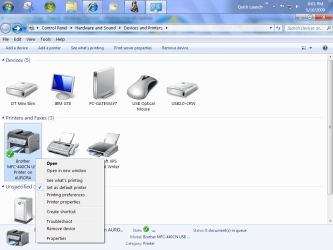
Make sure that it is your default printer
printer.PNG
 

My Computer

Computer Manufacturer/Model Number
Gateway GT5692
OS
Windows 7 Ulti. x64
CPU
AMD Phenom 8450 triple-core 2.10 ghz
Memory
4GB
Graphics Card(s)
ATI Radion HD 3200
Monitor(s) Displays
Gateway FPD1775W
Screen Resolution
1280x720
Hard Drives
465.6613 Gibibytes
I don't doubt this is the driver you have already installed, and tried, but to be on the safe side I thought I better check.
That's one mean PC you have there !
You could try system restore, then installing, if these are later drivers.

Driver for Microsoft Windows 7 x64 -
Version - 1.0.17.1 Date - 09/19/2009 Size - 73.45 MB

Lexmark - United States
 

My Computer

OS
XP, Vista, W7 64bit Home Premium
CPU
Intel Core Duo 6850 3.0 ghz @ 3.7 ghz
Motherboard
Asus P5E
Memory
4GB Corsair DDR 2 PC-6400
Graphics Card(s)
Ati 4870 1ghz
Sound Card
Supreme FX 11
Monitor(s) Displays
View Sonic VX1962wm
Screen Resolution
1680 X1050
Hard Drives
3 Seagate Sata Drives 160gb 250gb 500gb
PSU
Thermaltake 600 watt
Case
NZXT Alpha
Cooling
3X120cm Fans
Keyboard
Microsoft Digital Media Pro Keyboard
Mouse
Microsoft Wheel Mouse Optical
Internet Speed
1.5Mb to 8Mb/384k
Yeah thanks for all your help! But me being the idiot I am forgot to restart the printer. It was "jammed"/"not responding"..... Did a quick restart and then it WORKED! It works from my main system as well now so NO MORE "PRINTING PC"!!! Thanks for all your help!!! +Rep for Whest and WHS! Thanks again!

ZeshanA
 
It's the little things that give us most of the headaches. I'm glad you were able to fix it in time. Hope you get a good grade for your homework.
 

My Computer

Computer Manufacturer/Model Number
HP, Dell, Gateway, Toshiba - 4 laptops and 2 desktops
OS
Vista, Windows7, Mint Mate, Zorin, Windows 8
CPU
from 1.6GHz Duo to i7
Monitor(s) Displays
2x HP w2207
Hard Drives
5x HDD, 7x SSD, 12x Externals
Keyboard
with trackball - no mices
Mouse
Trackball mice
Internet Speed
DSL 6000
It's the little things that give us most of the headaches. I'm glad you were able to fix it in time. Hope you get a good grade for your homework.

Thanks!

ZeshanA
 
Back
Top