Printer search window does not appear

uidl7526

New member
Local time
4:17 AM
Messages
25
Hello,

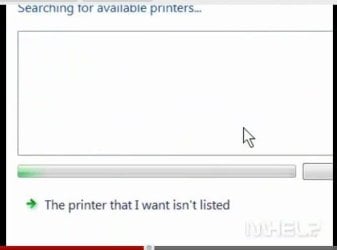
When you usually try to map a network printer, you go to: Devices & Printers --> Add printer --> Add a network, wireless or Bluetooth printer. At that point, usually a window should appear, where Windows is searching for printers automatically.
Well, I don't get that window. I get directly the attached window. Usually, you get to my attached window ONLY after you click "The printer that I want isn't listed".
Why is the usual window not appearing on my PC?
 

Attachments
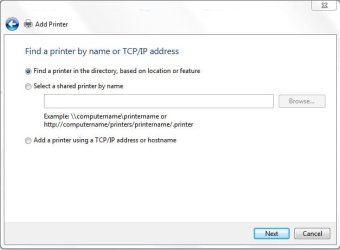
  • 001 Feb. 27 10.49.jpg
    001 Feb. 27 10.49.jpg
    21.5 KB · Views: 3

My Computer

Computer Manufacturer/Model Number
HP 8560p
OS
Windows 7 Enterprise x64
CPU
Intel Core i5 2520M @2,5 GHz
Memory
4 GB
Graphics Card(s)
Radeon HD 6470M
Sound Card
IDT High Definition Audio
Monitor(s) Displays
17"
Screen Resolution
1600 x 900
Hard Drives
320 GB
Hello,

When you usually try to map a network printer, you go to: Devices & Printers --> Add printer --> Add a network, wireless or Bluetooth printer. At that point, usually a window should appear, where Windows is searching for printers automatically.
Well, I don't get that window. I get directly the attached window. Usually, you get to my attached window ONLY after you click "The printer that I want isn't listed".
Why is the usual window not appearing on my PC?


You might want to check the bottom block where it says to enter the ip address.

Rich
 

My Computer

Computer type
Laptop
Computer Manufacturer/Model Number
Toshiba Laptop Qosimo X870
OS
Windows 7 Pro x64 SP1
CPU
Intel Core I7
Motherboard
Toshiba Qosmio
Memory
16 Gigs
Graphics Card(s)
NVIDIA GeForce GTX 670M
Monitor(s) Displays
17.7" laptop
Screen Resolution
1600 x 900
Hard Drives
256 Gig SanDisk SSD for C
256 Gig Intel SSD for D
Internet Speed
50/25 FIOS
Antivirus
Vipre (all you can eat for 10 machines)
Browser
IE and FF
Other Info
I have dos 6.22, wfwg 3.11, win98, 2000 and xp VHD's available for testing. MS's Virtual PC works great.
I am missing the attached window (screenshot taken from Youtube, since I don't get it on my own PC).
 

Attachments

  • 001 Feb. 28 08.37.jpg
    001 Feb. 28 08.37.jpg
    10.4 KB · Views: 3

My Computer

Computer Manufacturer/Model Number
HP 8560p
OS
Windows 7 Enterprise x64
CPU
Intel Core i5 2520M @2,5 GHz
Memory
4 GB
Graphics Card(s)
Radeon HD 6470M
Sound Card
IDT High Definition Audio
Monitor(s) Displays
17"
Screen Resolution
1600 x 900
Hard Drives
320 GB
you might have to wait before it completes searching. or you could manually go the network>user and install the printer directly from there.
 

My Computer

Computer type
PC/Desktop
Computer Manufacturer/Model Number
Self assembled
OS
Windows 10 Home 64Bit
CPU
Intel Core i5 10400 @ 2.90GHz
Motherboard
Intel Corporation DG41WV (PROCESSOR)
Memory
8.00GB Single-Channel Unknown @ 1329MHz (16-20-20-38)
Sound Card
Realtek High Definition Audio
Monitor(s) Displays
DELL E170S
Screen Resolution
1280x1024 pixels
Hard Drives
931GB TOSHIBA DT01ACA100 (SATA)
238GB TEAM TM8PS7256G (SATA SSD)
Case
Nothing Fancy
Cooling
Fans
Keyboard
A4 Tech Co LTD
Mouse
A4 Tech Co Ltd/Logitech
Internet Speed
25 Mbps
Back
Top