Printer Sharing Driver Issues - 32bit vs. 64bit

Farley

New member
Local time
9:36 AM
Messages
4
Howdy,

I have read on this forum a few people with printer sharing issues, but my problem seems to be a bit different, heres my problem:

I have a HP Server that is running XP Pro 32bit, & has a HP Laserjet 1220 printer shared across the network on a parallel port, all machines running XP (32bit & 64bit) connect with no problems, no drivers needed. I then installed Windows 7 32bit on a old laptop of mine, this also connects to printer over network, no drivers needed. I then installed 64bit 7 on my PC & another laptop, both of these machine could not connect to the printer, they can see the printer with no problems, but when I go connect, it says something like loading driver, then connecting to windows update, then comes up with an error & says driver not found.

It gives me an option to load the correct drivers myself, which I have been unable to do, the drivers for the printer are part of the XP & Vista & Windows 7 CD\DVD, HP says the printer will work with 32 & 64bit, no Windows 7 drivers (32 or 64bit) or Vista(32 or 64bit) are on the HP site for this printer.

As a test I tried the following:

I then tried something else, I got an old Dell PC i had around & installed 32bit 7 on this & connected the HP printer, then shared across the network & within a few minutes had all computers working with printer fine, XP & 7 (32 & 64bit) machines.

I then connected the printer to my PC & booted up in XP 64bit & shared printer, yet again had all machines working fine.

Even renamed Dell machine(32bit 7) network name same as the HP Server(32bit XP) network name, got all machines working on printer on dell 32bit 7 PC, then swapped printer back to HP server & shared again, 64bit 7 machines went straight back to the first issue "loading driver, then connecting to windows update, then comes up with an error & says driver not found".

From these problems it seems that the HP Server(32bit XP) is trying to hand out 32bit drivers over the network to the 64bit 7 machines & the 64bit 7 seems to get a bit lost on loading the right drivers which it has as part of the OS as when connecting to the dell machine which is running 32bit 7 the 64bit 7 machines have no problem loading the right driver.

I have tried to install x64 printer drivers on the HP Server to hand out over the network, but cannot find any to download that work.

One strange thing happened I was not going to say as it makes me more confused, when i removed the printer from Dell PC & reconnected it back to the HP Server, I then jumped on the laptop with 64bit 7 & tried to connected to the printer on the xp server & a screen popped up with a window 'installing drivers' only sore it for a second & it worked I was able to print to from the 64bit 7 laptop to the 32bit xp server...lol. Jumped straight back on my PC(64bit 7) but back to the old error 'connecting to windows update this may take sometime'...then error no driver found...

Sorry for the speech, any help would be great

Farley.
 

My Computer

Computer Manufacturer/Model Number
HP Pavillion DV6 Laptop
OS
Windows 7 64bit Ultimate
CPU
Intel i3 2.3GHz
Memory
8GB DDR3 1333MHz
Graphics Card(s)
Radeon HD5650m - 1GB RAM
Monitor(s) Displays
LED 16"
Screen Resolution
1366x768
Hard Drives
SAMSUNG 640GB SATA II
Mouse
Microsoft Wireless 5000 - BlueTrack Mouse
Internet Speed
Wi-Fi Service Provider - 6mb pipe
I've had success creating a new port, then pointing to the network path of the printer, like this:

\\computername\printername
 

My Computer

Computer Manufacturer/Model Number
Dell XPS 15 L502x
OS
Windows 7 Ultimate x64 SP1
CPU
Core i7-2670QM
Memory
8GB DDR3 PC3-10600
Graphics Card(s)
Intel HD Graphics 3000 + GeForce GT 540M
Screen Resolution
1920x1080
Hard Drives
1TB 5400RPM Seagate
I have tried to connect to the printer by using the '\\computername\printername' way this just brings up an error 'Cannot connect to printer' box, but have not tried to add a new port, what port would i use? to connect overa network to a parallel printer?....LTP1 or something like that?
 

My Computer

Computer Manufacturer/Model Number
HP Pavillion DV6 Laptop
OS
Windows 7 64bit Ultimate
CPU
Intel i3 2.3GHz
Memory
8GB DDR3 1333MHz
Graphics Card(s)
Radeon HD5650m - 1GB RAM
Monitor(s) Displays
LED 16"
Screen Resolution
1366x768
Hard Drives
SAMSUNG 640GB SATA II
Mouse
Microsoft Wireless 5000 - BlueTrack Mouse
Internet Speed
Wi-Fi Service Provider - 6mb pipe
Many thanks worked great, now printing from PC running 64bit 7 to 32bit xp server over the network....cheers

Farley
 

My Computer

Computer Manufacturer/Model Number
HP Pavillion DV6 Laptop
OS
Windows 7 64bit Ultimate
CPU
Intel i3 2.3GHz
Memory
8GB DDR3 1333MHz
Graphics Card(s)
Radeon HD5650m - 1GB RAM
Monitor(s) Displays
LED 16"
Screen Resolution
1366x768
Hard Drives
SAMSUNG 640GB SATA II
Mouse
Microsoft Wireless 5000 - BlueTrack Mouse
Internet Speed
Wi-Fi Service Provider - 6mb pipe
How did you solved it?
I tried the same but when I reconnect it to port \\server\sharedprinter or \\ipaddress\sharedprinter I always get the error that I haven't got the rights...
Thanks


How is your network setup?

You have to make sure that your security settings for the username you are using to log in are set correctly to access the printer.
 

My Computer

Computer Manufacturer/Model Number
HP Pavilion Elite HPE-410f
OS
Windows 7 Ultimate x64
CPU
AMD Phenom x6 1045t
Motherboard
N/A
Memory
8 GB
Graphics Card(s)
ATI Radeon HD 5570
Sound Card
Realtek Highdefinition Audio / 5.1 Dolby Setup
Monitor(s) Displays
HP w2207h Widescreen
Screen Resolution
1680*1050
Hard Drives
1 TB (fixed), 320 Portable maxtor, Server Hard drives
PSU
350 Watt
Case
HP CASE
Cooling
Bass
Keyboard
Logitech MX 5500
Mouse
Logitech MX 5500
Internet Speed
ROAD RUNNER 16MB D/512 U
Hi there
I've posted on this many times on how to share printers between 32 and 64 bit systems.

Just search - it was a while back and I can't remember the thread --look under my username.

It explains in steps what you have to do and seems to work in 99.99% of cases.

Cheers
jimbo
 

My Computer

Computer type
PC/Desktop
Computer Manufacturer/Model Number
Custom built, several laptops HP/ASUS
OS
Linux CENTOS 7 / various Windows OS'es and servers
CPU
Intel i7 Intel i5
Memory
8GB, 16GB
Graphics Card(s)
On Motherboard
Sound Card
Realtek HD audio
Monitor(s) Displays
Apple Cinema display, Samsung LCD
Screen Resolution
1920 X 1080
Hard Drives
4 X 1TB SATA
Mouse
Toshiba wireless laser
Internet Speed
> 20MB up
Jimbo45, Of course I tried your "step-by-step manual". But I didn't win. Maybee I am 0,01% of users. But I searched forum well, and found that I am not alone, many users have "Access dennied" message when try to add local port \\server\sharedprinter ... Unfortunatelly, I didn't find any solution. ..

To Acurasd: my network is simple: no domains, just workgroup (set the same on all computers). On VistaB32 there is a shared printer and it can be easilly access on other Vistas or XPs. But not on W7. But it is interesting that on other computer with VistaB32, there is a shared folder and it is accessible easily from W7. I also see shared printer from W7, but I can't attach it...
 

My Computer

OS
Vista
Is a Windows 64 bit or Windows 32 bit computer being the host for the computer?

either or you may have to install additional drivers to accomidate the different versions.


The way that you have your printers set up. Are they connected by USB to the REMOTE computer and you connect your hosts compute to that computer or as I have my printers set up I have networked printers and I connect to my printers by IP addresses.

Could you please identify your computers for instance:

What is the version computer supporting your printers.
what are the model numbers and makes of your printers
and how are they being attached..UsB or networked to the remote computer.
 

My Computer

Computer Manufacturer/Model Number
HP Pavilion Elite HPE-410f
OS
Windows 7 Ultimate x64
CPU
AMD Phenom x6 1045t
Motherboard
N/A
Memory
8 GB
Graphics Card(s)
ATI Radeon HD 5570
Sound Card
Realtek Highdefinition Audio / 5.1 Dolby Setup
Monitor(s) Displays
HP w2207h Widescreen
Screen Resolution
1680*1050
Hard Drives
1 TB (fixed), 320 Portable maxtor, Server Hard drives
PSU
350 Watt
Case
HP CASE
Cooling
Bass
Keyboard
Logitech MX 5500
Mouse
Logitech MX 5500
Internet Speed
ROAD RUNNER 16MB D/512 U
server: Vista Business 32bit
client: Windows 7 Pro 64 bit

additional 64bit drivers on 32bit server- as I already wrote, I tried it several times, Vista always say that those drivers are not for selected architecture

printer is connected to server via USB, printer is installed via install SW, then shared for everyone (I have no problem to print on it from XP home, XP pro, Vista Business - but all 32bit), all clients are connected through \\server\printer sharing

printer is Sharp AR-M160
 

My Computer

OS
Vista
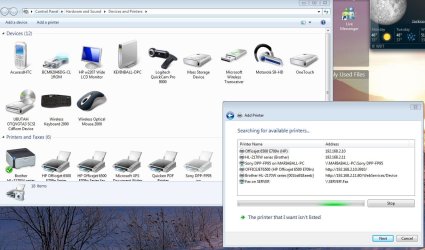
Once you share the printer...
then you go to the computer where you want to install...

what comes up.. screen shot..

this is what i got when i share printers.

This is from Windows 7 Wizard. and I am pulling printers from Windows 2008 Enterprise which is another version of Vista on Roids.
 

Attachments

  • Printer Capture.JPG
    Printer Capture.JPG
    158.6 KB · Views: 308

My Computer

Computer Manufacturer/Model Number
HP Pavilion Elite HPE-410f
OS
Windows 7 Ultimate x64
CPU
AMD Phenom x6 1045t
Motherboard
N/A
Memory
8 GB
Graphics Card(s)
ATI Radeon HD 5570
Sound Card
Realtek Highdefinition Audio / 5.1 Dolby Setup
Monitor(s) Displays
HP w2207h Widescreen
Screen Resolution
1680*1050
Hard Drives
1 TB (fixed), 320 Portable maxtor, Server Hard drives
PSU
350 Watt
Case
HP CASE
Cooling
Bass
Keyboard
Logitech MX 5500
Mouse
Logitech MX 5500
Internet Speed
ROAD RUNNER 16MB D/512 U
If pushing out printers via group policy, in order for the drivers to load, you have to have the following setting enabled inside your GPO. Either (or both)

computer\policies\admin templates\printers\point and print restrictions DISABLED

user\policies\admin templates\control panel\printers\point and print restrictions DISABLED

I am not entirely sure if you need both halves disabled or not, but I went ahead and did it, it's not going to hurt anything.

Apparently there was also a policy for Vista in a different path, but since we never did Vista, this was unknown to me. XP ignores this setting, which explains why it worked on XP and not on Win 7.
 

My Computer

OS
windows 7 32bit
1 Year down the road......

From my situation XP Pro 32bit OS running on my HP server had trouble handing out my 'HP Laser Jet' printer drivers to any machine running a 64bit OS, it had no problem giving out the drivers to any 32bit OS (XP, Vista, 7) across the network via RJ45 or wifi.

The win7 64bit machine would ask me where are the drivers, my printer drivers have been part of the standard install of XP, vista & win7, all that came with the printer were drivers for Win2000, accessing the HP driver list from within win7 64bit my printer was no where to be seen. Would then select download driver online, would go for 1 minute, then error out.

I got round the problem by using the 'creating a new port, then pointing to the network path of the printer' like this:

\\computername\printername

But this seemed to work sometimes, other times it would not, still got error about 'drivers not found' or 'port in use'.

I found a quick workaround to help me out that worked everytime,

When I had to connect a new machine to the network that was running a 64bit OS, if it was a laptop, I would simply take the laptop to the server room & connect it to the shared printer via USB, when this happens the win7 64bit on the lappie would load & install the drivers for the printer automatically...done, print test page, all good. I would then remove the USB cable & then try & connect to the shared printer on the laptop across the network via wifi, the win7 64bit would ask me where the drivers are on the laptop, but this time the correct drivers were displayed, available for me to select vs. before when their were no HP Laser Jet 1220 drivers, of course this was my problem to start with. I would browse to the HP driver list, select the newly entered 'Laserjet 1220' drivers the win7 64bit would add a new printer to my list just calls itself 'HP LaserJet 1220 copy 1' or something, would set this as default & test, all good.

Looks like when I connected the printer directly to the machine the drivers that I knew were there became unlocked somehow & accessible

If the machine running 64bit OS was a PC & not a laptop, I would either us a long long USB
ext cable to connect the printer to PC or if was too far away would take printer & move to PC before connecting via USB & then doing the above, but in my situation most of the new machines connecting to the network are laptops so connecting them with a usb cable is quite simple & only takes a few minutes.

Good Luck.....
 
Last edited:

My Computer

Computer Manufacturer/Model Number
HP Pavillion DV6 Laptop
OS
Windows 7 64bit Ultimate
CPU
Intel i3 2.3GHz
Memory
8GB DDR3 1333MHz
Graphics Card(s)
Radeon HD5650m - 1GB RAM
Monitor(s) Displays
LED 16"
Screen Resolution
1366x768
Hard Drives
SAMSUNG 640GB SATA II
Mouse
Microsoft Wireless 5000 - BlueTrack Mouse
Internet Speed
Wi-Fi Service Provider - 6mb pipe
Greetings,

This thread was about connecting a 64 bit windows client to a 32 bit XP print share. My issue is the same in reverse.

I have an HP laserjet 1300 hooked up to a windows 7 64 bit print share (working properly from all windows 7 64 bit client machines and a 32 bit xp windows client trying to connect to that share.

This is not an access problem - I have cached credentials against some shared folders and I can see the printer in my network places.

I have also connected the 32 bit client (a dell laptop) to the printer directly with a USB cable and I am able to print.

When I attempt to install 32 bit drivers on my windows 7 print server - it says no - I must use 64 bit drivers.

I know that this is a cold case at this point but I would sure like to be able to print to that HP laserjet 1300 from my 32 bit laptop (its my fastest printer.

Regards

Kithara
 

My Computer

OS
New York
Back
Top