
Could someone please help me with this?
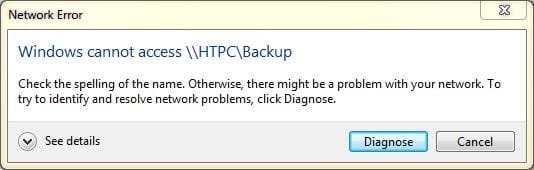
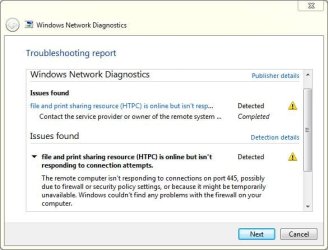
from my laptop win7 pc i cant access shared folders on my desktop win7 pc. This happens when i try to access the folders through 'network' or 'homegoup':
what's strange is that i can access my shared folders on the laptop through the desktop without any problems.
my homegroup/sharing settings are the same on both pc's
the only thing i can think of is that i was having some connection problems and restarted my router a few times. homegroup sharing was working fine a couple of days ago.
*i would like to add that i noticed that i have access for about 1 minute after restarting the pc, then it cuts out. i looked to see if any new services started/stopped at that time but i couldn't see anything.
from my laptop win7 pc i cant access shared folders on my desktop win7 pc. This happens when i try to access the folders through 'network' or 'homegoup':
what's strange is that i can access my shared folders on the laptop through the desktop without any problems.
my homegroup/sharing settings are the same on both pc's
the only thing i can think of is that i was having some connection problems and restarted my router a few times. homegroup sharing was working fine a couple of days ago.
*i would like to add that i noticed that i have access for about 1 minute after restarting the pc, then it cuts out. i looked to see if any new services started/stopped at that time but i couldn't see anything.
Last edited:
My Computer
At a glance
Windows 7 Ultimate x64 SP1AMD Turion II P5406 GBATI Radeon HD 4200
- Computer type
- Laptop
- Computer Manufacturer/Model Number
- Asus K52N
- OS
- Windows 7 Ultimate x64 SP1
- CPU
- AMD Turion II P540
- Motherboard
- Asus
- Memory
- 6 GB
- Graphics Card(s)
- ATI Radeon HD 4200
- Antivirus
- Avast
- Browser
- Chrome

