Printing to printer installed in XP Mode

tmiller

New member
Local time
4:55 PM
Messages
5
I have a print driver that is not compatible with Windows 7. I installed it in XP mode, and see the printer there. (this is Castelle Faxpress fax software... the driver is installed with the software). However I don't see the printer in Windows 7 where I really need it. I was hoping that installing a printer in XP mode would magically make it available to Windows 7 also.

Since the print driver won't install in Windows 7, I'm not able to simply share the XP Mode based printer and then install the port and driver in Windows 7.

Is there a simple way to make the printers from XP mode available to the host Win 7 machine?
 

My Computer

Computer Manufacturer/Model Number
Dell Precision M4400
OS
Windows 7 Pro 32bit
CPU
T9900
Memory
4 GB
Hard Drives
180 GB SSD
Hi and welcome to the Seven Forums.

First, double posting is not a very good idea. You don't get (possible) help any sooner even if you post your issue in several threads. In fact it might prevent some members to answer you because double posting is widely disliked.

That said, let's move forward. What you could first try is to check that XP Mode is using your host's NIC and not the default Virtual PC NAT. Read this thread, follow instructions (post #3) to change the NIC.

Kari
 

My Computer

Computer type
Laptop
Computer Manufacturer/Model Number
HP ENVY 17-1150eg
OS
Windows 10 Pro x64 EN-GB
CPU
1.6 GHz Intel Core i7-720QM Processor
Memory
6 GB
Graphics Card(s)
ATI Mobility Radeon HD 5850 Graphics
Sound Card
Beats sound system with integrated subwoofer
Monitor(s) Displays
17" laptop display, 22" LED and 32" Full HD TV through HDMI
Screen Resolution
1600*900 (1), 1920*1080 (2&3)
Hard Drives
Internal: 2 x 500 GB SATA Hard Disk Drive 7200 rpm
External: 2TB for backups, 3TB USB3 network drive for media
Cooling
As Envy runs a bit warm, I have it on a Cooler Master pad
Keyboard
Logitech diNovo Media Desktop Laser (bluetooth)
Mouse
Logitech Performance Mouse MX
Internet Speed
50/10 Mbps VDSL
Antivirus
Windows Defender 4.3.9431.0
Browser
Maxthon 3.5.2., IE11
Hello TMiller,
what is the printer that you have? Also I'm a little confused, are you running 7 on more than one machine? Or is it just one pc and you have xp mode and are wanting that same printer to working without having to use xp mode?

Thanks,
Sarah
 

My Computer

Computer Manufacturer/Model Number
Dell Vostro 220 mini
OS
Windows 7 Pro. 32 bit
CPU
2.93 GHz E7500 Intel Core 2 Duo
Motherboard
Dell
Memory
2 GB
Graphics Card(s)
Intel G45/G43
Sound Card
Realtek High Def.
Monitor(s) Displays
17" acer (I know...its bad)
Screen Resolution
1024x768
Hard Drives
WD 250 GB
Keyboard
Dell L100
Mouse
Dell optical (standard)
Internet Speed
100 Mbps 11.91 dl 12.46 ul
Other Info
Have questions, just ask.
Hi Kari,
Thanks for the reply. I've made this change so that I am now in the same subnet, etc. Now I'm able to browse to the printer shared from XP Mode, but I still can't install it to Windows 7. It fails at some point with a generic error (operation failed with error 0x0000000d). I'm assuming that is because it's trying to install the driver that is not compatible with Windows XP.
 

My Computer

Computer Manufacturer/Model Number
Dell Precision M4400
OS
Windows 7 Pro 32bit
CPU
T9900
Memory
4 GB
Hard Drives
180 GB SSD
Hi Sarah,
I'm just on the one computer. The "printer" is a print driver that sends to a fax server. It's Castelle Faxpress. The software installs to Win 7, but not the fax driver, and they say that they are not going to make a new version to be compatible. It was suggested that I try XP Compatibility mode. The printer installs in XP (as always), but I'm not finding a way to print to it from outside of XP compatibility mode. I can share the printer in XP, but when you go to install a shared printer on a nother machine (or in this case, on the host), it wants to install the driver locally. I was hoping there was a way around this.
 

My Computer

Computer Manufacturer/Model Number
Dell Precision M4400
OS
Windows 7 Pro 32bit
CPU
T9900
Memory
4 GB
Hard Drives
180 GB SSD
What make and model is your printer?
 

My Computer

Computer type
Laptop
Computer Manufacturer/Model Number
HP ENVY 17-1150eg
OS
Windows 10 Pro x64 EN-GB
CPU
1.6 GHz Intel Core i7-720QM Processor
Memory
6 GB
Graphics Card(s)
ATI Mobility Radeon HD 5850 Graphics
Sound Card
Beats sound system with integrated subwoofer
Monitor(s) Displays
17" laptop display, 22" LED and 32" Full HD TV through HDMI
Screen Resolution
1600*900 (1), 1920*1080 (2&3)
Hard Drives
Internal: 2 x 500 GB SATA Hard Disk Drive 7200 rpm
External: 2TB for backups, 3TB USB3 network drive for media
Cooling
As Envy runs a bit warm, I have it on a Cooler Master pad
Keyboard
Logitech diNovo Media Desktop Laser (bluetooth)
Mouse
Logitech Performance Mouse MX
Internet Speed
50/10 Mbps VDSL
Antivirus
Windows Defender 4.3.9431.0
Browser
Maxthon 3.5.2., IE11
It's actually a print driver that installs with Castelle Faxpress 9.1. It prints to a fax appliance (Faxpress 5000) on the network. When you install the software, a printer installs with it. In Windows 7, the software does install, but you get a message along the way saying that the driver could not be installed.

I asked OpenText (mfg) and they said that they are not planning on updating the software for Windows 7 but suggested trying XP compatibility. And here we are.
 

My Computer

Computer Manufacturer/Model Number
Dell Precision M4400
OS
Windows 7 Pro 32bit
CPU
T9900
Memory
4 GB
Hard Drives
180 GB SSD
Have you tried to install it on Seven using compatibility mode? Right click the installation application, choose Properties and then Compatibility tab and choose Run this program in compatibility mode for: and tick Windows XP.

Kari
 

My Computer

Computer type
Laptop
Computer Manufacturer/Model Number
HP ENVY 17-1150eg
OS
Windows 10 Pro x64 EN-GB
CPU
1.6 GHz Intel Core i7-720QM Processor
Memory
6 GB
Graphics Card(s)
ATI Mobility Radeon HD 5850 Graphics
Sound Card
Beats sound system with integrated subwoofer
Monitor(s) Displays
17" laptop display, 22" LED and 32" Full HD TV through HDMI
Screen Resolution
1600*900 (1), 1920*1080 (2&3)
Hard Drives
Internal: 2 x 500 GB SATA Hard Disk Drive 7200 rpm
External: 2TB for backups, 3TB USB3 network drive for media
Cooling
As Envy runs a bit warm, I have it on a Cooler Master pad
Keyboard
Logitech diNovo Media Desktop Laser (bluetooth)
Mouse
Logitech Performance Mouse MX
Internet Speed
50/10 Mbps VDSL
Antivirus
Windows Defender 4.3.9431.0
Browser
Maxthon 3.5.2., IE11
I had not, but unfortunately this doesn't work either. Same errors when the installation gets to the point where it's trying to install the driver.
 

My Computer

Computer Manufacturer/Model Number
Dell Precision M4400
OS
Windows 7 Pro 32bit
CPU
T9900
Memory
4 GB
Hard Drives
180 GB SSD
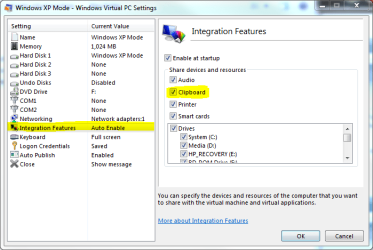
I really do not know where to go next. A bit clumsy workaround until we can find a solution: Check that you have integration enabled, and bidirectional clipboard allowed:

IF.PNG

Save the file you want to fax (print), copy it to XP Mode and print from there. Might work?

Kari
 

My Computer

Computer type
Laptop
Computer Manufacturer/Model Number
HP ENVY 17-1150eg
OS
Windows 10 Pro x64 EN-GB
CPU
1.6 GHz Intel Core i7-720QM Processor
Memory
6 GB
Graphics Card(s)
ATI Mobility Radeon HD 5850 Graphics
Sound Card
Beats sound system with integrated subwoofer
Monitor(s) Displays
17" laptop display, 22" LED and 32" Full HD TV through HDMI
Screen Resolution
1600*900 (1), 1920*1080 (2&3)
Hard Drives
Internal: 2 x 500 GB SATA Hard Disk Drive 7200 rpm
External: 2TB for backups, 3TB USB3 network drive for media
Cooling
As Envy runs a bit warm, I have it on a Cooler Master pad
Keyboard
Logitech diNovo Media Desktop Laser (bluetooth)
Mouse
Logitech Performance Mouse MX
Internet Speed
50/10 Mbps VDSL
Antivirus
Windows Defender 4.3.9431.0
Browser
Maxthon 3.5.2., IE11
I have a print driver that is not compatible with Windows 7. I installed it in XP mode, and see the printer there. (this is Castelle Faxpress fax software... the driver is installed with the software). However I don't see the printer in Windows 7 where I really need it. I was hoping that installing a printer in XP mode would magically make it available to Windows 7 also.

Since the print driver won't install in Windows 7, I'm not able to simply share the XP Mode based printer and then install the port and driver in Windows 7.

Is there a simple way to make the printers from XP mode available to the host Win 7 machine?


The simple answer. No.
The more complex answer. What ever OS you are printing from needs a driver which will present the printer to the applications - you can share a printer over the network but if it OS you are sharing with doesn't have a driver then you're not going to get anywhere. In short with no Win7 driver no Win7 is going to print to it.
 
I would just like to share my workaround for using faxpress on windows 7. complete the normal install as usual. parts may fail. you need not reboot. browse your install disc. on mine there is a rev905 folder (may be different but choose the newest one).

choose either the client32 or client64 folder as appropriate for your OS. on both the setup, and rsetup exe files, change the properties to run as administrator, and compatibility mode for windows xp

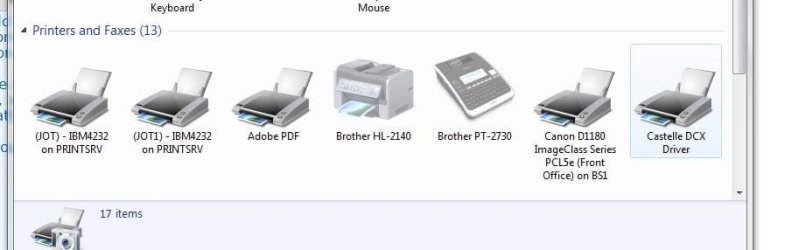
run setup.exe in that folder to go through the install again. many things will fail. doesnt matter. reboot. your castille dcx driver will appear and all of faxpress will work perfectly
 

Attachments

  • Capture.JPG
    Capture.JPG
    37.6 KB · Views: 43

My Computer

OS
windows 7 pro 32bit
Back
Top