Pro Tools on Windows 7

You need to go into your MyDigi account, now called MyAvid account, and download the full version of 8.0.3. Then download the 8.0.4b 64 bit Windows 7 drivers from the Avid web site. Follow the instructions posted.

Also right click the install icon and choose Run As Administrator when installing.
 

My Computer

Computer Manufacturer/Model Number
Self Build
OS
Windows 7 32 bit, Windows 7 64 bit, Windows Vista 32 bit all Ultimate
CPU
Intel Q9550
Motherboard
Asus P5Q Pro
Memory
4GB Crucial Ballistix
Monitor(s) Displays
2 Moniters
Hard Drives
4 hard drives
PSU
Corsair 650 Watt
Case
NZXT
thanks for the advice - i went to my avid account and am trying to add my mbox but i cant seem to figure out which is my activation code. It doesnt appear to be the authorization code for install. Any ideas where i can find that?
 

My Computer

Computer Manufacturer/Model Number
dell precision t3500
OS
windows 7 64 bit
CPU
intel xon W3520 2.67 Ghz
Memory
2 GB
Graphics Card(s)
nvidia 580
Protools 7.4 probs

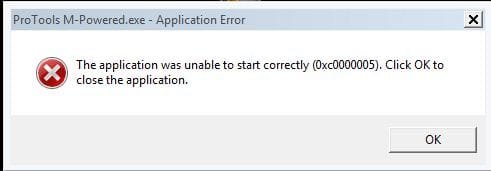
Hi frnz, I have used the technique explained by benoni (on the first page last mess)for registry tweaking for home premium and it worked but its not workin for ultimate addition rtm....a mess is coming when i launched the pt....i have attached the pic of the message....

It says that...

ProTools M-Powered.exe-Application error


This application was unable to start correctly (0xc0000005).Click OK to close the application.


help me guys...I can't work without protools and windows 7.
 

Attachments

  • Capture.JPG
    Capture.JPG
    16.6 KB · Views: 6

My Computer

Computer Manufacturer/Model Number
Intel
OS
Windows7
CPU
Intel
Motherboard
Core2duo
Memory
3GB
Graphics Card(s)
No
Sound Card
M-audio fast track pro
Monitor(s) Displays
LG 1515s tft 15"
Hard Drives
segate sata 150GB
Case
I-ball
Cooling
Fan
I have Sonar (8.5.3 Pro Ed) and thought I wanted to try Pro Tools, just to see what it was like since I got an M Audio Fast Track Ultra 8R, which is compatible with Pro Tools 8. I got a special 30 day trial "MP" edition but after looking at some of the many problems, I'm not going to even try it and just stay with Sonar. Sonar works well with Win 7 64 bit.
 

My Computer

Computer type
PC/Desktop
Computer Manufacturer/Model Number
My Own Build
OS
Windows 10 64 bit
CPU
Intel i7 6700K
Motherboard
ASUS ROG Maximus VIII Hero
Memory
16GB Corsair Dominator
Graphics Card(s)
Intel CPU Graphics
Sound Card
RealTek
Monitor(s) Displays
27" Dell S2719dgf
Screen Resolution
2560X1440
Hard Drives
1 TB Samsung 850 EVO SSD for Win 10 Pro
500GB Samsung 850 EVO SSD for Win 10 Insider
2 TB drive for backup
PSU
EVGA Supernova 750G2
Case
BeQuiet Silent Base 600
Cooling
Deepcool Captain 120EX
Keyboard
Microsoft Wireless 2000
Mouse
Microsoft wireless
Internet Speed
100 MB/sec (Cable)
Antivirus
Microsoft Defender and Malwarebytes
Browser
Edge/Firefox
Other Info
Cakewalk (Sonar) by BandLab and Studio One 4.1 Pro recording studio software. MOTU 896Mk3 Hybrid recording interface, Frontier Tranzport wireless control unit, Behringer X-Touch Control Surface.
Five USB connected optical drives for CD Audio production using Nero BurningROM
trying to get 7.4LE to run on Win7

I know this topic is way old but its the first one that pops up when I search for my problem so hopefully someone will reply.

I've been searching for about a week as to how to solve my problem with no real headway as to what to do. I am trying to run Pro Tools 7.4LE on my new windows 7 laptop. When I do the install there is an error that comes up (I dont remember what it is for sure) but when I close the error out everything finishes installing fine. then I go and try to start up the program and it asks me to jack in my hardware. I do. then my loading screen freezes at the 'DAE Loading' point. Eventually when i try to shut the program down I get a blue screen of death and the pc wants to boot up in safe mode.

First question is why exactly is this happening? and of course the second is how can I fix it? I dont want to have to change a registry key in IE8 unless I have to, or spend another $300 on a newer version of Pro Tools unless I know that is the only way to fix my issue.

thanks in advance.
 

My Computer

OS
Windows 7 64bit
Just go to youtube and check how to uninstall internet explorer and onces internet explorer uninstalled try to install pro tools

u have to un install ie to be able to use protools
 

My Computer

Computer Manufacturer/Model Number
hp
OS
windows 7
You can not uninstall IE 8 from Windows 7.

It is part of the OS.
 

My Computer

Computer Manufacturer/Model Number
Hopalong/ Godzilla
OS
Windows7 Pro 64bit SP-1; Windows XP Pro 32bit
CPU
Intel Core i7-870 Lynnfield 2.93GHz LGA 1156 95W Quad-Core
Motherboard
ASUS P7P55D-E PRO
Memory
8GB@1400MHz Crucial Ballistix DDR3-1600 4x2GB
Graphics Card(s)
ASUS ENGTX460 DirectCU/2DI/1GD5 1GB 256-bit GDDR5
Sound Card
VIA Onboard
Monitor(s) Displays
Asus VS248H-P 24"; Samsung SyncMaster 941BW 19"ws
Screen Resolution
1920x1080; 1440x900
Hard Drives
Samsung 830 120GB SSD
Intel 320 120GB SSD
Western Digital Caviar Black WD7501AALS 750GB 7200 RPM SATA 3.0Gb/s
Western Digital Caviar Black WD6401AALS 640GB 7200 RPM SATA 3.0Gb/s
PSU
COOLER MASTER Silent Pro RS850-AMBAJ3-US 850W Modular
Case
COOLER MASTER HAF 932 RC-932-KKN5-GP Black
Cooling
Scythe "Mugen-2 Rev.B" (2 ScytheKaze-Jyuni PWM fans)
Keyboard
Logitech K-320
Mouse
Kensington
Antivirus
Avast Inernet Suite
Browser
IE 9 ; Chrome

My Computer

Computer Manufacturer/Model Number
Moi
OS
Win7 Ultimate x64 7601
CPU
AMD Phenom II x4 955 Black Ed @ 3.60
Motherboard
ASUSTeK M3N72-D
Memory
8 Gig Kingston
Graphics Card(s)
nVidia 295GTX, nVidia 9800GT
Screen Resolution
1680x1050 + 1280x1024 x2 + 1280x768
Hard Drives
500GB Spinpoint F3 x2 in Hardware RAID0
PSU
Thermaltake 850w
Cooling
Arctic Cooling
Keyboard
OCZ
Mouse
Ozone Smog
EU version it appears so. EU court case.
Vaderzer0 may have that version.

Not on this side of the pond. All you can do is disable it. No uninstaller and trying to delete through registry trashes the entire OS.
It has been tried.
Mike

Good to know! Thanks Carbon6.

I looked at his profile appears he lives on this side of the pond.
 

My Computer

Computer Manufacturer/Model Number
Hopalong/ Godzilla
OS
Windows7 Pro 64bit SP-1; Windows XP Pro 32bit
CPU
Intel Core i7-870 Lynnfield 2.93GHz LGA 1156 95W Quad-Core
Motherboard
ASUS P7P55D-E PRO
Memory
8GB@1400MHz Crucial Ballistix DDR3-1600 4x2GB
Graphics Card(s)
ASUS ENGTX460 DirectCU/2DI/1GD5 1GB 256-bit GDDR5
Sound Card
VIA Onboard
Monitor(s) Displays
Asus VS248H-P 24"; Samsung SyncMaster 941BW 19"ws
Screen Resolution
1920x1080; 1440x900
Hard Drives
Samsung 830 120GB SSD
Intel 320 120GB SSD
Western Digital Caviar Black WD7501AALS 750GB 7200 RPM SATA 3.0Gb/s
Western Digital Caviar Black WD6401AALS 640GB 7200 RPM SATA 3.0Gb/s
PSU
COOLER MASTER Silent Pro RS850-AMBAJ3-US 850W Modular
Case
COOLER MASTER HAF 932 RC-932-KKN5-GP Black
Cooling
Scythe "Mugen-2 Rev.B" (2 ScytheKaze-Jyuni PWM fans)
Keyboard
Logitech K-320
Mouse
Kensington
Antivirus
Avast Inernet Suite
Browser
IE 9 ; Chrome
I ended up posting on the Avid forums and got a few answers, I ended up realizing that I had the opportunity to upgrade my software for free. I never registered it in the first place and found out that if you purchased 7.4 after Oct of '08 they let you upgrade to 8 for free. Thanks for your guys' help here though.
 

My Computer

OS
Windows 7 64bit
Hi!
I'm working on Pro Tools 7.4 M-Powered ... now i installed on pc windows 7 , but i can't use Pro Tools because some files from internet explorer 8 make some conflicts... to work with PT i must to unistall ie8 and install ie7, then PT will work... can somebody help me?

Well this is very clear that Pro tools does not works with Internet expolrer 8..But the issue of ie8 compatibility with pro tools is now resolved for pro tool 8.0.3 version.so it will create problem only with previous versions of pro tools.For windows 7 i will recommend you to install pro tools 8.0.4 version
 

My Computer

OS
window xp
pro tools m powered on windows 7 64 bit sp1 SOLVED

RIGHT HERE IS HOW TO GET YOUR PRO TOOLS M POWERED ( v.7 etc....) to definatley work with windows
do not panic ... follow these rules

START> (and type following word in the box/field WITHOUT THE COMMAS ) "regedit" > Click on the regedit choice/line that has appeared > AN APP HAS APPEARED ... GOOD KEEP GOING > CLICK ON HKEY_CURRENT_USER (and open it via the little triangle on the left) > scroll down to SOFTWARE open that too with little triangle > scroll down to MICROSOFT open it with little triangle > scroll down to WINDOWS open it with little triangle > scroll down to INTERNET SETTINGS... DO NOT OPEN THIS WITH THE LITTLE TRIANGLE JUST CLICK ON THE WORD " INTERNET SETTINGS" UNTIL IT TURNS BLUE/IS HIGHLIGHTED > now place your curser over in the empty space to the right of the written rules you see DO NOT TOUCH THEM OK ... AND RIGHT CLICK IN THE EMPTY SPACE > place curser on the word " NEW " > FROM THE DROP DOWN MENU CHOOSE " DWORD " click on it and a box appears below the RULES delete the title/words " NEW RULE#1" SO THE BOX IS EMPTY NOW > now type the follwing word as one word EXACTLY AS THIS (without any commas ) > "AllowCookies" > DOUBLE CLICK ON " AllowCookies" > a box appears > TYPE IN /REPLACE THE "0" WITH "1" , without the commas > AND PRESS " OK "

IN THE LIST OF RULES YOU SHOULD SEE YOUR RULE "AllowCookies" you know that you have also given that an instruction of "1" .... right ...now close the whole "REGEDIT" App. completely via the red "X" (THE USUAL WAY YOU CLOSE MOST WINDOWS ETC )


OPEN PRO TOOLS M POWERED
ENJOY !!!!!!:geek:
 

My Computer

OS
Windows 7 ultimate 64 sp1
Back
Top