Problem Accessing Separate Drive with Vista 32 Installe

l337Vader

New member
Local time
3:27 PM
Messages
2
I have 2 identical drives in my computer. Prior to Windows 7, I had Vista 32 Ultimate installed on drive 1. Drive 2 was used a backup drive.

I have now installed Windows 7 64 on drive 2. To make absolutely sure I didnt screw up my vista installation I removed drive 1 with vista on it from my pc.

I got Windows 7 up and running with no problems on drive 2 by doing a clean install by reformatting the entire drive, then reconnected drive 1 with Vista 32 installed. I can easily control which one I boot up by changing boot order in CMOS. This was done instead of having multiple boot partitions on a single driver for a few different reasons.

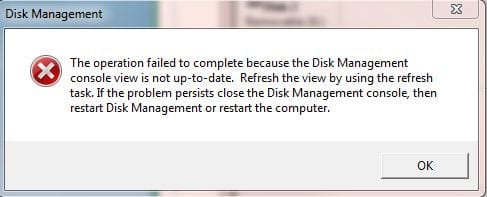
With both drives in and booted up under Windows 7 64, I am trying to access the data files on Vista 32. Unfortunately I dont have a drive letter for the vista 32 drive. I went into disk management to give it a drive letter, but I get an error message when I select drive letter. See attached image.

I tried refreshing and trying again but keep getting same error.

Is it possible to access the Data on the other drive under a NTFS partition? I did set the folders I wanted to access as viewable by everyone. the problem is I cant get a drive letter to the disk.

Help ?
 

Attachments
  • ErrorMsg.JPG
    ErrorMsg.JPG
    22.2 KB · Views: 41

My Computer My Computer

At a glance

Windows 7
OS
Windows 7
Welcome to the Se7enfourms! 1337Vader

Simply unplugging the data cable from the Vista drive would have been enough to prevent any detection and placement of 7 boot entries on the Vista drive there. Upon replugging in the drive for some reason 7 didn't mount it fully where you could assign a logical drive letter to it.

What you have to do now is intialize the Vista drive while in the Disk Management tool. When right clicking on the Vista drive item seen there you should see the option for that unless the drive is already initialized. Once that is done you will likely need to restart the system before you can assign a letter to it.
 

My Computers My Computers

  • At a glance

    W7 Ultimate x64/W10 Pro x64/W11 Pro Triple Bo...AMD Phenom II X4 975 Deneb 3.6ghz - 965 2nd r...Kingston Hyper X DDR3 1600 1.5v 16gb - Hyper ...MSI HD Radeon 5750 1gb - MSI HD Radeon 6450 o...
    Computer type
    PC/Desktop
    Computer Manufacturer/Model Number
    Custom builds = 2
    OS
    W7 Ultimate x64/W10 Pro x64/W11 Pro Triple Boot - Main PC W7 Remote PC Micro ATX W7 Pro x64/W11 Pro
    CPU
    AMD Phenom II X4 975 Deneb 3.6ghz - 965 2nd remote pc
    Motherboard
    Gigabyte GA-790XTA-UD4-Gigabyte GA-880GM-D2H remote pc
    Memory
    Kingston Hyper X DDR3 1600 1.5v 16gb - Hyper X Fury 8gb 2nd
    Graphics Card(s)
    MSI HD Radeon 5750 1gb - MSI HD Radeon 6450 on mini tower
    Sound Card
    Creative Labs X-Fi Xtreme Audio P - Realtek onooard 2nd case
    Monitor(s) Displays
    ASUS VW199T-P 19" HP 2082a Main-HP 2082a 20" remote pc
    Screen Resolution
    Asus 1440x900 - HP 1600x900
    Hard Drives
    WD Black 1TB HD per OS W7, W10, and pending W11 presently on 500gb OS Drive - Pending Triple 1TB HDs for Spanned Storage/backup volume
    Single 2TB external USB enclosure, single 1TB System 7 Host/Boot drive, Pending 8TB external HD for system image b
    PSU
    Corsair 750TX - primary / Corsair CX600 - second
    Case
    Antec 900-2 - SSD compatible / NZXT Vulcan mini tower
    Cooling
    Zalman CNPS9900A
    Keyboard
    AZIO L70 Backlit Letters Gaming - ONN Cordless/USB
    Mouse
    MSI DS200 Programmable, Logitech Cordless
    Internet Speed
    30mbps upgrade - primary hard wired - mini tower usb WiFi
    Antivirus
    GFI VIPRE Internet Security 2014 on W7 2016 beta on W10,
    Browser
    Cyberfox, WaterFox 64bit FF variants, FireFox x64, Pale Moon
    Other Info
    Accomdata fan cooled usb 2.0 PIDE/Sata II, III external enclosure.
    Sambient usb/eSata PATA/Sata II, III external enclosure.
  • At a glance

    W7 Pro x64/W11 ProAMD Deneb 3.6ghz - 965Kingston Hyper X Fury 8gbMSI HD Radeon 6450 DVI Output
    Computer type
    PC/Desktop
    System Manufacturer/Model Number
    CUSTOM ASSEMBLY
    OS
    W7 Pro x64/W11 Pro
    CPU
    AMD Deneb 3.6ghz - 965
    Motherboard
    Gigabyte GA-880GM-D2H remote pc
    Memory
    Kingston Hyper X Fury 8gb
    Graphics Card(s)
    MSI HD Radeon 6450 DVI Output
    Sound Card
    Realtek onooard Creative or Other separate PENDING
    Monitor(s) Displays
    VIZIO 32" LCD TV Separate LCD Pending
    Screen Resolution
    1600x1080
    Hard Drives
    WD 500GB OS Host/Boot WD Green 1TB Storage/Backup
    PSU
    Corsair 600W - THERMALTAKE 600W spare case
    Case
    NZXT Vulcan mini tower
    Cooling
    Twin 120mm Top Fans - 240mm Side Cover
    Keyboard
    ONN Cordless/USB Logitech Cordless
    Mouse
    ONN USB/Cordless - Logitech Cordless
    Internet Speed
    DSL 5G
    Browser
    MS Edge, FireFox, WaterFox x64, FireFox Nightly
    Other Info
    OS Testing-Remote Access to Main TeamViewer
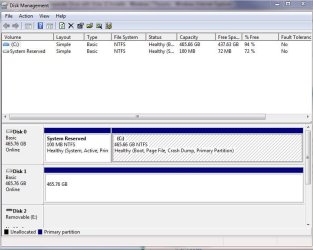
I don't see an option available to initialize. There is a screen shot of the acutal disk manager screen attached.

If I right click the drive space area, anything I choose results in the error message.

If I right click the small "Disk 1" box to the left of the drive space the only options I have are "Convert to Dynamic Disk", "Offline", and "Properties".

I can choose Properties here and it says the device is working properly.

Any other clues?
 

Attachments

  • DiskManager.JPG
    DiskManager.JPG
    63.9 KB · Views: 24

My Computer My Computer

At a glance

Windows 7
OS
Windows 7
The next thing to try right off would be going to the menu bar>actions and clicking the rescan option in the dropdown list there. For some reason the existing Vista primary on Drive #1 seen there isn't being properly detected and mounted while 7 is still detecting a working drive.

When removing the drive did you change sata ports by chance when replugging it back in? That's if those are sata models. It sounds like Windows is trying while something still isn't right like a bad port for sata or even a shaky data cable unless the power plug was ???
 

My Computers My Computers

  • At a glance

    W7 Ultimate x64/W10 Pro x64/W11 Pro Triple Bo...AMD Phenom II X4 975 Deneb 3.6ghz - 965 2nd r...Kingston Hyper X DDR3 1600 1.5v 16gb - Hyper ...MSI HD Radeon 5750 1gb - MSI HD Radeon 6450 o...
    Computer type
    PC/Desktop
    Computer Manufacturer/Model Number
    Custom builds = 2
    OS
    W7 Ultimate x64/W10 Pro x64/W11 Pro Triple Boot - Main PC W7 Remote PC Micro ATX W7 Pro x64/W11 Pro
    CPU
    AMD Phenom II X4 975 Deneb 3.6ghz - 965 2nd remote pc
    Motherboard
    Gigabyte GA-790XTA-UD4-Gigabyte GA-880GM-D2H remote pc
    Memory
    Kingston Hyper X DDR3 1600 1.5v 16gb - Hyper X Fury 8gb 2nd
    Graphics Card(s)
    MSI HD Radeon 5750 1gb - MSI HD Radeon 6450 on mini tower
    Sound Card
    Creative Labs X-Fi Xtreme Audio P - Realtek onooard 2nd case
    Monitor(s) Displays
    ASUS VW199T-P 19" HP 2082a Main-HP 2082a 20" remote pc
    Screen Resolution
    Asus 1440x900 - HP 1600x900
    Hard Drives
    WD Black 1TB HD per OS W7, W10, and pending W11 presently on 500gb OS Drive - Pending Triple 1TB HDs for Spanned Storage/backup volume
    Single 2TB external USB enclosure, single 1TB System 7 Host/Boot drive, Pending 8TB external HD for system image b
    PSU
    Corsair 750TX - primary / Corsair CX600 - second
    Case
    Antec 900-2 - SSD compatible / NZXT Vulcan mini tower
    Cooling
    Zalman CNPS9900A
    Keyboard
    AZIO L70 Backlit Letters Gaming - ONN Cordless/USB
    Mouse
    MSI DS200 Programmable, Logitech Cordless
    Internet Speed
    30mbps upgrade - primary hard wired - mini tower usb WiFi
    Antivirus
    GFI VIPRE Internet Security 2014 on W7 2016 beta on W10,
    Browser
    Cyberfox, WaterFox 64bit FF variants, FireFox x64, Pale Moon
    Other Info
    Accomdata fan cooled usb 2.0 PIDE/Sata II, III external enclosure.
    Sambient usb/eSata PATA/Sata II, III external enclosure.
  • At a glance

    W7 Pro x64/W11 ProAMD Deneb 3.6ghz - 965Kingston Hyper X Fury 8gbMSI HD Radeon 6450 DVI Output
    Computer type
    PC/Desktop
    System Manufacturer/Model Number
    CUSTOM ASSEMBLY
    OS
    W7 Pro x64/W11 Pro
    CPU
    AMD Deneb 3.6ghz - 965
    Motherboard
    Gigabyte GA-880GM-D2H remote pc
    Memory
    Kingston Hyper X Fury 8gb
    Graphics Card(s)
    MSI HD Radeon 6450 DVI Output
    Sound Card
    Realtek onooard Creative or Other separate PENDING
    Monitor(s) Displays
    VIZIO 32" LCD TV Separate LCD Pending
    Screen Resolution
    1600x1080
    Hard Drives
    WD 500GB OS Host/Boot WD Green 1TB Storage/Backup
    PSU
    Corsair 600W - THERMALTAKE 600W spare case
    Case
    NZXT Vulcan mini tower
    Cooling
    Twin 120mm Top Fans - 240mm Side Cover
    Keyboard
    ONN Cordless/USB Logitech Cordless
    Mouse
    ONN USB/Cordless - Logitech Cordless
    Internet Speed
    DSL 5G
    Browser
    MS Edge, FireFox, WaterFox x64, FireFox Nightly
    Other Info
    OS Testing-Remote Access to Main TeamViewer
Back
Top