Problem: Activating LAN in BIOS causes auto shutdown

FinSanity

New member
Local time
10:37 AM
Messages
6
Hello

I just recently installed Windows 7 Ultimate 32-bit as my second OS. I didn't want to upgrade Vista if there was any problems during installation and it seems I was right. First problem I had was installation didn't want to complete. The computer shutdown right after the first reboot.That I got solved by disabling USB and all integrated devices from the BIOS. Installation went fine after that. Everything went fine from then on until I re-activated everything from the BIOS. After that it goes like this: Windows 7 starts to the desktop and installs drivers for a few seconds and then shuts down. And re-starts and keeps doing it over and over. I disabled my integrated devices and then it stabilized.

The problems seem to be with my integrated devices. My BIOS is up to date and everything else seems to be up to date also. It would be nice to use all the devices I have on my computer. No sound and network sucks.

Thanks in advance.

P.S.
My motherboard is an ASUS P5E and I tested the compatibility with MS own Win 7 tester and no problems were found.
 
Last edited:

My Computer

Computer Manufacturer/Model Number
Windows Vista 32 bit Ultimate
OS
Vista
CPU
Intel Core 2 Duo 3Ghz
Motherboard
Asus P5E
Memory
4GB DDR2
Graphics Card(s)
Nvidia 8800
Normally if you activate LAN in the BIOS it is "Boot from"

The setting is to boot over a network, I would just change it back and you should be fine.'

I don't recall any LAN settings in a BIOS you would need to change.
 

My Computer

Computer Manufacturer/Model Number
Keeps changing - (Custom)
OS
Windows 7 Professional x64
CPU
Intel Core i7 860
Motherboard
Gigabyte GA-P55-UD4P
Memory
4GB DDR3 Mushkin 1600Mhz @ 7-8-7-20
Graphics Card(s)
MSI GTS250 1GB DDR3 Twin Frozr
Sound Card
Onboard realtek
Monitor(s) Displays
Samsung SyncMaster 24" P2450 + Samsung 20" 2033
Screen Resolution
1920 X 1080 and 1600 X 900 (#2 system 1440 X 900)
Hard Drives
Patriot Inferno 120GB SSD + 3 WD Blue 640GB drives
PSU
Corsair 750 HX Modular
Case
Lancool PC-K62
Cooling
Cooler Master TX3 CPU cooler and 4-140mm and 1-120mm case
Keyboard
Gigabyte USB keyboard
Mouse
Microsoft wireless laser mouse 5000
Internet Speed
7 Mb down 1.5 up
Other Info
System #2: AMD Phenom II X6 1055T (Freezer 7 Pro cooler) - Gigabyte 880GMA-UD2H - WD 500GB Black - 9500GT (1GB) 500W OCZ modular PSU - Antec 200 case. System #3 (LapTop) Core 2 Duo T6670 - 320GB 7200RPM HD - 4GB DDR3 RAM.
It's not the network boot setting, it's the enable/disable switch for the built in ethernet card.

It looks like this:

Marvell GigaBit LAN [Enabled]
 

My Computer

Computer Manufacturer/Model Number
Windows Vista 32 bit Ultimate
OS
Vista
CPU
Intel Core 2 Duo 3Ghz
Motherboard
Asus P5E
Memory
4GB DDR2
Graphics Card(s)
Nvidia 8800
I see what you're talking about now. You may have to update the BIOS if that is causing the system to keep restarting. Make sure that setting is your problem....it sounds like a different problem to me. I would load optimized defaults and reseat the RAM before I update the BIOS.

Good luck
 

My Computer

Computer Manufacturer/Model Number
Keeps changing - (Custom)
OS
Windows 7 Professional x64
CPU
Intel Core i7 860
Motherboard
Gigabyte GA-P55-UD4P
Memory
4GB DDR3 Mushkin 1600Mhz @ 7-8-7-20
Graphics Card(s)
MSI GTS250 1GB DDR3 Twin Frozr
Sound Card
Onboard realtek
Monitor(s) Displays
Samsung SyncMaster 24" P2450 + Samsung 20" 2033
Screen Resolution
1920 X 1080 and 1600 X 900 (#2 system 1440 X 900)
Hard Drives
Patriot Inferno 120GB SSD + 3 WD Blue 640GB drives
PSU
Corsair 750 HX Modular
Case
Lancool PC-K62
Cooling
Cooler Master TX3 CPU cooler and 4-140mm and 1-120mm case
Keyboard
Gigabyte USB keyboard
Mouse
Microsoft wireless laser mouse 5000
Internet Speed
7 Mb down 1.5 up
Other Info
System #2: AMD Phenom II X6 1055T (Freezer 7 Pro cooler) - Gigabyte 880GMA-UD2H - WD 500GB Black - 9500GT (1GB) 500W OCZ modular PSU - Antec 200 case. System #3 (LapTop) Core 2 Duo T6670 - 320GB 7200RPM HD - 4GB DDR3 RAM.
Thanks for your help. I'm pretty sure it was that. It was the only option I enabled in the BIOS after I got the USB working, since I thought I could go online and look for help.
 

My Computer

Computer Manufacturer/Model Number
Windows Vista 32 bit Ultimate
OS
Vista
CPU
Intel Core 2 Duo 3Ghz
Motherboard
Asus P5E
Memory
4GB DDR2
Graphics Card(s)
Nvidia 8800
BIOS updated and still the problem remains.
 

My Computer

Computer Manufacturer/Model Number
Windows Vista 32 bit Ultimate
OS
Vista
CPU
Intel Core 2 Duo 3Ghz
Motherboard
Asus P5E
Memory
4GB DDR2
Graphics Card(s)
Nvidia 8800
Have you installed the latest drivers for your Ethernet card?
 

My Computer

Computer type
PC/Desktop
Computer Manufacturer/Model Number
DELL VOSTRO 3650
OS
Windows 8.1 PRO
CPU
3rd Generation Intel Core i7‐3612QM CPU @ 2.10GHZ
Memory
8GB DDR3
Graphics Card(s)
NVIDIA GeForce GT 525M (128 bit), 1GB Grpahics
Screen Resolution
1920X1080
Hard Drives
750GB 5400RPM
BIOS updated and still the problem remains.

This is strange. If that was not the problem, it would seem to be drivers. That's the logical next step. If I can think of anything else I will post it here.
 

My Computer

Computer Manufacturer/Model Number
Keeps changing - (Custom)
OS
Windows 7 Professional x64
CPU
Intel Core i7 860
Motherboard
Gigabyte GA-P55-UD4P
Memory
4GB DDR3 Mushkin 1600Mhz @ 7-8-7-20
Graphics Card(s)
MSI GTS250 1GB DDR3 Twin Frozr
Sound Card
Onboard realtek
Monitor(s) Displays
Samsung SyncMaster 24" P2450 + Samsung 20" 2033
Screen Resolution
1920 X 1080 and 1600 X 900 (#2 system 1440 X 900)
Hard Drives
Patriot Inferno 120GB SSD + 3 WD Blue 640GB drives
PSU
Corsair 750 HX Modular
Case
Lancool PC-K62
Cooling
Cooler Master TX3 CPU cooler and 4-140mm and 1-120mm case
Keyboard
Gigabyte USB keyboard
Mouse
Microsoft wireless laser mouse 5000
Internet Speed
7 Mb down 1.5 up
Other Info
System #2: AMD Phenom II X6 1055T (Freezer 7 Pro cooler) - Gigabyte 880GMA-UD2H - WD 500GB Black - 9500GT (1GB) 500W OCZ modular PSU - Antec 200 case. System #3 (LapTop) Core 2 Duo T6670 - 320GB 7200RPM HD - 4GB DDR3 RAM.
Lan update

Welome to Windows 7 Support Forums Finn,
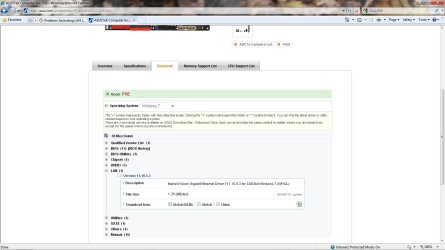
I suggest you update your LAN to the latest update from July of this year.
Attached is the Link to Asus support for Windows 7 in 32 bit, also I'm uploading the image from ASUS for you to view.

Happy New Year from your friends at Windows 7 Support.

Adrian
 

Attachments

  • Lan_gigabyte.jpg
    Lan_gigabyte.jpg
    95.3 KB · Views: 94

My Computer

Computer Manufacturer/Model Number
Custom Build
OS
Windows 7 7600 1 X64
CPU
AMD PHENOM II X 550 PROCESSOR 3.1 ghz
Motherboard
ASUS M4A78-TE
Memory
Corsair 4 gig ddr 3
Graphics Card(s)
ati radeon 3300
Sound Card
ati hd
Monitor(s) Displays
syncmaster 2033sw
Screen Resolution
1600X900 60 hz refresh
Hard Drives
twin_seagates SATA's 1 TB & 500 Gig, hitachi_slimline 160 gig
PSU
antec_550 watt
Case
cooler master GLite
Cooling
stock_heat sink
Internet Speed
20mbs up/ 1.5mbs down
Other Info
favorite child "stewie"
favorite dog "brian"
Lan update

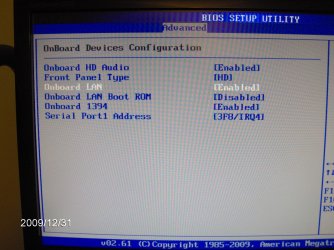
Attached are my bios settings for the onboard lan on an asus mobo.
 

Attachments

  • IM000346.jpg
    IM000346.jpg
    479.7 KB · Views: 396

My Computer

Computer Manufacturer/Model Number
Custom Build
OS
Windows 7 7600 1 X64
CPU
AMD PHENOM II X 550 PROCESSOR 3.1 ghz
Motherboard
ASUS M4A78-TE
Memory
Corsair 4 gig ddr 3
Graphics Card(s)
ati radeon 3300
Sound Card
ati hd
Monitor(s) Displays
syncmaster 2033sw
Screen Resolution
1600X900 60 hz refresh
Hard Drives
twin_seagates SATA's 1 TB & 500 Gig, hitachi_slimline 160 gig
PSU
antec_550 watt
Case
cooler master GLite
Cooling
stock_heat sink
Internet Speed
20mbs up/ 1.5mbs down
Other Info
favorite child "stewie"
favorite dog "brian"

My Computer

Computer Manufacturer/Model Number
Custom Build
OS
Windows 7 7600 1 X64
CPU
AMD PHENOM II X 550 PROCESSOR 3.1 ghz
Motherboard
ASUS M4A78-TE
Memory
Corsair 4 gig ddr 3
Graphics Card(s)
ati radeon 3300
Sound Card
ati hd
Monitor(s) Displays
syncmaster 2033sw
Screen Resolution
1600X900 60 hz refresh
Hard Drives
twin_seagates SATA's 1 TB & 500 Gig, hitachi_slimline 160 gig
PSU
antec_550 watt
Case
cooler master GLite
Cooling
stock_heat sink
Internet Speed
20mbs up/ 1.5mbs down
Other Info
favorite child "stewie"
favorite dog "brian"
Adrian:
It's exactly that which I'm talking about. I updated the drivers but it didn't help. I disable and everything's fine but when activated, nothing but trouble. I'm beginning to suspect that my on board LAN is busted up but I don't know how that could be since I'm posting this from the same computer but using Vista atm.
 

My Computer

Computer Manufacturer/Model Number
Windows Vista 32 bit Ultimate
OS
Vista
CPU
Intel Core 2 Duo 3Ghz
Motherboard
Asus P5E
Memory
4GB DDR2
Graphics Card(s)
Nvidia 8800
Do you think it would work if I installed an external network card in my computer and left the BIOS LAN option disabled? It shouldn't interfere with an external card right?
 

My Computer

Computer Manufacturer/Model Number
Windows Vista 32 bit Ultimate
OS
Vista
CPU
Intel Core 2 Duo 3Ghz
Motherboard
Asus P5E
Memory
4GB DDR2
Graphics Card(s)
Nvidia 8800
After update Bios on laptop Toshiba Satellite A-210-U12 from Toshiba website my pc has a black screen no boot menu.I can't start windows. Help!
 

My Computer

OS
windows 7
Back
Top