Solved Problem adding space to my C drive???

provlima

New member
Member
VIP
Local time
11:39 AM
Messages
101
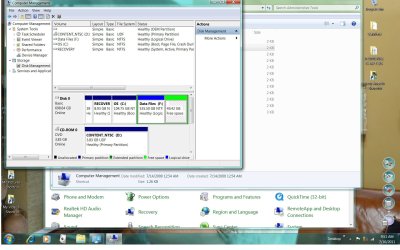
I'm trying to expand my C partition and thought that by shrinking my data partition by 50 GB that would expand my C drive by that amount. The below screen shot shows that the 50 GB went into a green area called free space.
How do I combine the free space to my C drive to get it to expand by the size in the free space partition????
Thanks for your help!!
Jim
 
Last edited:

My Computer

OS
w7
Hello Jim.


You need to use the method outlined in this tutorial at the link below to post the image.
In the Windows start menu right click computer and click manage, in the left pane of the "Computer Management" window that opens click disk management and post a maximized snip of that.

How to Upload and Post a Screenshot and File in Seven Forums


.
 
Last edited:

My Computer

Computer Manufacturer/Model Number
* BFK Customs *
OS
W 7 64-bit Ultimate
CPU
Intel Q9550 Yorkfield
Motherboard
ASUS P5Q Pro
Memory
8GB Dominator 8500C5D
Graphics Card(s)
ATI : XFX 5870
Sound Card
Realtek HD Audio 7-1
Monitor(s) Displays
1x 47" LCD HDMI & 3x 26" LCD HDMI
Screen Resolution
1920x1080P & 1920x1200
Hard Drives
1x 80GB Intel X25-M G2 SSD : 1x 500GB & 1x 640GB WD Caviar Black(s)
PSU
Corsair 620HX
Case
Cooler Master RC-690
Cooling
Tuniq Tower 120, 2x 140mm and 3x 120mm case fans
Keyboard
Microsoft 500
Mouse
Razer Diamondback 3G
Internet Speed
14 Mb/s
Other Info
1x Koutech 3Gb/s SATA HDD Hot Swap Rack
sorry about the screwup...here is the partition screenshot

.......
 

Attachments

  • screen.jpg
    screen.jpg
    183.4 KB · Views: 668

My Computer

OS
w7
How do I delete the post?????

sorry about that.....how do I edit/delete the errors????
 

My Computer

OS
w7
Hello again.


Right click the Free Space to create another Logical drive, then move everything on the F: Logical to the new created Logical, then delete the F: Logical using Windows disk management, then you will have to right click, delete the Free Space that creates then you should be able to extend C: into that unallocated space and be sure to post back with any further questions you may have and to keep us informed.
 

My Computer

Computer Manufacturer/Model Number
* BFK Customs *
OS
W 7 64-bit Ultimate
CPU
Intel Q9550 Yorkfield
Motherboard
ASUS P5Q Pro
Memory
8GB Dominator 8500C5D
Graphics Card(s)
ATI : XFX 5870
Sound Card
Realtek HD Audio 7-1
Monitor(s) Displays
1x 47" LCD HDMI & 3x 26" LCD HDMI
Screen Resolution
1920x1080P & 1920x1200
Hard Drives
1x 80GB Intel X25-M G2 SSD : 1x 500GB & 1x 640GB WD Caviar Black(s)
PSU
Corsair 620HX
Case
Cooler Master RC-690
Cooling
Tuniq Tower 120, 2x 140mm and 3x 120mm case fans
Keyboard
Microsoft 500
Mouse
Razer Diamondback 3G
Internet Speed
14 Mb/s
Other Info
1x Koutech 3Gb/s SATA HDD Hot Swap Rack
Thank you for helping me through this task. I am a little anxious that if I make a mistake I may delete my files on the F drive. Could you please help clarify the steps you gave me below?


1 Right click the Free Space to create another Logical drive, then move everything on the F: Logical to the new created Logical.
When I right click on the free space will I get a drop down menu with the option to create another logical drive?


2 then delete the F: Logical using Windows disk management
I them right click the F partition and delete it?? What happens to all the 120 GB of data currently stored on that F partition??


3 then you will have to right click
what partition do I have to right click on?

4 delete the Free Space that creates
when I complete the deletion there will be another (green section) partition of free space??

5 then you should be able to extend C: into that unallocated space
When I then right click on C the drop down menu will give me the option to expand C?? (that option is currently grayed out)


Thanks again for your help, it is much appreciated!!
Jim
 

My Computer

OS
w7
right click the current Free Space and delete it so it will become unallocated space.

You will have to shrink the F: Logical more, I would suggest an additional 200GB

then create a new Logical from that 250GB block of unallocated space

move everything on the F: Logical to the new created Logical so there is nothing left on the F: Logical to lose.

delete the F: Logical in Windows disk management

right click that Free Space and delete that so it will be unallocated space

then extend C: into that unallocated space.
 

My Computer

Computer Manufacturer/Model Number
* BFK Customs *
OS
W 7 64-bit Ultimate
CPU
Intel Q9550 Yorkfield
Motherboard
ASUS P5Q Pro
Memory
8GB Dominator 8500C5D
Graphics Card(s)
ATI : XFX 5870
Sound Card
Realtek HD Audio 7-1
Monitor(s) Displays
1x 47" LCD HDMI & 3x 26" LCD HDMI
Screen Resolution
1920x1080P & 1920x1200
Hard Drives
1x 80GB Intel X25-M G2 SSD : 1x 500GB & 1x 640GB WD Caviar Black(s)
PSU
Corsair 620HX
Case
Cooler Master RC-690
Cooling
Tuniq Tower 120, 2x 140mm and 3x 120mm case fans
Keyboard
Microsoft 500
Mouse
Razer Diamondback 3G
Internet Speed
14 Mb/s
Other Info
1x Koutech 3Gb/s SATA HDD Hot Swap Rack
thanks for your response
I can't delete the free space, that option is greyed out, the only option is New Simple Volume
 

My Computer

OS
w7
That shouldn't be so.


OK then shrink F: by another 200GB, then create a Logical of that 250GB Free Space and then post another snip of disk management for me to see.
 

My Computer

Computer Manufacturer/Model Number
* BFK Customs *
OS
W 7 64-bit Ultimate
CPU
Intel Q9550 Yorkfield
Motherboard
ASUS P5Q Pro
Memory
8GB Dominator 8500C5D
Graphics Card(s)
ATI : XFX 5870
Sound Card
Realtek HD Audio 7-1
Monitor(s) Displays
1x 47" LCD HDMI & 3x 26" LCD HDMI
Screen Resolution
1920x1080P & 1920x1200
Hard Drives
1x 80GB Intel X25-M G2 SSD : 1x 500GB & 1x 640GB WD Caviar Black(s)
PSU
Corsair 620HX
Case
Cooler Master RC-690
Cooling
Tuniq Tower 120, 2x 140mm and 3x 120mm case fans
Keyboard
Microsoft 500
Mouse
Razer Diamondback 3G
Internet Speed
14 Mb/s
Other Info
1x Koutech 3Gb/s SATA HDD Hot Swap Rack
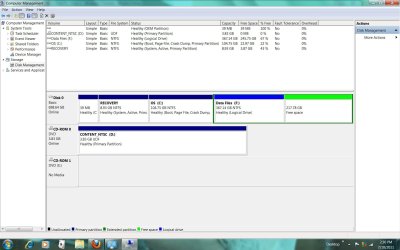
Its shrinking the F Drive but not by as much as I want My F File is down to 467GB and free space 118GB. Should I continue shrinking it.??

Will I be able to increase my C Drive by the 50GB or will I have a huge amount of GB space on my C drive that is wasted.

In other words am I going to be able to shrink my C drive to 150 GB when all this shrinkage and space allocation is done??
 

Attachments

  • cc.jpg
    cc.jpg
    135.1 KB · Views: 52

My Computer

OS
w7
I thought you said you have 120GB of data that needs moved off the F: Logical, that isn't enough for that now is it.


Shrink F: again, enter this 102400 as the amount when you are presented with the "how much" dialog box.
 

My Computer

Computer Manufacturer/Model Number
* BFK Customs *
OS
W 7 64-bit Ultimate
CPU
Intel Q9550 Yorkfield
Motherboard
ASUS P5Q Pro
Memory
8GB Dominator 8500C5D
Graphics Card(s)
ATI : XFX 5870
Sound Card
Realtek HD Audio 7-1
Monitor(s) Displays
1x 47" LCD HDMI & 3x 26" LCD HDMI
Screen Resolution
1920x1080P & 1920x1200
Hard Drives
1x 80GB Intel X25-M G2 SSD : 1x 500GB & 1x 640GB WD Caviar Black(s)
PSU
Corsair 620HX
Case
Cooler Master RC-690
Cooling
Tuniq Tower 120, 2x 140mm and 3x 120mm case fans
Keyboard
Microsoft 500
Mouse
Razer Diamondback 3G
Internet Speed
14 Mb/s
Other Info
1x Koutech 3Gb/s SATA HDD Hot Swap Rack
Thanks for your help. Sorry for the confusion but I originally posted that I'm trying to expand my C partition by 50GB and thought that by shrinking my data partition by 50 GB that would expand my C drive by that amount.

The 50 GB went into a green area called free space.
How do I combine the free space to my C drive to get it to expand by the size in the free space partition????
Thanks for your help!! My C Drive is currently 105 GB and I want it to be expanded to 155GB
How can I get the free space of 118 GB over to my C Drive??
Thanks for your help!
 

My Computer

OS
w7
Thanks for your help. Sorry for the confusion but I originally posted that I'm trying to expand my C partition by 50GB and thought that by shrinking my data partition by 50 GB that would expand my C drive by that amount.

The 50 GB went into a green area called free space.
How do I combine the free space to my C drive to get it to expand by the size in the free space partition????
Thanks for your help!! My C Drive is currently 105 GB and I want it to be expanded to 155GB
How can I get the free space of 118 GB over to my C Drive??
Thanks for your help!


I'm fully aware what you want and I'm showing you the only way to accomplish this, the way you think cannot be done without the use of purchased 3rd party software.

It is my pleasure to help you though. ;)
 

My Computer

Computer Manufacturer/Model Number
* BFK Customs *
OS
W 7 64-bit Ultimate
CPU
Intel Q9550 Yorkfield
Motherboard
ASUS P5Q Pro
Memory
8GB Dominator 8500C5D
Graphics Card(s)
ATI : XFX 5870
Sound Card
Realtek HD Audio 7-1
Monitor(s) Displays
1x 47" LCD HDMI & 3x 26" LCD HDMI
Screen Resolution
1920x1080P & 1920x1200
Hard Drives
1x 80GB Intel X25-M G2 SSD : 1x 500GB & 1x 640GB WD Caviar Black(s)
PSU
Corsair 620HX
Case
Cooler Master RC-690
Cooling
Tuniq Tower 120, 2x 140mm and 3x 120mm case fans
Keyboard
Microsoft 500
Mouse
Razer Diamondback 3G
Internet Speed
14 Mb/s
Other Info
1x Koutech 3Gb/s SATA HDD Hot Swap Rack
I shrunk by another 102400
I still have no option to delete the free space
Jim
 

Attachments

  • cccc.jpg
    cccc.jpg
    131.2 KB · Views: 27

My Computer

OS
w7
Don't delete it, now create a Logical it the Free Space.
 

My Computer

Computer Manufacturer/Model Number
* BFK Customs *
OS
W 7 64-bit Ultimate
CPU
Intel Q9550 Yorkfield
Motherboard
ASUS P5Q Pro
Memory
8GB Dominator 8500C5D
Graphics Card(s)
ATI : XFX 5870
Sound Card
Realtek HD Audio 7-1
Monitor(s) Displays
1x 47" LCD HDMI & 3x 26" LCD HDMI
Screen Resolution
1920x1080P & 1920x1200
Hard Drives
1x 80GB Intel X25-M G2 SSD : 1x 500GB & 1x 640GB WD Caviar Black(s)
PSU
Corsair 620HX
Case
Cooler Master RC-690
Cooling
Tuniq Tower 120, 2x 140mm and 3x 120mm case fans
Keyboard
Microsoft 500
Mouse
Razer Diamondback 3G
Internet Speed
14 Mb/s
Other Info
1x Koutech 3Gb/s SATA HDD Hot Swap Rack
I take it I start at 5.

In the middle pane, right click on the empty unallocated partition or volume and click on New Simple Volume.
In my case is that the 218 GB free space that was created??

7. Type in how many MB (1 GB = 1024 MB) you want to use from the unallocated partition to create the new partition with, then click on the Next button.
Would that be 51200 for 50GB?

??If you want to use all of the unallocated partition to create the new partition with, then type all of the maximum disk space shown for the unallocated partition. If you do not use all of the maximum disk space, then you can use the left over space from the unallocted partition to create another new partition with.
[FONT=&quot]
[/FONT]

8. Select an available drive letter that you want to be assigned to the new partition in Computer, then click on the Next button.


9. Type in a volume label name that you want for the new partition, check the Perform a quick format box, and click on the Next button.


If I use 50 GB as mentioned above will I have an additional partition of 168 GB of space? Would I be able to add this to my F Drive?

[FONT=&quot]
[/FONT]
 

My Computer

OS
w7
Please listen ...


right click the Free Space and click New Simple Volume.

create a partition out of ALL the Free Space, remember you need a partition big enough to move all the data on the F: partition to, RIGHT?
 

My Computer

Computer Manufacturer/Model Number
* BFK Customs *
OS
W 7 64-bit Ultimate
CPU
Intel Q9550 Yorkfield
Motherboard
ASUS P5Q Pro
Memory
8GB Dominator 8500C5D
Graphics Card(s)
ATI : XFX 5870
Sound Card
Realtek HD Audio 7-1
Monitor(s) Displays
1x 47" LCD HDMI & 3x 26" LCD HDMI
Screen Resolution
1920x1080P & 1920x1200
Hard Drives
1x 80GB Intel X25-M G2 SSD : 1x 500GB & 1x 640GB WD Caviar Black(s)
PSU
Corsair 620HX
Case
Cooler Master RC-690
Cooling
Tuniq Tower 120, 2x 140mm and 3x 120mm case fans
Keyboard
Microsoft 500
Mouse
Razer Diamondback 3G
Internet Speed
14 Mb/s
Other Info
1x Koutech 3Gb/s SATA HDD Hot Swap Rack
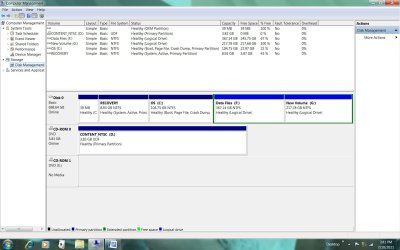
I followed your steps
Here's what the HD looks like now
what do I do now to accomplish adding the 5O GB to the C Drive?
Appreciate your help

Jim
 

Attachments

  • ddd.jpg
    ddd.jpg
    135.8 KB · Views: 50

My Computer

OS
w7
Back
Top