Solved Problem adding space to my C drive???

Low country friend,
Tried to with the boot version and still could not acoomplish expanding G
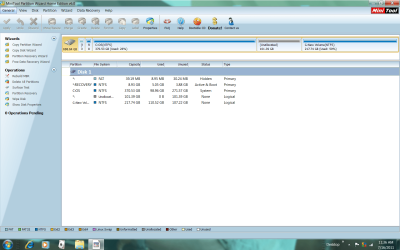
This is what it looks like now. Its been very frustrating. Is there anything else you can suggest to combine the free space with the G data partition with the current arrangement of my HD??
 

Attachments

  • Fri.png
    Fri.png
    70.1 KB · Views: 19

My Computer

OS
w7
Sorry Jim, I'm at a loss; is all the data on G: ok, no issues / loss?
 

My Computer

Computer Manufacturer/Model Number
* BFK Customs *
OS
W 7 64-bit Ultimate
CPU
Intel Q9550 Yorkfield
Motherboard
ASUS P5Q Pro
Memory
8GB Dominator 8500C5D
Graphics Card(s)
ATI : XFX 5870
Sound Card
Realtek HD Audio 7-1
Monitor(s) Displays
1x 47" LCD HDMI & 3x 26" LCD HDMI
Screen Resolution
1920x1080P & 1920x1200
Hard Drives
1x 80GB Intel X25-M G2 SSD : 1x 500GB & 1x 640GB WD Caviar Black(s)
PSU
Corsair 620HX
Case
Cooler Master RC-690
Cooling
Tuniq Tower 120, 2x 140mm and 3x 120mm case fans
Keyboard
Microsoft 500
Mouse
Razer Diamondback 3G
Internet Speed
14 Mb/s
Other Info
1x Koutech 3Gb/s SATA HDD Hot Swap Rack
all the data is on G, was trying to combine the 100GB free space with the G partition with no success.
I guess I'll just have to live with the 217GB partition for all my data, and the loss of 100GB of potential space use.
You have been very kind and patient with sharing your expertise and time and for that I am very appreciative.
Thanks again friend!!
Jim
 

My Computer

OS
w7
Post a snip of the installed Partition Wizard so I can see what it sees.
 

My Computer

Computer Manufacturer/Model Number
* BFK Customs *
OS
W 7 64-bit Ultimate
CPU
Intel Q9550 Yorkfield
Motherboard
ASUS P5Q Pro
Memory
8GB Dominator 8500C5D
Graphics Card(s)
ATI : XFX 5870
Sound Card
Realtek HD Audio 7-1
Monitor(s) Displays
1x 47" LCD HDMI & 3x 26" LCD HDMI
Screen Resolution
1920x1080P & 1920x1200
Hard Drives
1x 80GB Intel X25-M G2 SSD : 1x 500GB & 1x 640GB WD Caviar Black(s)
PSU
Corsair 620HX
Case
Cooler Master RC-690
Cooling
Tuniq Tower 120, 2x 140mm and 3x 120mm case fans
Keyboard
Microsoft 500
Mouse
Razer Diamondback 3G
Internet Speed
14 Mb/s
Other Info
1x Koutech 3Gb/s SATA HDD Hot Swap Rack
good morning!
here is the screenshot
 

Attachments

  • pwscreenshot.png
    pwscreenshot.png
    90.9 KB · Views: 11

My Computer

OS
w7
Hello.


While there, you can't right click G: and drag the left border all the way to the left and "Apply"?
 

My Computer

Computer Manufacturer/Model Number
* BFK Customs *
OS
W 7 64-bit Ultimate
CPU
Intel Q9550 Yorkfield
Motherboard
ASUS P5Q Pro
Memory
8GB Dominator 8500C5D
Graphics Card(s)
ATI : XFX 5870
Sound Card
Realtek HD Audio 7-1
Monitor(s) Displays
1x 47" LCD HDMI & 3x 26" LCD HDMI
Screen Resolution
1920x1080P & 1920x1200
Hard Drives
1x 80GB Intel X25-M G2 SSD : 1x 500GB & 1x 640GB WD Caviar Black(s)
PSU
Corsair 620HX
Case
Cooler Master RC-690
Cooling
Tuniq Tower 120, 2x 140mm and 3x 120mm case fans
Keyboard
Microsoft 500
Mouse
Razer Diamondback 3G
Internet Speed
14 Mb/s
Other Info
1x Koutech 3Gb/s SATA HDD Hot Swap Rack
Friend...that is the crux of the problem
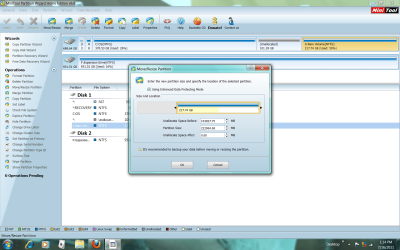
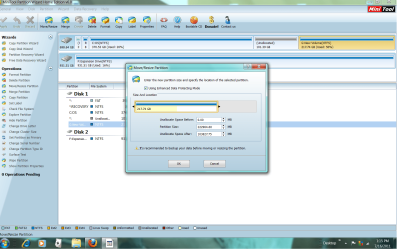
As you can see on the before and after screenshots below the unallocated 101.39GB is moving from the right of G to its left and not combining with the G space to expand the G drive to 319GB which is my objective.
thanks for your help!
 

Attachments

  • before dragging to left.png
    before dragging to left.png
    140.1 KB · Views: 7
  • after dragging to left.png
    after dragging to left.png
    134.7 KB · Views: 4

My Computer

OS
w7
I don't know if this will work or not.


Go ahead and move it all to the left and apply and do all the steps so the Free Space will be on the right of G:, restart the PC then see if all the Free Space is to the right in Windows 7 disk management then see if disk management will extend G: into the Free Space.


This whole silly thing makes no sence at all. :shock:
 

My Computer

Computer Manufacturer/Model Number
* BFK Customs *
OS
W 7 64-bit Ultimate
CPU
Intel Q9550 Yorkfield
Motherboard
ASUS P5Q Pro
Memory
8GB Dominator 8500C5D
Graphics Card(s)
ATI : XFX 5870
Sound Card
Realtek HD Audio 7-1
Monitor(s) Displays
1x 47" LCD HDMI & 3x 26" LCD HDMI
Screen Resolution
1920x1080P & 1920x1200
Hard Drives
1x 80GB Intel X25-M G2 SSD : 1x 500GB & 1x 640GB WD Caviar Black(s)
PSU
Corsair 620HX
Case
Cooler Master RC-690
Cooling
Tuniq Tower 120, 2x 140mm and 3x 120mm case fans
Keyboard
Microsoft 500
Mouse
Razer Diamondback 3G
Internet Speed
14 Mb/s
Other Info
1x Koutech 3Gb/s SATA HDD Hot Swap Rack
Dejavu.. moved the free space to the right.... and the windows extend option is again greyed out ...I guess the PC has gotten the best of me...it refuses to budge :(
 

My Computer

OS
w7
I'm completely at a loss now mate.
 

My Computer

Computer Manufacturer/Model Number
* BFK Customs *
OS
W 7 64-bit Ultimate
CPU
Intel Q9550 Yorkfield
Motherboard
ASUS P5Q Pro
Memory
8GB Dominator 8500C5D
Graphics Card(s)
ATI : XFX 5870
Sound Card
Realtek HD Audio 7-1
Monitor(s) Displays
1x 47" LCD HDMI & 3x 26" LCD HDMI
Screen Resolution
1920x1080P & 1920x1200
Hard Drives
1x 80GB Intel X25-M G2 SSD : 1x 500GB & 1x 640GB WD Caviar Black(s)
PSU
Corsair 620HX
Case
Cooler Master RC-690
Cooling
Tuniq Tower 120, 2x 140mm and 3x 120mm case fans
Keyboard
Microsoft 500
Mouse
Razer Diamondback 3G
Internet Speed
14 Mb/s
Other Info
1x Koutech 3Gb/s SATA HDD Hot Swap Rack
solved the problem!! Thank you my friend

Hi friend,
I wanted to get back to you and let you know I finally solved the problem which has been frustrating us both. Long story short I applied what you taught me earlier in the thread about the Diskpart tool and was able to extend the G (Data) disk to unallocated volume on the right of it. I also tried the free Easyus partition manager but got the same frustrating results as Partition Wizard, then decided to try Diskpart.
I now have a 498GB Data drive. I can't thank you enough for helping me!!
Your friend from Maryland
Jim
 

My Computer

OS
w7
Hello again my friend Jim!


Very well done, good job and thanks for the update, I was hoping to hear you got it sorted.


:party:
 

My Computer

Computer Manufacturer/Model Number
* BFK Customs *
OS
W 7 64-bit Ultimate
CPU
Intel Q9550 Yorkfield
Motherboard
ASUS P5Q Pro
Memory
8GB Dominator 8500C5D
Graphics Card(s)
ATI : XFX 5870
Sound Card
Realtek HD Audio 7-1
Monitor(s) Displays
1x 47" LCD HDMI & 3x 26" LCD HDMI
Screen Resolution
1920x1080P & 1920x1200
Hard Drives
1x 80GB Intel X25-M G2 SSD : 1x 500GB & 1x 640GB WD Caviar Black(s)
PSU
Corsair 620HX
Case
Cooler Master RC-690
Cooling
Tuniq Tower 120, 2x 140mm and 3x 120mm case fans
Keyboard
Microsoft 500
Mouse
Razer Diamondback 3G
Internet Speed
14 Mb/s
Other Info
1x Koutech 3Gb/s SATA HDD Hot Swap Rack
Back
Top