Solved Problem Changing Backup Drive Designation

hwp

New member
Local time
10:38 AM
Messages
10
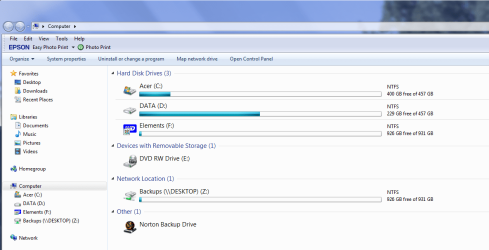
I recently changed from having a desktop and a laptop networked to having two Win7 desktop computers networked. I have an external harddrive attached to DESKTOP for backup. Part of that external harddrive is designated as Backups(\\DESKTOP)(Z) . I am running Norton 360 on both desktops and they both backup to drive Z:. I would like to change the name of DESKTOP to something like DESKTOP1 (to differentiate it from DESKTOP2), which I know how to do, but I don't know how to change the designation of the Z: portion of the external harddrive. When I try to edit Backups(\\DESKTOP)(Z) I get a bing. Is there way to change the Z: drive designation?
 

My Computer My Computer

At a glance

Windows 7
Computer Manufacturer/Model Number
Acer Z5700
OS
Windows 7
Hi,

That looks like you mapped Z:. I think you can rename it by double-clicking it, and then renaming it.

Post back if you need more help.

Regards,
Golden
 

My Computer My Computer

At a glance

Windows 10 Pro x64 ; Xubuntu x64Intel i7 860 @ 2.80 GHz O/C'ed to 4.0GHz16GB Corsair Vengance DDR3 @ 661 MHz Dual Cha...EVGA NVidia GTX 560 1024MB
Computer type
PC/Desktop
Computer Manufacturer/Model Number
Golden Mk. I.4
OS
Windows 10 Pro x64 ; Xubuntu x64
CPU
Intel i7 860 @ 2.80 GHz O/C'ed to 4.0GHz
Motherboard
Gigabyte P55A-UD3R Rev.1. Award BIOS F13
Memory
16GB Corsair Vengance DDR3 @ 661 MHz Dual Channel (9-9-9-24)
Graphics Card(s)
EVGA NVidia GTX 560 1024MB
Sound Card
Realtek Integrated
Monitor(s) Displays
Dual Samsung SyncMaster 2494HS
Screen Resolution
1920*1080 and 1920*1080
Hard Drives
1*Samsung 840 EVO 120GB SSD;
1*OCZ Vertex 2 60GB SSD;
2*Samsung F3 SpinPoint 1TB in RAID0;
1*Samsung F1 SpinPoint 1TB;
2*Western Digital 1TB External USB 3.0
1*Western Digital 500GB External USB 3.0
1*Seagate 500GB External USB 2.0
PSU
Thermaltake ToughPower QFan 750W
Case
Thermaltake Element S VK60001W2Z
Cooling
Corsair H60 Water Cooling, 2*230mm and 2*80mm case fans
Keyboard
Logitech G110
Mouse
Logitech MX518
Thanks for the suggestion. After going into the Control Panel and selecting "Computer" I got a list of the various components. I tried a double left click on Backups(\\DESKTOP)(Z) and got a list of the files on the drive. I then right clicked on the Backups(\\DESKTOP)(Z) component and got a submenu. From that I selected the "rename" option. But when I tried to change the drive name I got a beep.

I can't remember if I created the Z: drive or if Norton 360 created it.

I am wondering if I have to reformat the hardrive and start over.

All suggestions are appreciated.
 

My Computer My Computer

At a glance

Windows 7
Computer Manufacturer/Model Number
Acer Z5700
OS
Windows 7
Hi,

OK. Are you using Norton360 to do backups?

Can you take a screen capture of your explorer showing this Z drive, and post it here?

Regards,
Golden
 

My Computer My Computer

At a glance

Windows 10 Pro x64 ; Xubuntu x64Intel i7 860 @ 2.80 GHz O/C'ed to 4.0GHz16GB Corsair Vengance DDR3 @ 661 MHz Dual Cha...EVGA NVidia GTX 560 1024MB
Computer type
PC/Desktop
Computer Manufacturer/Model Number
Golden Mk. I.4
OS
Windows 10 Pro x64 ; Xubuntu x64
CPU
Intel i7 860 @ 2.80 GHz O/C'ed to 4.0GHz
Motherboard
Gigabyte P55A-UD3R Rev.1. Award BIOS F13
Memory
16GB Corsair Vengance DDR3 @ 661 MHz Dual Channel (9-9-9-24)
Graphics Card(s)
EVGA NVidia GTX 560 1024MB
Sound Card
Realtek Integrated
Monitor(s) Displays
Dual Samsung SyncMaster 2494HS
Screen Resolution
1920*1080 and 1920*1080
Hard Drives
1*Samsung 840 EVO 120GB SSD;
1*OCZ Vertex 2 60GB SSD;
2*Samsung F3 SpinPoint 1TB in RAID0;
1*Samsung F1 SpinPoint 1TB;
2*Western Digital 1TB External USB 3.0
1*Western Digital 500GB External USB 3.0
1*Seagate 500GB External USB 2.0
PSU
Thermaltake ToughPower QFan 750W
Case
Thermaltake Element S VK60001W2Z
Cooling
Corsair H60 Water Cooling, 2*230mm and 2*80mm case fans
Keyboard
Logitech G110
Mouse
Logitech MX518
Yes I am using Norton 360 for my backups. Is this the screen shot you wanted to see?
 

Attachments

  • acerscreen.png
    acerscreen.png
    45.2 KB · Views: 9

My Computer My Computer

At a glance

Windows 7
Computer Manufacturer/Model Number
Acer Z5700
OS
Windows 7
Hi,

Yep. OK, usually you should just be able to rename it as I indicated, but I think that folder is controlled by Norton (are you using that for antivirus too?) so it won't allow it to be renamed.

Since you don't remember if Norton set that up for you, I suspect that if you wanted to change it, you would have to re-configure your Norton backup again. Unfortunately, I dont really know anything about it so I can't offer any advice on that. Perhaps you could look through the Norton help on that?

Let us know what you find out.

Regards,
Golden
 

My Computer My Computer

At a glance

Windows 10 Pro x64 ; Xubuntu x64Intel i7 860 @ 2.80 GHz O/C'ed to 4.0GHz16GB Corsair Vengance DDR3 @ 661 MHz Dual Cha...EVGA NVidia GTX 560 1024MB
Computer type
PC/Desktop
Computer Manufacturer/Model Number
Golden Mk. I.4
OS
Windows 10 Pro x64 ; Xubuntu x64
CPU
Intel i7 860 @ 2.80 GHz O/C'ed to 4.0GHz
Motherboard
Gigabyte P55A-UD3R Rev.1. Award BIOS F13
Memory
16GB Corsair Vengance DDR3 @ 661 MHz Dual Channel (9-9-9-24)
Graphics Card(s)
EVGA NVidia GTX 560 1024MB
Sound Card
Realtek Integrated
Monitor(s) Displays
Dual Samsung SyncMaster 2494HS
Screen Resolution
1920*1080 and 1920*1080
Hard Drives
1*Samsung 840 EVO 120GB SSD;
1*OCZ Vertex 2 60GB SSD;
2*Samsung F3 SpinPoint 1TB in RAID0;
1*Samsung F1 SpinPoint 1TB;
2*Western Digital 1TB External USB 3.0
1*Western Digital 500GB External USB 3.0
1*Seagate 500GB External USB 2.0
PSU
Thermaltake ToughPower QFan 750W
Case
Thermaltake Element S VK60001W2Z
Cooling
Corsair H60 Water Cooling, 2*230mm and 2*80mm case fans
Keyboard
Logitech G110
Mouse
Logitech MX518
Thanks for the reply. I can live with things as they are so I'm going to leave it as it is.
 

My Computer My Computer

At a glance

Windows 7
Computer Manufacturer/Model Number
Acer Z5700
OS
Windows 7
Back
Top