JavaScript is disabled. For a better experience, please enable JavaScript in your browser before proceeding.
You are using an out of date browser. It may not display this or other websites correctly.
You should upgrade or use an
alternative browser .
Problem downloading from smartphone
I have a Samsung Galaxy Ace 2 smartphone, and am trying to download photos from it to the harddrive.
Have installed the Samsung software and when we hook up the phone to the computer we hear the device connect sound but it does not show up as a drive.
Have also hooked up the mini SD card via a hub but the pictures I want are on the phone internal memory.
Nothing shows up in Computer as a drive and the USB's drivers are all up to date
Can anyone help us as please as we are now at a loss as to what to do.
Computer Manufacturer/Model Number Custom made upgraded by my brother OS Windows 7 Home Premium 64bit SP1 CPU Athon II X2 260 @ 3.2Ghz Motherboard Gigabyte GA-MA78LMT-S2 (Socket M2) Memory 8GB Kingston DDR3 1333Mhz Graphics Card(s) On board Radeon 3000 Sound Card On board Monitor(s) Displays 22" E-Machines LCD backlit Hard Drives Samsung 830 120GB (boot)
Samsung Spinpoint 7200rpm SATA 500GB (data) PSU Gigabyte GE-C420A-C2 420W (peak) Case Gigabyte GZ-M2BPD-710 Micro ATX Cooling Coolermaster Hyper TX3
New member
Guru
Gold Member
VIP
You don't need the Samsung bloatware KIES to access the data on the device. Remove this software and just plug the smartphone, Windows will automatically install the MTP drivers (provided the device is in MTP mode, NOT in image/KIES mode).
Computer type PC/Desktop Computer Manufacturer/Model Number Custom Build OS Windows 10 Pro x64, Arch Linux CPU Intel Core 2 Quad Q8200 OC'd 3.08GHz Motherboard Asus Rampage formula LGA775 Memory 8GB DDR2 900Mhz Graphics Card(s) MSI GT730 2GB GDDR5 (Kepler) Sound Card Supreme FX2 Monitor(s) Displays Samsung LS22F350 LED Screen Resolution 1080P Hard Drives Kingston SSDNow UV400 120GB, 500GB Hitachi, 2TB Samsung, 500GB Seagate FreeAgent, 640GB Samsung, 160GB Toshiba (Arch) PSU AeroCool 500W Bronze Cooling Cooler Master V6 + 3X fans Keyboard Prolink keyboard Mouse Logitech M705 Internet Speed 1MiB/s Browser Chrome Beta
Computer type PC/Desktop Computer Manufacturer/Model Number Self Built OS Win 10 Pro x64 CPU Intel I5-2500K @3.3GHz Motherboard Asrock P67 Extreme4 Memory 16GB G.Skill Ripjaws X (4x4GB) Graphics Card(s) EVGA GeForce 750 Ti SC 2GB Sound Card ASUS Xonar DG 5.1 Channels 24-bit 96KHz PCI Interface Sound Monitor(s) Displays auria eq2367 Screen Resolution 1920 x 1080 Hard Drives 250GB Samsung 850 EVO SSD
1TB WD Blue
1TB Hitachi PSU SeaSonic X 650W 80 Plus Gold Case Corsair Obsidian 750D Cooling Corsair H60, Three 140mm case fans Keyboard Logitech Wireless Keyboard K520 Mouse Logitech Wireless Mouse M310 Internet Speed Wave Broadband ~ 100 dn 5 up Antivirus Windows Defender, Malwarebytes Premium Browser Edge, IE11, Chrome Other Info Laptop specs: HP g7-1365dx /
CPU: AMD A6-3420M APU with Radeon(tm) HD Graphics /
RAM: Crucial 8Gb (2x4Gb) /
SSD: Crucial M4-CT128M4SSD2 ATA Device/ FW 000F /
GFX: AMD Radeon HD 6520G /
OS: Windows 10 Pro x64
New member
Power User
Thread Starter
Thanks yowanvista and Derek have tried all options but we are just getting several messages about storage in SD and USB modes nothing to with setting it up or itself installing it's own MTP.
The photos we can see on the phone itself but not via the computer.
Oh the KIES was removed as advised.
Computer Manufacturer/Model Number Custom made upgraded by my brother OS Windows 7 Home Premium 64bit SP1 CPU Athon II X2 260 @ 3.2Ghz Motherboard Gigabyte GA-MA78LMT-S2 (Socket M2) Memory 8GB Kingston DDR3 1333Mhz Graphics Card(s) On board Radeon 3000 Sound Card On board Monitor(s) Displays 22" E-Machines LCD backlit Hard Drives Samsung 830 120GB (boot)
Samsung Spinpoint 7200rpm SATA 500GB (data) PSU Gigabyte GE-C420A-C2 420W (peak) Case Gigabyte GZ-M2BPD-710 Micro ATX Cooling Coolermaster Hyper TX3
Computer type PC/Desktop Computer Manufacturer/Model Number Self Built OS Win 10 Pro x64 CPU Intel I5-2500K @3.3GHz Motherboard Asrock P67 Extreme4 Memory 16GB G.Skill Ripjaws X (4x4GB) Graphics Card(s) EVGA GeForce 750 Ti SC 2GB Sound Card ASUS Xonar DG 5.1 Channels 24-bit 96KHz PCI Interface Sound Monitor(s) Displays auria eq2367 Screen Resolution 1920 x 1080 Hard Drives 250GB Samsung 850 EVO SSD
1TB WD Blue
1TB Hitachi PSU SeaSonic X 650W 80 Plus Gold Case Corsair Obsidian 750D Cooling Corsair H60, Three 140mm case fans Keyboard Logitech Wireless Keyboard K520 Mouse Logitech Wireless Mouse M310 Internet Speed Wave Broadband ~ 100 dn 5 up Antivirus Windows Defender, Malwarebytes Premium Browser Edge, IE11, Chrome Other Info Laptop specs: HP g7-1365dx /
CPU: AMD A6-3420M APU with Radeon(tm) HD Graphics /
RAM: Crucial 8Gb (2x4Gb) /
SSD: Crucial M4-CT128M4SSD2 ATA Device/ FW 000F /
GFX: AMD Radeon HD 6520G /
OS: Windows 10 Pro x64
Is it possible to copy the images from the phone to the external SD Card then plug that directly into the computer?
Last edited: Apr 30, 2013
Computer type PC/Desktop Computer Manufacturer/Model Number Custom Build OS Windows 7 Ultimate x64 CPU Intel Core i7-2700K Sandy Bridge 3.5GHz Motherboard Asus P8Z68-V Pro Memory Corsair Vengeance 16GB DDR3 1600Mhz Graphics Card(s) Asus GeForce GTX 670 2GB Sound Card Creative Sound Blaster X-Fi Xtreme 7.1 Monitor(s) Displays Samsung 24" LED Monitor Screen Resolution 1920 x 1080 Hard Drives Corsair Force GT 240GB SSD
Western Digital 3TB HDD PSU Corsair AX860i Fully-Modular Case Cooler Master HAF 922 Powder Coated White Cooling Noctua NH-U12S Keyboard Razer BlackWidow Ultimate Stealth Edition Mouse Razer Mamba Internet Speed Verizon FiOS 20Mbps Antivirus Microsoft Security Essentials Browser Internet Explorer Other Info Razer Tiamat 7.1 Surround Sound Headset
New member
Guru
Gold Member
VIP
Thanks yowanvista and Derek have tried all options but we are just getting several messages about storage in SD and USB modes nothing to with setting it up or itself installing it's own MTP.
The photos we can see on the phone itself but not via the computer.
Oh the KIES was removed as advised.
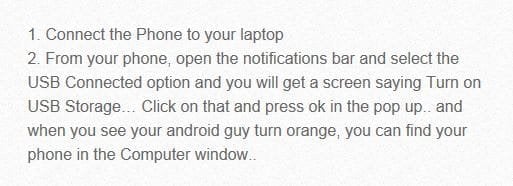
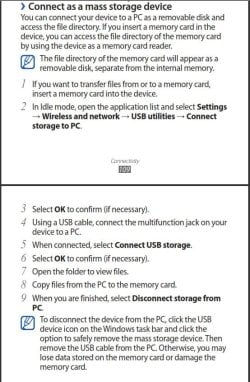
I have the exact phone and MTP just works fine but you can also use USB Mass Storage mode. Go to Settings>Wireless and networks>USB utilities and select "Connect storage to PC" then connect your USB cable to your PC.
You should see Windows installing the Mass Storage driver. You'll have both internal & external listed in your Computer folder.
Computer type PC/Desktop Computer Manufacturer/Model Number Custom Build OS Windows 10 Pro x64, Arch Linux CPU Intel Core 2 Quad Q8200 OC'd 3.08GHz Motherboard Asus Rampage formula LGA775 Memory 8GB DDR2 900Mhz Graphics Card(s) MSI GT730 2GB GDDR5 (Kepler) Sound Card Supreme FX2 Monitor(s) Displays Samsung LS22F350 LED Screen Resolution 1080P Hard Drives Kingston SSDNow UV400 120GB, 500GB Hitachi, 2TB Samsung, 500GB Seagate FreeAgent, 640GB Samsung, 160GB Toshiba (Arch) PSU AeroCool 500W Bronze Cooling Cooler Master V6 + 3X fans Keyboard Prolink keyboard Mouse Logitech M705 Internet Speed 1MiB/s Browser Chrome Beta