Problem installing XP on Virtual machine windows 7

Ukdodger

New member
Member
VIP
Local time
12:40 AM
Messages
178
Location
Surrey England
I'm running W7 Home and have installed Oracle Virtual machine on which I want to install XP. But when I try installing XP the option 'Install' is greyed out. I've tried increasing the HD size (20GB) of the virtual machine but with the same result.

The reason I'm doing all this is because I must transfer my address book from my Sharp ZQ-570 Organiser as it's about to stop working (it eats batteries) and the program to do the transfer (Intellisync) is a 32 bit prog. I've tried the XP service pack 3 compatibility route and it doesnt work. A vrtual machine seems to be the only option left. Any help gratefully accepted.
 

My Computer

Computer type
Laptop
OS
Windows 7 home
Jump into your BIOS, and look for an "Enable Intel Virtual Technology", or equivalent....
 

My Computer

Computer type
PC/Desktop
Computer Manufacturer/Model Number
HP
OS
Windows 7 Home Premium 64 bit
CPU
AMD A4
Memory
5 GB
Graphics Card(s)
Integrated Radeon
Hard Drives
500 gb WD
Antivirus
360 TS
Browser
IE
Have you tried installing the Intellisync program on the Win 7 machine? The fact that it is a 32-bit program shouldn't prevent it from installing on Win 7, even if your Win 7 machine is 64-bit. You may need to try using compatibility mode to get the Intellisync program to work.

Personally, I haven't encountered any programs that I ran on my XP machine that wouldn't run on my Win 7 machine. I'm not saying that none exist, I'm just saying all that I tried worked.
 

My Computer

Computer type
PC/Desktop
Computer Manufacturer/Model Number
Home Built desktop, Dell G15 5511 Gaming laptop,MS Surface Pro 7 tablet
OS
W10 Pro desktop, W11 laptop, W11 Pro tablet (all 64-bit)
CPU
3.7Ghz 8700K i7, i7-11800H, i7-1065G7
Motherboard
ASUS TUF Z370-Pro Gaming in desktop
Memory
16G desktop, 16G laptop, 4G tablet
Graphics Card(s)
AMD Radeon RX580, RTX 3060, Intel Iris Plus
Sound Card
High Definition Audio (Built-in to mobo)
Monitor(s) Displays
Samsung U32J59 32" (2x), 15.6", 12"
Screen Resolution
3840x2160, 3840x2160, 1920x1080, 2160x1440
Hard Drives
500G SSD for OS; 2T, 10T & 15T HDDs for Data on Desktop, 1TB SSD laptop, 128G SSD tablet.
PSU
Corsair CX 750M
Case
Antec 100
Cooling
CM 212+
Keyboard
IBM Model M - used continuously since 1986
Mouse
Microsoft Pro IntelliMouse
Internet Speed
400M down 8M up
Antivirus
Windows Defender
Browser
FireFox
Other Info
Built my first computer (8Mhz 8088cpu, 640K RAM, 20MB HDD, 2 360K floppy drives) in 1985 and have been building them for myself, relatives and friends ever since.
Thanks for both replies. Yes Strollin I have tried that it returns that it cant read the disk because it's 32bit. Also tried the XP compatibilty option but it returns that it isnt an XP compatible program. Also it's not listed on the MS site as being one of those that are compatible.

I'll try that MDD.

Cheers for helping.
 

My Computer

Computer type
Laptop
OS
Windows 7 home
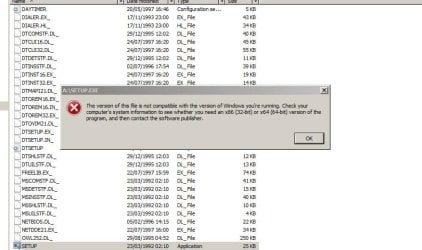
Any chance you could post a screenshot of the actual error message you receive? 32-bit shouldn't matter as far as reading the disk itself and the point of not being XP compatible is confusing.

Is this the software you are trying to install? INTELLISYNC FOR SHARP ORGANIZER Specs - CNETIf so, it will not work on XP, Win 7 or a VM because it requires Windows CE to run. I don't think you'll ever be able to run it on a PC.
 

My Computer

Computer type
PC/Desktop
Computer Manufacturer/Model Number
Home Built desktop, Dell G15 5511 Gaming laptop,MS Surface Pro 7 tablet
OS
W10 Pro desktop, W11 laptop, W11 Pro tablet (all 64-bit)
CPU
3.7Ghz 8700K i7, i7-11800H, i7-1065G7
Motherboard
ASUS TUF Z370-Pro Gaming in desktop
Memory
16G desktop, 16G laptop, 4G tablet
Graphics Card(s)
AMD Radeon RX580, RTX 3060, Intel Iris Plus
Sound Card
High Definition Audio (Built-in to mobo)
Monitor(s) Displays
Samsung U32J59 32" (2x), 15.6", 12"
Screen Resolution
3840x2160, 3840x2160, 1920x1080, 2160x1440
Hard Drives
500G SSD for OS; 2T, 10T & 15T HDDs for Data on Desktop, 1TB SSD laptop, 128G SSD tablet.
PSU
Corsair CX 750M
Case
Antec 100
Cooling
CM 212+
Keyboard
IBM Model M - used continuously since 1986
Mouse
Microsoft Pro IntelliMouse
Internet Speed
400M down 8M up
Antivirus
Windows Defender
Browser
FireFox
Other Info
Built my first computer (8Mhz 8088cpu, 640K RAM, 20MB HDD, 2 360K floppy drives) in 1985 and have been building them for myself, relatives and friends ever since.
Any chance you could post a screenshot of the actual error message you receive? 32-bit shouldn't matter as far as reading the disk itself and the point of not being XP compatible is confusing.

Is this the software you are trying to install? INTELLISYNC FOR SHARP ORGANIZER Specs - CNETIf so, it will not work on XP, Win 7 or a VM because it requires Windows CE to run. I don't think you'll ever be able to run it on a PC.

Strollin attached is a file showing screenshot. I'm using W7 home. W7 Pro will do it apparently but means I'd have to buy it. I dont think that version of Intellisync is the same as mine. Mine is a very early edition and on 3.5 inch disks.

Also it did work fine on my old XP.

Cheers
 

Attachments

  • Screenshot (20h 19m 05s).jpg
    Screenshot (20h 19m 05s).jpg
    121.5 KB · Views: 4

My Computer

Computer type
Laptop
OS
Windows 7 home
Are you running 64-bit Win 7 Home? If so, I think the problem may be that the program is a 16-bit program. The error message is telling you to check with the software publisher for a 32-bit or 64-bit version of the software to run on your machine. 64-bit Win 7 cannot run 16-bit software but 32-bit can. Win 7 Pro won't help (unless you install the 32-bit version).

It looks like you are on the right track by setting up a VM with XP in it. Have you tried mdd1963's suggestion of enabling VT in your BIOS? Did it help?
 

My Computer

Computer type
PC/Desktop
Computer Manufacturer/Model Number
Home Built desktop, Dell G15 5511 Gaming laptop,MS Surface Pro 7 tablet
OS
W10 Pro desktop, W11 laptop, W11 Pro tablet (all 64-bit)
CPU
3.7Ghz 8700K i7, i7-11800H, i7-1065G7
Motherboard
ASUS TUF Z370-Pro Gaming in desktop
Memory
16G desktop, 16G laptop, 4G tablet
Graphics Card(s)
AMD Radeon RX580, RTX 3060, Intel Iris Plus
Sound Card
High Definition Audio (Built-in to mobo)
Monitor(s) Displays
Samsung U32J59 32" (2x), 15.6", 12"
Screen Resolution
3840x2160, 3840x2160, 1920x1080, 2160x1440
Hard Drives
500G SSD for OS; 2T, 10T & 15T HDDs for Data on Desktop, 1TB SSD laptop, 128G SSD tablet.
PSU
Corsair CX 750M
Case
Antec 100
Cooling
CM 212+
Keyboard
IBM Model M - used continuously since 1986
Mouse
Microsoft Pro IntelliMouse
Internet Speed
400M down 8M up
Antivirus
Windows Defender
Browser
FireFox
Other Info
Built my first computer (8Mhz 8088cpu, 640K RAM, 20MB HDD, 2 360K floppy drives) in 1985 and have been building them for myself, relatives and friends ever since.
Are you running 64-bit Win 7 Home? If so, I think the problem may be that the program is a 16-bit program. The error message is telling you to check with the software publisher for a 32-bit or 64-bit version of the software to run on your machine. 64-bit Win 7 cannot run 16-bit software but 32-bit can. Win 7 Pro won't help (unless you install the 32-bit version).

It looks like you are on the right track by setting up a VM with XP in it. Have you tried mdd1963's suggestion of enabling VT in your BIOS? Did it help?

Thanks Strollin. It looks like you're dead right. It's a 16bit program. I dont know how to access the BIOS. It looks like Virtual box is the best idea. The problem I have with that is VB wont see the 'A' drive. I'm looking into that.

Cheers for your help.
 

My Computer

Computer type
Laptop
OS
Windows 7 home
What is your manufacturer for your laptop? I can tell you how to access the BIOS.
 

My Computer

Computer type
PC/Desktop
Computer Manufacturer/Model Number
me!
OS
Windows 10 Pro x64
CPU
AMD Ryzen 5 1600 @ [email protected]
Motherboard
ASUS B350 PRIME-PLUS
Memory
G.Skill Flare X 16GB (2x8GB) DDR4-2400 @ 2666MHz
Graphics Card(s)
Sapphire Radeon Vega 56 NITRO+
Sound Card
None
Monitor(s) Displays
ASUS VG248QZ
Screen Resolution
1920x1080
Hard Drives
Samsung 850 EVO 250GB*, 1TB Seagate Constellation ES, 2x Samsung 840 250GB in RAID0*

*Thanks ICIT2LOL for supplying me with all of these drives!
PSU
Corsair VS550
Case
Corsair Crystal 460X
Cooling
AMD Wraith Spire
Keyboard
Ducky Shine 6 w/ MX Browns and PBT keycaps
Mouse
Xtrfy M1-Ice
Internet Speed
100MBit/s down, 20MBit/s up
Antivirus
Bitdefender
Browser
Google Chrome
Are you kidding? Haha, I have a Samsung RV511 right next to me. You access the BIOS on these computers by pressing F2 at the Samsung screen.
 

My Computer

Computer type
PC/Desktop
Computer Manufacturer/Model Number
me!
OS
Windows 10 Pro x64
CPU
AMD Ryzen 5 1600 @ [email protected]
Motherboard
ASUS B350 PRIME-PLUS
Memory
G.Skill Flare X 16GB (2x8GB) DDR4-2400 @ 2666MHz
Graphics Card(s)
Sapphire Radeon Vega 56 NITRO+
Sound Card
None
Monitor(s) Displays
ASUS VG248QZ
Screen Resolution
1920x1080
Hard Drives
Samsung 850 EVO 250GB*, 1TB Seagate Constellation ES, 2x Samsung 840 250GB in RAID0*

*Thanks ICIT2LOL for supplying me with all of these drives!
PSU
Corsair VS550
Case
Corsair Crystal 460X
Cooling
AMD Wraith Spire
Keyboard
Ducky Shine 6 w/ MX Browns and PBT keycaps
Mouse
Xtrfy M1-Ice
Internet Speed
100MBit/s down, 20MBit/s up
Antivirus
Bitdefender
Browser
Google Chrome
Are you kidding? Haha, I have a Samsung RV511 right next to me. You access the BIOS on these computers by pressing F2 at the Samsung screen.

Easy when you know how! Thanks but even so there's nothing in the BIOS that's even remotely like "Enable Intel Virtual Technology".

Cheers anyway.
 

My Computer

Computer type
Laptop
OS
Windows 7 home
Hmm, to be honest i also had problems virtualizing using VirtualBox. It didn't just work whatever i tried. I switched to Virtual PC and it worked like a charm. Not on my main computer, on the RV511.
 

My Computer

Computer type
PC/Desktop
Computer Manufacturer/Model Number
me!
OS
Windows 10 Pro x64
CPU
AMD Ryzen 5 1600 @ [email protected]
Motherboard
ASUS B350 PRIME-PLUS
Memory
G.Skill Flare X 16GB (2x8GB) DDR4-2400 @ 2666MHz
Graphics Card(s)
Sapphire Radeon Vega 56 NITRO+
Sound Card
None
Monitor(s) Displays
ASUS VG248QZ
Screen Resolution
1920x1080
Hard Drives
Samsung 850 EVO 250GB*, 1TB Seagate Constellation ES, 2x Samsung 840 250GB in RAID0*

*Thanks ICIT2LOL for supplying me with all of these drives!
PSU
Corsair VS550
Case
Corsair Crystal 460X
Cooling
AMD Wraith Spire
Keyboard
Ducky Shine 6 w/ MX Browns and PBT keycaps
Mouse
Xtrfy M1-Ice
Internet Speed
100MBit/s down, 20MBit/s up
Antivirus
Bitdefender
Browser
Google Chrome
Hmm, to be honest i also had problems virtualizing using VirtualBox. It didn't just work whatever i tried. I switched to Virtual PC and it worked like a charm. Not on my main computer, on the RV511.

Yeah I tried that before but you need W7 pro. It's a bummer..
 

My Computer

Computer type
Laptop
OS
Windows 7 home
Really? I'm on Ultimate and it works fine fine fine.
 

My Computer

Computer type
PC/Desktop
Computer Manufacturer/Model Number
me!
OS
Windows 10 Pro x64
CPU
AMD Ryzen 5 1600 @ [email protected]
Motherboard
ASUS B350 PRIME-PLUS
Memory
G.Skill Flare X 16GB (2x8GB) DDR4-2400 @ 2666MHz
Graphics Card(s)
Sapphire Radeon Vega 56 NITRO+
Sound Card
None
Monitor(s) Displays
ASUS VG248QZ
Screen Resolution
1920x1080
Hard Drives
Samsung 850 EVO 250GB*, 1TB Seagate Constellation ES, 2x Samsung 840 250GB in RAID0*

*Thanks ICIT2LOL for supplying me with all of these drives!
PSU
Corsair VS550
Case
Corsair Crystal 460X
Cooling
AMD Wraith Spire
Keyboard
Ducky Shine 6 w/ MX Browns and PBT keycaps
Mouse
Xtrfy M1-Ice
Internet Speed
100MBit/s down, 20MBit/s up
Antivirus
Bitdefender
Browser
Google Chrome
You don't need Pro or Ultimate to run Virtual PC but you do need either of them to be able to run XP Mode which is a VM for Virtual PC provided by MS that contains a fully licensed copy of XP Pro.

You can download Virtual PC here: Download Windows Virtual PC from Official Microsoft Download Center

You may need to install an update in order to get virtualization to work. See this link: Why am I receiving errors about hardware-assisted virtualization (HAV) when I try to use Windows XP Mode and Windows Virtual PC?
 

My Computer

Computer type
PC/Desktop
Computer Manufacturer/Model Number
Home Built desktop, Dell G15 5511 Gaming laptop,MS Surface Pro 7 tablet
OS
W10 Pro desktop, W11 laptop, W11 Pro tablet (all 64-bit)
CPU
3.7Ghz 8700K i7, i7-11800H, i7-1065G7
Motherboard
ASUS TUF Z370-Pro Gaming in desktop
Memory
16G desktop, 16G laptop, 4G tablet
Graphics Card(s)
AMD Radeon RX580, RTX 3060, Intel Iris Plus
Sound Card
High Definition Audio (Built-in to mobo)
Monitor(s) Displays
Samsung U32J59 32" (2x), 15.6", 12"
Screen Resolution
3840x2160, 3840x2160, 1920x1080, 2160x1440
Hard Drives
500G SSD for OS; 2T, 10T & 15T HDDs for Data on Desktop, 1TB SSD laptop, 128G SSD tablet.
PSU
Corsair CX 750M
Case
Antec 100
Cooling
CM 212+
Keyboard
IBM Model M - used continuously since 1986
Mouse
Microsoft Pro IntelliMouse
Internet Speed
400M down 8M up
Antivirus
Windows Defender
Browser
FireFox
Other Info
Built my first computer (8Mhz 8088cpu, 640K RAM, 20MB HDD, 2 360K floppy drives) in 1985 and have been building them for myself, relatives and friends ever since.
You don't need Pro or Ultimate to run Virtual PC but you do need either of them to be able to run XP Mode which is a VM for Virtual PC provided by MS that contains a fully licensed copy of XP Pro.

You can download Virtual PC here: Download Windows Virtual PC from Official Microsoft Download Center

You may need to install an update in order to get virtualization to work. See this link: Why am I receiving errors about hardware-assisted virtualization (HAV) when I try to use Windows XP Mode and Windows Virtual PC?

You need according to MS either Professional, Enterprise, or Ultimate. No W7 home unfortunately.
 

My Computer

Computer type
Laptop
OS
Windows 7 home
That is for XP Mode. Here is the system requirements for Virtual PC:

System RequirementsSupported Operating System
Windows 7

    • Processor: Intel®, AMD®, VIA® processors capable of hardware-assisted virtualization, with the setting turned on in the BIOS.
    • Memory: 2GB of memory recommended.
    • Hard disk requirement: 20MB hard disk space for installing Windows Virtual PC.
 

My Computer

Computer type
PC/Desktop
Computer Manufacturer/Model Number
Home Built desktop, Dell G15 5511 Gaming laptop,MS Surface Pro 7 tablet
OS
W10 Pro desktop, W11 laptop, W11 Pro tablet (all 64-bit)
CPU
3.7Ghz 8700K i7, i7-11800H, i7-1065G7
Motherboard
ASUS TUF Z370-Pro Gaming in desktop
Memory
16G desktop, 16G laptop, 4G tablet
Graphics Card(s)
AMD Radeon RX580, RTX 3060, Intel Iris Plus
Sound Card
High Definition Audio (Built-in to mobo)
Monitor(s) Displays
Samsung U32J59 32" (2x), 15.6", 12"
Screen Resolution
3840x2160, 3840x2160, 1920x1080, 2160x1440
Hard Drives
500G SSD for OS; 2T, 10T & 15T HDDs for Data on Desktop, 1TB SSD laptop, 128G SSD tablet.
PSU
Corsair CX 750M
Case
Antec 100
Cooling
CM 212+
Keyboard
IBM Model M - used continuously since 1986
Mouse
Microsoft Pro IntelliMouse
Internet Speed
400M down 8M up
Antivirus
Windows Defender
Browser
FireFox
Other Info
Built my first computer (8Mhz 8088cpu, 640K RAM, 20MB HDD, 2 360K floppy drives) in 1985 and have been building them for myself, relatives and friends ever since.
That is for XP Mode. Here is the system requirements for Virtual PC:

System RequirementsSupported Operating System
Windows 7

    • Processor: Intel®, AMD®, VIA® processors capable of hardware-assisted virtualization, with the setting turned on in the BIOS.
    • Memory: 2GB of memory recommended.
    • Hard disk requirement: 20MB hard disk space for installing Windows Virtual PC.

Thanks Stollin and to everyone else that answered.
 

My Computer

Computer type
Laptop
OS
Windows 7 home
No problem! It is my duty to help! :D
 

My Computer

Computer type
PC/Desktop
Computer Manufacturer/Model Number
me!
OS
Windows 10 Pro x64
CPU
AMD Ryzen 5 1600 @ [email protected]
Motherboard
ASUS B350 PRIME-PLUS
Memory
G.Skill Flare X 16GB (2x8GB) DDR4-2400 @ 2666MHz
Graphics Card(s)
Sapphire Radeon Vega 56 NITRO+
Sound Card
None
Monitor(s) Displays
ASUS VG248QZ
Screen Resolution
1920x1080
Hard Drives
Samsung 850 EVO 250GB*, 1TB Seagate Constellation ES, 2x Samsung 840 250GB in RAID0*

*Thanks ICIT2LOL for supplying me with all of these drives!
PSU
Corsair VS550
Case
Corsair Crystal 460X
Cooling
AMD Wraith Spire
Keyboard
Ducky Shine 6 w/ MX Browns and PBT keycaps
Mouse
Xtrfy M1-Ice
Internet Speed
100MBit/s down, 20MBit/s up
Antivirus
Bitdefender
Browser
Google Chrome
Back
Top