Solved Problem recoverying from backup via USB 3.0 external drive

wuming79

New member
Local time
11:47 PM
Messages
6
Hi, I tried to backup and recovery in win 7 via USB 3.0 external drive but it always says it can't find the system image. Is that because Win 7 does not load USB 3.0 driver during startup? I have tried many systems with USB 3.0 port but they are all the same. If I plug the extension drive to a USB 2.0 port just after the message below pop up, the recovery will see the system image. It's like the USB 3.0 port is not working at all. Pls help.


My Computer My Computer

At a glance

windows 7 64bit
OS
windows 7 64bit
Where is the system image?

I think Windows Backup likes it to be in the root of the drive and with the original name---not relocated.
 

My Computer My Computer

At a glance

Windows 7 Home Premium SP1, 64-bitIntel Skylake i5-6600K, not overclocked8 GB HyperX DDR4-2666 (2 x 4 GB)none; graphics are integrated on CPU
Computer type
PC/Desktop
Computer Manufacturer/Model Number
Ignatz Special; 4 speed manual gearbox; factory air conditioning; one of one
OS
Windows 7 Home Premium SP1, 64-bit
CPU
Intel Skylake i5-6600K, not overclocked
Motherboard
AsRock Z170M Extreme 4, micro ATX
Memory
8 GB HyperX DDR4-2666 (2 x 4 GB)
Graphics Card(s)
none; graphics are integrated on CPU
Sound Card
onboard: Realtek ALC1150; external: USB Behringer UF0-202
Monitor(s) Displays
Dell S2340M 23 inch IPS
Screen Resolution
1600 x 900
Hard Drives
System: Crucial MX100 series SSD, 128 GB;
Data: Samsung Spinpoint 103SJ, 1 TB;
Backup: WD Caviar Green WD30EZRX-00D8PB0, 3 TB
PSU
Rosewill SilentNight 500 watt fanless, semi-modular
Case
Antec Solo II
Cooling
Noctua NH-U12S; Noctua F12 intake, Noctua S12A exhaust
Keyboard
Microsoft 200 6JH-00001 USB
Mouse
Dell or Microsoft optical wired; USB
Antivirus
Microsoft Security Essentials and Malwarebytes Premium
Browser
Pale Moon
Other Info
All fans PWM; speeds at idle: CPU circa 500 rpm; intake circa 600 rpm; exhaust circa 600 rpm; CPU temps 27 idle and 47 C load in a warm room (27 C/81 F) when running Intel Extreme Tuning Utility stress test.
You need to load the USB 3 Host Controller and Hub drivers at the beginning of the restore process. Then the reimage software should see the disk and image.
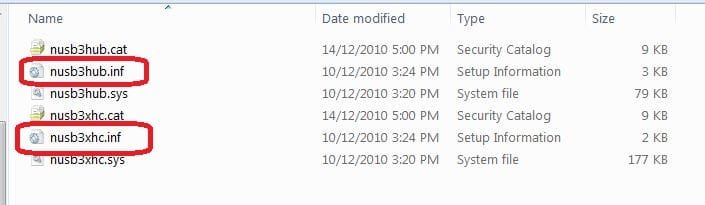
With Windows imaging you go to the load driver option and select the 2 appropriate *.inf files.
USB3 Drivers.jpg
Also,
I use WD MyBook Essentials usb2/3 HDDs. Even when the drivers are installed, you may need to wake the HDD up by physically disconnecting HDD power and USB the plugging back in.

It is a bit annoying with this fiddling but Windows will locate the image. The speed of the USB 3 reimage more than makes up for the nuisance.

----Store the drivers anywhere convenient. I have them on my Boot utility flash drive.
 

My Computer My Computer

At a glance

Windows 7x64 Home Premium SP1Intel i7 2600kG.Skill Ripjaws (DDR3-1600) 2x4GBNvidia GeForce GTS 450; Intel HD Graphics 300...
Computer type
PC/Desktop
Computer Manufacturer/Model Number
Own build
OS
Windows 7x64 Home Premium SP1
CPU
Intel i7 2600k
Motherboard
ASUS P8Z68 Deluxe
Memory
G.Skill Ripjaws (DDR3-1600) 2x4GB
Graphics Card(s)
Nvidia GeForce GTS 450; Intel HD Graphics 3000(GT2+)
Monitor(s) Displays
Dell Ultrasharp IPS panel U2311H, Samsung SyncMaster P2350
Screen Resolution
1920x1080
Hard Drives
Samsung 850 Pro SSD 256GB, Samsung SSD 840 120GB, Seagates 1TB Barracuda ST31000528AS x2
PSU
Seasonic M12II 520W
Case
Lian Li Lancool PC-K60
Cooling
Case: 1x120mm, 3x140mm CPU: Hyper 212+
Keyboard
Logitech MK520 (wireless)
Mouse
Logitech MK520
Internet Speed
6-7 Mbps
Antivirus
Norton Security Premium, Malwarebytes on 2 (MSE on 3rd PC)
Browser
FireFox
Other Info
Audio: Logitech Z523 2.1
mjf!!! YOU ARE THE MAN!!!!!! IT WORKS!!!! THANKS!! :-)
 

My Computer My Computer

At a glance

windows 7 64bit
OS
windows 7 64bit
I don't think windows 7 backups are restorable. I had a recent hd crash. Had a valid recovery boot disk and a valid USB 2.0 system back up and system image. The thing would not restore my system to a new HD. Same error, no system image found. Unable to restore system. So much for that. The best way is to clone the HD with Clonezilla and keep the clone in a safe place to use when the other one crashes. Redo it every few months to reflect updated system.
 

My Computer My Computer

At a glance

Windows 7 home premiumAthlon X24gigNvidia
Computer Manufacturer/Model Number
Compaq HP/ Presario CQ50
OS
Windows 7 home premium
CPU
Athlon X2
Motherboard
Nvidia
Memory
4gig
Graphics Card(s)
Nvidia
Sound Card
Built in
Monitor(s) Displays
TFT
Hard Drives
500gig Samsung
@Pazooza,
Windows images do restore to existing HDDs. I've done this so many times I've lost count. I've restored to new HDDs a few times with no problems.
I would never say it works for all system configurations all the time - I believe it doesn't so you're not alone.

You don't need to clone though. In my opinion imaging is a far more efficient and flexible way to restore to an existing or a new HDD.
I would recommend you give free Macrium Reflect a go. I along with many forum members use it. It's good solid software and perhaps more reliable in general.
 

My Computer My Computer

At a glance

Windows 7x64 Home Premium SP1Intel i7 2600kG.Skill Ripjaws (DDR3-1600) 2x4GBNvidia GeForce GTS 450; Intel HD Graphics 300...
Computer type
PC/Desktop
Computer Manufacturer/Model Number
Own build
OS
Windows 7x64 Home Premium SP1
CPU
Intel i7 2600k
Motherboard
ASUS P8Z68 Deluxe
Memory
G.Skill Ripjaws (DDR3-1600) 2x4GB
Graphics Card(s)
Nvidia GeForce GTS 450; Intel HD Graphics 3000(GT2+)
Monitor(s) Displays
Dell Ultrasharp IPS panel U2311H, Samsung SyncMaster P2350
Screen Resolution
1920x1080
Hard Drives
Samsung 850 Pro SSD 256GB, Samsung SSD 840 120GB, Seagates 1TB Barracuda ST31000528AS x2
PSU
Seasonic M12II 520W
Case
Lian Li Lancool PC-K60
Cooling
Case: 1x120mm, 3x140mm CPU: Hyper 212+
Keyboard
Logitech MK520 (wireless)
Mouse
Logitech MK520
Internet Speed
6-7 Mbps
Antivirus
Norton Security Premium, Malwarebytes on 2 (MSE on 3rd PC)
Browser
FireFox
Other Info
Audio: Logitech Z523 2.1
I just wanted to chime in that installing the USB 3 drivers fixed my problem too. I had to download them from the Lenovo website, burn them to a CD, boot from the Windows 7 repair disk, and then insert my CD with the drivers. Then I was able to load the drivers using the Advanced... button. After I loaded all of the drivers (...\x64\nusb3hub.inf, ..\x64\nusb3xhc.inf, a total of 7 drivers for me), I was able to see my external HDD in the USB port. System Recovery saw the backup image at that point, and I was able to continue on.
 

My Computer My Computer

At a glance

Windows 7 Professional 64-bit16 GB
Computer Manufacturer/Model Number
Lenovo ThinkPad W520
OS
Windows 7 Professional 64-bit
Memory
16 GB
It's nice when you can actually use the speed of the USB3 interface (the HDD is basically a Sata HDD after all).
It can be easier to just stick the USB3 drivers on a USB2 flash drive (a bit or irony there). I think Windows 8 will recognize USB3 by default.
 

My Computer My Computer

At a glance

Windows 7x64 Home Premium SP1Intel i7 2600kG.Skill Ripjaws (DDR3-1600) 2x4GBNvidia GeForce GTS 450; Intel HD Graphics 300...
Computer type
PC/Desktop
Computer Manufacturer/Model Number
Own build
OS
Windows 7x64 Home Premium SP1
CPU
Intel i7 2600k
Motherboard
ASUS P8Z68 Deluxe
Memory
G.Skill Ripjaws (DDR3-1600) 2x4GB
Graphics Card(s)
Nvidia GeForce GTS 450; Intel HD Graphics 3000(GT2+)
Monitor(s) Displays
Dell Ultrasharp IPS panel U2311H, Samsung SyncMaster P2350
Screen Resolution
1920x1080
Hard Drives
Samsung 850 Pro SSD 256GB, Samsung SSD 840 120GB, Seagates 1TB Barracuda ST31000528AS x2
PSU
Seasonic M12II 520W
Case
Lian Li Lancool PC-K60
Cooling
Case: 1x120mm, 3x140mm CPU: Hyper 212+
Keyboard
Logitech MK520 (wireless)
Mouse
Logitech MK520
Internet Speed
6-7 Mbps
Antivirus
Norton Security Premium, Malwarebytes on 2 (MSE on 3rd PC)
Browser
FireFox
Other Info
Audio: Logitech Z523 2.1
^This The problems arise because Windows 7 has not native support for USB3.0. Windows 8 will.
 

My Computer My Computer

At a glance

Windows 10 Pro. EFI boot partition, full EFI ...i7 4770k 4.4GHz (44-44-43-43 turbo) @ 1.248V16GB (8GBx2) @2200 MHz G.skill Sniper 10-11-1...MSI GTX 970 Gaming 4G
Computer type
PC/Desktop
Computer Manufacturer/Model Number
Home built (GeneO industries)/Model 4
OS
Windows 10 Pro. EFI boot partition, full EFI boot
CPU
i7 4770k 4.4GHz (44-44-43-43 turbo) @ 1.248V
Motherboard
ASUS Maximus VI Hero
Memory
16GB (8GBx2) @2200 MHz G.skill Sniper 10-11-10-30-1, 1.6V
Graphics Card(s)
MSI GTX 970 Gaming 4G
Sound Card
Onboard SupremeFX Audio
Monitor(s) Displays
NEC Spectraview 2490WUXi-SV
Screen Resolution
1920 x 1200
Hard Drives
Samsung 850 Pro 256GB (OS), Samsung 2x 128GB 840 Pro SSD in RAID0, 3x WD Blue 6Gb/s 1TB RAID0, WD 2TB Black external USB 3.0, 2TB WD20EARS Green external USB 3.0, 2x 500GB Seagate and 1 750 GB external USB, 1x 350GB external USB3
PSU
Seasonic X-850 (2012 KM3 model)
Case
Fractal Design Define R4
Cooling
NH-D14, NF-F12, NF-A15; NF-P14, NF-P12,NF-A14, S12A PWM
Keyboard
Cooler Master Storm Quickfire Rapid - Brown
Mouse
Logitech G602
Internet Speed
126.4 Mb/s down, 24.3 Mb/s up
Other Info
USB 3.0 x8 , SATA III x8, eSATA, USB 2.0 x6. Samsung DVD R/W drive.

WEI: CPU 7.8, Memory 7.9, Graphics 7.9, Disk 7.9
Hi, I just saw this post and it is concerning to me, because I am using the WDmybook usb3 to store my images. But I am using Macruim reflect (free edition), will I have any of these issues (not being able to see the image on a usb3 drive) using macruim when restoring? I am using Windows 7 home edition 64 bit

If so, are there any tutorials that show where you get the drivers MJF was discussing above and where they need to be installed at?
 

My Computer My Computer

At a glance

Windows 7 home premium 64 bit sp1Intel Core I7-2600 3.4 Ghz 1155 8M 95W CPU16 gb DD3 1333MHZNvidea Gforce GTX 550Ti
Computer type
PC/Desktop
Computer Manufacturer/Model Number
SYX SG-103
OS
Windows 7 home premium 64 bit sp1
CPU
Intel Core I7-2600 3.4 Ghz 1155 8M 95W CPU
Motherboard
MSI P67A-C43 (B3) ATX
Memory
16 gb DD3 1333MHZ
Graphics Card(s)
Nvidea Gforce GTX 550Ti
Sound Card
Realtek ALC892 integrated
Monitor(s) Displays
acer 23"
Screen Resolution
1920 x 1080
Hard Drives
Hitachi 1 TB 3.5" SATA 3G 7200rpm
Seagate ST32000641AS baracuda XT , 2 TB 3.5" 7200 rpm
Western digital My Book 1 tb USB2 external
Western digital My Book 3 tb USB3 external
PSU
500 Watt 80 plus
Case
Cooler Master Elite 310 RC-310-BWN1-GP
Keyboard
Logitech MK 200 Keybard
Mouse
Logitech MK200 mouse
Other Info
24x DVDRW Dual Layer SATA optical drive
When making a Macrium image the USB3 drivers will be installed and it will see the USB 3 ext HDD like any other.

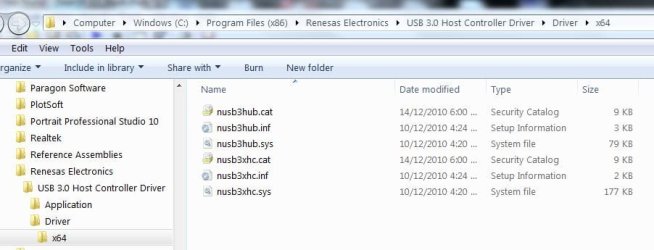
To restore an image you will need to install the drivers. Mine are located here
USB3-Drivers.jpg
When making the pe disk I suggest you always select the option to add drivers manually if needed. Even if you install the drivers so they are recognized automatically (option 2), I'd keep the manual option just in case you need some other driver later. To install the drivers the 2 options are:
1) Manually. Simply store the drivers on say a USB flash drive. The Recovery pe has an option to browse to the driver location and load them. Then your USB 3 HDD should be seen.
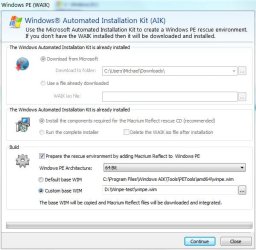
2) Automatically. When making the pe DVD you will hit this screen
Macrium pe.JPG
Notice the winpe.wim down the bottom. Copy it to a "custom" location the use the DISM command to add the USB3 drivers.Use the procedure:
Add and Remove Drivers Offline
In this procedure it assumes you have created an empty folder called "test".
The USB3 drivers will load automatically. Most of the time you will just exit the manual load option screen.
 
Last edited:

My Computer My Computer

At a glance

Windows 7x64 Home Premium SP1Intel i7 2600kG.Skill Ripjaws (DDR3-1600) 2x4GBNvidia GeForce GTS 450; Intel HD Graphics 300...
Computer type
PC/Desktop
Computer Manufacturer/Model Number
Own build
OS
Windows 7x64 Home Premium SP1
CPU
Intel i7 2600k
Motherboard
ASUS P8Z68 Deluxe
Memory
G.Skill Ripjaws (DDR3-1600) 2x4GB
Graphics Card(s)
Nvidia GeForce GTS 450; Intel HD Graphics 3000(GT2+)
Monitor(s) Displays
Dell Ultrasharp IPS panel U2311H, Samsung SyncMaster P2350
Screen Resolution
1920x1080
Hard Drives
Samsung 850 Pro SSD 256GB, Samsung SSD 840 120GB, Seagates 1TB Barracuda ST31000528AS x2
PSU
Seasonic M12II 520W
Case
Lian Li Lancool PC-K60
Cooling
Case: 1x120mm, 3x140mm CPU: Hyper 212+
Keyboard
Logitech MK520 (wireless)
Mouse
Logitech MK520
Internet Speed
6-7 Mbps
Antivirus
Norton Security Premium, Malwarebytes on 2 (MSE on 3rd PC)
Browser
FireFox
Other Info
Audio: Logitech Z523 2.1
I just wanted to chime in that installing the USB 3 drivers fixed my problem too. I had to download them from the Lenovo website, burn them to a CD, boot from the Windows 7 repair disk, and then insert my CD with the drivers. Then I was able to load the drivers using the Advanced... button. After I loaded all of the drivers (...\x64\nusb3hub.inf, ..\x64\nusb3xhc.inf, a total of 7 drivers for me), I was able to see my external HDD in the USB port. System Recovery saw the backup image at that point, and I was able to continue on.

where do i find the 3.0 usb drivers?? from the laptop manufacturers website or the external hard drive manufacturers website?? please let me know .. thanks..
 

My Computer My Computer

At a glance

windows 7 home premium 64 bit
OS
windows 7 home premium 64 bit
My USB3 drivers are located here
C:\Program Files (x86)\Renesas Electronics\USB 3.0 Host Controller Driver\Driver\x64
like I mentioned above
 

My Computer My Computer

At a glance

Windows 7x64 Home Premium SP1Intel i7 2600kG.Skill Ripjaws (DDR3-1600) 2x4GBNvidia GeForce GTS 450; Intel HD Graphics 300...
Computer type
PC/Desktop
Computer Manufacturer/Model Number
Own build
OS
Windows 7x64 Home Premium SP1
CPU
Intel i7 2600k
Motherboard
ASUS P8Z68 Deluxe
Memory
G.Skill Ripjaws (DDR3-1600) 2x4GB
Graphics Card(s)
Nvidia GeForce GTS 450; Intel HD Graphics 3000(GT2+)
Monitor(s) Displays
Dell Ultrasharp IPS panel U2311H, Samsung SyncMaster P2350
Screen Resolution
1920x1080
Hard Drives
Samsung 850 Pro SSD 256GB, Samsung SSD 840 120GB, Seagates 1TB Barracuda ST31000528AS x2
PSU
Seasonic M12II 520W
Case
Lian Li Lancool PC-K60
Cooling
Case: 1x120mm, 3x140mm CPU: Hyper 212+
Keyboard
Logitech MK520 (wireless)
Mouse
Logitech MK520
Internet Speed
6-7 Mbps
Antivirus
Norton Security Premium, Malwarebytes on 2 (MSE on 3rd PC)
Browser
FireFox
Other Info
Audio: Logitech Z523 2.1
  • Like
Reactions: Arc
Where can I find the ASMedia USB 3 Host Controller Drivers? Is there a website I can download it from? Or can I find it on my computer?
I have win7 64 bit. My motherboard is an Asus (P8P67 LE). When I try to restore my image backup from my boot CD it just don't see my USB 3 external drive!
If someone could help me I would much appreciate it.
 

My Computer My Computer

At a glance

w7 64 biti7 2600K 3.4GHz 4 Core 8 Thread4GB 1600 MHz DDR3Nvidia GeForce Gt 240
Computer type
PC/Desktop
Computer Manufacturer/Model Number
Asus
OS
w7 64 bit
CPU
i7 2600K 3.4GHz 4 Core 8 Thread
Motherboard
P8P67 LE
Memory
4GB 1600 MHz DDR3
Graphics Card(s)
Nvidia GeForce Gt 240
Sound Card
Motherboard
Monitor(s) Displays
Vizio 32 Inch
Screen Resolution
1920 X 1080
Hard Drives
solid-state drive (SSD)
PSU
500 Watts
Case
Antec 900
Cooling
Generic Fan
Keyboard
Generic Keyboard
Mouse
Generic Mouse
Internet Speed
50 Mbps
Antivirus
Microsoft Security Essentials
Browser
Waterfox
YESH !!! MJF; I was able to install the nec usb 3.0 x64 drivers after loading the repair disc and voila image restore then was able to see the windows 7 image file. :D:D:D

thankyou MJF for your list of drivers so I could compare to what I had. Two ways to do it is: 1. run the nec install exec file and burn the files over to cd-rom. 2. Another is to copy similar files from C:\windows\system32\drivers. First method is better but one needs the motherboard cd-rom or go to the manufacture's website.


NOTE: image restore will NOT see images kept in folders on your external usb drive. At least I could not use images in folders unless I copy them some place else perhaps.
 

My Computer My Computer

At a glance

windows 7 ultimate x64i7 860corsair 8 GBxfx
Computer Manufacturer/Model Number
custom made
OS
windows 7 ultimate x64
CPU
i7 860
Motherboard
evga p55
Memory
corsair 8 GB
Graphics Card(s)
xfx
Sound Card
on board sound (realtek)
Monitor(s) Displays
samsung widescreen syncmaster226BW
Hard Drives
seagate
PSU
corsair TX 750W
Case
zyan
Cooling
coolermaster
Sorry to bump an old thread but I am Having a near exact problem on my Lenovo Ideapad z585 Laptop. I'm upgrading my hard drive because the old one is bad, and the Windows backup and restore program that runs when booting from the repair disk I burned will NOT find/recognize the system image on my Toshiba USB 3.0 external drive. I tried looking for drivers and added the ones that were shown/described in this thread in the Additional options but it still can't see the image.

Does each kind of computer have a different set of drivers and I just tried the wrong ones? The only usb3.0 drivers I could find for Lenovo Ideapad z585 was some kind of AMD bundle that was listed on the Lenovo website. I downloaded it but couldn't find the appropriate .inf files (I found some similar ones in the USB folder but they didn't work either!)

My computers been out of comission for a month because of this, nothing seems to work. If someone could link me to where to download the appropriate drivers then that would really help me out....
 

My Computer My Computer

At a glance

Windows 7 Home Premium 64 bit
Computer type
Laptop
Computer Manufacturer/Model Number
Lenovo
OS
Windows 7 Home Premium 64 bit
reply to dillo 65

I think you might misunderstand.....the driver download was so that the repair disk could detect the USB DRIVE where the image was stored...not the image itself. Remember that the image CAN NOT be inside of a folder on the External usb drive. If the image is inside of a folder it will not be found.


Unfortunately sometimes the image somehow gets corrupted so that even though you have seemingly done everything right, you will not be able to restore it or even have the repair disc see it. It seems to happen especially if you move it around by copying etc. So, when you load the repair disc make sure that it detects the USB drive at all when you browse and if it doesn't, that is when you need the USB driver. Usually the image is automatically found by the repair disc once it detects your USB drive.

If no matter what, the repair disc does not detect your external USB drive, then I would try with another computer copying it to a different USB drive; perhaps USB 2.0

In the future always boot to your repair disc as a dry run to make sure it can find your image that you created.

Hope this helps...Good LUCK!!!
 
Last edited:

My Computer My Computer

At a glance

windows 7 ultimate x64i7 860corsair 8 GBxfx
Computer Manufacturer/Model Number
custom made
OS
windows 7 ultimate x64
CPU
i7 860
Motherboard
evga p55
Memory
corsair 8 GB
Graphics Card(s)
xfx
Sound Card
on board sound (realtek)
Monitor(s) Displays
samsung widescreen syncmaster226BW
Hard Drives
seagate
PSU
corsair TX 750W
Case
zyan
Cooling
coolermaster
Thanks for your reply, I guess I misunderstood the initial posts... My computer has no problem seeing the external drive, it's just the image it can't see. The image is in the root of the drive, it is the only thing on the drive, and it hasn't been moved between drives or anything. In fact it's the second one I've made because the first one had the same problem.

I guess I'm just going to have to buy a 2.0 drive or buy a new windows installation CD.... This is all very frustrating...
 

My Computer My Computer

At a glance

Windows 7 Home Premium 64 bit
Computer type
Laptop
Computer Manufacturer/Model Number
Lenovo
OS
Windows 7 Home Premium 64 bit
Save your money...more tips

This is answer to DILLO65...It will not do you any good to buy another drive...save your money...by the way...are you sure that the usb drive is formatted NTFS? If not then copy the image somewhere...reformat the USB drive to NTFS and then copy it back. The repair disc will not see an image on anything other than NTFS format. Also LENOVA should furnish you with restore discs for your laptop hopefully. If not then yeah you will have to buy the OS. Another thing you can do is find on the internet a download of windows operating system disc, burn it to a dvd (from ISO image) and then buy the license (product id) from Microsoft which can be done after you install your copy of the operating system. Yes it is a pain, I grant you all of this and am sorry I do not have a more direct solution to your problem
 
Last edited:

My Computer My Computer

At a glance

windows 7 ultimate x64i7 860corsair 8 GBxfx
Computer Manufacturer/Model Number
custom made
OS
windows 7 ultimate x64
CPU
i7 860
Motherboard
evga p55
Memory
corsair 8 GB
Graphics Card(s)
xfx
Sound Card
on board sound (realtek)
Monitor(s) Displays
samsung widescreen syncmaster226BW
Hard Drives
seagate
PSU
corsair TX 750W
Case
zyan
Cooling
coolermaster
Back
Top